
Product Overview
The VIOFO A229 Pro 3CH is a high-performance 3-channel dash camera system designed to provide comprehensive video surveillance for your vehicle. This bundle includes the A229 Pro 3CH dash cam and the HK4 Hardwire Kit, enabling advanced parking surveillance features. The system features dual Sony STARVIS 2 image sensors (IMX678 and IMX675) for superior image quality, HDR for all three channels, and an upgraded infrared cabin recording camera. It supports 4K resolution for the front camera, 2K for the rear camera, and 1080P for the interior cabin camera.
Key features include hands-free voice control, faster 5GHz Wi-Fi for quick data transfer and app control, high-precision GPS, and various parking modes when connected via the HK4 Hardwire Kit. A Circular Polarizing Lens (CPL) is also included to reduce glare and reflections.

Image: The VIOFO A229 Pro 3CH dash camera system, including the main front unit, interior camera, rear camera, HK4 hardwire kit, and CPL filter.
Package Contents
Before installation, please verify that all items listed below are present in your package:
- VIOFO A229 Pro Dash Camera (Front Unit)
- Rear Camera
- Interior Camera
- HK4 Hardwire Kit
- Car Charger (USB Type-C Power Cable)
- Rear Camera Cable (6 meters / 19.7 ft)
- Interior Camera Cable (1 meter)
- Type-C Data Cable
- Trim Removal Tool
- Windshield Static Stickers (x2)
- Circular Polarizing Lens (CPL)
- User Manual
- Spare Mount Sticky Pads

Image: Visual representation of the VIOFO A229 Pro 3CH dash cam and HK4 Hardwire Kit package contents.
Setup and Installation
Before You Begin
- MicroSD Card Requirement: The dashcam does not include a microSD card. A U1/U3 high-speed card (up to 512GB) is required for operation. Using a VIOFO branded card is recommended for optimal performance and reliability.
- Power Source: Always use the original car charger and power cable provided. Avoid using mobile phone chargers or generic data cables, as they may not provide sufficient power.
Mounting the Dash Cam
The VIOFO A229 Pro uses 3M adhesive stickers and static windshield stickers for secure mounting. It is recommended to apply the static sticker to the windshield first, then attach the 3M adhesive mount to the static sticker. This allows for easier repositioning or removal without leaving residue directly on the glass.

Image: Diagram illustrating the recommended placement of the front, interior, and rear cameras, and the routing of power and camera cables within a vehicle.
Connecting the Cameras
- Connect the interior camera to the main front unit using the 1-meter interior camera cable.
- Connect the rear camera to the main front unit using the 6-meter rear camera cable. Ensure the cable is routed neatly and securely, avoiding interference with vehicle operations. Do not connect the rear camera cable to defroster lines.
Hardwire Kit Installation (for Parking Mode)
The HK4 Hardwire Kit is essential for utilizing the 24-hour buffered parking mode features. Refer to the separate HK4 Hardwire Kit user manual included in your bundle for detailed installation instructions. This kit connects directly to your vehicle's fuse box to provide continuous power.
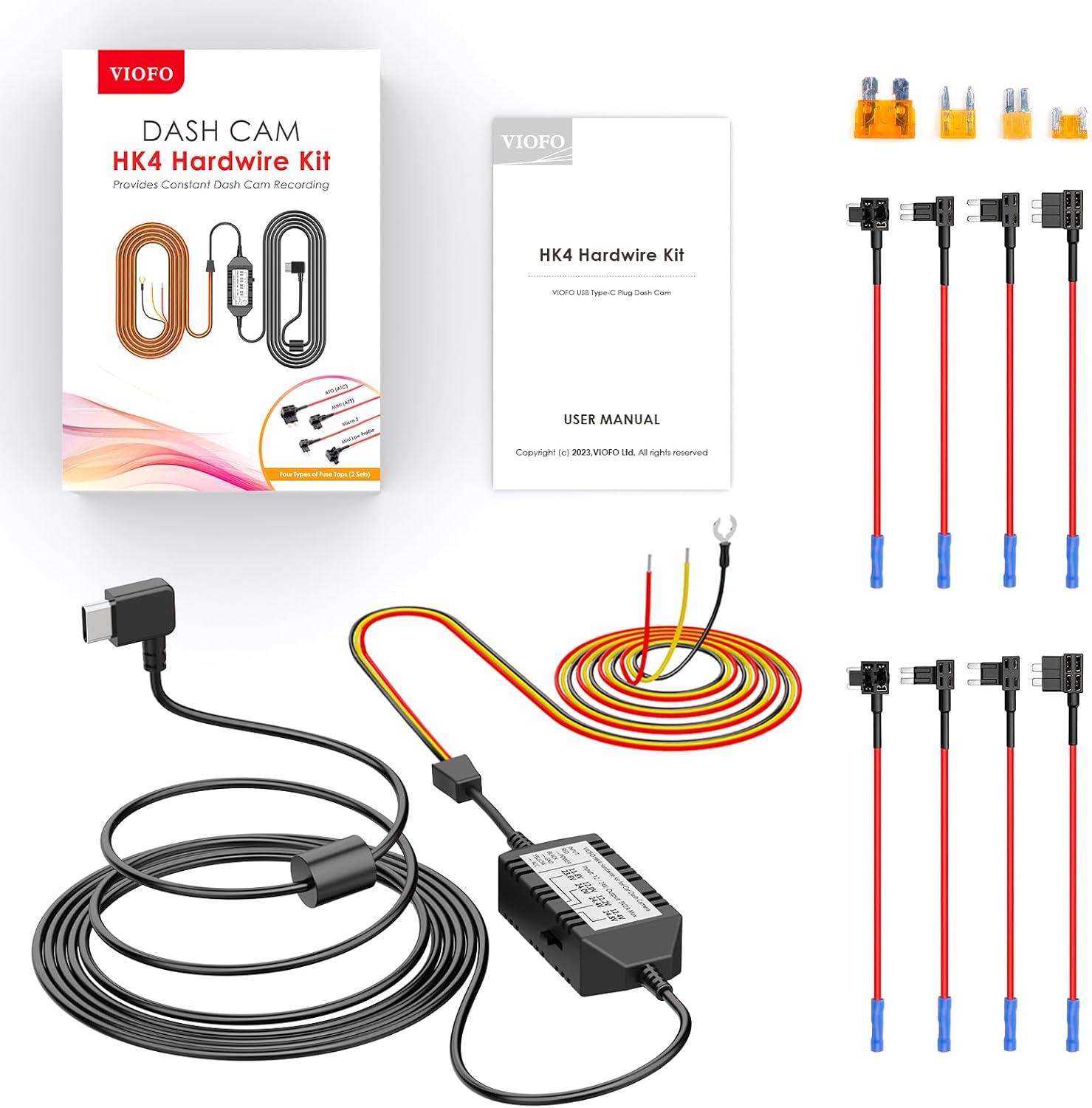
Image: The VIOFO HK4 Hardwire Kit, including the main unit, various fuse taps, and wiring for connecting to a vehicle's power supply.
Operating Instructions
Powering On/Off
The dash cam will automatically power on and begin recording when connected to your vehicle's power supply and the ignition is turned on. It will power off automatically when the ignition is turned off (unless hardwired for parking mode).
Voice Control
The A229 Pro supports hands-free voice commands for common operations. Simply speak the command clearly. Examples include:
- "Take photo"
- "Lock the video"
- "Turn on Wi-Fi"
- "Turn off Wi-Fi"
- "Turn on audio"
- "Turn off audio"
- "Show front camera"
- "Show rear camera"

Image: A driver interacting with the VIOFO dash cam using voice commands, illustrating the hands-free operation for functions like taking photos, locking video, and controlling Wi-Fi.
Wi-Fi and App Control
Connect your smartphone to the dash cam via the VIOFO app using the faster 5GHz Wi-Fi connection. This allows for:
- Easy Wi-Fi configuration
- Live preview of recordings
- Playing back recorded videos
- Downloading videos to your mobile device
Parking Mode Options
When the HK4 Hardwire Kit is installed, the A229 Pro offers three parking mode options:
- Auto Event Detection (Buffered): Records 15 seconds before and 30 seconds after a detected movement or impact.
- Time Lapse Recording: Records continuously at a low frame rate to save storage space.
- Low Bitrate Recording: Records continuously at a lower bitrate to save storage space while maintaining video quality.

Image: Visual explanation of the three parking mode options: Auto Event Detection, Time Lapse Recording, and Low Bitrate Recording, highlighting their functions.
Loop Recording and Emergency Lock
The dash cam continuously records, overwriting the oldest files when the memory card is full. In the event of a collision or sudden impact, the built-in G-sensor automatically locks the current video segment, preventing it from being overwritten. This ensures critical footage is preserved.
GPS Functionality
The A229 Pro incorporates a Quad-Mode GPS, compatible with GPS, BEIDOU, GALILEO, and GLONASS satellite systems. This enhances accuracy and stability in positioning, providing comprehensive vehicle location, speed, and timestamp data to your video files. When GPS is enabled, the map screen is displayed during video playback in the VIOFO App or on a computer.
Circular Polarizing Lens (CPL)
The included CPL filter can be affixed to the front lens of the dash cam. It effectively diminishes reflections and glare from glass and road surfaces, significantly enhancing image clarity and contrast in various lighting conditions.

Image: Side-by-side comparison showing the effect of the Circular Polarizing Lens (CPL) on dash cam footage, demonstrating reduced glare and improved clarity when the CPL is used.
Maintenance
MicroSD Card Care
- Regularly format your microSD card (at least once a month) within the dash cam's settings to maintain optimal performance and prevent data corruption.
- Use only high-endurance microSD cards designed for dash cam use to withstand continuous writing cycles and extreme temperatures.
- Replace the microSD card periodically (e.g., every 6-12 months) as they have a limited lifespan due to continuous recording.
Cleaning the Device
- Wipe the camera lenses gently with a soft, lint-free cloth to ensure clear recordings. Avoid abrasive materials.
- Clean the exterior of the dash cam with a dry or slightly damp cloth. Do not use harsh chemicals or solvents.
Troubleshooting
Common Issues and Solutions
- Dash Cam Not Powering On: Ensure the car charger is securely connected to both the dash cam and the vehicle's power outlet. Verify the vehicle's ignition is on. If using the hardwire kit, check the fuse connections.
- Recording Errors / Card Not Recognized: Ensure a U1/U3 high-speed microSD card is inserted correctly. Format the card within the dash cam's settings. If issues persist, try a different, high-quality microSD card. Some non-VIOFO branded cards may cause issues, especially in high temperatures.
- Poor Video Quality / Glare: Ensure the lenses are clean. Adjust the angle of the dash cam. If glare from the windshield is an issue, ensure the CPL filter is properly installed and rotated for optimal effect.
- No Signal from Rear/Interior Camera: Verify that the camera cables are securely connected to both the main unit and the respective cameras. Ensure the correct camera is connected to the correct port (e.g., do not swap rear and interior cameras if they have different IR capabilities).
- Overheating in Hot Climates: Ensure the dash cam is mounted in a location with adequate airflow. Using a VIOFO branded high-endurance microSD card can help, as some cards may contribute to heat issues.
Further Assistance
For more detailed usage guidance and frequently asked questions, please refer to the FAQ section on the official VIOFO website.

Image: A graphic summarizing important tips for dash cam usage, including charging instructions, microSD card requirements, rear camera cable notes, screen saver settings, and GPS logger information.
Specifications
| Feature | Detail |
|---|---|
| Model Name | A229 Pro 3CH |
| Video Capture Resolution | Front: 4K (2160P), Rear: 2K (1440P), Interior: 1080P |
| Image Sensors | Front: Sony STARVIS 2 IMX678, Rear: Sony STARVIS 2 IMX675, Interior: Sony STARVIS IMX307 |
| Connectivity Technology | Wi-Fi (5GHz), GPS |
| Special Features | Voice Control, HDR (3-channel), Parking Mode (with HK4), Loop Recording, G-Sensor, CPL Included |
| Display | 2.4" HD Screen |
| Lens Rotation | Rotatable Lens (Front: 30°, Interior: 360°) |
| Storage Support | Up to 512GB microSD card (U1/U3 high endurance recommended) |
| Mounting Type | 3M Sticker & Static Windshield Stickers |
| Color | Black |
| Manufacturer | VIOFO |
| First Available | November 7, 2023 |

Image: Visual representation of the VIOFO A229 Pro's 2.4-inch HD screen, rotatable lens, and product dimensions for the main unit and cameras.
Warranty and Support
For detailed information regarding the product warranty, technical support, and frequently asked questions, please visit the official VIOFO website. The website provides comprehensive resources to assist you with any inquiries or issues you may encounter with your A229 Pro 3CH Dash Cam and HK4 Hardwire Kit.


