1. Setup
1.1 Package Contents
Please check the package for the following items:
- RKEBK BC62 Car MP3 Player FM Transmitter
- User Manual
1.2 Product Overview
Familiarize yourself with the components of your BC62 device.
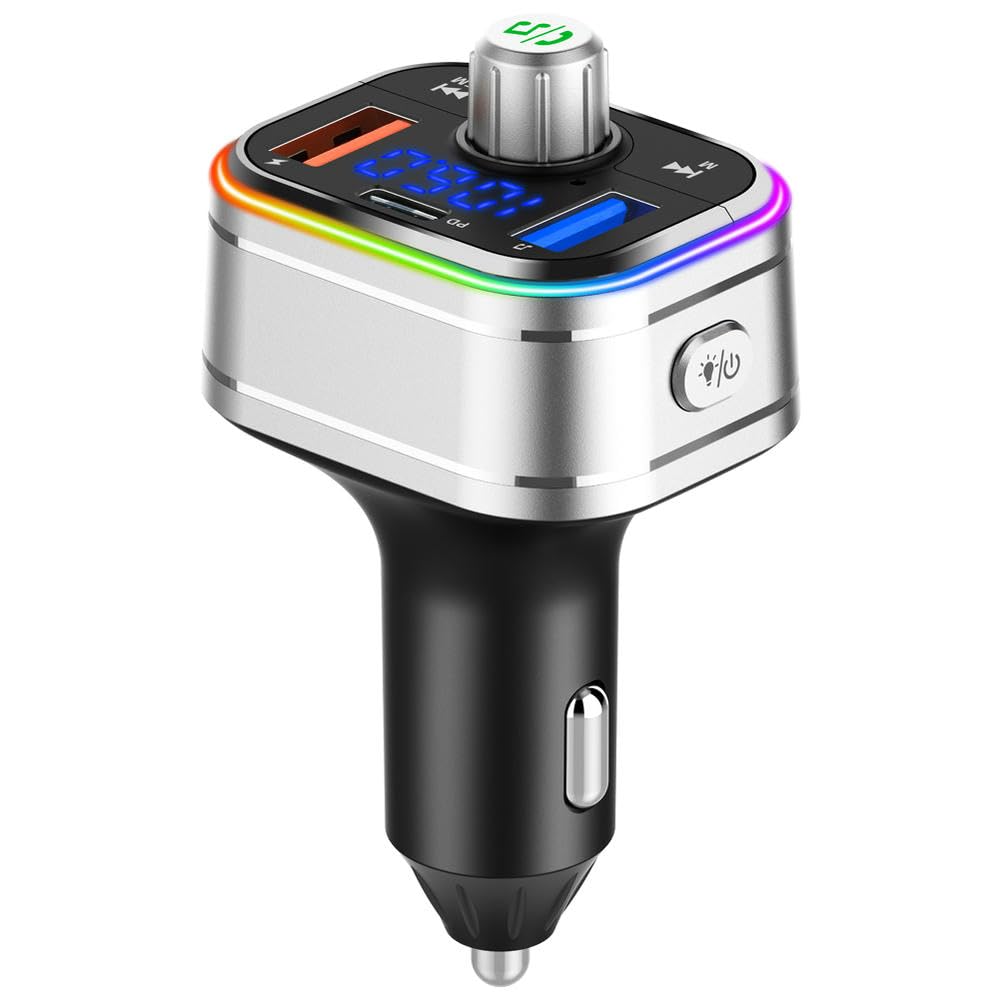
Image 1: Front view of the RKEBK BC62 Car MP3 Player FM Transmitter, showing the display, control buttons, and charging ports.
The device features a digital display, multi-function button, previous/next track buttons, a microphone for hands-free calls, a USB-A port for music playback and charging, and a USB-C (PD 3.0) port for fast charging.
1.3 Installation
- Insert the BC62 into your vehicle's 12V/24V cigarette lighter socket.
- The device will power on automatically, and the LED display will light up.
1.4 Initial Bluetooth Pairing
- Ensure your BC62 is powered on.
- On your mobile device, enable Bluetooth and search for available devices.
- Select "BC62" from the list of devices.
- Once connected, the device will confirm the successful pairing.
1.5 FM Frequency Setup
- Tune your car's FM radio to an unused frequency (one with static or no broadcast).
- On the BC62, press and hold the multi-function button until the FM frequency on the display starts flashing.
- Use the previous/next track buttons to adjust the BC62's FM frequency to match your car's radio.
- Once matched, press the multi-function button again to confirm the frequency. You should now hear audio from your BC62 through your car's speakers.
2. Operating
2.1 Playing Music
The BC62 supports music playback via Bluetooth and USB drive.
- Bluetooth Playback: After successful Bluetooth pairing, open your music app on your mobile device and start playing. Audio will transmit to your car's speakers via the set FM frequency.
- USB Drive Playback: Insert a USB flash drive (up to 32GB, FAT32 format) containing MP3/WMA/WAV/FLAC audio files into the USB-A port. The device will automatically detect and play music from the drive.
Use the previous/next track buttons on the BC62 to skip tracks. Press the multi-function button to play/pause music.
2.2 Hands-Free Calling
When connected via Bluetooth, the BC62 allows for hands-free phone calls.
- Answer Call: Press the multi-function button once.
- End Call: Press the multi-function button once during a call.
- Reject Call: Press and hold the multi-function button for 2 seconds.
- Redial Last Number: Double-press the multi-function button.
2.3 Charging Devices
The BC62 is equipped with two charging ports:
- USB-C (PD 3.0) Port: Provides fast charging for compatible devices.
- USB-A Port: Can be used for standard charging (5V/1A) or for USB drive music playback.
Connect your device's charging cable to the appropriate port on the BC62.
2.4 Volume Control and Navigation
Adjust volume and navigate tracks using the device's controls:
- Volume Adjustment: Rotate the multi-function button clockwise to increase volume, counter-clockwise to decrease volume.
- Track Navigation: Use the previous/next track buttons to move between songs.
3. Maintenance
3.1 Cleaning
To maintain optimal performance and appearance:
- Ensure the device is unplugged from the car's power socket before cleaning.
- Wipe the exterior with a soft, dry cloth.
- Do not use liquid cleaners, aerosols, or solvents.
3.2 Storage
When not in use for extended periods:
- Unplug the device from the car's cigarette lighter socket.
- Store it in a cool, dry place, away from direct sunlight and extreme temperatures.
3.3 Safety Precautions
- Do not disassemble, repair, or modify the product.
- Avoid exposing the device to water or excessive moisture.
- Keep out of reach of children.
- Do not operate the device while driving if it distracts you from the road.
4. Troubleshooting
| Problem | Possible Cause | Solution |
|---|---|---|
| Device does not power on. | Loose connection or no power from car socket. | Ensure the device is firmly inserted into the cigarette lighter socket. Check if the car socket is functional. |
| Poor FM signal or static. | Interference from other radio stations or incorrect frequency. | Find a clearer, unused FM frequency on your car radio and match the BC62 to it. Avoid frequencies used by strong local stations. |
| Bluetooth not connecting. | Bluetooth is off on mobile device, device not in pairing mode, or already connected to another device. | Ensure Bluetooth is enabled on your phone. Restart the BC62 and your phone. Forget "BC62" from your phone's Bluetooth list and re-pair. |
| Music not playing from USB drive. | Incorrect file format, unsupported USB drive, or drive not properly inserted. | Ensure music files are MP3/WMA/WAV/FLAC. Check if the USB drive is FAT32 formatted and properly inserted. Try a different USB drive. |
| Charging is slow or not working. | Cable issue, device not compatible with fast charging, or port used for music playback. | Use a high-quality charging cable. Ensure your device supports PD 3.0 for fast charging. Note that the USB-A port is primarily for music and standard charging. |
5. Specifications
| Model | BC62 |
| Bluetooth Version | 5.0 (Typical for such devices, inferring) |
| Input Voltage | DC 12V-24V |
| USB-C Output | PD 3.0, 18W Max (5V/3A, 9V/2A, 12V/1.5A) |
| USB-A Output | 5V/1A (for music playback and standard charging) |
| FM Frequency Range | 87.5-108.0 MHz (Typical for such devices, inferring) |
| Supported Audio Formats | MP3, WMA, WAV, FLAC |
| USB Drive Capacity | Up to 32GB (FAT32) |
6. Warranty and Support
6.1 Warranty Information
This product is covered by a standard manufacturer's warranty against defects in materials and workmanship. The warranty period typically begins from the date of purchase. Please retain your proof of purchase for warranty claims. For specific warranty terms and conditions, refer to the documentation provided at the time of purchase or contact customer support.
6.2 Customer Support
If you encounter any issues or have questions regarding your RKEBK BC62 Car MP3 Player FM Transmitter that are not addressed in this manual, please contact the seller or manufacturer's customer support. Contact details are usually available on the product packaging or the retailer's website.


