
Apple iPhone 15 Plus (Renewed)
Apple iPhone 15 Plus (Renewed) - User Manual
Model: MTXR3LL/A | Brand: Apple
1. Introduction
This manual provides essential information for setting up, operating, and maintaining your Apple iPhone 15 Plus (Renewed). Please read thoroughly to ensure optimal performance and longevity of your device.
2. Device Overview
The iPhone 15 Plus features a 6.7-inch Super Retina XDR display, powered by the A16 Bionic chip. It includes a dual-camera system with a 48MP main lens and supports 5G connectivity. This renewed device offers a blend of performance and style.
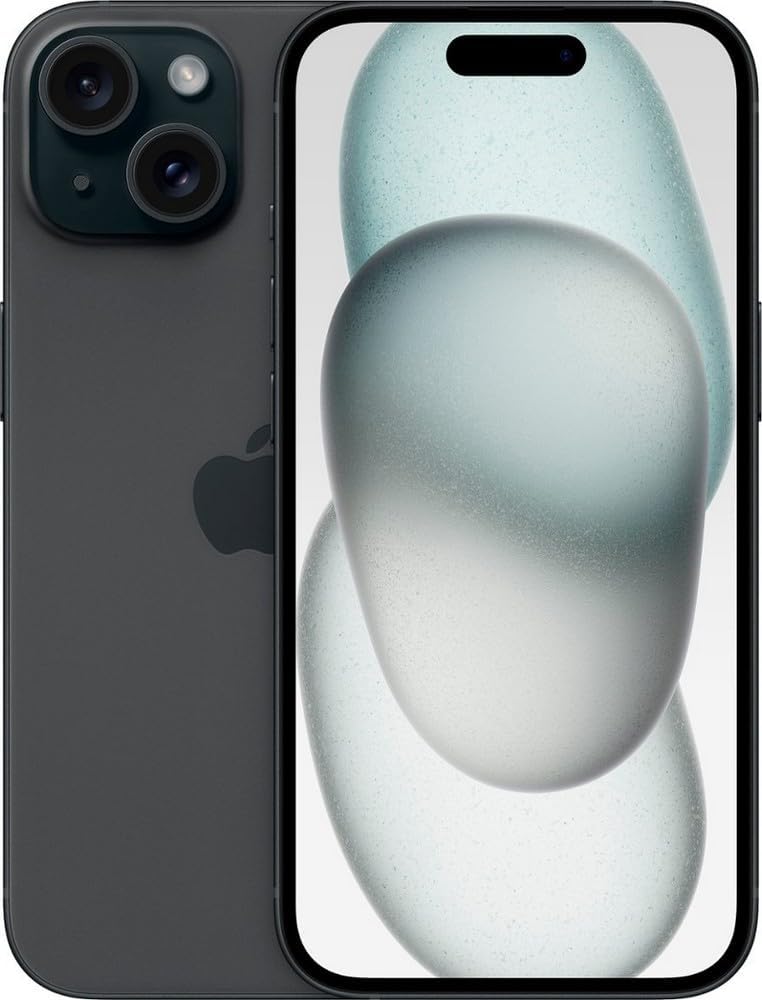
Figure 2.1: Front and back view of the Apple iPhone 15 Plus. The device is black, showcasing its dual camera system on the rear and the Dynamic Island on the front display.

Figure 2.2: Close-up of the Apple iPhone 15 Plus front display, highlighting the Dynamic Island at the top.

Figure 2.3: Side view of the Apple iPhone 15 Plus, showing the volume buttons and the Action button.
3. Setup
3.1 Initial Power On
To power on your iPhone 15 Plus, press and hold the side button until the Apple logo appears. Follow the on-screen instructions to complete the initial setup process.
3.2 SIM Card / eSIM Activation
The iPhone 15 Plus (Renewed) supports eSIM technology. For activation, contact your service provider. Physical SIM card slots are not present on US models.
3.3 Data Transfer
You can transfer data from your previous device during the initial setup using iCloud backup, iTunes/Finder backup, or direct device-to-device transfer.
4. Operating Your Device
4.1 Display and Dynamic Island
The 6.7-inch Super Retina XDR display offers vibrant visuals. The Dynamic Island, located at the top of the screen, dynamically adapts to show alerts, activities, and notifications, providing an interactive user experience.
4.2 Camera System
The advanced dual-camera system includes a 48MP Main camera and an Ultra Wide lens. It supports super-high-resolution photos (24MP and 48MP) and next-generation portraits with Focus and Depth Control. The camera also features 4X optical zoom range.

Figure 4.1: Close-up of the iPhone 15 Plus dual camera module on the rear, showing the lenses and flash.
4.3 Charging and Battery
The iPhone 15 Plus features a USB-C port for charging and data transfer, supporting fast charging. It also supports wireless charging with MagSafe technology. The device offers up to 26 hours of video playback.

Figure 4.2: Bottom view of the iPhone 15 Plus, showing the USB-C charging port and speaker grilles.
4.4 Security Features
Face ID provides secure authentication for unlocking your device, making purchases, and signing into apps.
4.5 Emergency Features
The device includes Emergency SOS via satellite, Crash Detection, and Roadside Assistance via satellite for critical situations.
5. Maintenance
To ensure the longevity of your iPhone 15 Plus, keep it clean and free from dust. Avoid exposing it to extreme temperatures or liquids. Regularly check battery health in settings and optimize usage for extended battery life.
6. Troubleshooting
6.1 Overheating
If your device feels warm during use or charging, it is normal. However, if it becomes excessively hot, discontinue use and charging. Ensure proper ventilation and avoid direct sunlight. Unlike some previous models, the iPhone 15 Plus is designed to manage heat more effectively, preventing auto-dimming due to temperature.
6.2 Screen Issues
For minor screen issues like unresponsiveness or display glitches, try restarting the device. If the issue persists, contact support.
6.3 Connectivity Problems
If you experience issues with Wi-Fi, Bluetooth, or cellular connectivity (5G), try toggling airplane mode on and off, restarting the device, or resetting network settings. For eSIM issues, contact your carrier.
7. Specifications
| Feature | Detail |
|---|---|
| Product Dimensions | 6.33 x 3.06 x 0.31 inches |
| Item Weight | 7.1 ounces |
| Item Model Number | MTXR3LL/A |
| Operating System | iOS 17 |
| Wireless Communication Technologies | Cellular |
| Connectivity Technologies | Bluetooth, NFC, USB, Wi-Fi |
| Special Features | Built-In GPS, Dual SIM (eSIM), Fast Charging Support, Mobile Hotspot Capability, Wireless Charging |
| Other Camera Features | Front, Rear (48MP Main, Ultra Wide) |
| Color | Black |
| Battery Power Rating | 16.95 Watt Hours (4383 Milliamp Hours) |
| Memory Storage Capacity | 128 GB |
| Standing Screen Display Size | 6.7 Inches |
| RAM Memory Installed Size | 6 GB |
| Wireless Carrier | Unlocked for All Carriers |
| Cellular Technology | 5G |
8. What's in the Box
- Apple iPhone 15 Plus
- USB Charging Cable
9. Warranty and Support
This product is a renewed device. It comes with a 90-day refund/replacement return policy from the seller, Loop-Mobile. For any issues or support, please contact the seller directly through Amazon.
For general Apple support and resources, visit the Official Apple Support Website.
10. Product Video Review
No official seller videos are available for this product.
Related Documents - iPhone 15 Plus (Renewed)
 |
iPhone Safety, Regulatory, and Warranty Information Comprehensive guide to iPhone safety, radio frequency exposure, battery handling, hearing aid compatibility, medical device interference, warranty, regulatory compliance, and disposal information from Apple. |
 |
iPhone User Manual and Guide - Comprehensive Overview Explore the complete iPhone user manual. This guide covers everything you need to know, from getting started and basics to personalization and privacy settings for your Apple iPhone. |
 |
AppleCare+ with Theft and Loss: Coverage, Costs, and Claims Guide Comprehensive guide to AppleCare+ with Theft and Loss, detailing coverage for accidental damage, theft, and loss for iPhone, iPad, and Apple Watch, including service fees, deductibles, and claim procedures. |
 |
AppleCare+ Försäkringsvillkor Sverige - Omfattande Guide Detaljerad information om AppleCare+ försäkringsvillkor i Sverige, inklusive täckning, undantag, anmälan, uppsägning, och hantering av personuppgifter från Apple och AIG. |
 |
AppleCare+ Terms and Conditions: Your Guide to Coverage and Service Understand the full terms and conditions of AppleCare+ plans, including what's covered, service fees, cancellation policies, and state-specific variations for your Apple devices. |
 |
AppleCare+ with Theft and Loss: Plan Details, Coverage, and Costs for iPhone, iPad, and Apple Watch Comprehensive summary of AppleCare+ with Theft and Loss, detailing coverage for accidental damage, theft, and loss for Apple Watch, iPad, and iPhone. Includes service fees, deductibles, plan costs, and claim procedures. |
Ask a question about this manual
Ask about setup, troubleshooting, compatibility, parts, safety, or missing instructions. Manuals+ will review the question and use this page’s manual context to help answer it.