
1. Introduction
This manual provides comprehensive instructions for the setup, operation, and maintenance of your FEELWORLD LUT11H 10.1-inch Ultra Bright Camera Field Monitor. Please read this manual thoroughly before using the device to ensure proper functionality and to maximize its performance.
The FEELWORLD LUT11H is a professional 10.1-inch camera field monitor designed for DSLR and mirrorless cameras, offering a 2000nit ultra-bright touchscreen display, 1920x1200 resolution, and advanced monitoring features such as waveform, LUT support, and an F970 install and power kit.
2. What's in the Box
Carefully unpack the box and ensure all items are present and in good condition. If any items are missing or damaged, please contact your retailer.
- 1× Monitor
- 1× Mini HDMI Cable
- 1× Power Adapter
- 1× U-shape Bracket
- 1× User Manual

Image: Package contents of the FEELWORLD LUT11H monitor.
3. Setup Instructions
3.1 Powering the Monitor
The LUT11H monitor can be powered via the included power adapter or compatible F970 series batteries.
- Using the Power Adapter: Connect the power adapter to the DC IN 12V port on the monitor and plug it into a power outlet.
- Using Batteries: The monitor features dual battery plates compatible with Sony NP-F batteries (F970, F960, F950, F930, F770, F750, F730, F570, F550, F530 series). Insert two charged batteries into the battery slots on the rear of the monitor. Double-tap the battery icon on the upper right corner of the monitor to quickly switch between batteries.

Image: Rear view of the monitor demonstrating the dual battery plates and external power kit for accessories.
3.2 Connecting to a Camera
Connect your camera's HDMI output to one of the HDMI INPUT ports on the monitor using the appropriate HDMI cable (Mini HDMI cable included). The monitor supports various HDMI input/output formats up to 4K (3840x2160p) at 60/50/30/29.97/25/24/23.98Hz and 4096x2160p at 60/50/30/29.97/25/24/23.98Hz.
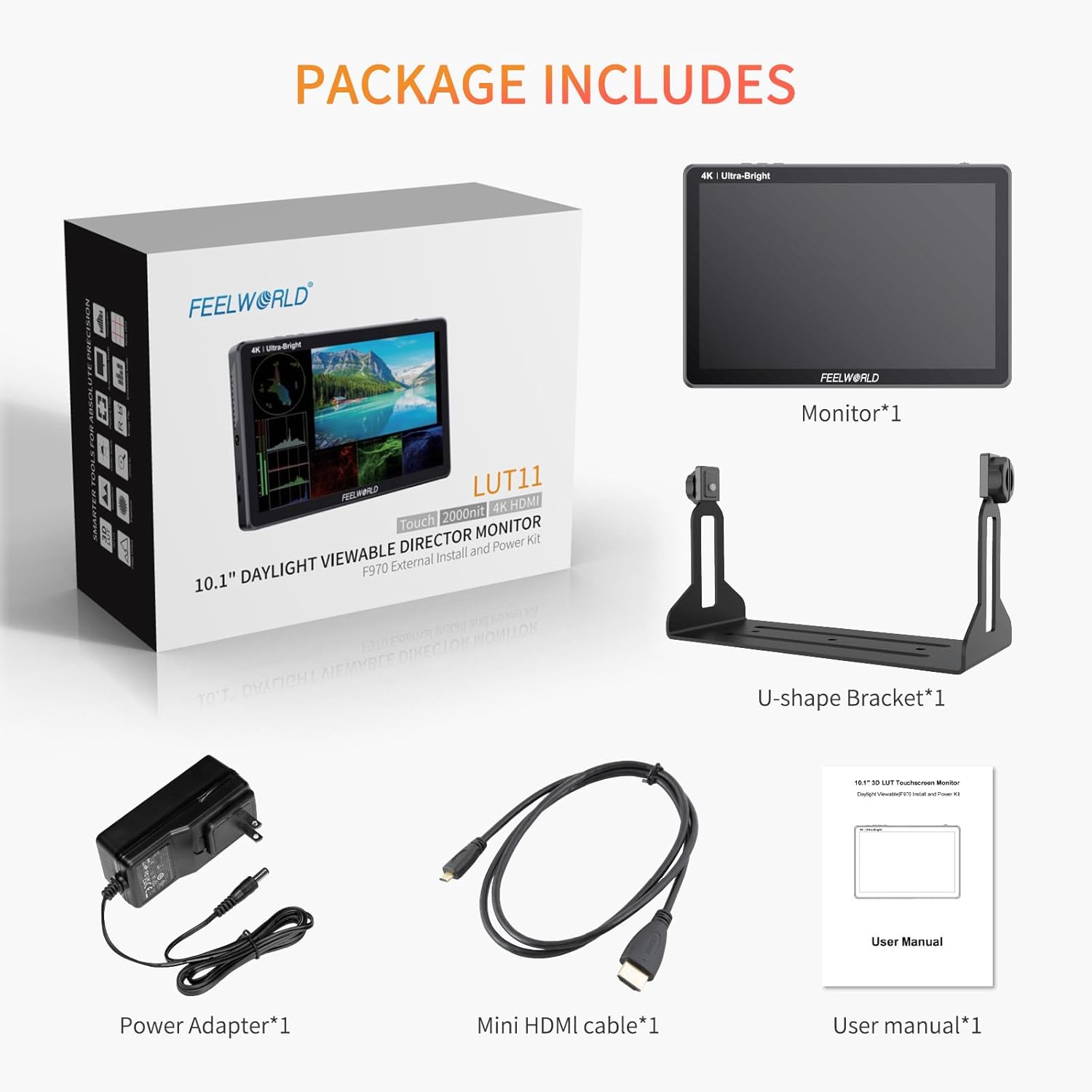
Image: Detailed view of the monitor's HDMI input/output and power ports.
3.3 Mounting the Monitor
The monitor comes with a U-shape bracket for tabletop use. It also features multiple 1/4-20 mounting points for attaching to camera rigs, light stands, or other accessories.
Video: This video demonstrates the physical setup of the FEELWORLD LUT11H monitor, including connecting power and HDMI cables, and showing its use in various filming scenarios. It highlights the touchscreen interface and external power design.
4. Operating Instructions
4.1 Power On/Off
Press and hold the power button located on the top edge of the monitor to turn it on or off. A short press will put the monitor into standby mode.
4.2 Touchscreen Control
The LUT11H features a sensitive touchscreen for intuitive menu navigation. Double-tap the screen to open the main menu. Swipe gestures can be used to adjust functions, zoom, backlight, and volume.
Video: This video showcases the FEELWORLD LUT11H monitor's features in a studio setting, including its ultra-bright display, custom 3D LUT loading, sensitive touchscreen controls, dual battery plates for extended power, and 4K HDMI input/output capabilities.
4.3 Custom Shortcut Keys
The monitor includes customizable function buttons (F1, F2, F3) on the top panel. These can be assigned to frequently used features for quick access. Refer to the on-screen menu for customization options.
4.4 Loading 3D LUTs
The LUT11H supports loading up to 50 custom 3D LUTs for previewing filming looks. To load LUTs:
- Copy the .cube LUT files to an SD card.
- Insert the SD card into the SD card slot on the monitor. Ensure the chip faces up.
- Navigate to the LUT menu option and select 'Import' to load the LUT files.
Requirements: SD card format must be FAT32 or NTFS. LUT file format suffix is .cube (case insensitive). A single file must not exceed 7.9MB. Supports LUT_3D_SIZE of 16, 17, 32, 33, 64, 65. LUT file names should be in English or numeric to avoid recognition issues.

Image: The monitor's display showing various professional aids for accurate exposure and focus.
4.5 Monitoring Features
The monitor offers a suite of professional monitoring tools:
- Waveform: Displays the luminance and chrominance levels of the video signal.
- RGB Parade: Shows the individual red, green, and blue components of the video signal.
- Vectorscope: Visualizes the color information of the video signal.
- Histogram: Graphical representation of the tonal distribution of an image.
- Embedded Audio: Monitors audio levels.
- Focus Peaking: Highlights in-focus areas for precise focusing.
- Zoom: Magnifies a portion of the image for detailed inspection.
- Zebra: Indicates overexposed areas.
- False Color: Helps in setting proper exposure by displaying different exposure levels in distinct colors.
- Safe Frames: Displays guides for various aspect ratios to ensure content is within broadcast-safe areas.

Image: The monitor's ultra-bright display and light sensor for auto-dimming in strong sunlight.
4.6 Tally Light
The monitor features a 3-color (green, red, yellow) rear Tally light, controlled via DB-9 ports at the bottom of the monitor. This provides visual cues for camera status in multi-camera setups.

Image: The monitor's Tally light system for production environments.
5. Maintenance
To ensure the longevity and optimal performance of your FEELWORLD LUT11H monitor, follow these maintenance guidelines:
- Cleaning: Use a soft, dry cloth to clean the monitor's screen and body. For stubborn smudges, lightly dampen the cloth with water or a screen-safe cleaning solution. Avoid harsh chemicals or abrasive materials.
- Storage: When not in use, store the monitor in a cool, dry place away from direct sunlight and extreme temperatures. Use the original packaging or a protective case to prevent dust and physical damage.
- Battery Care: If using batteries, ensure they are fully charged before storage and periodically recharge them if stored for extended periods to maintain battery health.
- Cable Management: Avoid bending or crimping cables excessively to prevent internal damage.
6. Troubleshooting
If you encounter issues with your monitor, refer to the following common problems and solutions:
| Problem | Possible Cause | Solution |
|---|---|---|
| Monitor does not power on. | No power, low battery, or faulty power adapter. | Check power adapter connection. Ensure batteries are charged and correctly inserted. Try a different power source. |
| No video signal. | Incorrect HDMI connection, incompatible signal, or camera output issue. | Verify HDMI cable is securely connected to both monitor and camera. Check camera's video output settings. Ensure signal format is supported by the monitor. |
| Power button light remains on after shutdown. | This is normal behavior for some power-saving modes. The accessory port may also remain powered. | To completely power off and de-energize accessory ports, remove the batteries or disconnect the power adapter. |
| Touchscreen unresponsive. | Temporary software glitch or physical obstruction. | Restart the monitor. Ensure the screen is clean and free of debris. |
| LUTs not loading from SD card. | Incorrect file format, card format, or file name. | Ensure LUT files are .cube, SD card is FAT32/NTFS, file size is under 7.9MB, and file names are simple (English/numeric). Reinsert SD card correctly. |
If the problem persists after trying these solutions, please contact FEELWORLD customer support.
7. Specifications
| Feature | Detail |
|---|---|
| Model Number | LUT11H |
| Screen Size | 10.1 inches |
| Brightness | 2000nit |
| Resolution | 1920x1200 |
| Pixel Pitch | 224 PPI |
| Aspect Ratio | 16:10 |
| Contrast Ratio | 800:1 |
| Viewing Angle | 170° |
| HDMI Input/Output | 2x HDMI Tally Input, 1x HDMI Output (Supports up to 4K60P) |
| Power Kit | F970 Install and Power Kit |
| Weight | 1.78 pounds |
| Package Dimensions | 10.24 x 8.27 x 4.33 inches |
8. Warranty and Support
The FEELWORLD LUT11H monitor comes with a 1-year official warranty. For technical support, warranty claims, or further assistance, please visit the official FEELWORLD store or contact their customer service directly.
Official FEELWORLD Store: https://www.amazon.com/stores/Feelworld/page/1A6E4BE6-7F40-4786-923E-DF4BBD79C7F3