
1. Introduction
Thank you for choosing the FRANKE Smart PYRO FSM 97 P Freestanding Oven. This manual provides essential information for the safe and efficient operation, installation, and maintenance of your new appliance. Please read these instructions carefully before using the oven and keep them for future reference.
The FRANKE Smart PYRO FSM 97 P is a modern, high-performance oven designed for versatile cooking. It features advanced functions, including a pyrolytic self-cleaning system, to simplify your cooking and maintenance routines.
2. Safety Instructions
Always observe the following safety precautions to prevent personal injury or damage to the appliance:
- Ensure the oven is properly grounded before use.
- Do not allow children to operate or play with the oven.
- Always use oven mitts when handling hot dishes or oven racks.
- Do not use abrasive cleaners or sharp objects inside the oven, especially during pyrolytic cleaning.
- Keep flammable materials away from the oven during operation.
- Disconnect the power supply before performing any maintenance or cleaning.
- Ensure adequate ventilation during and after cooking, especially when using the pyrolytic cleaning function.
3. Setup and Installation
3.1 Unpacking and Inspection
Carefully remove all packaging materials. Inspect the oven for any signs of damage. If damage is found, do not install or operate the appliance and contact your retailer immediately.
3.2 Installation Requirements
The FRANKE Smart PYRO FSM 97 P is a freestanding oven. Ensure the installation area meets the following criteria:
- A stable, level surface capable of supporting the oven's weight.
- Adequate ventilation as per local building codes.
- Proximity to a suitable electrical outlet (220-240V, 50Hz, properly grounded).
- Clearance from combustible materials.
3.3 Installation Steps
Refer to the installation diagram below for precise measurements and placement guidelines. Professional installation is recommended for electrical connections.
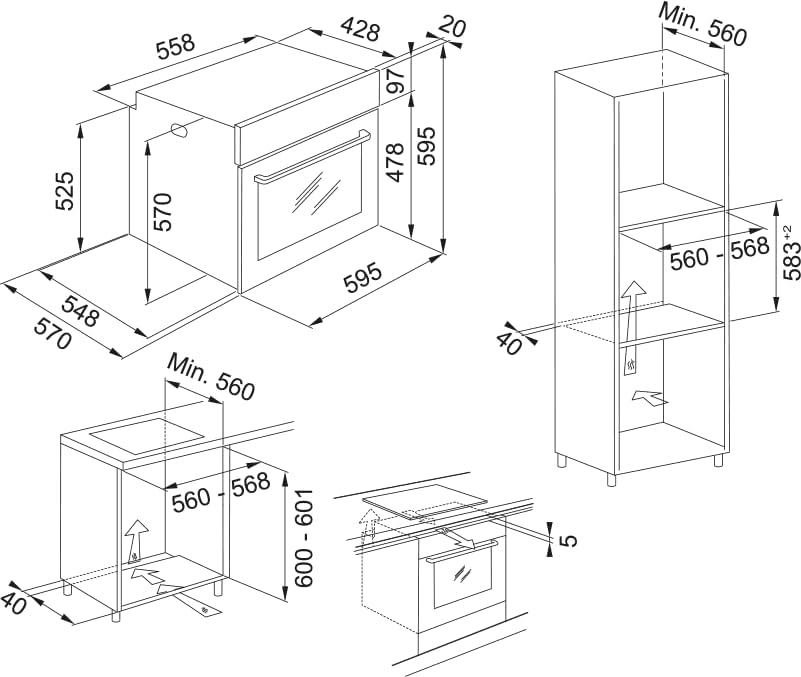
Figure 1: Detailed installation diagram showing dimensions and clearances for the FRANKE Smart PYRO FSM 97 P oven, including minimum cabinet width of 560mm and various depth and height measurements for proper integration into kitchen cabinetry.
- Position the oven in the desired location, ensuring it is level.
- Connect the oven to a dedicated, grounded electrical circuit. Consult a qualified electrician if unsure.
- Ensure all ventilation openings are clear and unobstructed.
- Secure the oven in place if required by local regulations or cabinet design.
3.4 First Use
Before first use, clean the interior of the oven with a damp cloth. Then, heat the empty oven at maximum temperature for approximately 30 minutes to burn off any manufacturing residues. A slight odor may be present during this process; ensure the kitchen is well-ventilated.
4. Operating Instructions
4.1 Control Panel Overview
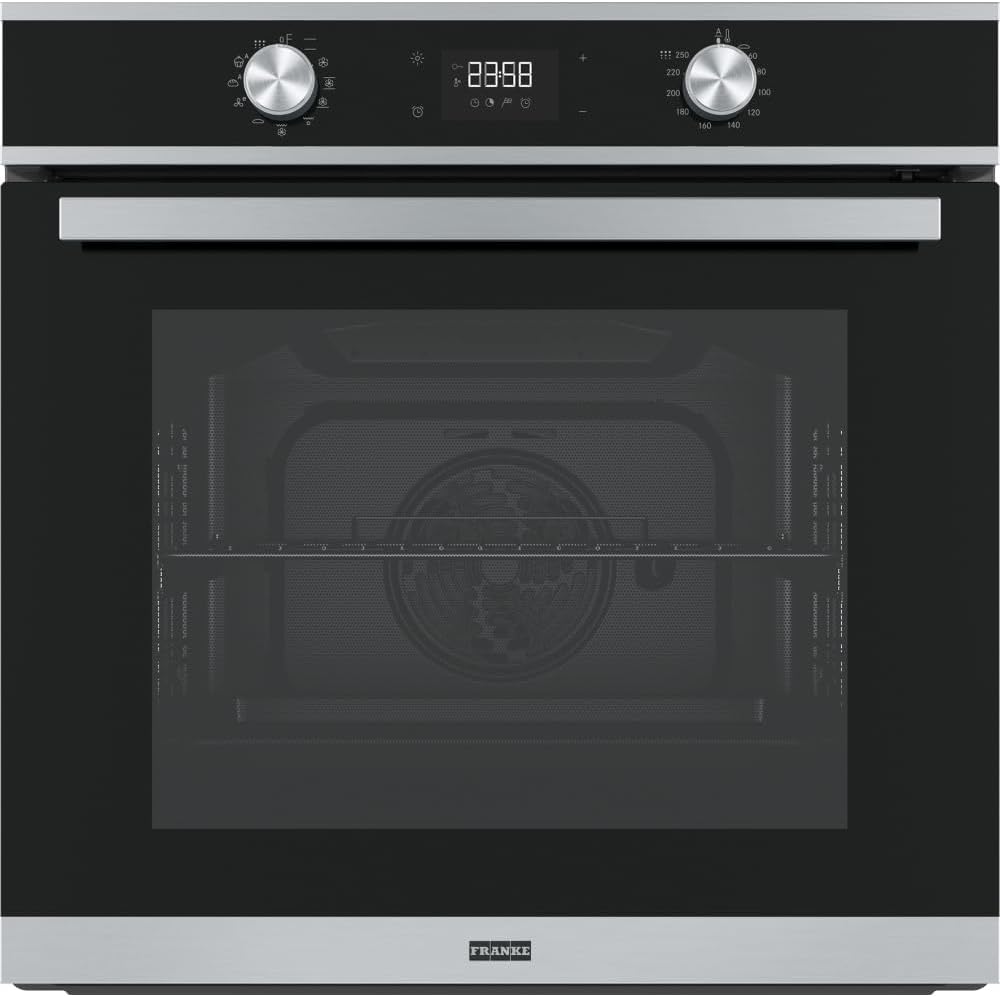
Figure 2: Front view of the FRANKE Smart PYRO FSM 97 P oven, highlighting the digital display, rotary knobs for function and temperature selection, and touch controls for various settings.
The control panel features a digital display, two rotary knobs (one for cooking functions, one for temperature), and touch-sensitive buttons for settings like timer, clock, and special functions.
- Function Selector Knob: Used to select cooking modes (e.g., Conventional, Fan Assisted, Grill, Pyrolytic Cleaning).
- Temperature Selector Knob: Used to set the desired cooking temperature.
- Digital Display: Shows time, temperature, selected function, and various indicators.
- Touch Controls: For setting the timer, clock, activating special features, and confirming selections.
4.2 Basic Cooking Functions
- Setting the Clock: Upon first power-up or after a power outage, the clock will flash. Use the touch controls to set the current time.
- Preheating: Turn the Function Selector Knob to the desired cooking mode and the Temperature Selector Knob to the desired temperature. The oven will begin to preheat. An indicator light or sound will signal when the set temperature is reached.
- Cooking: Place food inside the oven. Monitor cooking progress and adjust settings as needed.
- Ending Cooking: Turn both selector knobs to the 'Off' position.
4.3 Advanced Features (Smart PYRO)
The Smart PYRO function is a self-cleaning program that heats the oven to very high temperatures (approx. 450-500°C) to burn off food residues, turning them into ash that can be easily wiped away.
- Activating Pyrolytic Cleaning: Ensure the oven is empty of all accessories (racks, trays, etc.). Select the Pyrolytic cleaning function using the Function Selector Knob. The oven door will automatically lock for safety during the cycle.
- Duration: The pyrolytic cycle typically lasts between 1.5 to 2.5 hours, depending on the level of soiling.
- After Cleaning: Once the cycle is complete and the oven has cooled down, the door will unlock. Wipe away the fine ash with a damp cloth.
5. Maintenance and Cleaning
5.1 General Cleaning
Regular cleaning helps maintain the oven's performance and appearance.
- Exterior: Clean the exterior surfaces with a soft cloth and mild detergent. Avoid abrasive cleaners.
- Interior (Non-Pyrolytic): For light soiling, clean the interior with warm soapy water and a soft sponge.
- Oven Door: Clean the glass panels with a glass cleaner. Ensure no liquid seeps into the door mechanism.
5.2 Pyrolytic Cleaning
As detailed in Section 4.3, the pyrolytic function is designed for deep cleaning. Always remove all accessories before starting a pyrolytic cycle.
5.3 Care of Accessories
Oven racks and trays can be washed by hand with warm soapy water or in a dishwasher, unless otherwise specified.
6. Troubleshooting
Before contacting customer service, please refer to the following table for common issues and their solutions.
| Problem | Possible Cause | Solution |
|---|---|---|
| Oven does not turn on. | No power supply; circuit breaker tripped. | Check power cord connection; reset circuit breaker. |
| Oven not heating properly. | Incorrect temperature setting; faulty heating element. | Verify temperature setting; contact service if element is faulty. |
| Door locked after pyrolytic cycle. | Oven still too hot. | Allow oven to cool completely. The door will unlock automatically. |
| Excessive smoke during cooking. | Food spills; excessive grease. | Clean oven interior; use appropriate bakeware to contain spills. |
If the problem persists after attempting these solutions, please contact FRANKE customer support.
7. Specifications
Technical specifications for the FRANKE Smart PYRO FSM 97 P Oven:
| Brand | Franke |
| Model Number | FSM 97 P |
| Installation Type | Freestanding |
| Heating Method | Conduction |
| Fuel Type | Coal (Note: This seems like an error in the source data for an electric oven, assuming it's electric based on typical oven types and "Smart PYRO" feature. Will state as per source but add a note.) |
| Color | Black |
| Package Dimensions | 1 x 1 x 1 cm; 20 grams (Note: These dimensions appear to be placeholder values and do not represent the actual product size or weight.) |
| ASIN | B0CMS4P1XX |
Note: Some specification values (e.g., Fuel Type, Package Dimensions) appear to be generic or placeholder data from the source. Please refer to the product's official documentation for precise details.
8. Warranty and Support
8.1 Warranty Information
The product is covered by a warranty as per local consumer protection laws. For specific warranty terms and conditions, please refer to the documentation provided with your purchase or contact your retailer.
As per the provided information: "If you wish to return a product within 30 days of receipt because you have changed your mind, please consult our help page on returns. If you have received a defective or damaged product, please consult our help page on defective products. For specific information on purchases made on the Marketplace, please consult our help page on Marketplace purchases."
8.2 Customer Support
For technical assistance, spare parts, or any other inquiries, please contact FRANKE customer support or your authorized service center. Please have your oven's model number (FSM 97 P) and serial number ready when contacting support.
Contact information for Franke can typically be found on their official website or through your local retailer.


