
1. Introduction and Safety Information
This manual provides essential information for the safe and efficient operation, installation, and maintenance of your LiftMaster 84504R 1/2 HP Belt Drive DC Battery Backup Garage Door Opener with Security Camera. Please read all instructions carefully before beginning installation or operation.
Important Safety Instructions
- Always ensure the garage door area is clear of obstructions before operating the opener.
- Do not allow children to operate or play with the garage door opener controls.
- Regularly inspect the safety sensors to ensure they are properly aligned and functioning. These sensors protect people and vehicles by stopping the door from closing on obstructions.
- Disconnect power to the opener before performing any maintenance or repairs.
- The unit features electronic protection against forced openings of the garage door.
2. Setup and Installation
The LiftMaster 84504R is designed for easy integration into your garage system. Note that this model is supplied without the rail assembly, which must be acquired separately and installed according to its specific instructions.
Included Components:
- LiftMaster 84504R Opener Head Unit with Built-in Security Camera
- Safety Sensors (for door obstruction detection)
- 485LM Battery Backup Unit
- 893MAX Universal Remote Control
- Internal Wall Button
Installation Steps (Summary):
- Mounting: Securely mount the opener head unit to the garage ceiling using appropriate hardware and following the rail assembly instructions.
- Connect Rail Assembly: Attach the belt drive rail assembly (sold separately) to the opener head and the garage door.
- Install Safety Sensors: Mount the safety sensors on each side of the garage door opening, ensuring they are aligned and connected to the opener.
- Wire Wall Button: Connect the internal wall button to the opener unit.
- Install Battery Backup: Connect the 485LM Battery Backup unit to the designated port on the opener.
- Power Connection: Plug the opener into a grounded electrical outlet.
- Program Remote: Follow the instructions provided with the 893MAX Universal Remote to program it to your opener.
- myQ App Setup: Download the myQ app and follow the in-app instructions to connect your opener for smart features.
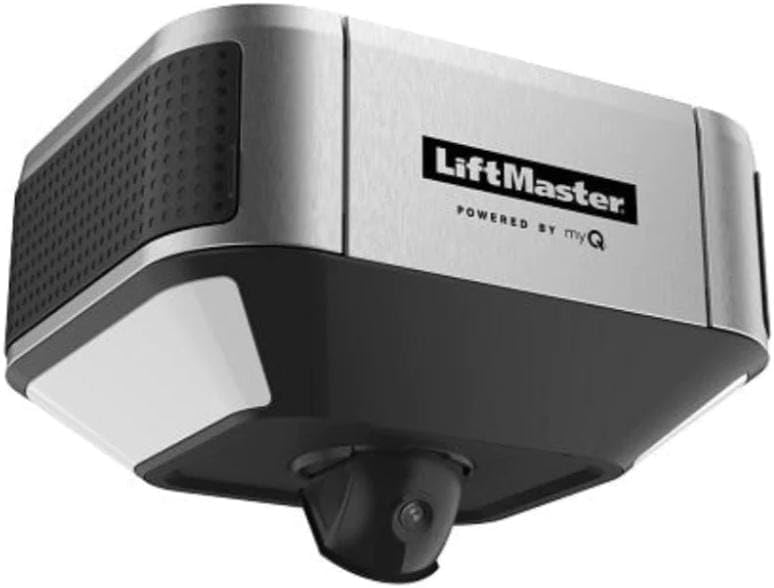
Figure 2.1: LiftMaster 84504R Opener Head Unit with Integrated Camera.

Figure 2.2: Underside view of the LiftMaster 84504R, highlighting the integrated camera lens.
3. Operating Instructions
Your LiftMaster 84504R offers multiple ways to operate your garage door, including remote control, wall button, and smart features via the myQ app.
Standard Operation:
- Remote Control (893MAX): Press the programmed button on your remote to open or close the garage door.
- Wall Button: Press the internal wall button to operate the garage door.
Smart Features (myQ App):
The myQ app provides enhanced control and monitoring capabilities for your garage door opener.
- Remote Control: Open or close your garage door from anywhere using your smartphone.
- Live Streaming and Video Storage: View live-streaming video from your garage for free. For recording and saving videos for up to 7 or 30 days, a myQ Video Storage Subscription is required.
- 2-Way Audio: Communicate in real-time between your garage and your smartphone through the integrated camera.
- People Detection: The camera can identify when a person has been detected in your garage.
- Rich Notifications: Receive thumbnail alerts when an event is recorded. Press and hold the alert to see details.
- Access Alerts: Get alerts when recordings are captured, showing who entered or exited your garage.
- Download, Save, and Share: With a Video Storage Plan, you can download, save, and share video clips directly from the myQ app for up to 30 days.
Amazon Key In-Garage Delivery:
The opener supports Amazon Key In-Garage Delivery for secure package delivery. Eligible Prime Members can link their account to Amazon Key within the myQ app to monitor and control deliveries from their smartphone.
Battery Backup Operation:
The integrated 485LM Battery Backup allows you to operate your garage door during power outages, ensuring continued access. This feature meets California SB-969 requirements.
Quiet Operation and Lighting:
The DC motor and extra-strong belt drive system provide virtually silent operation. The unit also features side-to-side 1,500 lumen LED lighting for bright illumination of your garage.
Official Product Videos:
No official product videos from the seller were available for embedding based on the provided criteria.
4. Maintenance
Regular maintenance ensures the longevity and optimal performance of your LiftMaster 84504R garage door opener.
- Safety Sensor Check: Periodically test the safety sensors by placing an object in the door's path to ensure it reverses. Clean sensor lenses if necessary.
- Belt Inspection: Inspect the belt drive system for any signs of wear or damage. The smooth start/stop operation helps extend hardware life and reduce maintenance.
- Battery Backup: Test the battery backup regularly by unplugging the main power and attempting to operate the door. Ensure the battery is charged.
- General Cleaning: Keep the opener head unit clean and free of dust and debris.
5. Troubleshooting
This section addresses common issues you might encounter with your garage door opener.
| Problem | Possible Cause | Solution |
|---|---|---|
| Door does not close completely. | Safety sensors misaligned or obstructed. | Check and align safety sensors. Clear any obstructions. |
| Opener makes unusual noise. | Loose components or worn parts. | Inspect mounting hardware and belt. Contact a qualified technician if noise persists. |
| Remote control not working. | Dead battery in remote or remote out of range. | Replace remote battery. Ensure you are within operating range. Reprogram remote if necessary. |
| myQ app connectivity issues. | Wi-Fi signal weak or internet outage. | Check home Wi-Fi network. Restart router and opener. Ensure myQ app is updated. |
| Battery backup not providing power. | Battery discharged or faulty. | Allow battery to recharge. If issue persists, battery may need replacement. |
For more detailed troubleshooting or issues not listed here, please refer to the comprehensive troubleshooting guide on the LiftMaster support website or contact customer service.
6. Specifications
Detailed technical specifications for the LiftMaster 84504R garage door opener.
- Model Number: 84504R
- Manufacturer: Chamberlain
- Motor: 1/2 HP DC Motor
- Drive Type: Belt Drive (Belt sold separately)
- Power Source: Electric with 485LM Battery Backup
- Integrated Camera: HD-Quality Video 1080p, glare-resistant, night vision
- Audio: 2-Way Audio via myQ App
- Lighting: Side-to-side 1,500 Lumen LED Lighting
- Item Weight: 21.1 pounds
- Product Dimensions: 10 x 12 x 12 inches
- Color: Metal
- Batteries: Not included (for remote, etc., but unit has integrated backup battery)
- First Available: November 6, 2023
7. Warranty and Support
For information regarding the product warranty, please refer to the warranty documentation included with your purchase or visit the official LiftMaster website. Warranty terms and conditions may vary.
For technical support, replacement parts, or further assistance, please contact LiftMaster Customer Service or visit their online support portal. You can typically find contact information on the manufacturer's website or in your product packaging.
Website: www.liftmaster.com