Introduction
This manual provides detailed instructions for the safe and proper installation, operation, and maintenance of your Maclean MC-750N Universal Tilting TV Wall Mount. Please read this manual thoroughly before installation and retain it for future reference.
The Maclean MC-750N is designed to securely mount LCD, LED, and Plasma TVs ranging from 60 to 120 inches, with a maximum weight capacity of 120 kg. It features a slim profile of 80mm from the wall and a tilt adjustment of +10° to -10° for optimal viewing angles.
Safety Information
WARNING: Failure to read and follow all instructions can result in personal injury, property damage, or voiding your warranty. The manufacturer is not liable for damage or injury caused by incorrect assembly or use.
- Ensure the mounting surface can safely support the combined weight of the mount and the display.
- Do not exceed the maximum weight capacity of 120 kg.
- Verify VESA compatibility with your TV before installation.
- Use appropriate tools and safety equipment during installation.
- If you are unsure about any part of the installation process, consult a qualified professional.
- Keep children and pets away from the work area during installation.
- Check all connections periodically to ensure they remain secure.
Package Contents
Before installation, verify that all components are present and undamaged. If any parts are missing or damaged, do not proceed with installation and contact customer support.
- Wall Plate Assembly
- TV Brackets (2x)
- Mounting Hardware Kit (screws, anchors, washers for wall and TV attachment)
- Instruction Manual
Note: Specific screw sizes and types may vary. Refer to the hardware kit for exact components.
Specifications
| Feature | Specification |
|---|---|
| Model | MC-750N |
| Screen Size Compatibility | 60" - 120" (or larger if weight and VESA are compatible) |
| Maximum Load Capacity | 120 kg |
| Distance from Wall | 80 mm |
| Tilt Adjustment | +10° to -10° |
| VESA Compatibility | 50x50, 75x75, 100x100, 100x150, 150x100, 100x200, 200x100, 150x150, 200x200, 200x300, 300x200, 200x400, 400x200, 300x300, 300x400, 400x300, 600x200, 400x400, 600x300, 400x600, 600x400, 700x400, 800x400, 600x600, 800x500, 800x600, 900x600 mm |
| Material | Alloy Steel, Stainless Steel |
| Color | Black |

Image: The Maclean MC-750N TV mount highlighting its maximum load capacity of 120 kg.
Setup and Installation
Proper installation is crucial for the safety and stability of your TV. Follow these steps carefully.
1. Prepare the Wall and Mark Drilling Points
Determine the ideal mounting location on your wall. Ensure there are no hidden electrical wires or plumbing. Use a stud finder to locate wall studs if mounting on a wood stud wall. For concrete or brick walls, use appropriate anchors.

Image: The Maclean MC-750N TV wall mount shown installed on a wall, illustrating its appearance in a living room setting.
Position the wall plate against the wall at the desired height and use a level to ensure it is perfectly horizontal. Mark the drilling points through the holes on the wall plate. For wood studs, drill pilot holes. For concrete/brick, drill holes and insert wall anchors.
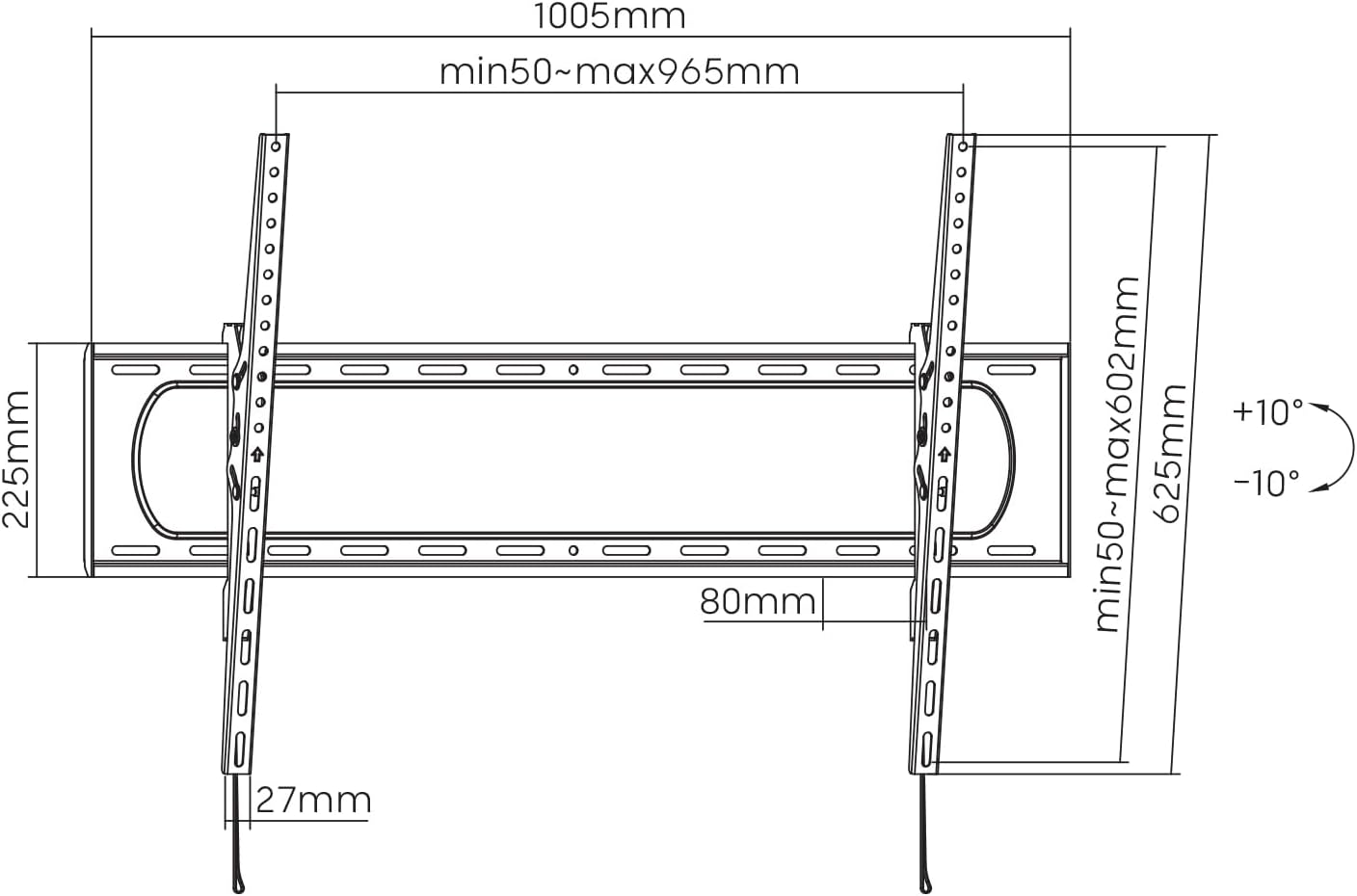
Image: Technical drawing of the MC-750N wall mount, showing overall dimensions, VESA mounting points, and the 80mm distance from the wall.
2. Attach Wall Plate to the Wall
Secure the wall plate to the wall using the appropriate screws and washers from the mounting hardware kit. Ensure all screws are tightened firmly to prevent movement.
3. Attach TV Brackets to the TV
Lay your TV face down on a soft, clean surface to protect the screen. Identify the VESA mounting holes on the back of your TV. Select the correct screws, washers, and spacers (if needed) from the hardware kit that fit your TV's VESA pattern.
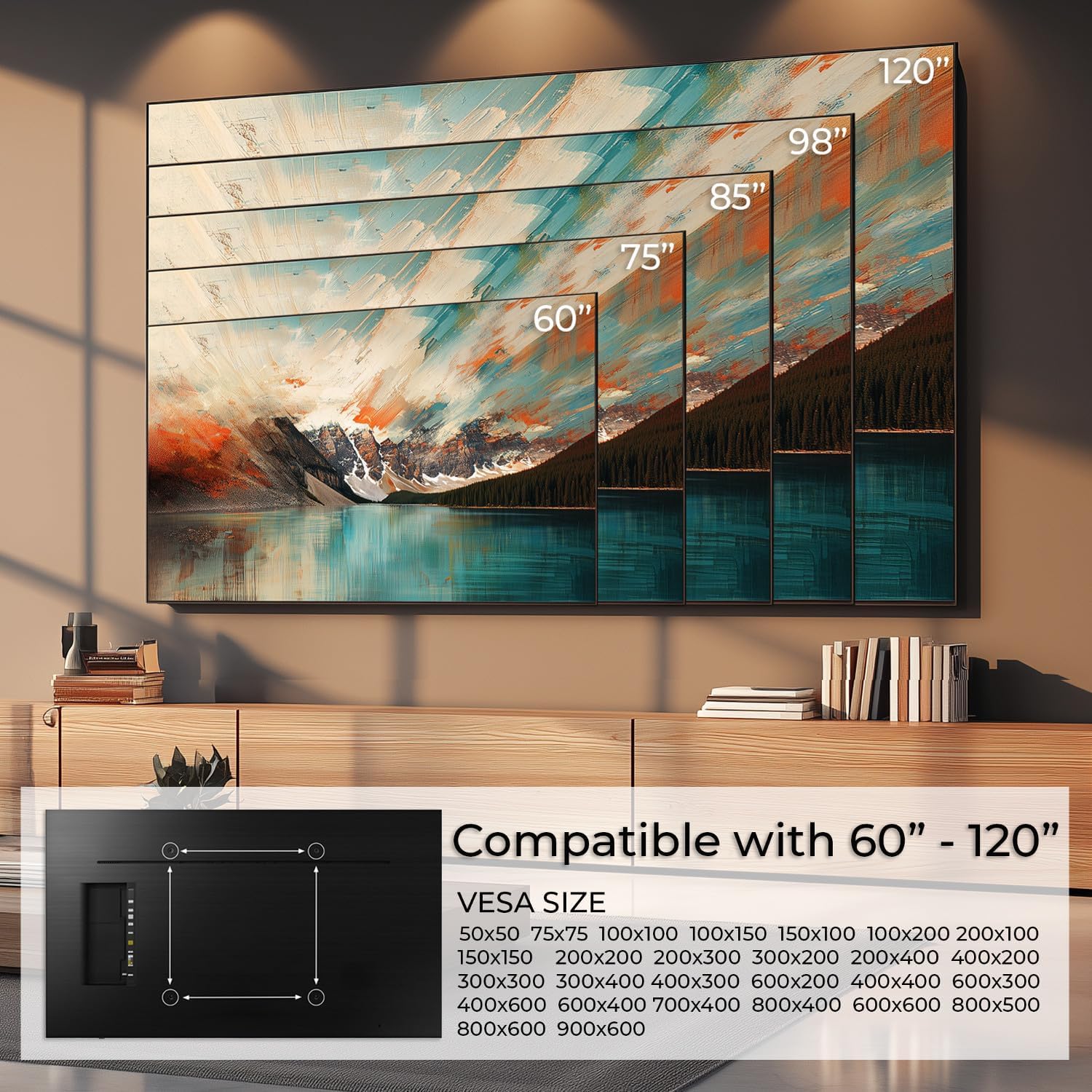
Image: A diagram illustrating various TV screen sizes (60" to 120") and a list of compatible VESA sizes for the Maclean MC-750N mount.
Attach the two TV brackets to the back of your TV, ensuring they are oriented correctly (usually with the hooks facing downwards and the pull-straps at the bottom). Do not overtighten the screws.
4. Mount TV onto Wall Plate
With assistance, carefully lift the TV and hook the TV brackets onto the top edge of the wall plate. Gently lower the TV until the brackets fully engage with the wall plate. Ensure the TV is centered and level.
5. Secure the TV
Locate the safety screws or locking mechanism on the bottom of the TV brackets. Tighten these screws or engage the locking mechanism to prevent the TV from accidentally lifting off the wall plate. The MC-750N features a pull-strap release for easy locking and unlocking.
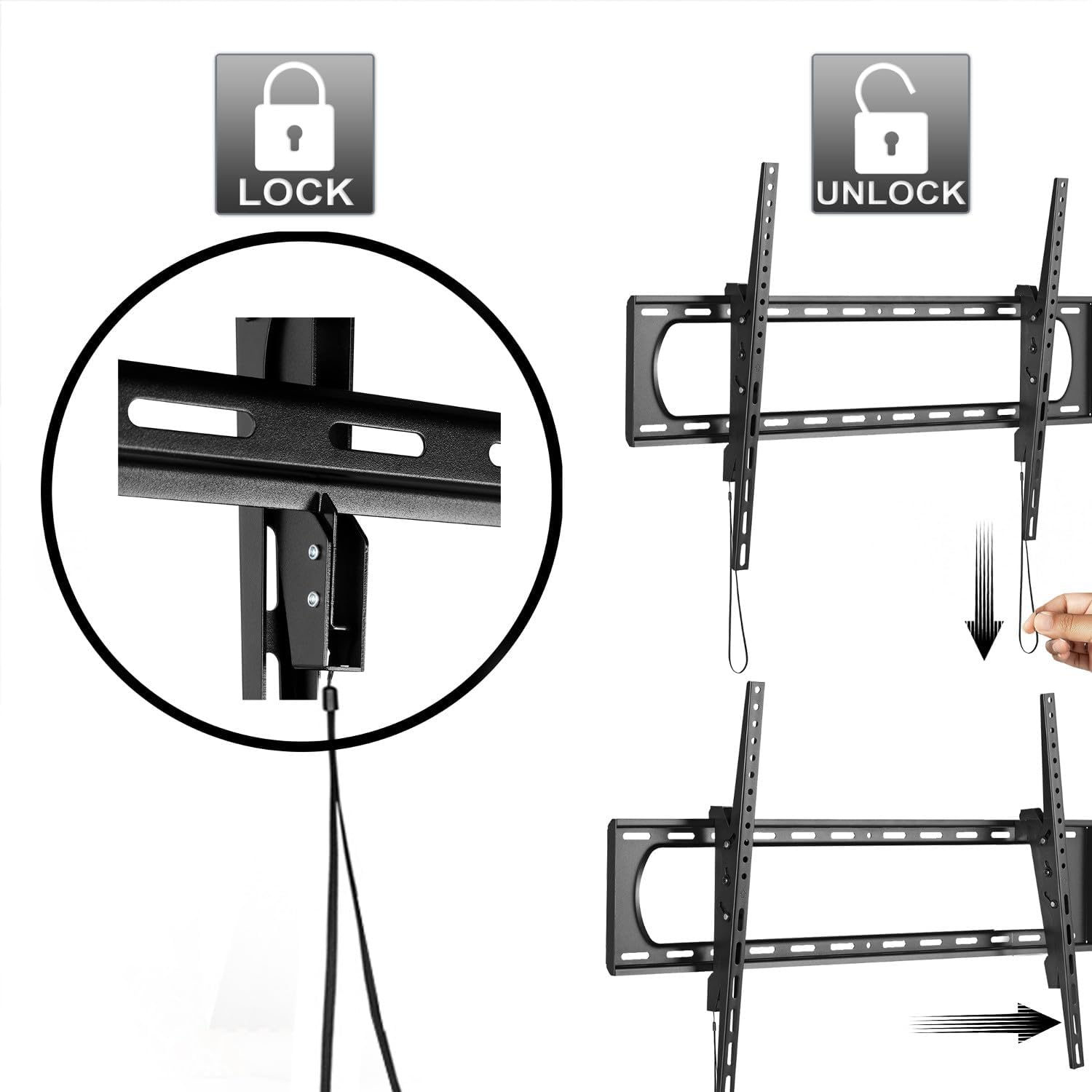
Image: A visual guide demonstrating the "LOCK" and "UNLOCK" functions of the TV mount using the integrated pull straps.
Operating Instructions
Tilt Adjustment
The Maclean MC-750N allows for a tilt adjustment of +10° to -10°. To adjust the tilt, loosen the tilt adjustment knobs or bolts on the side of the TV brackets. Adjust the TV to your desired viewing angle, then firmly tighten the knobs/bolts to secure the tilt position.

Image: A diagram illustrating the 10-degree upward and downward tilt capability, as well as the 80mm distance of the TV from the wall when mounted.
Removing the TV from the Mount
To remove the TV, first pull the release straps located at the bottom of the TV brackets to disengage the locking mechanism. With assistance, carefully lift the TV upwards and away from the wall plate.
Maintenance
- Cleaning: Clean the mount with a soft, dry cloth. Avoid abrasive cleaners or solvents.
- Periodic Checks: Periodically check all screws and connections to ensure they remain tight and secure.
- Damage: If any part of the mount becomes damaged, discontinue use and contact customer support for replacement parts or advice.
Troubleshooting
- TV not level: Ensure the wall plate is perfectly level before attaching it to the wall. Small adjustments can sometimes be made by slightly loosening and re-tightening the TV bracket screws.
- Missing parts: If any parts are missing from the package, do not proceed with installation. Contact your retailer or Maclean customer service immediately.
- Difficulty tilting: Ensure the tilt adjustment knobs/bolts are sufficiently loosened before attempting to adjust the angle. Do not force the mechanism.
Warranty Information
For warranty details, please consult your retailer or the official Maclean website. Retain your proof of purchase for any warranty claims.
Customer Support
If you have any questions, require technical assistance, or need replacement parts, please contact Maclean customer service through their official website or your point of purchase.


