
Tiptiper VD07
Tiptiper VD07 Large Makeup Vanity Instruction Manual
Model: VD07 | Brand: Tiptiper
1. Introduction
This manual provides detailed instructions for the assembly, operation, and maintenance of your Tiptiper VD07 Large Makeup Vanity. Please read this manual thoroughly before assembly and use to ensure proper function and safety.
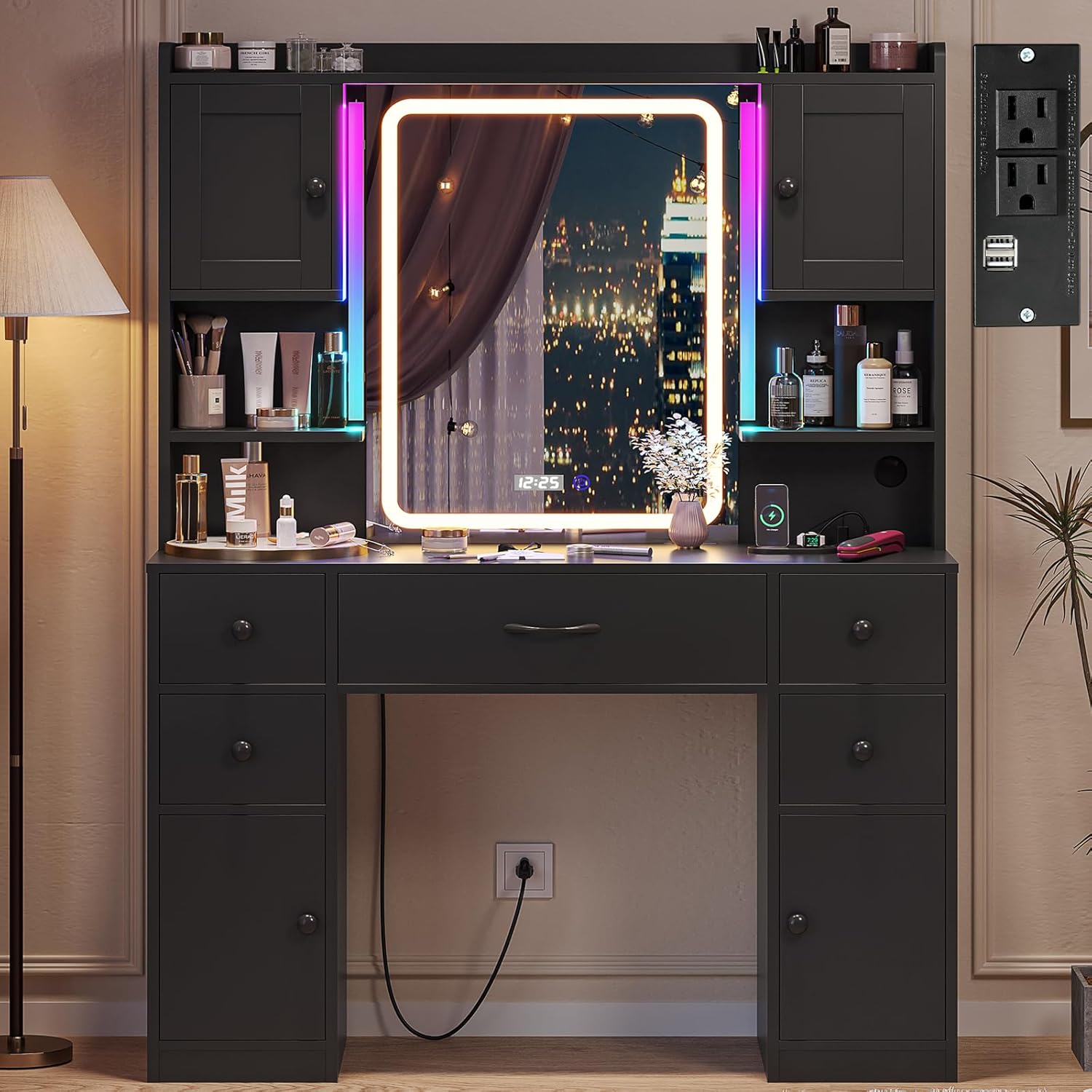
Image 1: Tiptiper VD07 Large Makeup Vanity. This image shows the complete vanity unit with its illuminated mirror, storage compartments, and overall design.
2. Safety Information
- Assembly may require tools and careful handling to avoid injury.
- Always unplug electrical components before handling or cleaning.
- Keep electrical components away from water to prevent electric shock.
- Do not overload power outlets to avoid electrical hazards.
- Ensure the vanity is placed on a stable, level surface.
- Consider anchoring the vanity to a wall to prevent tipping, especially in households with children or pets.
3. Package Contents
Verify that all components are present before beginning assembly. Refer to the included parts list in your packaging for a complete inventory. If any parts are missing or damaged, please contact customer support.
4. Setup and Assembly
Assembly of the Tiptiper VD07 vanity requires careful attention to the provided instructions. It is highly recommended that two individuals participate in the assembly process to ensure stability and prevent damage or injury.
- Unpack all components and lay them out on a clean, soft surface to prevent scratches.
- Identify each part using the labels and the assembly diagram.
- Follow the step-by-step instructions provided in the separate assembly guide. Pay close attention to screw types and orientation of panels.
- Secure all connections firmly but avoid over-tightening, which can damage the engineered wood.
- Once assembled, ensure the vanity is stable. If any wobbling occurs, recheck connections.
- For added safety, especially if the vanity will be used in a high-traffic area or by children, consider securing it to a wall using appropriate anchoring hardware (not included).
Note: Some users have reported that assembly can be time-consuming and requires precision. Take your time and double-check each step.
5. Operating Instructions
5.1. LED Mirror with Digital Time Display
The integrated LED mirror provides adjustable illumination and a digital time display for convenience.
- Power On/Off: Lightly tap the power button icon on the mirror surface to turn the LED lights on or off.
- Change Light Color: With the lights on, tap the power button icon repeatedly to cycle through three light settings: warm yellow, warm white, and cool white.
- Adjust Brightness: Press and hold the power button icon to dim or brighten the lights. Release when the desired brightness is achieved.
- Digital Time Display: The mirror features a digital clock. The clock displays time in 24-hour format and cannot be changed to 12-hour format. The clock is always on when the vanity is powered.

Image 2: LED Mirror Controls. This image illustrates the touch controls for changing light color and adjusting brightness, along with the digital time display.
5.2. RGB Ambient Light Bar
The vanity includes an RGB ambient light bar for customizable lighting effects.
- Control: The RGB light bar is controlled via a dedicated app or receiver. Refer to the separate instructions for the RGB light kit for detailed pairing and operation.
- Features: Explore over 60,000 light colors, 100+ dynamic modes, mic mode (lights react to sound), music mode (lights sync with music), and timing functions.

Image 3: RGB Ambient Light Bar. This image demonstrates the RGB light bar in action, highlighting its various color and mode options controlled via an app and receiver.
5.3. Power Outlet and Charging Station
The vanity is equipped with a built-in charging station for your electronic devices.
- Outlets: Features 2 standard AC outlets (125V/12A) and 2 USB ports (5V/2.1A).
- Power Cord: The integrated power strip has a 4.6-foot cord.
- Usage: Plug in your hair tools, phone chargers, or other small electronic devices.
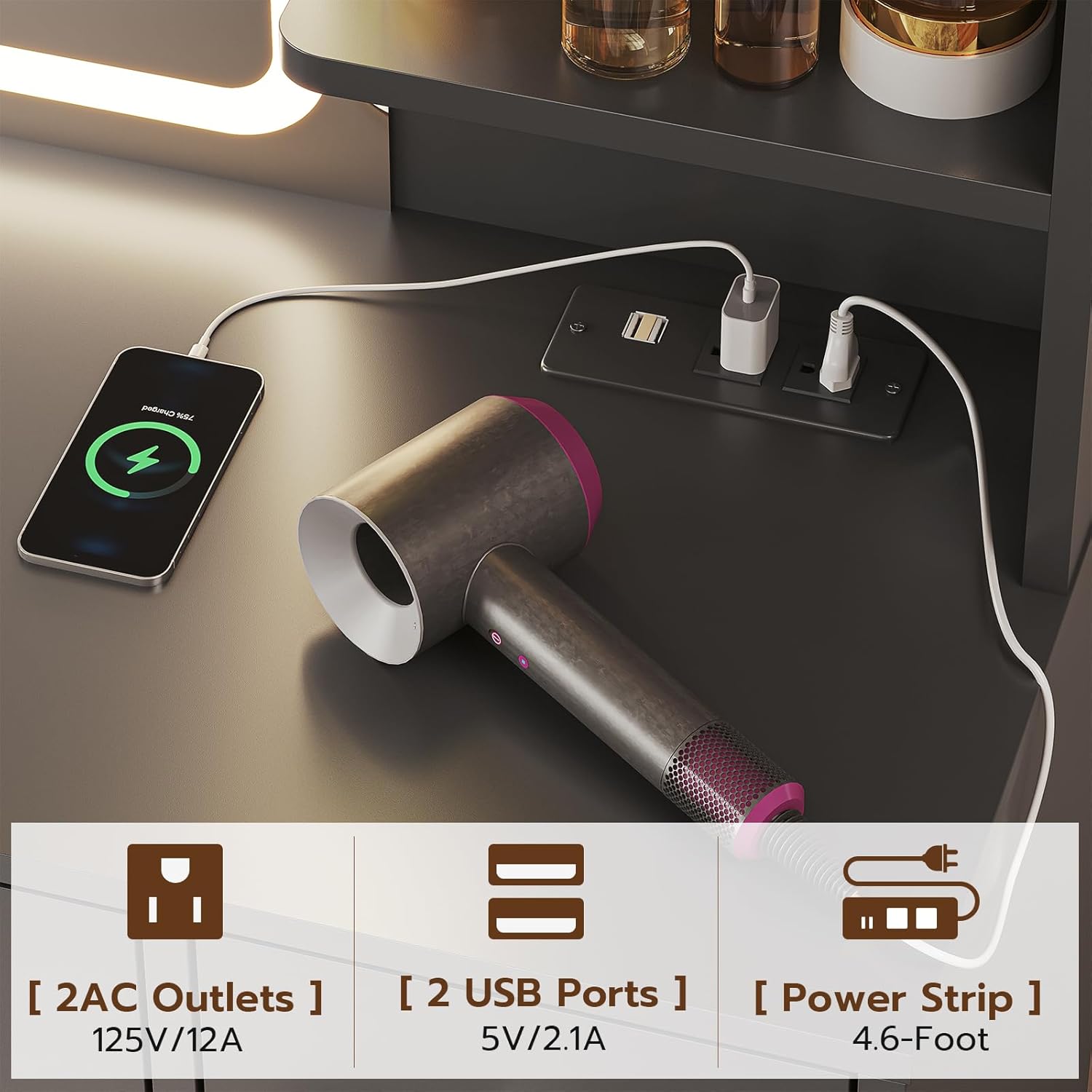
Image 4: Charging Station. This image shows a close-up of the integrated power strip with two AC outlets and two USB ports, demonstrating its use for charging devices.
5.4. Storage Features
The Tiptiper VD07 vanity offers extensive storage solutions to keep your items organized.
- Drawers: Five deep drawers provide ample space for cosmetics, accessories, and personal items.
- Cabinets: Four storage cabinets offer concealed storage.
- Open Shelves: Three open shelves are ideal for displaying frequently used items or decorative pieces.
- Adjustable Shelves: Some cabinet shelves are adjustable, allowing customization of storage space.
- Necklace Hooks: Integrated hooks inside cabinets provide a dedicated space for hanging necklaces and other jewelry.

Image 5: Storage Overview. This image displays the vanity with its drawers and cabinets open, showcasing the various storage compartments.

Image 6: Detailed Storage Features. This image highlights the adjustable shelves within the cabinets and the integrated hooks for necklaces.
6. Maintenance
- Cleaning: Wipe the vanity surfaces with a dry, soft cloth. Avoid abrasive cleaners or harsh chemicals that could damage the finish.
- Spills: Clean up spills immediately with a dry cloth to prevent staining or damage to the engineered wood.
- Electrical Components: Ensure all electrical components are unplugged before cleaning. Use a dry cloth for the mirror and power strip.
- General Care: Avoid placing extremely hot or cold items directly on the surface. Use coasters or protective pads as needed.
7. Troubleshooting
| Problem | Possible Cause | Solution |
|---|---|---|
| LED mirror lights not working or inconsistent. | Loose connection, faulty component, or light tap not registered. | Ensure all electrical connections are secure. Try a firm, deliberate tap on the power icon. If issues persist, contact customer support. |
| RGB ambient lights not functioning correctly. | Improper app connection, faulty receiver, or component issue. | Refer to the RGB light kit's specific instructions for app pairing and troubleshooting. Verify power to the receiver. If unresolved, contact customer support. |
| Power outlets or USB ports not providing power. | Vanity not plugged in, circuit overload, or faulty power strip. | Ensure the vanity's main power cord is securely plugged into a working wall outlet. Avoid plugging in too many high-power devices simultaneously. If the issue continues, contact customer support. |
| Digital clock displays 24-hour format only. | The clock is designed for 24-hour display. | This is a design feature and cannot be changed to 12-hour format. |
| Vanity feels wobbly after assembly. | Loose connections or uneven placement. | Re-tighten all assembly screws. Ensure the vanity is on a flat, even surface. Consider using wall anchoring hardware for increased stability. |
| Particle board chipping during assembly or use. | Rough handling or excessive force during assembly. | Handle all components carefully during assembly. Avoid dropping or striking the vanity. |
8. Specifications
| Feature | Detail |
|---|---|
| Model Number | VD07 |
| Brand | Tiptiper |
| Product Dimensions | 15.8"D x 41.5"W x 58.5"H (40.1cm D x 105.4cm W x 148.6cm H) |
| Item Weight | 113 pounds (51.2 kg) |
| Frame Material | Engineered Wood |
| Color | Modern Black |
| LED Mirror Lights | 3 settings (Warm Yellow, Warm White, Cool White), Dimmable |
| Digital Display | Time (24-hour format) |
| Power Outlets | 2 AC Outlets (125V/12A) |
| USB Ports | 2 USB Ports (5V/2.1A) |
| Power Strip Length | 4.6-Foot |
| Storage | 5 Drawers, 3 Open Shelves, 4 Cabinets (with adjustable shelves and necklace hooks) |
| Product Care | Wipe with Dry Cloth |
9. Warranty and Support
Tiptiper products are manufactured with quality and care. For warranty information, product support, or to report missing/damaged parts, please contact Tiptiper customer service. Keep your purchase receipt for warranty claims.
Customer Service: Please refer to the contact information provided with your product packaging or visit the official Tiptiper website.