1. Introduction
Thank you for purchasing the Shop-Vac Cordless Handheld Vacuum Cleaner SV5430021. This manual provides essential information for the safe and efficient operation, maintenance, and troubleshooting of your new vacuum cleaner. Please read it thoroughly before first use and keep it for future reference.

Image 1: Shop-Vac Cordless Handheld Vacuum Cleaner with included accessories.
2. Important Safety Information
Always follow basic safety precautions when using electrical appliances to reduce the risk of fire, electric shock, or injury.
- Read all instructions before using the appliance.
- Do not use outdoors or on wet surfaces.
- Do not allow to be used as a toy. Close attention is necessary when used by or near children.
- Use only as described in this manual. Use only manufacturer’s recommended attachments.
- Do not use with damaged cord or plug. If appliance is not working as it should, has been dropped, damaged, left outdoors, or dropped into water, return it to a service center.
- Do not pull or carry by cord, use cord as a handle, close a door on cord, or pull cord around sharp edges or corners. Do not run appliance over cord. Keep cord away from heated surfaces.
- Do not unplug by pulling on cord. To unplug, grasp the plug, not the cord.
- Do not handle plug or appliance with wet hands.
- Do not put any object into openings. Do not use with any opening blocked; keep free of dust, lint, hair, and anything that may reduce airflow.
- Keep hair, loose clothing, fingers, and all parts of body away from openings and moving parts.
- Do not pick up anything that is burning or smoking, such as cigarettes, matches, or hot ashes.
- Do not use to pick up flammable or combustible liquids, such as gasoline, or use in areas where they may be present.
- Do not use without dust bag and/or filters in place.
- Turn off all controls before unplugging.
- Use extra care when cleaning on stairs.
- Do not use to pick up toxic material (chlorine bleach, ammonia, drain cleaner, etc.).
- Do not charge the unit outdoors.
- Use only the charger supplied by the manufacturer to recharge.
- Do not incinerate the appliance even if it is severely damaged. Batteries can explode in a fire.
3. Package Contents
Verify that all items listed below are included in your package:
- Shop-Vac Cordless Handheld Vacuum Cleaner
- Stainless Steel Filter
- Cartridge Filter
- AC Power Charger
- Gulper Nozzle
- Crevice Tool
- Extension Tube x2

Image 2: All components included in the product package.
4. Product Overview
The Shop-Vac Cordless Handheld Vacuum Cleaner is designed for quick and efficient cleaning in various environments. Its compact size and powerful suction make it ideal for home, garage, and car use.
Key Components:
- ON/OFF Switch: Activates and deactivates the vacuum.
- Dust Bowl Door Release: Button to open the dust cup for emptying.
- Dust Bowl: Transparent container for collecting debris.
- Charge Port: Input for the AC power charger.
- Dust Bowl Door: The opening for accessing the dust bowl and filters.

Image 3: Detailed view of the vacuum's main parts.
Features:
- Powerful Suction: 12.0 Kpa motor for effective cleaning of dust, paper, crumbs, and pet hair.
- Cordless & Portable: Compact design (17.8"x 4.2"x 3.7") for easy use anywhere.
- Low Noise: Operates below 80dB.
- Fast Charging: 2500 mAh lithium-ion battery charges in 2.5-3 hours for 15 minutes of runtime.
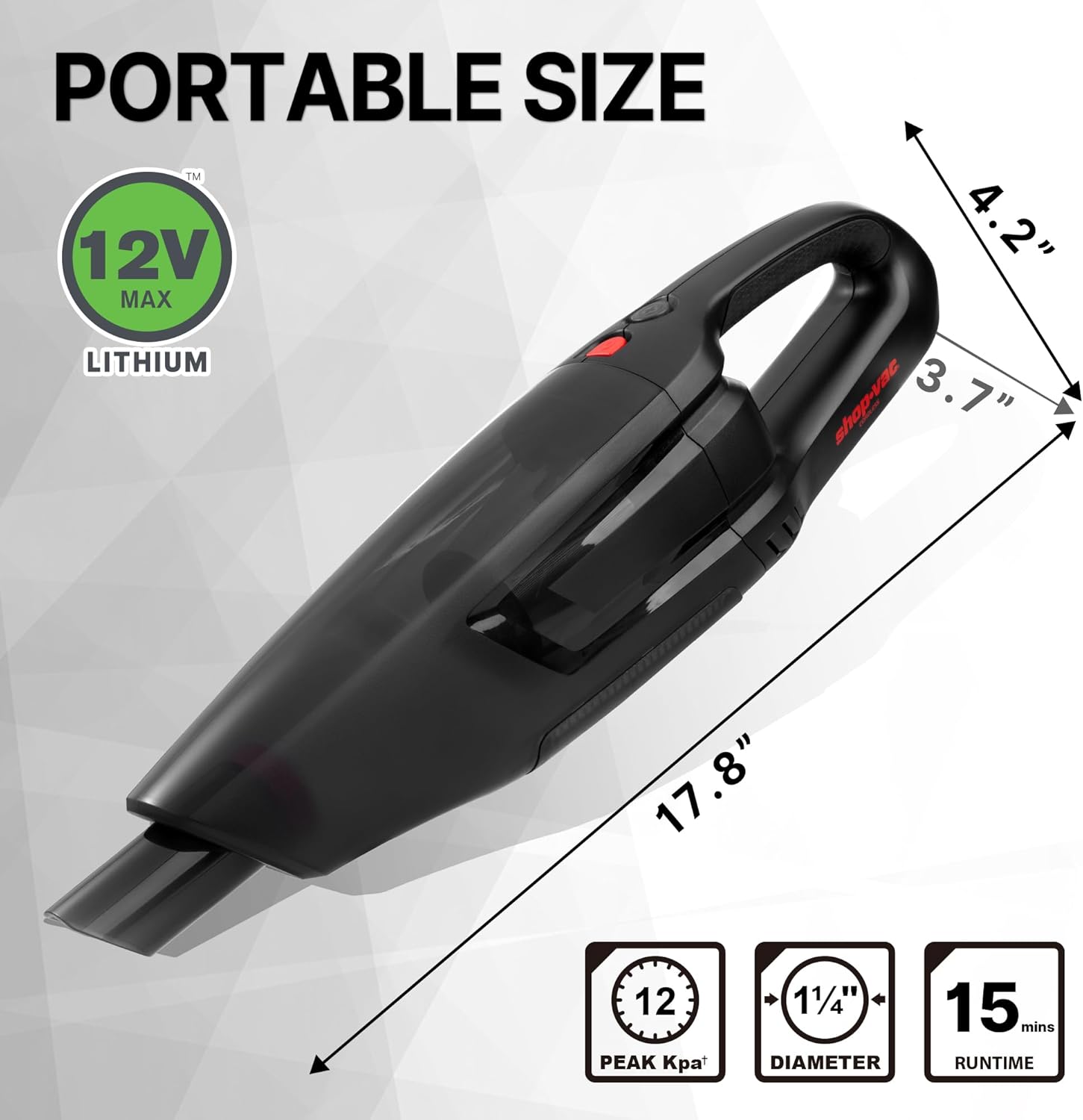
Image 4: Portable size and performance metrics of the vacuum.
5. Setup
5.1 Charging the Vacuum
- Ensure the vacuum is turned off.
- Connect the AC Power Charger to the charge port on the vacuum.
- Plug the charger into a standard wall outlet.
- Allow 2.5-3 hours for a full charge. The indicator light will change to show charging status.
- Once fully charged, unplug the charger.
5.2 Attaching Accessories
The vacuum comes with various attachments for different cleaning needs:
- Gulper Nozzle: Ideal for general cleaning of dust, liquids, and crumbs.
- Crevice Tool: Designed for cleaning small corners and gaps.
- Extension Tubes: Attach to the crevice tool or gulper nozzle to reach hard-to-access areas.
To attach an accessory, simply align it with the vacuum's nozzle and push firmly until it clicks into place. To remove, pull the accessory straight off.
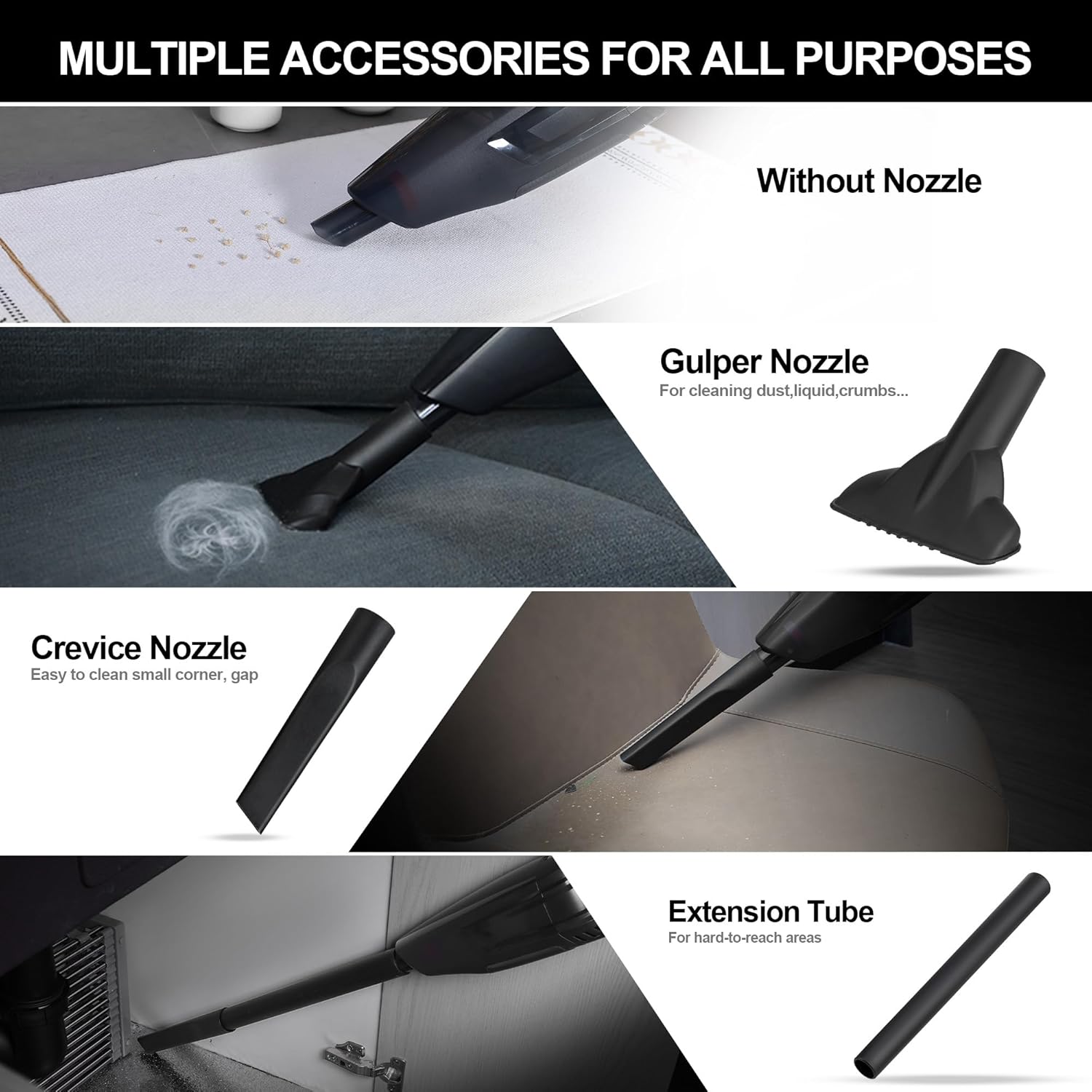
Image 5: Different attachments and their applications.
6. Operating Instructions
6.1 Powering On/Off
To turn the vacuum on, slide the ON/OFF switch to the 'ON' position. To turn it off, slide the switch to the 'OFF' position.
6.2 General Cleaning
Select the appropriate attachment for your cleaning task. For example, use the gulper nozzle for larger debris on flat surfaces or the crevice tool with extension tubes for tight spaces in your car or between sofa cushions.

Image 6: Cleaning pet hair from upholstery.

Image 7: Cleaning crumbs from car interior.
6.3 Product Video Overview
Video 1: An official product video from Shop-Vac Direct demonstrating the features and use of the Cordless Handheld Vacuum Cleaner.
7. Maintenance
Regular maintenance ensures optimal performance and extends the lifespan of your vacuum cleaner.
7.1 Emptying the Dust Cup
The 700 ml dust cup is designed for easy emptying:
- Ensure the vacuum is turned off.
- Press the Dust Bowl Door Release button on the top of the vacuum.
- The dust cup door will open, allowing you to easily dump collected debris into a trash bin.
- Close the dust cup door firmly until it clicks.

Image 8: Instructions for emptying the dust cup.
7.2 Cleaning and Replacing Filters
The dust tank and filters are washable. Regular cleaning maintains suction power.
- After emptying the dust cup, remove the filters (stainless steel and cartridge filters).
- Rinse the filters under running water until clean.
- Allow filters to air dry completely before reinserting them into the dust cup. Ensure they are fully dry to prevent damage and maintain suction.
- Replace filters as needed. Replacement filter 5430086 can be found on the Shop-Vac Store.

Image 9: Washable and reusable double-layer filters.
8. Troubleshooting
If you encounter issues with your Shop-Vac Cordless Handheld Vacuum Cleaner, refer to the following common problems and solutions:
- No Power: Ensure the battery is fully charged. Check if the ON/OFF switch is in the 'ON' position.
- Reduced Suction: Empty the dust cup. Clean or replace the filters. Check for blockages in the nozzle or attachments.
- Vacuum Not Charging: Ensure the charger is properly connected to both the vacuum and the wall outlet. Verify the outlet is functional.
- Unusual Noise: Turn off the vacuum immediately. Check for any foreign objects lodged in the nozzle, hose, or brush roll (if applicable).
If the problem persists after attempting these solutions, please contact customer support.
9. Specifications
| Feature | Specification |
|---|---|
| Brand | Shop-Vac |
| Model Name | SV5430021 |
| Special Feature | Cordless |
| Filter Type | Cartridge |
| Is Cordless? | Yes |
| Capacity | 700 ml (Dust Cup) / 2.98 Pounds (Weight) |
| Wattage | 9 Watt-hours |
| Charging Time | 2.5-3 Hours |
| Battery Life | 15 minutes |
| Maximum Suction | 12.0 Kpa |
| Noise Level | 80 Decibels |
| Product Dimensions | 17.2"L x 5.56"W x 8"H |
| Item Weight | 2.98 pounds |
| Color | Black |
| Battery Description | Lithium-Ion |
10. Warranty & Customer Support
For warranty information, product registration, or customer support, please visit the official Shop-Vac Store or contact their customer service directly. Keep your purchase receipt as proof of purchase.


