1. Introduction and Product Overview
This manual provides detailed instructions for the safe installation, operation, and maintenance of your Breezary 65 Inch Industrial Ceiling Fan with Lights. Please read this manual thoroughly before installation and keep it for future reference.
The Breezary 65-inch ceiling fan is designed for large rooms, offering powerful airflow with a quiet DC motor. It features 5 reversible blades, an integrated LED light with adjustable color temperatures, and convenient remote control operation. Its industrial/farmhouse style makes it suitable for various indoor and outdoor covered spaces.

Figure 1.1: Breezary 65 Inch Industrial Ceiling Fan with Lights installed in a living room setting.
2. Important Safety Information
WARNING: To reduce the risk of fire, electric shock, or personal injury, always follow these basic precautions:
- Read all instructions before installing the fan.
- Installation must be performed by a qualified electrician.
- Ensure the supply voltage is 120V/60Hz.
- All wiring must be in accordance with national and local electrical codes.
- The outlet box and support structure must be securely mounted and capable of reliably supporting a minimum of 35 lbs (15.9 kg).
- Do not operate the fan with a damaged power cord or plug.
- Avoid placing objects in the path of the fan blades.
- Disconnect power at the circuit breaker before servicing or cleaning.
3. Package Contents
Verify that all components listed below are included in your package. If any parts are missing or damaged, contact customer service immediately.
- 1 x 65 Inch 5-Blade Ceiling Fan
- 1 x Remote Control (batteries not included)
- 2 x Downrods (1x 6 inches, 1x 10 inches)
- 1 x User Manual
- Mounting Hardware Kit
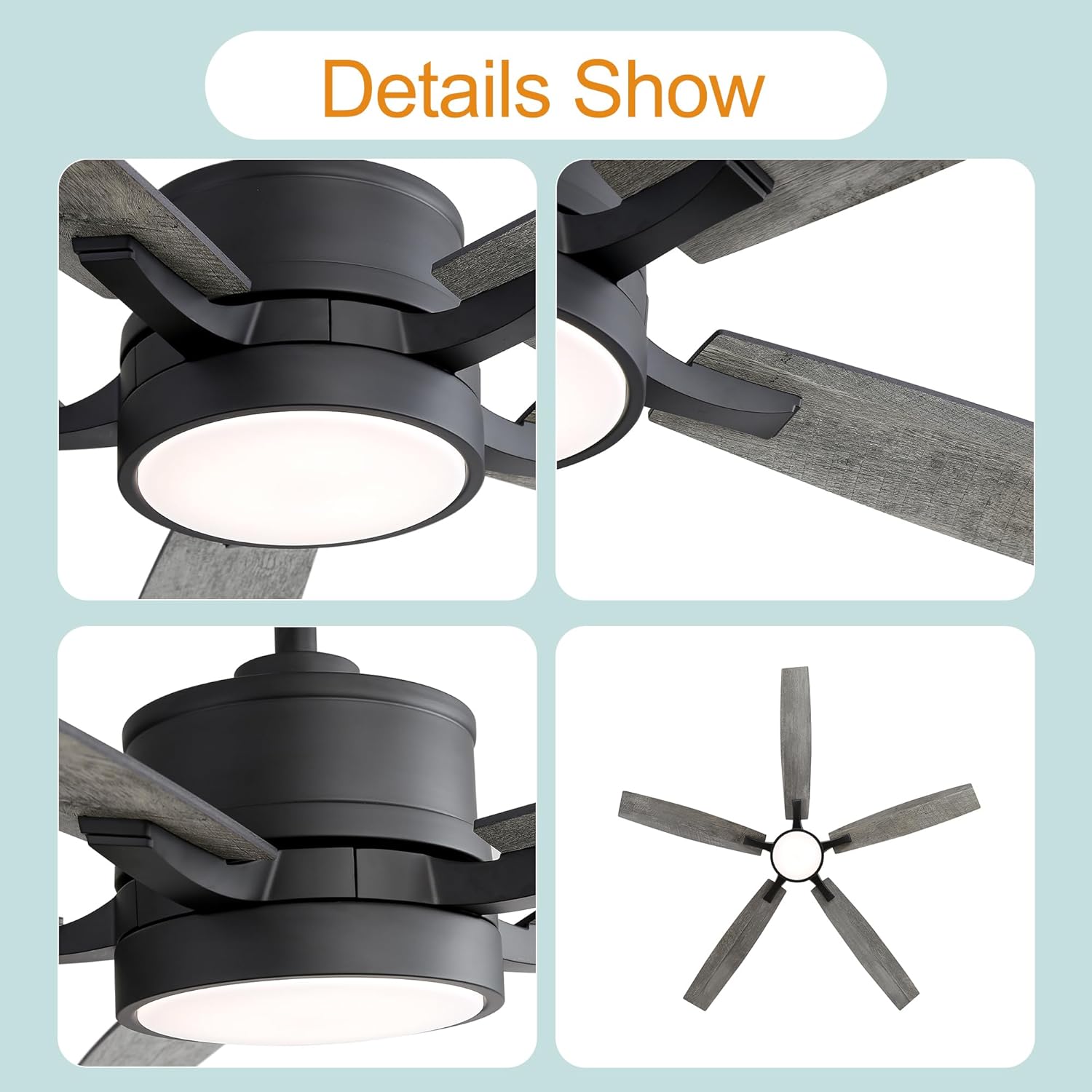
Figure 3.1: Close-up views of the fan's light kit, blade attachment, and motor housing.
4. Product Specifications
| Feature | Specification |
|---|---|
| Model Number | 29004-BK-AMZ |
| Fan Type | Downrod-Mount Ceiling Fan |
| Style | Industrial/Farmhouse |
| Body Color | Matte Black |
| Number of Blades | 5 |
| Blade Material | Plywood |
| Blade Colors | Dark Wood Grain/Light Wood Grain (Reversible) |
| Overall Size (with 6" rod) | 65 inches diameter x 15.8 inches height |
| Overall Size (with 10" rod) | 65 inches diameter x 19.8 inches height |
| Motor Type | DC Motor, Reversible |
| Motor Voltage | 120V/60Hz |
| Max Motor Speeds | 135 RPM |
| Air Flow Capacity | 4830 CFM (Max) |
| Lighting Type | Integrated LED |
| Max LED Wattage | 20W |
| Lumen Output | 600LM |
| Dimmable Light | Yes |
| Color Temperatures | 3000K (Warm White), 4500K (Neutral White), 6000K (Cool White) |
| Noise Level | Low Noise Operation |
| Sloped Ceiling Compatible | Yes (up to 13°) |
| Net Weight | 16.8 lb |
| Certifications | ETL |
5. Setup and Installation
This ceiling fan is designed for straightforward installation, with most functional components pre-assembled. However, due to the electrical nature of the product, professional installation by a certified electrician is highly recommended for safety and proper functionality.
5.1 Mounting Options
The fan supports downrod mounting and is compatible with sloped ceilings up to 13 degrees. Two downrods (6-inch and 10-inch) are included to accommodate various ceiling heights.
5.2 Pre-Installation Steps
- Turn off power at the circuit breaker and wall switch.
- Ensure the mounting location is structurally sound and can support the fan's weight.
- Unpack all components and verify against the package contents list.
5.3 Installation Procedure (Summary)
For detailed step-by-step instructions, refer to the dedicated installation manual included in your product packaging. A general overview includes:
- Securely attach the mounting bracket to the ceiling outlet box.
- Assemble the downrod with the motor housing and canopy.
- Perform electrical wiring connections according to local codes (typically black to black, white to white, ground to ground).
- Carefully lift and hang the fan assembly onto the mounting bracket.
- Attach the fan blades to the motor housing.
- Install the LED light kit and light cover.
- Ensure all connections are secure and components are properly seated.

Figure 5.1: Example of the fan installed in a large living area, demonstrating its suitable application.
6. Operating Instructions
Your Breezary ceiling fan comes with a multi-function remote control for convenient operation of both the fan and the integrated LED light.
6.1 Remote Control Functions
Insert two AAA batteries (not included) into the remote control. The remote allows you to:
- Fan ON/OFF: Turn the fan on or off.
- Fan Speed Control: Select from 6 wind speed gears (1-6).
- Light ON/OFF: Turn the LED light on or off independently.
- Color Temperature Adjustment: Cycle through 3 color temperatures: 3000K (Warm White), 4500K (Neutral White), and 6000K (Cool White).
- Light Dimming: Adjust the brightness of the LED light.
- Reversible Motor Function: Change the direction of blade rotation.

Figure 6.1: Illustration of the fan's adjustable LED light, demonstrating the 3000K, 4500K, and 6000K color temperature options.
6.2 Reversible Motor Function
The reversible DC motor allows you to change the direction of the fan blades for year-round comfort:
- Summer Mode (Counter-Clockwise): Blades rotate counter-clockwise to push air downward, creating a cooling breeze.
- Winter Mode (Clockwise): Blades rotate clockwise to draw air upward, circulating warm air evenly throughout the room.

Figure 6.2: Visual explanation of the reversible motor function, illustrating airflow for cooling (counter-clockwise) and warming (clockwise).
7. Maintenance
Regular maintenance ensures the longevity and optimal performance of your ceiling fan. Always disconnect power before performing any maintenance.
- Cleaning: Use a soft, damp cloth to wipe down the fan blades and motor housing. Do not use abrasive cleaners or solvents, as they may damage the finish.
- Blade Care: Periodically check the blade screws for tightness. Loose blades can cause wobbling and noise.
- Light Kit: The integrated LED light source is designed for long life and typically does not require replacement. If issues arise, contact customer service.
- Annual Check: Annually inspect all connections and mounting hardware to ensure they remain secure.
8. Troubleshooting
Before contacting customer service, please refer to the following troubleshooting guide for common issues:
| Problem | Possible Cause | Solution |
|---|---|---|
| Fan does not start | No power to fan; Loose wire connections; Remote control issues. | Check circuit breaker and wall switch. Ensure all wiring connections are secure. Replace remote control batteries. Re-pair remote if necessary (refer to remote manual). |
| Fan wobbles | Loose blade screws; Unbalanced blades; Loose mounting bracket. | Tighten all blade screws. Check for bent blades. Ensure mounting bracket is securely fastened to the ceiling. |
| Light does not work | Loose wire connection to light kit; LED driver issue. | Check light kit wiring connections. If problem persists, contact customer service. |
| Remote control not working | Dead batteries; Remote not paired with fan. | Replace batteries. Follow pairing instructions in the remote control manual. |
| Excessive noise | Loose screws; Motor issues; Blades hitting an obstruction. | Check all screws on the fan and mounting. Ensure no wires or objects are touching the blades. If motor noise persists, contact customer service. |
9. Warranty and Customer Support
Breezary provides a 2-year warranty for this ceiling fan, covering defects in materials and workmanship from the date of purchase. Additionally, a 30-day return and money-back guarantee is offered.
For any questions, technical assistance, or warranty claims, please contact Breezary customer service. Please have your model number (29004-BK-AMZ) and purchase information ready when contacting support.
You can visit the official Breezary store for more information: Breezary Store on Amazon


