
1. Introduction
The MOOER GE1000Li is a versatile guitar multieffects pedal processor designed to provide a comprehensive range of tonal options for guitarists. It integrates advanced digital signal processing with an intuitive user interface, including a 5-inch touch screen, to offer a powerful and portable solution for practice, recording, and live performance. This manual provides detailed instructions for setting up, operating, and maintaining your GE1000Li unit.

Figure 1: MOOER GE1000Li Guitar Multieffects Pedal Processor overview.
2. Key Features
- 5-inch High-Quality Color Touch Screen: Provides an intuitive interface for navigation and parameter adjustment.
- Extensive Effect Modules: Features over 300 effects, including amp simulators, reverb, delay, overdrive, and dynamics, configurable in series or parallel.
- Advanced AI Equalization: An AI-driven auto equalizer with customizable parameters that can automatically generate EQ adjustments based on playing style.
- Third-Party IR Support: Compatible with third-party Impulse Response (IR) files, including MOOER MNRS 2048pt sample files via the GE Cloud app.
- Stereo FX LOOP Function: Switchable serial/parallel TRS stereo FX LOOP for integrating external effects into any part of the effect chain.
- Versatile Connectivity: Includes programmable MIDI IN/OUT, USB-C for preset management, USB audio, USB MIDI, and Bluetooth audio output.
- Physical Controls: Equipped with 6 rotatable dial controls and over 15 button controls for direct parameter access.
- Built-in Rechargeable Battery: A 4750mAh Li-ion battery provides up to 6 hours of operation.
- Wireless Footswitch Support: Allows for wireless control (footswitch sold separately).

Figure 2: Visual overview of the MOOER GE1000Li's main features.
3. Setup
3.1 Unboxing and Initial Inspection
Upon receiving your MOOER GE1000Li, carefully unbox the unit and inspect its contents. Ensure all components are present and undamaged. The package typically includes the GE1000Li unit, power adapter, USB cable, and a quick start guide.

Figure 3: Contents of the MOOER GE1000Li package.
3.2 Powering On
- Connect the included power adapter to the DC IN port on the rear panel of the GE1000Li.
- Plug the power adapter into a suitable power outlet.
- Press the power button located on the unit to turn it on. The touch screen will illuminate.
The GE1000Li features a built-in 4750mAh rechargeable Li-ion battery, providing up to 6 hours of portable operation. Ensure the unit is charged before extended use without external power.

Figure 4: The GE1000Li features a built-in rechargeable battery for portable use.
3.3 Basic Connections
Connect your guitar to the GUITAR IN jack. For output, you have several options:
- Main Out (L/Mono, R): Connect to a mixer, audio interface, or full-range flat-response (FRFR) speaker system.
- Amp Out: Connect to a guitar amplifier's input.
- Phones: Connect headphones for silent practice.
- XLR Out (L, R): Balanced outputs for direct connection to a PA system or recording console.

Figure 5: Diagram illustrating the various input and output connections on the GE1000Li.
4. Operating Instructions
4.1 Navigating the Touch Screen
The 5-inch touch screen is the primary interface for controlling the GE1000Li. All operations, including selecting effects, adjusting parameters, and managing presets, can be performed by tapping and swiping on the screen. Physical buttons and knobs provide additional tactile control for frequently used functions.

Figure 6: Interacting with the 5-inch touch screen for parameter adjustments.
4.2 Effect Modules and Chains
The GE1000Li supports up to 14 simultaneous effect modules, which can be arranged in dual effect chains. These chains can be configured in series or parallel, offering extensive flexibility for tone shaping. You can select from over 300 effects, including various amp models, cabinet simulations, and modulation effects.

Figure 7: Diagram illustrating the dual effect chain architecture and module arrangement.
For a demonstration of the dual effects chain functionality, please refer to the video below:
Video 1: Demonstration of the GE1000Li's dual effects chain capabilities.
4.3 AI Equalization Function
The GE1000Li features an advanced AI equalization function that simplifies tone adjustment. By selecting a musical style and playing a short piece, the system can automatically generate EQ settings. These settings can then be further refined manually.
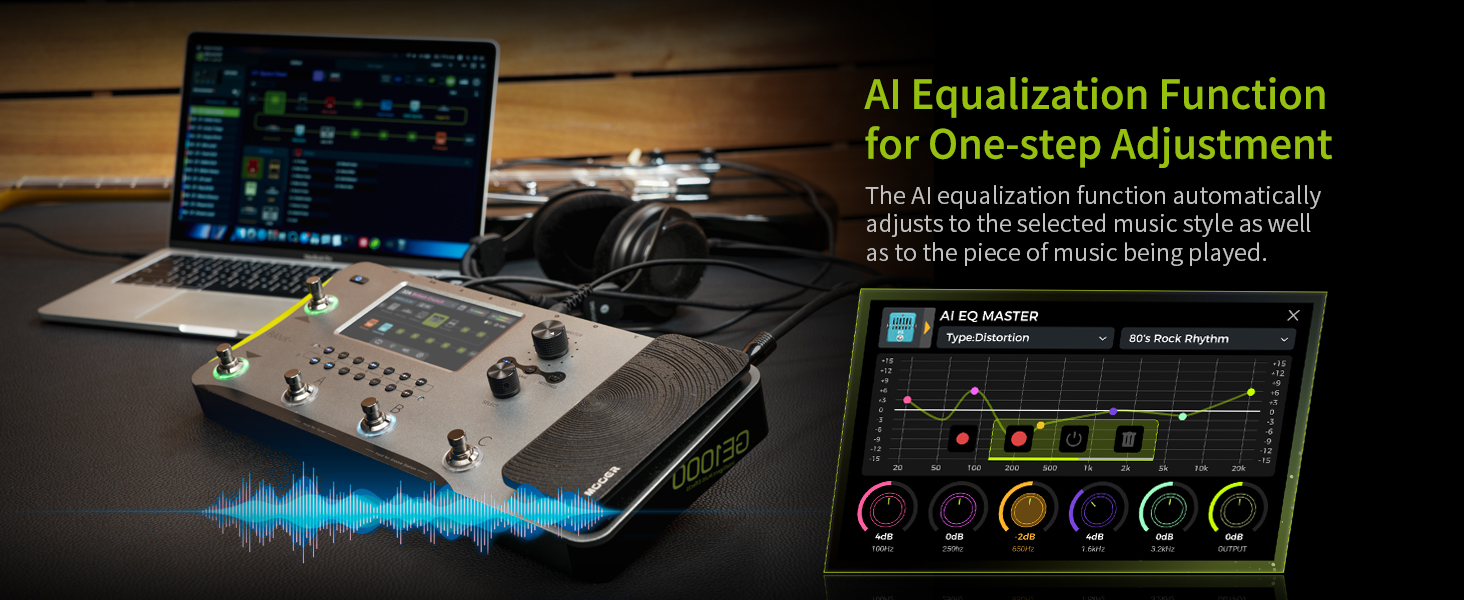
Figure 8: The AI Equalization interface for one-step tone adjustment.
Observe the AI EQ Master in action in the following video:
Video 2: Preview of the AI EQ Master feature, demonstrating automatic equalization based on musical style.
4.4 GE Cloud APP
The GE Cloud APP provides comprehensive preset management and tone modification capabilities for both desktop and mobile devices. This application allows users to organize, backup, and share their custom tones, as well as load third-party IR files.

Figure 9: The GE Cloud APP interface on both computer and mobile devices.
5. Connectivity
The GE1000Li offers a variety of connectivity options to integrate into any setup:
- FX LOOP: The switchable serial/parallel TRS stereo FX LOOP allows for the insertion of external effects pedals into your signal chain at any point.
- MIDI IN/OUT: Programmable MIDI interfacing for control with other MIDI-compatible devices.
- USB-C Port: Used for preset management, USB audio, and USB MIDI functionality. It supports low-latency ASIO USB C interfacing up to 192kHz.
- Bluetooth Audio: Supports Bluetooth audio output functionality for wireless monitoring or playback.

Figure 10: Rear panel showing various input and output ports, including USB-C and FX Loop.
6. Maintenance
6.1 Firmware Updates
To ensure optimal performance and access to the latest features, regularly check for and install firmware updates. Visit the official MOOER website to download the most recent firmware. Always back up your tone settings before performing a firmware update.
6.2 Battery Care
The GE1000Li's internal lithium-ion battery provides extended playtime. To prolong battery life, avoid fully discharging the unit frequently and store it in a cool, dry place when not in use for extended periods. Use only the provided power adapter for charging.
7. Troubleshooting
- No Sound: Check all cable connections (guitar in, output to amp/mixer, power). Ensure the volume levels on the GE1000Li and connected devices are appropriately set. Verify that no effect modules are bypassed or muted.
- Unit Not Powering On: Ensure the power adapter is securely connected and the power outlet is functional. If using battery power, ensure the battery is charged.
- Unexpected Tones/Noise: Check individual effect parameters for extreme settings. Ensure proper grounding to avoid hum or buzz. Consider performing a factory reset if issues persist after checking settings (refer to the full manual on the MOOER website for factory reset procedures).
- Connectivity Issues (USB/MIDI/Bluetooth): Ensure correct drivers are installed for USB connections. Verify MIDI cable connections and settings on both the GE1000Li and external MIDI devices. For Bluetooth, ensure the GE1000Li is in pairing mode and within range of the receiving device.
8. Specifications
| Feature | Specification |
|---|---|
| Item Weight | 1.5 Kilograms (3.3 pounds) |
| Package Dimensions | 14.3 x 7 x 4.5 inches |
| Item Model Number | GE1000 |
| Batteries | 1 Lithium Ion battery required (included) |
| Battery Type | Lithium Ion |
| Power Source | Battery Powered |
| Hardware Interface | USB |
| Signal Format | Analog |
| Amperage | 300 Milliamps |
9. Warranty and Support
For detailed warranty information and technical support, please refer to the official MOOER website or contact your authorized dealer. Keep your purchase receipt as proof of purchase for warranty claims.