
1. Product Overview
The AODK L Shaped Desk is a versatile and functional workstation designed for home office, gaming, and general use. This desk features a reversible design, allowing for flexible configuration to fit various room layouts. It is equipped with integrated power outlets and USB charging ports for convenient device charging, four spacious fabric drawers for organization, and a dedicated host stand for your computer tower. Constructed with durable, waterproof desk boards and a robust iron frame, it offers stability and longevity. Adjustable foot pads ensure stability on uneven surfaces.
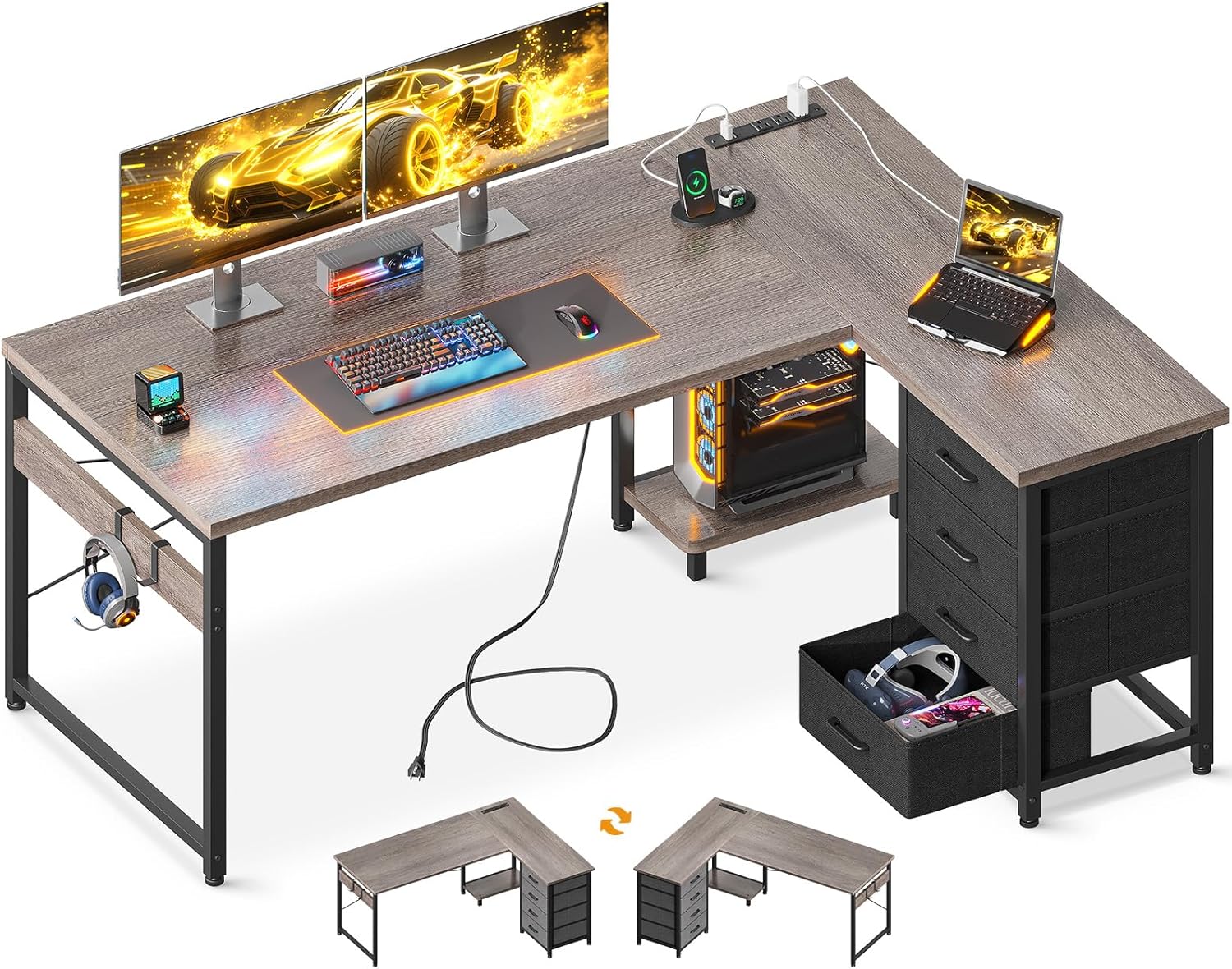
Figure 1: Overview of the AODK L Shaped Desk setup.
2. Safety Information
- Read all instructions carefully before assembly and use.
- Keep all small parts and packaging materials away from children and pets to prevent choking hazards.
- Assemble the desk on a clean, flat, and soft surface to prevent scratches.
- Ensure all screws and fasteners are securely tightened before use. Periodically check and re-tighten as necessary.
- Do not overload the desk. Distribute weight evenly across the surface.
- For electrical safety, ensure the power cord is not pinched or damaged. Do not expose the power strip to liquids. Use only with compatible devices and within specified voltage limits (120V/12A for AC outlets, 5V/2A for USB ports).
- Do not stand or sit on the desk.
- Use the adjustable foot pads to ensure the desk is level and stable on uneven floors.
3. Package Contents
Before beginning assembly, verify that all components listed in your product's specific packing list are present and undamaged. While the exact number of small parts may vary, the main components typically include:
- Desk Panels (L-shaped main top, side panels)
- Metal Frame Components (legs, support bars)
- Fabric Drawers (4 units)
- Integrated Power Strip (with 3 AC outlets and 2 USB ports)
- Host Stand
- Iron Hooks (2 units)
- Hardware Pack (screws, bolts, nuts, adjustable foot pads)
- Assembly Tools (e.g., Allen wrench, screwdriver)
- Instruction Manual
4. Setup and Assembly Instructions
The AODK L Shaped Desk is designed for straightforward assembly. All parts are clearly labeled, and a tool kit is included to assist with the process. For detailed, step-by-step instructions, please refer to the dedicated assembly manual provided in your package.
Important Note on Reversible Design: This desk features a reversible design, allowing you to configure the L-shape with the drawer unit on either the left or right side. Your assembly manual will contain specific instructions for both configurations, often labeled as 'L#' and 'R#'. Please carefully review these sections and choose the configuration that best suits your space before starting assembly. It has been noted that some manuals may have the 'L#' instructions correspond to a right-side drawer setup and 'R#' to a left-side setup; always cross-reference with the visual diagrams to ensure your desired orientation.
- Unpack all components and lay them out on a protected surface.
- Identify each part using the labels and the assembly diagram.
- Follow the numerical sequence of steps in the provided manual.
- Ensure all connections are firm but do not overtighten screws to avoid damaging the material.
- Once assembled, adjust the foot pads at the base of the desk legs to level the desk and prevent wobbling.

Figure 2: Product dimensions and reversible design illustration.

Figure 3: Visual representation of the reversible desk design.
5. Operating Instructions
5.1. Integrated Power Outlets and USB Ports
The desk is equipped with a built-in power strip featuring 3 standard AC outlets (120V/12A) and 2 USB charging ports (5V/2A). This allows for convenient charging of your electronic devices directly from your workspace.
- Plug the desk's main power cord into a standard wall outlet.
- Connect your devices (laptops, phones, Bluetooth accessories, etc.) to the available AC outlets or USB ports.
- Ensure devices are compatible with the provided power specifications.

Figure 4: Recessed power strip with AC outlets and USB ports.
5.2. Fabric Drawers
The four fabric drawers provide ample storage for documents, stationery, and personal items, helping to keep your desktop organized.
- Gently pull the handle to open the drawer.
- Push the drawer back into its slot to close.
- Avoid placing excessively heavy or sharp objects in the drawers to prevent damage.

Figure 5: Four large capacity fabric drawers for storage.
5.3. Host Stand and Headphone Hooks
Utilize the dedicated host stand to keep your computer tower off the floor, freeing up under-desk space. The two iron hooks are ideal for hanging headphones or other accessories.

Figure 6: Under-desk space with host stand and headphone hooks visible.
6. Maintenance
- Cleaning: Wipe surfaces with a soft, damp cloth. Avoid using harsh chemicals, abrasive cleaners, or polishes that may damage the finish. For the fabric drawers, spot clean with a mild detergent if necessary.
- Hardware Check: Periodically inspect all screws and fasteners to ensure they remain tight. Re-tighten as needed to maintain stability.
- Avoid Moisture: While the desk boards are waterproof, prolonged exposure to excessive moisture should be avoided. Immediately wipe up any spills.
- Heat Protection: Use coasters or protective pads under hot items to prevent damage to the desk surface.
7. Troubleshooting
| Problem | Possible Cause | Solution |
|---|---|---|
| Desk is wobbly/unstable. | Uneven floor; loose fasteners. | Adjust the foot pads at the bottom of the legs until the desk is level. Check and tighten all assembly screws. |
| Power outlets/USB ports not working. | Desk power cord not plugged in; power strip malfunction; overloaded circuit. | Ensure the desk's power cord is securely plugged into a functional wall outlet. Avoid plugging in too many high-power devices simultaneously. If issues persist, contact support. |
| Fabric drawers do not slide smoothly. | Incorrect assembly; obstruction; drawer overloaded. | Verify the drawer frame was assembled correctly according to the manual. Check for any items obstructing the drawer's path. Reduce the weight in the drawer. |
| Missing or damaged parts. | Shipping damage; packaging error. | Do not proceed with assembly. Contact AODK customer support immediately with your purchase details. |
8. Specifications
- Brand: AODK
- Model: 850056234689
- Dimensions (D x W x H): 39.4" x 53" x 30"
- Color: Grey Oak
- Material: Engineered Wood (Desk Boards), Metal (Frame)
- Number of Drawers: 4 (Fabric)
- Power Outlets: 3 AC Outlets (120V/12A), 2 USB Ports (5V/2A)
- Special Features: Built-In USB Outlet, Reversible Design, Rust Resistant, Scratch Resistant, Adjustable Foot Pads
- Recommended Use: Home Office, Gaming
9. Warranty and Support
The AODK L Shaped Desk comes with a limited warranty. For specific details regarding warranty coverage, duration, and terms, please refer to the warranty information included with your product or contact AODK customer service.
For any questions, concerns, or assistance with assembly, operation, or troubleshooting, a professional after-sales team is available to provide support. They aim to reply to messages within 24 hours.
Contact Support: Please refer to the contact information provided in your product packaging or visit the official AODK website for customer service details.