Product Overview
This CD player is designed for compatibility with Sony HI-FI systems, offering reliable audio playback. It features a robust design and essential functions for an enjoyable listening experience.
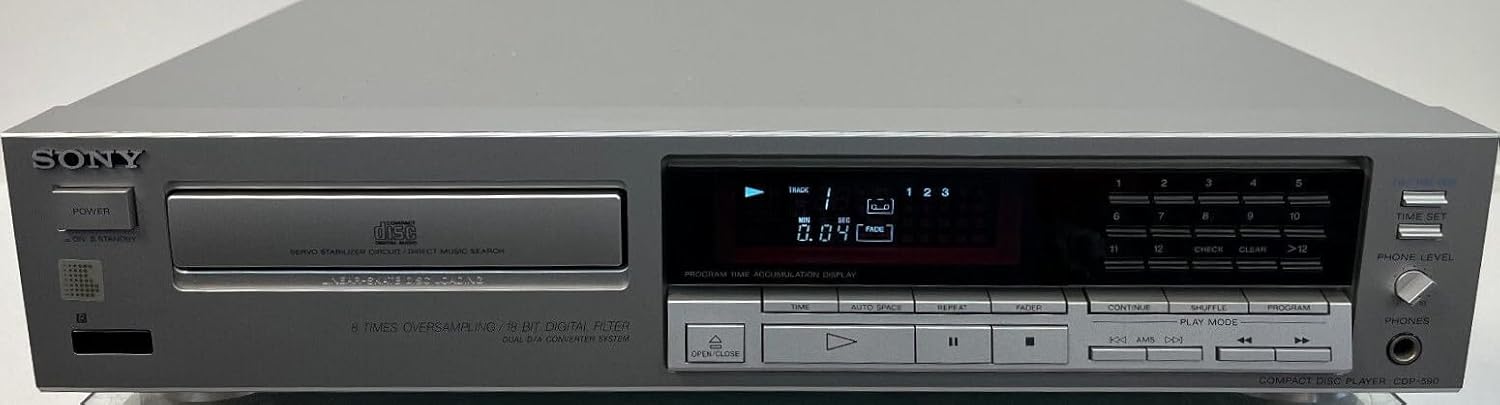
Figure 1: Front panel of the Compatible Sony CDP-590 CD Player. This image displays the front panel of the silver CD player. Key features visible include the 'SONY' branding (indicating compatibility), the disc tray on the left, a digital display showing track and time information, and various control buttons for playback, programming, and headphone level adjustment on the right.
Package Contents
Please check that all items listed below are included in your package:
- Compatible Sony CDP-590 CD Player (Silver)
- Connection Cable (Anschlusskabel)
- User Manual (this document)
Setup Guide
1. Connecting the CD Player
- Power Connection: Connect the provided connection cable to the AC input on the rear of the CD player and then to a standard wall outlet.
- Audio Connection: Use RCA audio cables (not included, unless specified) to connect the audio output jacks on the rear of the CD player to the corresponding audio input jacks (e.g., "CD IN" or "AUX IN") on your amplifier or receiver. Ensure left and right channels are matched correctly (typically red for right, white/black for left).
2. Initial Power On
After connecting all cables, press the POWER button on the front panel of the CD player to turn the unit on. The display should illuminate.
Operating Instructions
1. Loading a CD
- Press the OPEN/CLOSE button (marked with an upward triangle and downward triangle icon) to open the disc tray.
- Place a CD into the disc tray with the label side facing up.
- Press the OPEN/CLOSE button again to close the disc tray. The player will read the disc and display the total number of tracks and total playing time.
2. Basic Playback
- Play: Press the PLAY button (triangle icon) to start playback.
- Pause: Press the PAUSE button (two vertical bars icon) to temporarily stop playback. Press again to resume.
- Stop: Press the STOP button (square icon) to stop playback completely.
- Skip Tracks: Use the SKIP buttons (double arrow icons, forward and backward) to move to the next or previous track.
- Fast Forward/Rewind: Hold down the SKIP buttons during playback to fast forward or rewind within a track.
3. Advanced Playback Features
- Program Play: Use the numeric keypad (1-12) and PROGRAM button to create a custom playback sequence of tracks.
- Repeat Play: Press the REPEAT button to repeat the current track, all tracks, or a programmed sequence.
- Shuffle Play: Press the SHUFFLE button to play tracks in a random order.
- Time Display: Press the TIME button to cycle through different time displays (e.g., elapsed time of current track, remaining time of current track, total remaining time).
4. Headphone Output
Connect headphones to the PHONES jack on the front panel. Adjust the listening volume using the PHONE LEVEL knob.
Care and Maintenance
1. Cleaning the Unit
- Wipe the exterior of the CD player with a soft, dry cloth.
- For stubborn dirt, slightly dampen the cloth with water or a mild, non-abrasive cleaner. Do not use strong solvents like alcohol, benzene, or paint thinner, as they may damage the finish.
- Keep the disc tray clean and free of dust.
2. Disc Handling
- Handle discs by their edges to avoid fingerprints on the playing surface.
- Store discs in their cases when not in use to prevent scratches and dust accumulation.
- Clean dirty discs with a soft, lint-free cloth, wiping gently from the center outwards.
Troubleshooting
If you encounter any issues with your CD player, please refer to the table below for common problems and their solutions.
| Problem | Possible Cause | Solution |
|---|---|---|
| No power | Power cable not connected securely. | Ensure the power cable is firmly plugged into the unit and the wall outlet. Check the power outlet with another device. |
| Disc not playing / "No Disc" error | Disc inserted incorrectly or is dirty/damaged. | Ensure the disc is inserted label-side up. Clean the disc with a soft cloth. Try a different, known-good disc. |
| No sound output | Audio cables not connected correctly; amplifier/receiver input not selected. | Check RCA audio cable connections between the CD player and your amplifier/receiver. Ensure the correct input source is selected on your amplifier/receiver. Check volume levels on both the CD player (headphone out) and amplifier. |
| Disc skipping or distorted sound | Dirty or scratched disc; unit placed on an unstable surface. | Clean the disc. Try a different disc. Place the CD player on a stable, level surface away from vibrations. |
Technical Specifications
| Feature | Specification |
|---|---|
| Model Number | CDP-590 (Compatible) |
| Brand | Generisch |
| Supported Audio Formats | MP3, WMA, WAV, AAC, ALAC (Note: Compatibility with these formats may depend on disc type, e.g., data CD-R/RW) |
| Connector Type | RCA (Audio Output) |
| Number of Channels | 2 (Stereo) |
| ASIN | B0CMP8V78K |
| Country of Origin | France |
| Included Components | Connection Cable |
Warranty and Support Information
This product is covered by a standard manufacturer's warranty. For specific warranty terms and conditions, please refer to the documentation provided with your purchase or contact the seller directly.
For technical support, troubleshooting assistance beyond this manual, or warranty claims, please contact the seller or retailer from whom you purchased this product. Please have your purchase details and product model number (CDP-590) ready when contacting support.


