
Introduction
Thank you for choosing the CIAO TECH 9 Outlet Extender with 2 USB Ports. This versatile multi-plug wall outlet is designed to provide convenient power access and charging solutions for your electronic devices in various environments, including travel, home, and office. It features built-in surge protection to safeguard your valuable electronics.
Key features include:
- Multi Plug Wall Outlet: Compact and portable design for charging convenience on the go.
- Outlet Splitter: 9 AC outlets and 2 USB ports for powering multiple devices simultaneously.
- Multi-function USB Outlet: 2 USB charging ports (5V/3.1A) for fast charging.
- Surge Protector Outlet: Built-in 540 Joules surge protection to safeguard electronics.
- Efficient Plug Design: Features a 90-degree swivel plug to avoid blocking other outlets.
Product Overview

Figure 1: The 9 Outlet Extender in use, demonstrating its compact design and multiple connections.
The CIAO TECH 9 Outlet Extender is designed for maximum utility and safety. It transforms a standard wall outlet into a multi-functional power station. The unit features three sets of three AC outlets on its sides, providing ample space for various plugs without obstruction. On the top, two USB ports offer convenient charging for mobile devices.

Figure 2: Overview of the extender's features, highlighting its 9 outlets and 2 USB ports for complete charging safety.
The unique swivel plug allows for flexible positioning, ensuring that the extender does not block adjacent wall outlets. This thoughtful design helps maintain a clutter-free space and improves overall productivity by centralizing your power needs.
Setup
Setting up your 9 Outlet Extender is simple:
- Locate a standard 3-prong wall outlet. Ensure the outlet is in good condition and provides stable power.
- Align the extender's plug with the wall outlet. The 90-degree swivel plug can be rotated to best suit your space and avoid blocking other outlets.
- Firmly insert the extender into the wall outlet until it is securely seated. A blue indicator light on the unit will illuminate, confirming that it is receiving power and the surge protection is active.
- Once plugged in, you can begin connecting your devices to the available AC outlets and USB ports.

Figure 3: The 90-degree rotating plug allows for flexible installation and prevents obstruction of other outlets.
Operating Instructions
The 9 Outlet Extender is designed for ease of use:
- AC Outlets: Plug your electronic devices directly into any of the nine 3-prong AC outlets. These outlets are spaced to accommodate larger power adapters without blocking adjacent ports.
- USB Ports: Use the two USB ports on the top of the unit to charge your smartphones, tablets, and other USB-powered devices. These ports provide 5V/3.1A total output for efficient and fast charging.
- Surge Protection: The built-in 540 Joules surge protector continuously monitors incoming power and will automatically cut off power to connected devices in the event of a power surge or spike, protecting them from damage. The blue indicator light confirms active surge protection.
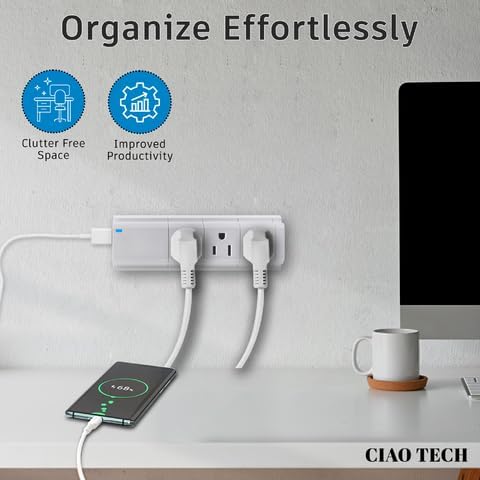
Figure 4: The extender helps organize your charging setup, creating a clutter-free and productive environment.

Figure 5: Enjoy unlimited convenience with the ability to charge multiple devices anywhere, thanks to its versatile installation options.

Figure 6: The extender provides assured safety with comprehensive protection against short circuits, voltage spikes, and overloads.
Maintenance
To ensure the longevity and optimal performance of your 9 Outlet Extender, follow these simple maintenance guidelines:
- Cleaning: Disconnect the extender from the wall outlet before cleaning. Use a soft, dry cloth to wipe down the exterior. Do not use liquid cleaners or aerosol sprays.
- Storage: When not in use, store the extender in a cool, dry place away from direct sunlight and extreme temperatures.
- Inspection: Periodically inspect the unit for any signs of damage, such as frayed wires, cracked casing, or loose prongs. If any damage is found, discontinue use immediately and contact customer support.
- Ventilation: Ensure the unit has adequate ventilation and is not covered by curtains, furniture, or other objects that could impede airflow.
Troubleshooting
If you encounter any issues with your 9 Outlet Extender, please refer to the following common problems and solutions:
- No Power to Devices:
- Ensure the extender is firmly plugged into a working wall outlet.
- Check if the blue indicator light is illuminated. If not, the surge protection might have tripped due to an overload or power surge. Unplug all devices, then unplug and re-plug the extender.
- Verify that the wall outlet itself is functioning by plugging in another device directly.
- Slow USB Charging:
- Ensure your device's charging cable is not damaged and is properly connected.
- The total USB output is 5V/3.1A. If multiple devices are connected, the charging speed may be distributed. Try charging one device at a time to see if the speed improves.
- Some devices require specific charging protocols. Ensure your device is compatible with standard USB charging.
- Extender Feels Loose in Outlet:
- While the swivel plug is designed for flexibility, ensure it is not excessively loose. If it consistently falls out or feels unstable, discontinue use and contact customer support.
- Avoid placing heavy objects on the extender or pulling on connected cords, which can strain the connection.
If the problem persists after attempting these solutions, please contact customer support for further assistance.
Specifications
| Feature | Detail |
|---|---|
| Product Dimensions | 2 x 5.75 x 3 inches |
| Item Weight | 8.4 ounces |
| Model Number | CPAZ900-034 |
| Total Power Outlets | 9 AC Outlets |
| USB Ports | 2 USB-A Ports |
| USB Output | 5V/3.1A Total |
| Voltage | 125VAC, 60Hz |
| Current Rating | 15A |
| Wattage | 1875W |
| Surge Protection | 540 Joules |
| Special Features | Surge Protection, Cordless, Fast Charging, USB Slot, 90-degree Swivel Plug |
| Color | White |
| Manufacturer | Lifeware Group LLC |
Warranty and Support
This CIAO TECH product is manufactured with high-quality materials and undergoes rigorous quality control. While specific warranty details are not provided in this manual, most electronic products come with a limited manufacturer's warranty covering defects in materials and workmanship.
For warranty claims, technical support, or any questions regarding your 9 Outlet Extender, please contact the manufacturer or your point of purchase. Please have your model number (CPAZ900-034) and purchase information ready when contacting support.
Contact Information:
Please refer to the packaging or the official CIAO TECH website for the most up-to-date customer support contact details.