
Benro TSSL08AN00P
Benro TSSL08AN00P Superslim Aluminum Tripod Instruction Manual
Model: TSSL08AN00P
1. Introduction
This manual provides detailed instructions for the safe and effective use of your Benro TSSL08AN00P Superslim Aluminum Tripod with N00P Arca-Style Ball Head. Please read this manual thoroughly before operating the product and retain it for future reference.
The Benro SuperSlim tripod is designed for photographers requiring a versatile and compact support system. It features a slim profile for easy transport, a N00P ball head with Arca-type quick-release plate, and multiple accessory mounts.
2. Safety Information
- Always ensure all locking mechanisms are securely tightened before mounting equipment or leaving the tripod unattended.
- Do not exceed the maximum load capacity of 8.8 lb (4 kg) to prevent damage to the tripod or attached equipment.
- Avoid placing the tripod on unstable or uneven surfaces.
- Keep hands and fingers clear of moving parts, especially during folding and unfolding.
- Do not expose the tripod to extreme temperatures, corrosive substances, or excessive moisture.
- When transporting, ensure the tripod is fully collapsed and secured in its bag to prevent accidental damage.
3. Product Components
Familiarize yourself with the main parts of your Benro TSSL08AN00P tripod:
- N00P Ball Head: Provides flexible camera positioning with independent pan and tilt controls.
- Arca-Type Quick Release Plate: For quick attachment and detachment of your camera.
- Center Column: Extends for additional height, can be split for low-angle shots.
- Leg Sections: Four sections per leg for height adjustment.
- Twist Leg Locks: Securely lock leg sections at desired lengths.
- Leg Angle Adjusters: Allow legs to be set at different angles for stability on various terrains.
- Bubble Levels: Integrated on the head and legs for precise leveling.
- 1/4"-20 Accessory Mounts: For attaching external accessories.

Figure 3.1: The Benro TSSL08AN00P Superslim Tripod with N00P Ball Head. This image illustrates the overall design of the tripod, including the legs, center column, and ball head assembly.

Figure 3.2: A detailed view of the Benro N00P Ball Head, showing the Arca-type quick release plate, locking knobs, and integrated bubble level.
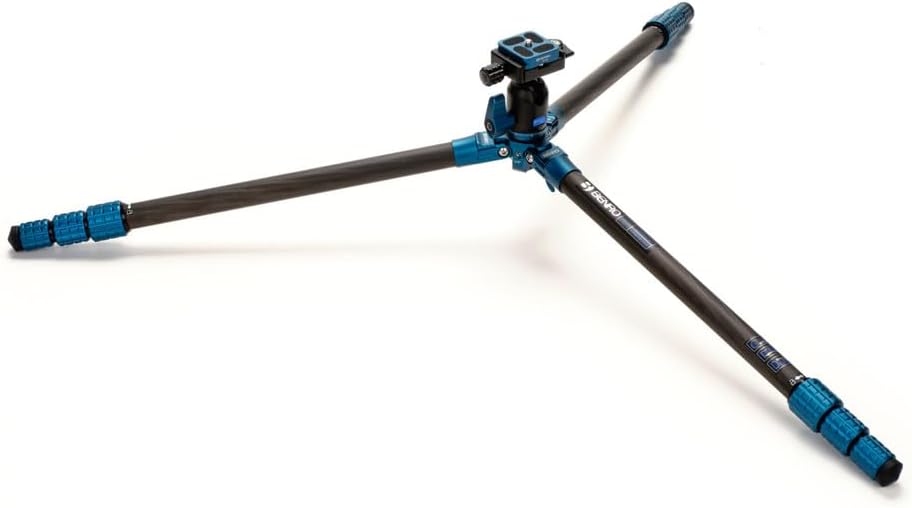
Figure 3.3: Close-up of the twist-lock mechanisms on the tripod legs, used for extending and securing leg sections.
4. Setup Instructions
4.1 Unfolding the Tripod
- Place the tripod on a flat, stable surface.
- Release the leg angle adjusters on each leg and extend the legs outwards to your desired angle. Ensure they click into place.
- Twist the leg locks counter-clockwise to loosen each leg section. Pull out the leg sections to the desired height.
- Twist the leg locks clockwise to securely tighten each section. Repeat for all three legs.
4.2 Attaching Your Camera
- Locate the Arca-type quick release plate on the N00P ball head.
- Unscrew the camera screw on the quick release plate and attach it to the 1/4"-20 tripod socket on the bottom of your camera. Tighten securely.
- Ensure the quick release plate is properly aligned with the clamp on the ball head.
- Open the quick release clamp lever on the ball head and slide the plate with your camera into the clamp.
- Close the quick release clamp lever firmly to secure your camera. Gently test the camera's stability before letting go.
4.3 Leveling the Tripod
Use the built-in bubble levels on the N00P head and tripod legs to ensure your setup is perfectly level for accurate shots.
- Adjust the length of each tripod leg until the bubble in the leg-mounted level is centered.
- Fine-tune the leveling using the ball head's adjustments until the bubble in the head-mounted level is centered.
5. Operating Instructions
5.1 Adjusting the Ball Head
- Ball Lock Knob: Loosen this knob to adjust the angle of your camera (tilt and swivel). Tighten it to secure the camera in position.
- Pan Lock Knob: Loosen this knob to rotate the camera horizontally (panning) without changing the tilt. Tighten it to lock the panning movement.
5.2 Adjusting Center Column Height
- Loosen the center column lock knob.
- Raise or lower the center column to the desired height.
- Securely tighten the center column lock knob.
For extremely low-angle shots, the center column can be split or reversed. Consult the Benro website or contact support for specific instructions on this advanced feature if needed.
5.3 Using Accessory Mounts
The tripod features multiple 1/4"-20 accessory mounts. These allow you to attach additional equipment such as external monitors, LED lights, or microphones directly to the tripod body, expanding your creative options.
6. Maintenance
- Cleaning: Wipe down the tripod with a soft, damp cloth after each use, especially if used in dusty, sandy, or wet environments. Avoid harsh chemicals.
- Lubrication: Moving parts like leg locks and the ball head mechanism generally do not require lubrication. If movement becomes stiff, contact Benro support for advice.
- Storage: Store the tripod in a dry, cool place, preferably in its included carrying bag, to protect it from dust and damage.
- Inspection: Periodically check all screws, bolts, and locking mechanisms for tightness. Do not overtighten.
7. Troubleshooting
| Problem | Possible Cause | Solution |
|---|---|---|
| Tripod is unstable or wobbly. | Leg sections not fully extended or locked; uneven surface; leg angle adjusters not engaged. | Ensure all leg sections are fully extended and twist locks are securely tightened. Verify leg angle adjusters are clicked into position. Adjust leg lengths for uneven terrain. |
| Camera not securely attached to ball head. | Quick release plate not tightened to camera; quick release clamp not fully closed. | Ensure the quick release plate screw is tight on the camera. Confirm the quick release clamp lever on the ball head is fully closed and locked. |
| Ball head movement is stiff or loose. | Ball lock knob not adjusted correctly; dirt or debris in mechanism. | Adjust the ball lock knob to achieve desired tension. If stiff, clean the area around the ball. If issues persist, contact Benro support. |
| Leg sections do not extend or retract smoothly. | Dirt or sand inside leg sections; twist locks overtightened or damaged. | Clean leg sections thoroughly. Ensure twist locks are not overtightened. If damage is suspected, contact Benro support. |
8. Specifications
| Feature | Detail |
|---|---|
| Model Name | TSSL08AN00P |
| Material | Aluminum |
| Load Capacity | 8.8 lb (4 kg) |
| Maximum Height | 61.42 inches (156 cm) |
| Minimum Height | 7.1 inches (18 cm) |
| Folded Length | 20.5 inches (52 cm) |
| Item Weight | 2.49 lb (1.13 kg) |
| Leg Sections | 4 |
| Tripod Head Type | Ball Head (N00P Arca-Style) |
| Accessory Mounts | 1/4"-20 |
9. Warranty Information
Benro products are manufactured to high-quality standards. For specific warranty terms and conditions applicable to your TSSL08AN00P tripod, please refer to the official Benro website or contact Benro customer support. Keep your proof of purchase for warranty claims.
10. Customer Support
If you have any questions, require technical assistance, or need to report an issue with your Benro TSSL08AN00P tripod, please contact Benro customer support through their official website:
Please have your model number (TSSL08AN00P) and proof of purchase available when contacting support.
Related documentsTSSL08AN00P


Ask a question about this manual
Ask about setup, troubleshooting, compatibility, parts, safety, or missing instructions. Manuals+ will review the question and use this page’s manual context to help answer it.