Introduction
Thank you for choosing the INGCO 1400W 210mm Cutting Disc, Model BMS14002. This manual provides essential information for the safe and efficient operation, maintenance, and troubleshooting of your new power tool. Please read these instructions carefully before use and keep them for future reference.
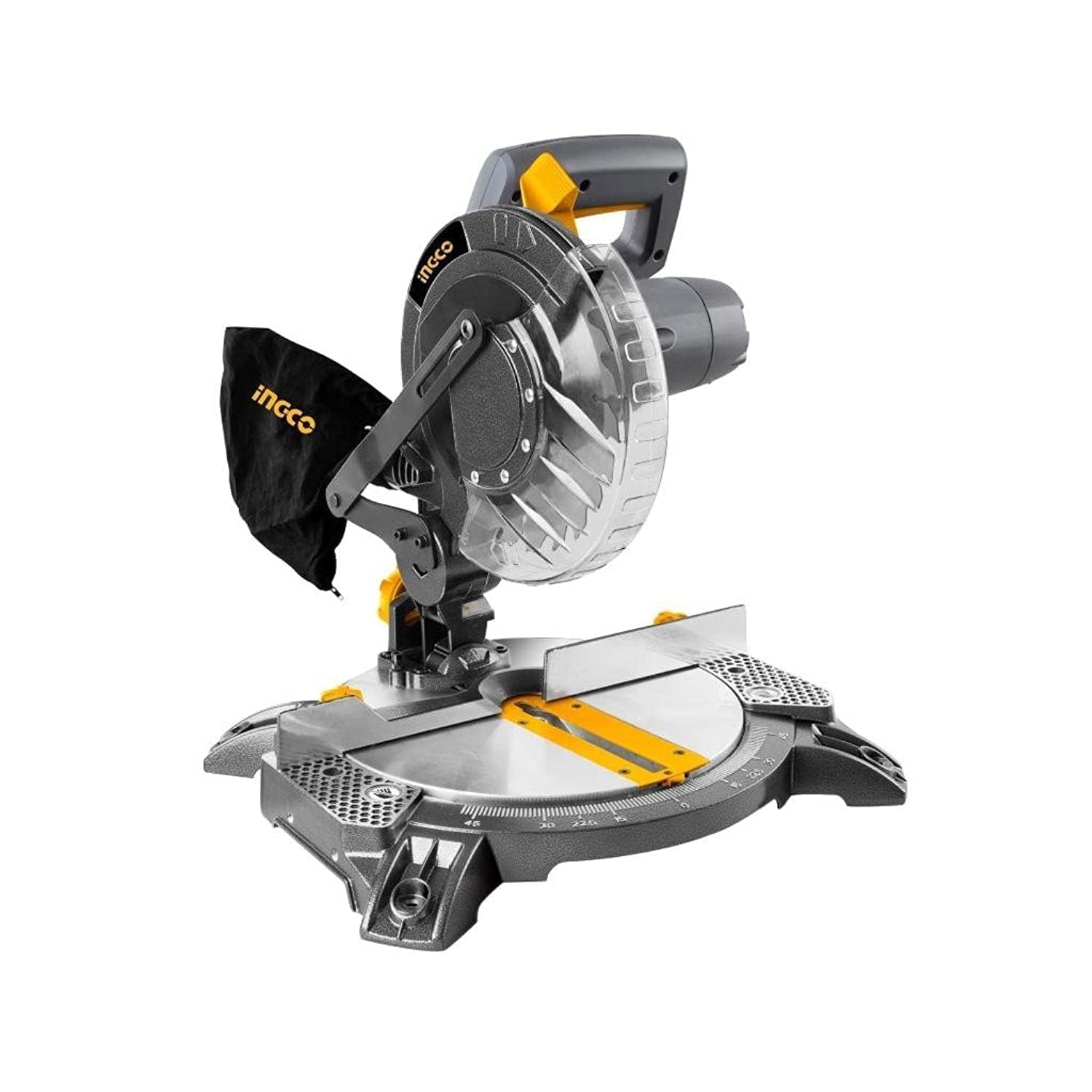
Figure 1: INGCO 1400W 210mm Cutting Disc, Model BMS14002. This image shows the complete cutting disc unit from a front-side perspective, highlighting its main components like the motor housing, blade guard, and base.
General Safety Instructions
Always follow basic safety precautions when using electrical tools to reduce the risk of fire, electric shock, and personal injury. Keep this manual handy for quick reference.
- Work Area Safety: Keep your work area clean and well-lit. Cluttered or dark areas invite accidents. Do not operate power tools in explosive atmospheres, such as in the presence of flammable liquids, gases, or dust.
- Electrical Safety: Power tool plugs must match the outlet. Never modify the plug in any way. Avoid body contact with earthed or grounded surfaces. Do not expose power tools to rain or wet conditions.
- Personal Safety: Always wear eye protection (safety glasses or goggles). Use hearing protection when operating the tool for extended periods. Wear a dust mask if operations create dust. Dress properly; avoid loose clothing or jewelry.
- Tool Use and Care: Do not force the power tool. Use the correct power tool for your application. Disconnect the plug from the power source before making any adjustments, changing accessories, or storing power tools.
- Maintenance: Maintain power tools. Check for misalignment or binding of moving parts, breakage of parts, and any other condition that may affect the power tool’s operation.
Product Components
Familiarize yourself with the main parts of your INGCO Cutting Disc before operation.
- Motor Housing
- Cutting Blade (210mm)
- Blade Guard
- Base Plate
- Handle with Power Switch
- Material Clamp
- Miter Angle Adjustment

Figure 2: Close-up view of the cutting disc's blade area, showing the blade guard and the cutting surface. This image highlights the protective features around the blade.
Setup
1. Unpacking and Inspection
- Carefully remove the cutting disc and all accessories from the packaging.
- Inspect the tool for any damage that may have occurred during shipping. Do not operate if damaged.
- Ensure all components listed in the packaging are present.
2. Mounting the Tool (if applicable)
For stable operation, it is recommended to mount the cutting disc to a workbench using appropriate bolts and nuts (not included). Refer to the base plate for mounting holes.
3. Blade Installation/Replacement
Warning: Always disconnect the tool from the power supply before changing the blade.
- Locate the blade locking mechanism and spindle lock button.
- Press the spindle lock button to prevent the blade from rotating.
- Use the provided wrench to loosen the blade retaining bolt.
- Remove the old blade and clean the arbor flanges.
- Install the new 210mm blade, ensuring the rotation direction matches the arrow on the blade guard.
- Tighten the blade retaining bolt securely while holding the spindle lock.
- Release the spindle lock.
Operating Instructions
1. Preparing for a Cut
- Ensure the work area is clear and well-lit.
- Secure the workpiece firmly using the material clamp. Ensure it cannot shift during the cut.
- Adjust the miter angle if necessary. Loosen the locking knob, set the desired angle, and re-tighten.
- Plug the tool into a suitable power outlet (220-240V, 50/60Hz).
2. Making a Cut
- Hold the handle firmly.
- Press the power switch to start the motor. Allow the blade to reach full speed before engaging the workpiece.
- Slowly lower the blade into the workpiece with a steady, controlled motion. Do not force the cut.
- Once the cut is complete, release the power switch and allow the blade to stop completely before raising it from the workpiece.
- Wait for the blade to stop before removing the cut material.

Figure 3: The INGCO Cutting Disc actively cutting a piece of wood. This image demonstrates the tool in use, showing the blade engaging with the material and the protective guard in place.
3. Cutting Different Materials
This cutting disc is suitable for various materials including metal and wood, as indicated by the blade material (Aluminum Oxide) and surface recommendation. Always use the appropriate blade for the material being cut. For metal, ensure the blade is designed for metal cutting. For wood, use a wood-specific blade.
Maintenance
Regular maintenance ensures the longevity and safe operation of your tool.
- Cleaning: After each use, disconnect the tool and clean it with a soft, dry cloth. Remove any dust or debris from the motor vents and blade area. Do not use harsh chemicals or abrasive cleaners.
- Blade Inspection: Regularly inspect the blade for wear, damage, or dullness. Replace dull or damaged blades immediately.
- Carbon Brushes: The carbon brushes may need replacement after extended use. Consult a qualified service technician for this procedure.
- Storage: Store the tool in a dry, secure place, out of reach of children.
Troubleshooting
| Problem | Possible Cause | Solution |
|---|---|---|
| Tool does not start. | No power supply; faulty switch; worn carbon brushes. | Check power connection. Test outlet. Replace switch or carbon brushes (consult technician). |
| Blade not cutting efficiently. | Dull or incorrect blade; material too hard; improper cutting technique. | Replace blade. Ensure correct blade for material. Apply less pressure, allow blade to do the work. |
| Excessive vibration or noise. | Loose blade; damaged blade; worn bearings. | Check blade tightness. Replace damaged blade. Consult technician for bearing issues. |
Specifications
| Feature | Detail |
|---|---|
| Manufacturer | INGCO |
| Item Model Number | BMS14002 |
| Power Source Type | Corded Electric |
| Wattage | 1400W |
| Blade Diameter | 210mm |
| Item Weight | 20 grams (Note: This weight appears incorrect for a power tool, likely a data entry error. Actual weight would be significantly higher.) |
| Product Dimensions | 10 x 20 x 37 cm |
| Color | Silver or Black |
| Style | Industrial |
| Handle Material | Metal or Plastic |
| Compliant Standards | VDE |
| Special Features | VDE Certified |
| Included Components | 1 unit (main tool) |
| Batteries Required? | No |
| Blade Material | Aluminum Oxide |
| Surface Recommendation | Metal and Wood |
| Cutting Angle | 45 degrees |
Warranty and Support
For warranty information, technical support, or service inquiries, please refer to the warranty card included with your product or contact INGCO customer service directly. Keep your purchase receipt as proof of purchase.
Contact Information: Please visit the official INGCO website for the most up-to-date contact details and service center locations.


