VINABTY YK-MB2136-231103 Infrared Remote Control User Manual
Brand: VINABTY | Model: YK-MB2136-231103
1. Introduction
This manual provides comprehensive instructions for the VINABTY YK-MB2136-231103 Infrared Remote Control. It is designed as an alternative remote for Uclan Denys 2 and Ustym 4K Denys receivers, as well as compatible televisions. Please read this manual carefully before use to ensure proper operation and to maximize the lifespan of your device.
2. Safety Information
- Do not expose the remote control to direct sunlight, heat sources, or extreme temperatures.
- Avoid dropping the remote control or subjecting it to strong impacts.
- Do not immerse the remote control in water or any other liquid.
- Keep batteries out of reach of children. If swallowed, seek immediate medical attention.
- Dispose of used batteries according to local regulations.
3. Package Contents
The package should contain the following item:
- 1 x VINABTY YK-MB2136-231103 Infrared Remote Control
Note: Batteries are not included and must be purchased separately.
4. Setup
4.1 Battery Installation
The remote control requires two AAA alkaline batteries for operation.
- Locate the battery compartment cover on the back of the remote control.
- Slide the cover downwards or press the latch (if present) to open the compartment.
- Insert two AAA alkaline batteries, ensuring the positive (+) and negative (-) terminals match the diagrams inside the compartment.
- Close the battery compartment cover by sliding it back into place until it clicks securely.
No programming or pairing is required. The remote is ready for use once batteries are installed.

Image 1: Angled view of the VINABTY YK-MB2136-231103 remote control, highlighting its ergonomic design and the location of the battery compartment on the rear.
5. Operating Instructions
This remote control features 36 buttons designed for intuitive control of your Uclan Denys 2, Ustym 4K Denys receiver, and compatible television.
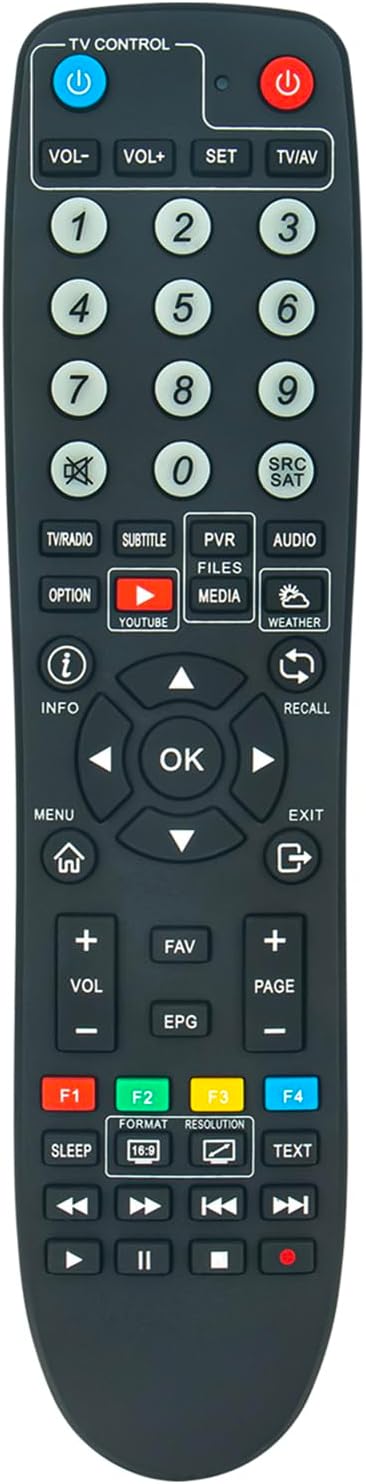
Image 2: Front view of the VINABTY YK-MB2136-231103 remote control, displaying all 36 buttons and their labels.
5.1 Basic Functions
- Power Button (⬤): Turns the connected device ON or OFF.
- TV Control (Blue Button): Switches the remote's control mode to operate the television.
- VOL+ / VOL-: Adjusts the volume level.
- CH+ / CH- (Number buttons 1-9, 0): Selects channels.
- SET: Used for specific settings or programming functions (refer to your device's manual).
- TV/AV: Switches between TV and AV input sources.
5.2 Navigation and Menu Controls
- Directional Arrows (Up, Down, Left, Right): Navigates through menus and options.
- OK Button: Confirms selections or enters menus.
- MENU: Opens the main menu of the connected device.
- EXIT: Exits the current menu or screen.
- INFO: Displays information about the current program or selection.
- RECALL: Returns to the previously viewed channel.
5.3 Advanced Functions
- PVR / FILES / MEDIA: Accesses Personal Video Recorder, file browser, or media playback functions.
- SUBTITLE: Toggles subtitles ON/OFF or selects subtitle tracks.
- AUDIO: Selects audio tracks or modes.
- YOUTUBE: Direct access to the YouTube application (if supported by the device).
- WEATHER: Direct access to weather information (if supported by the device).
- F1, F2, F3, F4 (Color Buttons): Function buttons, their specific use depends on the context of the menu or application on your device.
- SLEEP: Activates the sleep timer function.
- FORMAT / RESOLUTION: Adjusts screen format or video resolution.
- TEXT: Accesses teletext or similar text-based services.
- Playback Controls (Play, Pause, Stop, Rewind, Fast Forward, Previous, Next, Record): Controls media playback.
6. Maintenance
6.1 Cleaning
To clean the remote control, use a soft, dry cloth. For stubborn dirt, slightly dampen the cloth with water or a mild cleaning solution. Do not use abrasive cleaners or solvents.
6.2 Storage
When not in use for extended periods, remove the batteries to prevent leakage and potential damage to the remote control. Store the remote in a cool, dry place away from direct sunlight.
7. Troubleshooting
- Remote not responding:
- Ensure batteries are inserted correctly with the correct polarity.
- Replace old batteries with new AAA alkaline batteries.
- Check for any obstructions between the remote control and the device's infrared sensor.
- Ensure you are within the operating range (up to 10 meters) and pointing the remote directly at the device.
- Some buttons not working:
- Clean the remote control, especially around the non-functional buttons, to remove any dirt or debris.
- If only TV control buttons are not working, ensure the remote is in TV control mode (if applicable).
- Device not responding to specific functions:
- Verify that the function is supported by your connected device (Uclan Denys 2, Ustym 4K Denys, or TV).
- Consult the user manual of your connected device for specific function details.
8. Specifications
| Brand | VINABTY |
| Model Number | YK-MB2136-231103 |
| Connectivity Technology | Infrared |
| Compatible Devices | Uclan Denys 2, Ustym 4K Denys, Television |
| Power Source | 2 x AAA Alkaline Batteries (not included) |
| Number of Buttons | 36 |
| Maximum Range | 10 Meters |
| Special Feature | Ergonomic Design |
9. Warranty and Support
This remote control is designed for reliable performance. For any questions or support needs, please contact your retailer or the manufacturer directly. Please retain your proof of purchase for warranty purposes.
For further assistance, refer to the support documentation for your Uclan Denys 2 or Ustym 4K Denys receiver.


