
Introduction
Thank you for choosing the URAQT Mini Portable Vacuum Cleaner. This 3-in-1 multifunctional cordless vacuum is designed for efficient cleaning in various environments, including your car, office, and home. This manual provides essential information for the safe and effective use, maintenance, and troubleshooting of your device. Please read it thoroughly before operation and retain it for future reference.
Product Overview
Familiarize yourself with the components and accessories included with your URAQT Mini Portable Vacuum Cleaner.
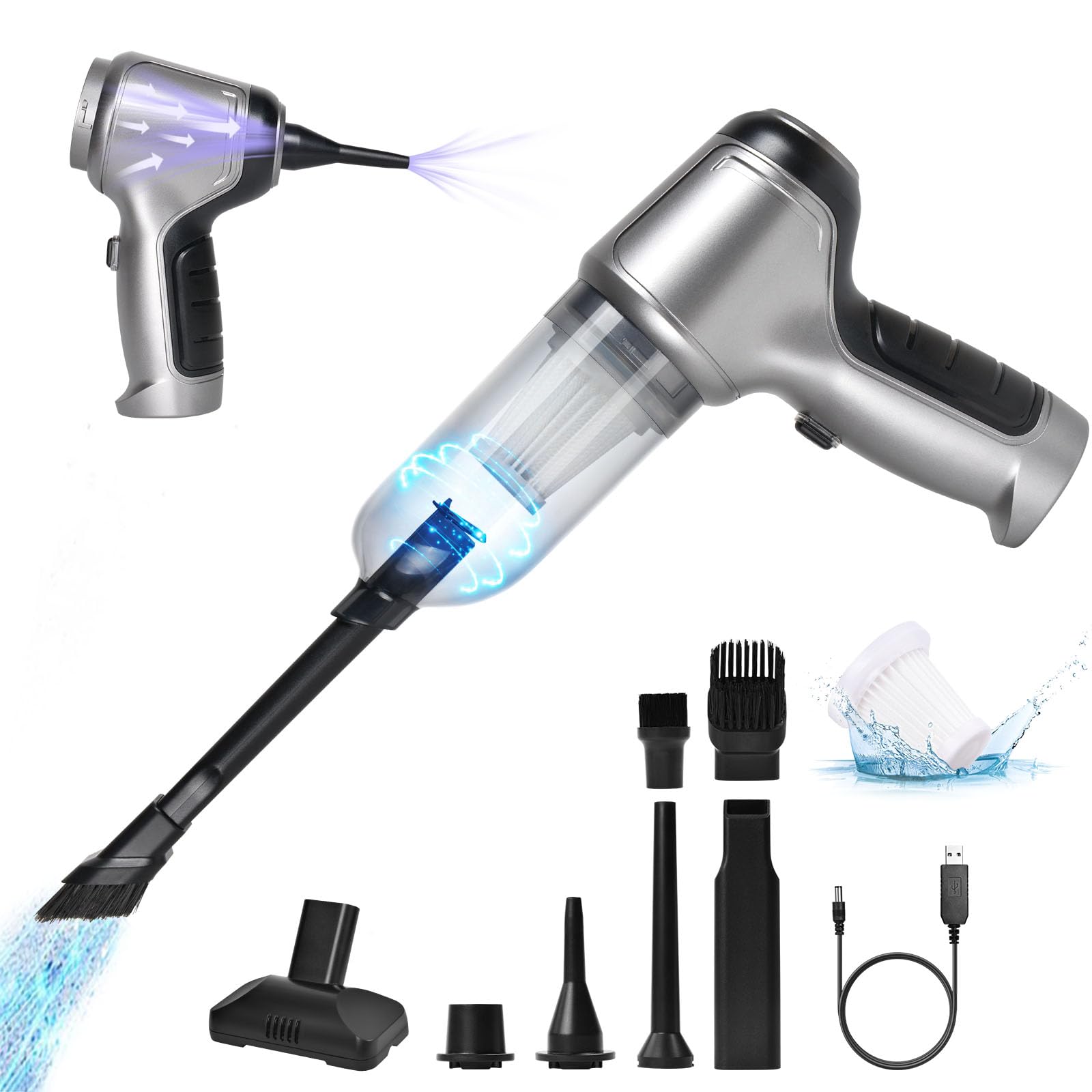
Figure 1: Product Components and Accessories. This image illustrates the main body of the vacuum cleaner, including the handle, ON/OFF switch, air outlet, and USB charging port. It also shows the detachable dust bucket, washable filter, and various accessories such as the brush nozzle, flat nozzle, flat mouth nozzle, blow nozzle, and coarse suction nozzle. The product dimensions are also indicated.
Packing List:
- 1 x Host (Main Vacuum Unit)
- 1 x Long Flat Nozzle
- 1 x Long Mouthpiece (often refers to the flat nozzle or a similar attachment)
- 1 x Charging Cable (USB boost charging cable)
- 1 x Air Suction Nozzle
- 1 x Blower Nozzle
- 1 x Floor Brush Nozzle
Note: The "Long Mouthpiece" and "Long Flat Nozzle" may refer to the same or similar accessories depending on packaging. The "Floor Brush Nozzle" is also referred to as "Brush Nozzle" in some diagrams.
Setup
1. Initial Charging
Before first use, fully charge the vacuum cleaner. Use the provided 5V USB boost charging cable.
- Connect the USB-DC charging cable to the vacuum cleaner's charging port.
- Plug the USB end into a compatible power source such as a laptop, mobile power bank, car charger, or a standard power adapter (5V output).
- The charging indicator light will typically show the charging status.
- A full charge takes approximately 3 hours.

Figure 2: USB Charging. The vacuum cleaner can be charged using various USB power sources, including laptops, mobile power banks, car chargers, and wall adapters. Charging time is approximately 3-4 hours for 20-30 minutes of usage.
2. Attaching Accessories
Select the appropriate nozzle for your cleaning task and attach it firmly to the vacuum's suction or blowing port.
- For Vacuuming: Attach the desired nozzle (e.g., long flat nozzle, brush nozzle) to the front suction inlet.
- For Blowing: Attach the blower nozzle to the air outlet at the rear of the device.
- For Vacuum Sealing: Attach the air suction nozzle to the front suction inlet for compressing storage bags.

Figure 3: Multifunctional Nozzle Combination. This image shows how different nozzles are used for various functions: a soft brush head for vacuuming, a blow nozzle for inflating items like swimming rings, and a suction nozzle for home storage vacuum compression.
Operating Instructions
The URAQT Mini Portable Vacuum Cleaner offers three primary functions: vacuuming, blowing, and vacuum sealing.
1. Power On/Off
- Locate the ON/OFF switch on the handle of the vacuum cleaner.
- Press the switch to turn the device on.
- Press the switch again to turn the device off.
2. Vacuuming Mode
This mode is used for cleaning dust, crumbs, pet hair, and other small debris.
- Ensure the desired suction nozzle is securely attached to the front inlet.
- Turn on the vacuum cleaner.
- Direct the nozzle towards the area to be cleaned.
- The vacuum features strong suction (up to 15000Pa) for effective cleaning.

Figure 4: Versatile Cleaning Applications. This image showcases the vacuum cleaner's effectiveness in various scenarios, including cleaning car interiors, removing pet fur, tidying sofas, and dusting electronic devices like laptop keyboards.
3. Blowing Mode (Air Duster)
This mode is ideal for blowing away dust from delicate surfaces, keyboards, or inflating small items.
- Attach the blower nozzle to the air outlet at the rear of the vacuum.
- Turn on the device.
- Direct the airflow towards the target area.
- The device offers 2-gear adjustable wind for varying intensity.

Figure 5: Powerful and Portable Air Duster. This image demonstrates the vacuum cleaner's blowing function, suitable for cleaning computer components, keyboards, and other electronics. It highlights the two adjustable wind gears for controlled airflow.
4. Vacuum Sealing Mode
Use this function to compress storage bags, saving space.
- Attach the air suction nozzle to the front inlet.
- Place the nozzle over the valve of a compatible vacuum storage bag.
- Turn on the device to remove air from the bag.
Maintenance
Regular maintenance ensures optimal performance and extends the lifespan of your vacuum cleaner.
1. Emptying the Dust Bucket
- Ensure the vacuum cleaner is turned off.
- Detach the dust bucket from the main unit by pressing the release button or twisting as indicated in Figure 1.
- Empty the collected debris into a waste bin.
- Reattach the dust bucket securely.
2. Cleaning the Filter
The vacuum cleaner features a two-stage filter system, including a washable HEPA filter.
- After emptying the dust bucket, remove the filter.
- Tap the filter gently to dislodge loose dust.
- For thorough cleaning, rinse the filter under running water.
- Allow the filter to air dry completely before reinserting it into the dust bucket. Do not use the vacuum with a wet filter.
- Regular filter cleaning prevents clogging and maintains suction power.

Figure 6: Air Dust Cleaner Components. This image highlights the detachable dust bucket and the washable filter, emphasizing the cyclone strong suction and effective dust removal capabilities of the device.
3. Exterior Cleaning
- Wipe the exterior of the vacuum cleaner with a soft, damp cloth.
- Do not use harsh chemicals or abrasive cleaners.
Troubleshooting
If you encounter issues with your URAQT Mini Portable Vacuum Cleaner, refer to the following common problems and solutions:
| Problem | Possible Cause | Solution |
|---|---|---|
| Vacuum does not turn on. | Battery is depleted. Power switch is off. | Charge the vacuum cleaner fully. Ensure the ON/OFF switch is pressed. |
| Low suction power. | Dust bucket is full. Filter is clogged. Nozzle is blocked. | Empty the dust bucket. Clean or wash the filter. Check and clear any blockages in the nozzle or suction path. |
| Short operating time after full charge. | Battery degradation. Filter is clogged, causing the motor to work harder. | Ensure the battery is fully charged (approx. 3 hours). Clean the filter regularly. If the issue persists, contact customer support. |
| Blowing function is weak. | Blower nozzle not properly attached. Device is on lower speed setting. | Ensure the blower nozzle is securely attached to the air outlet. Check if the device has multiple speed settings and adjust if necessary (refer to Figure 5). |
Specifications
| Model Number | U4-VacuumCleaner-FBA |
| Brand | URAQT |
| Product Material | ABS |
| Rated Voltage | DC 7.4V / DC 11.1V |
| Vacuum Degree | Approximately 12000Pa (up to 15000Pa) |
| Rated Speed | 150,000 rpm |
| Lithium Battery Capacity | 2 x 2000 mAh |
| Charging Method | 5V USB boost charging cable |
| Rated Power | 120W |
| Noise Level | ≤84 dB (Operating), 65 Decibels (Specified) |
| Usage Temperature | -20°C to +50°C |
| Runtime | Up to 20-30 minutes |
| Special Feature | Bagless, 3-in-1 Multifunction (Vacuum, Blow, Seal) |
| Form Factor | Handheld |
| Connectivity Technology | USB |
Warranty and Support
URAQT products are manufactured to high-quality standards. For specific warranty information, please refer to the documentation provided with your purchase or contact the retailer. If you experience any issues or have questions regarding your URAQT Mini Portable Vacuum Cleaner, please contact URAQT customer support through your purchase platform or the official URAQT website for assistance.