
BAOFENG BF-F12-Pair
Contents
BAOFENG F12 UV-12 Two Way Radio User Manual
Model: BF-F12-Pair
Introduction
The BAOFENG F12 UV-12 is a high-performance, dual-band VHF/UHF two-way radio designed for clear and reliable communication. Equipped with a keyboard, LCD screen, and a robust TPU waterproof casing, it is built for durability and ease of use in various environments. This manual will guide you through the essential steps for setting up, operating, maintaining, and troubleshooting your F12 UV-12 radios to ensure optimal performance.
What's in the Box
Please inspect the package contents carefully. If any items are missing or damaged, contact your retailer.

Image: Complete package contents of the BAOFENG F12 UV-12 Two Way Radio.
- 2x F12 Radio
- 2x 1500mAh Li-ion Battery
- 2x Belt Clip
- 2x Adapter
- 2x Desktop Charger
- 2X Earphone
- 1x User Manual
Setup
1. Battery Installation
Align the 1500mAh Li-ion battery with the battery compartment on the back of the radio. Gently push the battery into place until it clicks securely. To remove, press the release latch (if present) and slide the battery out.
2. Charging the Battery
Before first use, fully charge the radio's battery. The F12 UV-12 supports convenient USB Type-C charging.

Image: The 1500mAh polymer lithium-ion battery provides durable power and long standby time.

Image: The radio supports USB Type-C charging for versatile power options.
- Connect the USB Type-C cable to the charging port on the radio.
- Connect the other end of the cable to a compatible USB power source (e.g., wall adapter, computer USB port, power bank).
- Alternatively, place the radio in the provided desktop charger and ensure it makes proper contact.
- The charging indicator light will show the charging status (refer to the radio's display or LED for specific indications).
3. Attaching Accessories
Attach the antenna by screwing it clockwise onto the connector on top of the radio until it is finger-tight. Secure the belt clip to the back of the radio using the provided screws. Connect the earphone to the audio jack if desired.
Operating the Radio
1. Power On/Off and Volume
To power on the radio, rotate the power/volume knob clockwise. Continue rotating to adjust the volume. To power off, rotate the knob counter-clockwise until it clicks.
2. Display and Navigation
The F12 UV-12 features a 1.44-inch LED screen for clear display of channels, frequencies, and settings. Use the keypad and navigation buttons (SCAN, MON, MENU, A/B, SEL) to navigate through menus and adjust settings.
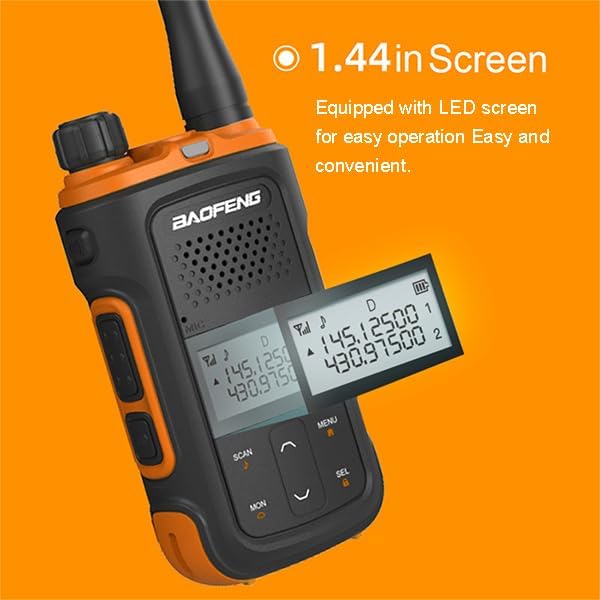
Image: The 1.44-inch LED screen provides easy operation and clear information display.
3. Channel Selection and Frequency Range
The radio supports up to 99 memory channels. You can switch between channels using the up/down buttons or by entering the channel number directly via the keypad. The radio operates on VHF (136-174 MHz) and UHF (400-470 MHz) frequencies.
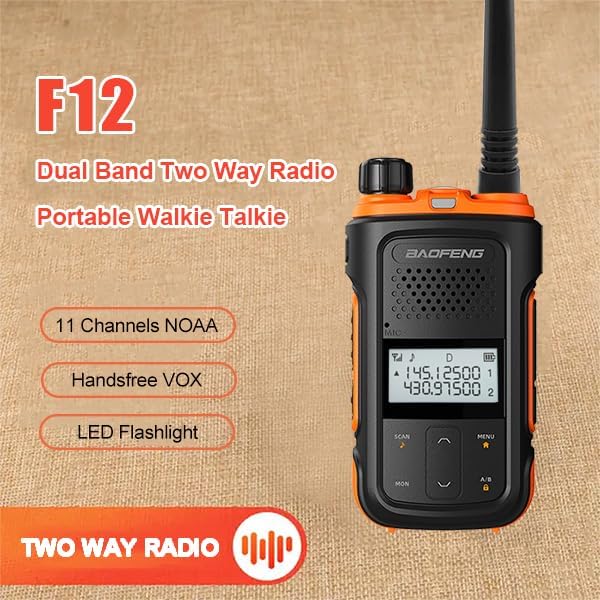
Image: Key features of the F12 radio, including dual-band operation and NOAA channels.
4. VOX (Voice Activated Transmit)
VOX allows for hands-free operation. When enabled, the radio will automatically transmit when it detects your voice. To activate or adjust VOX sensitivity, navigate to the VOX setting in the menu.

Image: Overview of F12 features, including Handsfree VOX and NOAA weather channels.
5. LED Flashlight
The radio is equipped with a built-in LED flashlight for convenience in low-light conditions. Press the dedicated flashlight button to turn it on or off.

Image: The integrated LED flashlight provides illumination for various situations.
6. CTCSS Tones and DCS Codes
The radio supports 50 CTCSS tones and 208 DCS codes. These codes help filter out unwanted signals and allow for more private communication within a group. Refer to the user manual for detailed instructions on setting these tones and codes.
7. NOAA Weather Radio
The F12 UV-12 includes 11 NOAA Weather Radio channels, allowing you to receive important weather alerts and forecasts.
Maintenance
1. Cleaning
Wipe the radio's surface with a soft, damp cloth. Do not use harsh chemicals, solvents, or abrasive cleaners, as they may damage the casing or internal components. Ensure the USB port cover is securely closed to maintain water resistance.
2. Battery Care
To prolong battery life, avoid fully discharging the battery frequently. Recharge the battery when the low battery indicator appears. If storing the radio for an extended period, charge the battery to about 50% and remove it from the radio.
3. Storage
Store the radio in a cool, dry place away from direct sunlight, extreme temperatures, and high humidity. Keep it away from strong magnetic fields and corrosive materials.
Troubleshooting
| Problem | Possible Cause | Solution |
|---|---|---|
| Radio does not power on. | Battery is dead or not properly installed. | Charge the battery fully. Ensure the battery is securely installed. |
| Cannot transmit or receive. | Incorrect channel/frequency, low battery, or antenna issue. | Verify channel/frequency settings. Charge battery. Ensure antenna is securely attached. Check if CTCSS/DCS settings match the other radio. |
| Poor audio quality or static. | Weak signal, interference, or squelch level too low. | Move closer to the other radio. Avoid sources of interference. Adjust squelch level (Ten (10) levels of Squelch adjustment). |
| Keypad unresponsive. | Keypad lock is active. | Refer to the user manual for instructions on how to unlock the keypad. |
Specifications
Below are the key technical specifications for the BAOFENG F12 UV-12 Two Way Radio:

Image: Product dimensions of the BAOFENG F12 radio.
| Feature | Detail |
|---|---|
| Model Number | BF-F12-Pair |
| Brand | BAOFENG |
| Number of Channels | 99 |
| Frequency Range | 136-174 MHz, 400-470 MHz |
| Tuner Technology | UHF/VHF |
| Output Power | High (2W) or Low (0.5W) selectable |
| Battery Capacity | 1500mAh Li-ion |
| Voltage | 3.7 Volts (DC) |
| Display | 1.44 inch LED screen |
| Charging Port | USB Type-C |
| CTCSS Tones | 50 |
| DCS Codes | 208 |
| Special Features | LED Flashlight, VOX, NOAA Weather Radio, Emergency Alert Function, Battery Saving Function, Busy Channel Lock Out, PC Programmable |
| Water Resistance Level | Not Water Resistant (TPU waterproof casing refers to material, not immersion rating) |
| FCC ID | 2AJGM-F12 |
Warranty and Support
Warranty Information
The BAOFENG F12 UV-12 Two Way Radio comes with a 6-month warranty from the date of purchase. This warranty covers manufacturing defects and malfunctions under normal use. It does not cover damage caused by misuse, accidents, unauthorized modifications, or natural disasters.
Customer Support
For technical assistance, warranty claims, or any questions regarding your BAOFENG F12 UV-12 radio, please contact your original retailer or the BAOFENG customer support team. Please have your product model number (BF-F12-Pair) and purchase details ready when contacting support.
You can visit the official BAOFENG store for more information and resources: BAOFENG Store on Amazon
Documents and downloads
Ask a question about this manual
Ask about setup, troubleshooting, compatibility, parts, safety, or missing instructions. Manuals+ will review the question and use this page’s manual context to help answer it.