1. Introduction
This manual provides essential information for the safe and efficient operation of your JARXIOKE 12V 1200W Pure Sine Wave Inverter. Please read these instructions thoroughly before use and retain them for future reference.
2. Product Overview
2.1 Key Features
- Pure Sine Wave Output: Provides stable AC 100V power, suitable for most household electrical appliances.
- High Power Output: Rated at 1200W continuous power with a peak output of 2400W.
- Versatile Connectivity: Features 2 AC 100V outlets, 2 USB sockets, and 1 Type-C port.
- Frequency Selection: Switchable between 50Hz and 60Hz to match regional power standards.
- Remote Control: Includes a wireless remote for convenient power management (12V 23A battery not included).
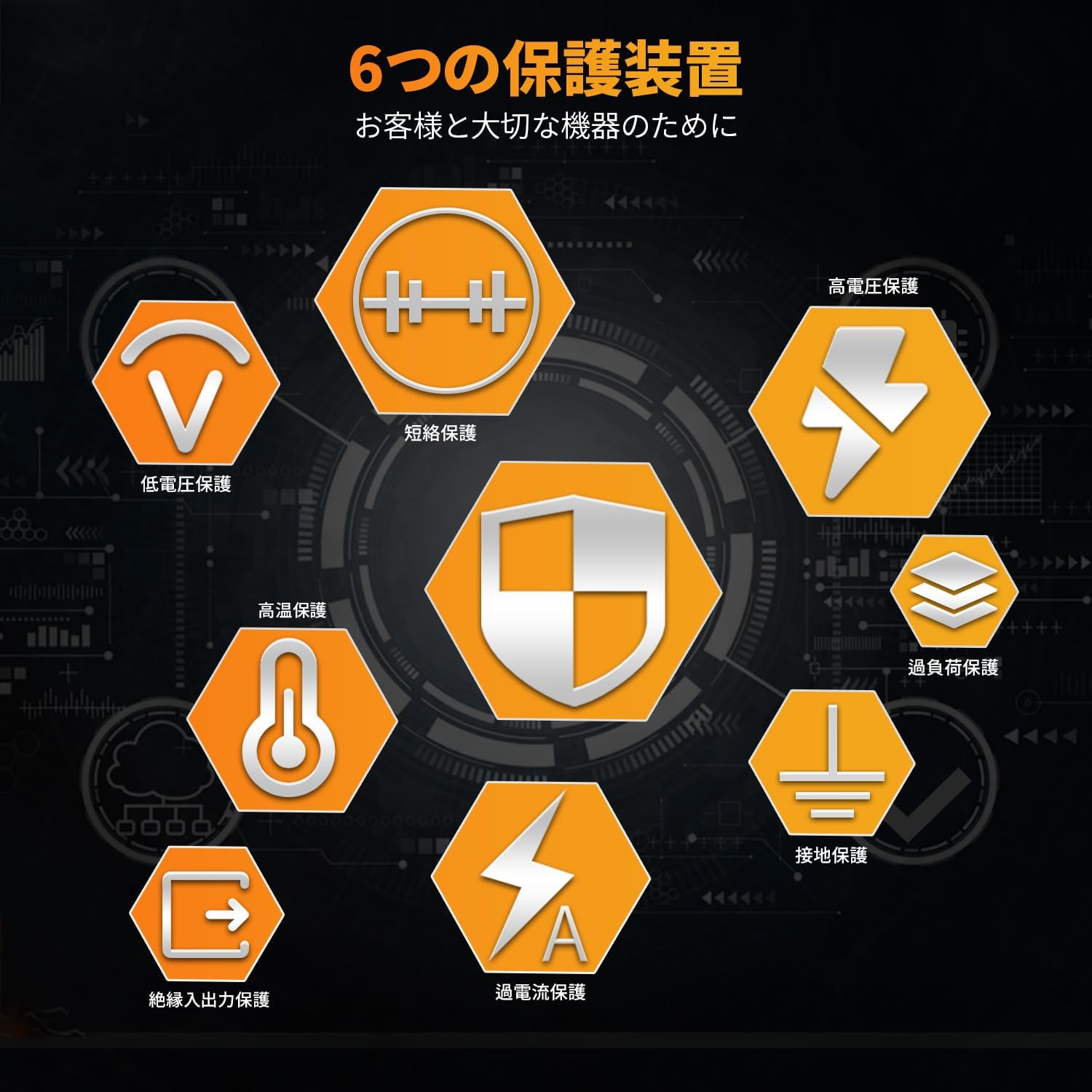
- Comprehensive Protection: Built-in safeguards against low voltage, overvoltage, overload, short circuit, and overheating.
- LCD Display: Clear display shows input voltage, output voltage, battery level, output frequency, protection status, fan status, and output power.
2.2 Product Components
The inverter features various ports and indicators for optimal functionality.
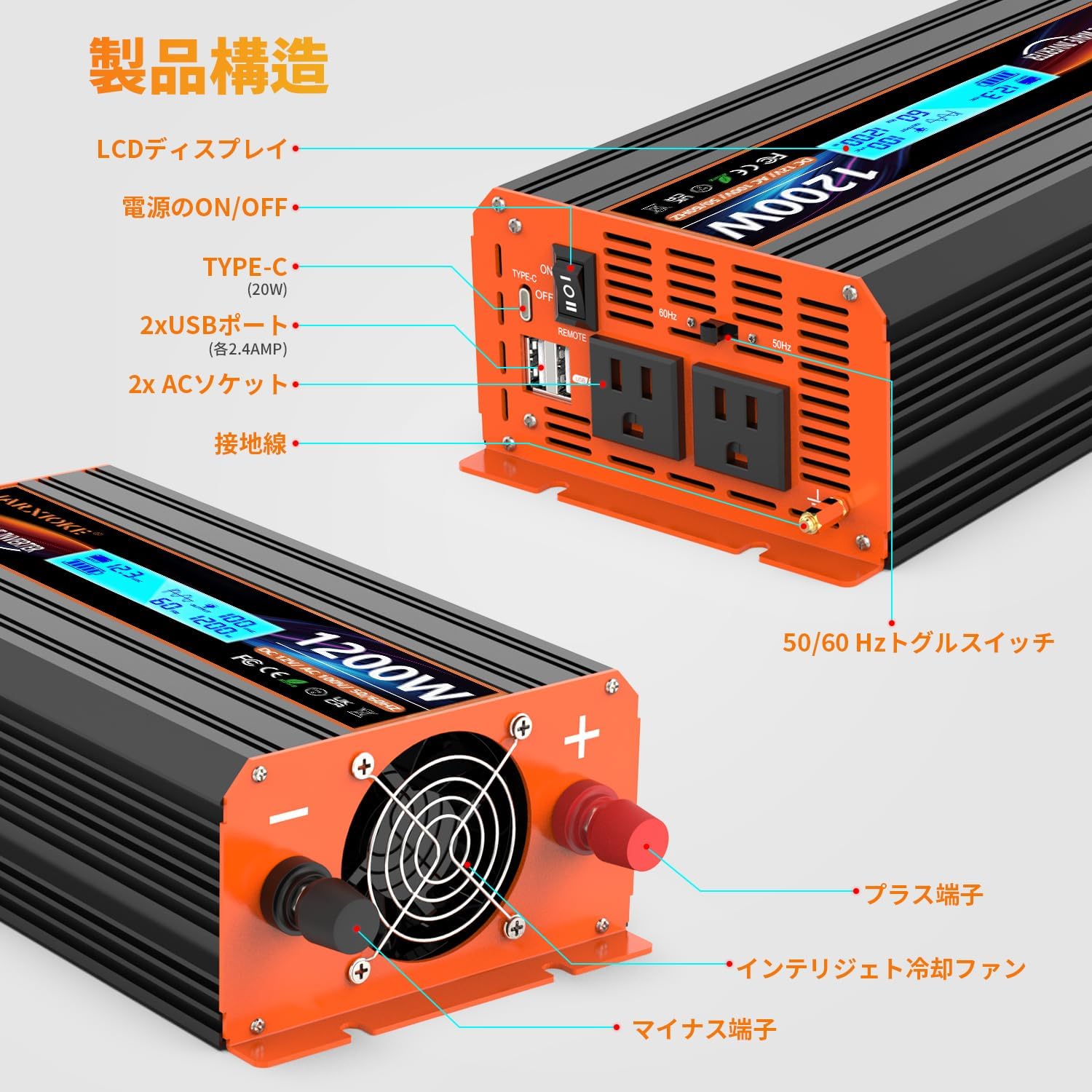
- Front Panel:
- 2x AC 100V Outlets
- 2x USB Ports (5V 2.4A, Max 3.4A)
- 1x Type-C Port (Max 20W)
- ON/OFF Power Switch
- 50/60Hz Frequency Toggle Switch
- Grounding Post
- LCD Display
- Rear Panel:
- DC 12V Input Terminals (Positive and Negative)
- Intelligent Cooling Fan
3. Setup and Installation
3.1 Package Contents
Verify that all items are present in the package:
- 1x JARXIOKE 12V 1200W Pure Sine Wave Inverter
- 2x Power Cables (50cm, red for positive, black for negative)
- 1x Ground Wire
- 1x Wireless Remote Control (requires 1x 12V 23A battery, not included)
- 1x Instruction Manual
3.2 Connecting the Inverter
- Prepare the Battery: Ensure your 12V battery is fully charged and in good condition.
- Connect Power Cables:
- Connect the red power cable to the positive (+) terminal of the inverter and then to the positive (+) terminal of the 12V battery.
- Connect the black power cable to the negative (-) terminal of the inverter and then to the negative (-) terminal of the 12V battery.
- Ensure all connections are tight and secure to prevent arcing or overheating.
- Connect Ground Wire: Connect the ground wire to the grounding post on the inverter and to a suitable ground point (e.g., vehicle chassis or earth ground).
- Remote Control Battery: Insert a 12V 23A battery into the wireless remote control.

4. Operating Instructions
4.1 Powering On/Off
- Manual Operation:
- To turn on, slide the ON/OFF power switch on the inverter to the "ON" position.
- To turn off, slide the ON/OFF power switch to the "OFF" position.
- Remote Control Operation:
- Ensure the inverter's ON/OFF power switch is set to the "REMOTE" position (usually indicated below the switch).
- Press the "ON" button on the wireless remote control to power on the inverter.
- Press the "OFF" button on the wireless remote control to power off the inverter.

Video: Demonstration of the remote control functionality, showing the inverter being turned on and off wirelessly. The video also displays the pure sine wave output on an oscilloscope.
4.2 Connecting Appliances
Once the inverter is powered on, you can connect your AC and DC appliances:
- Plug AC appliances (up to 1200W total) into the 100V AC outlets.
- Connect USB-powered devices to the USB-A ports or the Type-C port.
- Ensure the total wattage of connected appliances does not exceed 1200W to prevent overload.
4.3 Frequency Selection (50Hz/60Hz)
Use the 50/60Hz toggle switch on the front panel to select the appropriate frequency for your region or appliances.
4.4 LCD Display Information
The intelligent LCD display provides real-time operational status:
- Input Voltage (VDC)
- Output Voltage (VAC)
- Battery Level Indicator
- Output Frequency (Hz)
- Protection Status (e.g., Undervoltage, Overvoltage, Overload, Overheat)
- Cooling Fan Status
- Output Power (W)

5. Safety Features and Protections
The JARXIOKE inverter is equipped with multiple safety features to protect both the device and connected appliances:
- Low Voltage Protection (UNDERVOLTAGE): Automatically shuts down if the input DC voltage drops below a safe operating level (e.g., 9.5V).
- Overvoltage Protection (OVERVOLTAGE): Automatically shuts down if the input DC voltage exceeds a safe operating level (e.g., 16V).
- Overload Protection (OVERLOAD): Shuts down if the connected load exceeds the inverter's rated output (1200W).
- Short Circuit Protection: Protects against damage from short circuits in the output.
- Overheat Protection (OVERHEAT): Activates the cooling fan and may shut down the unit if internal temperature becomes too high.
- Ground Fault Protection: Ensures safe operation by providing a ground connection.
Video: Demonstrates the inverter's ability to power a 750W angle grinder, showcasing its robust performance for various tools, and illustrates how the inverter reacts to different input and load conditions, including protection mechanisms.
6. Applications
The JARXIOKE 12V 1200W Pure Sine Wave Inverter is suitable for a wide range of applications, providing reliable AC power wherever you need it:
- Vehicle Use: Power tools, small appliances, and electronics in cars, trucks, RVs, and boats.
- Outdoor Activities: Ideal for camping, tailgating, and other outdoor events to run lights, small refrigerators, and entertainment systems.
- Emergency Backup: Provides essential power during power outages caused by natural disasters like typhoons or earthquakes.
- Home Use: Can power various household appliances up to 1200W, such as electric kettles, hair dryers, fans, refrigerators, and televisions.
- Solar Power Systems: Integrates with solar setups to convert DC solar power into usable AC electricity.


7. Specifications
| Feature | Specification |
|---|---|
| Brand | JARXIOKE |
| Model Number | 12v-1200w |
| Input Voltage | DC 12V (9.5-16V) |
| Output Voltage | AC 100V |
| Rated Output Power | 1200W |
| Peak Output Power | 2400W |
| Output Waveform | Pure Sine Wave |
| Output Frequency | 50Hz / 60Hz (Switchable) |
| AC Outlets | 2x AC 100V Sockets |
| USB Ports | 2x USB-A (5V 2.4A, Max 3.4A) |
| Type-C Port | 1x Type-C (Max 20W) |
| Product Dimensions | 22 x 13 x 7 cm |
| Product Weight | 1.78 kg |
| Power Source | Battery Powered |
| Recommended Uses | Home, Vehicle, Power Outage, Truck, Outdoor, Boat, RV Camper, Automobile, Solar Power System |
8. Troubleshooting
The LCD display provides error codes for common issues. Refer to the display for specific warnings.
| Error Code/Indicator | Description | Possible Solution |
|---|---|---|
| UNDERVOLTAGE | Input DC voltage is too low. | Recharge or replace the 12V battery. Check battery connections. |
| OVERVOLTAGE | Input DC voltage is too high. | Disconnect from the power source immediately. Ensure the input voltage does not exceed 16V. |
| OVERLOAD | Connected load exceeds 1200W or a short circuit is detected. | Reduce the total wattage of connected appliances. Check for short circuits in connected devices or cables. |
| OVERHEAT | Internal temperature is too high. | Ensure proper ventilation around the inverter. Allow the unit to cool down. Check if the cooling fan is obstructed. |
9. Maintenance
- Keep the inverter clean and free from dust and debris.
- Ensure the cooling fan vents are not blocked to allow for proper airflow.
- Regularly check all cable connections for tightness and signs of corrosion.
- Store the inverter in a cool, dry place when not in use.

10. Warranty and Support
This JARXIOKE inverter comes with a 24-month warranty from the date of purchase. Please retain your proof of purchase for warranty claims.
For technical support or warranty inquiries, please contact JARXIOKE customer service through your retailer or the official brand channels.


