
FitStand 5524
FitStand Adjustable Electric Standing Desk User Manual
Model: 5524
Brand: FitStand
Introduction
This manual provides essential information for the assembly, operation, maintenance, and troubleshooting of your FitStand Adjustable Electric Standing Desk, model 5524. This desk is designed to offer a versatile and ergonomic workspace, allowing seamless transitions between sitting and standing positions to promote a healthier work environment.

Image: The FitStand Adjustable Electric Standing Desk, featuring a black desktop and black frame, set up with two computer monitors, a keyboard, mouse, and a backpack hanging from a side hook. This image illustrates the desk's primary function as a workstation.
Important Safety Information
To ensure safe and proper use of your standing desk, please adhere to the following guidelines:
- Ensure proper assembly of all components before use.
- Do not exceed the maximum weight limits specified in the specifications section.
- Consider environmental factors such as temperature and humidity, as extreme conditions may affect desk performance.
- Keep children and pets away from the desk during operation to prevent injury.
- Avoid placing liquids directly on the control panel or near electrical components.
Setup and Assembly
The FitStand Adjustable Electric Standing Desk is designed for straightforward installation. All necessary assembly tools are included in the package. For optimal safety and ease, it is recommended that two people participate in the assembly process.
The desktop is constructed from two spliced panels, which helps reduce the overall weight and simplifies handling during assembly. Please refer to the detailed assembly instructions provided in the separate assembly guide included with your product for step-by-step procedures.
Before beginning assembly, ensure you have a clear, spacious area and that all parts listed in the assembly guide are present and undamaged.
Operating Instructions
Height Adjustment
Your FitStand desk offers a smooth electric height adjustment range from 28.7 inches (sitting height) to 46.5 inches (standing height). Use the up and down arrow buttons on the digital control panel to precisely adjust the desk to your desired ergonomic position.

Image: A visual representation of the desk's height adjustment capabilities, showing a desk at its minimum height of 28.7 inches and another at its maximum height of 46.5 inches, highlighting the versatility for both sitting and standing use.
Memory Presets
The digital control panel allows you to save up to four preferred height settings for quick and convenient transitions. To set a memory preset:
- Adjust the desk to your desired height using the up/down arrows.
- Press the "M" or "Set" button (refer to your specific control panel layout).
- Press one of the numbered preset buttons (1, 2, 3, or 4) within a few seconds to save the current height to that number.
To recall a saved height, simply press the corresponding numbered preset button.
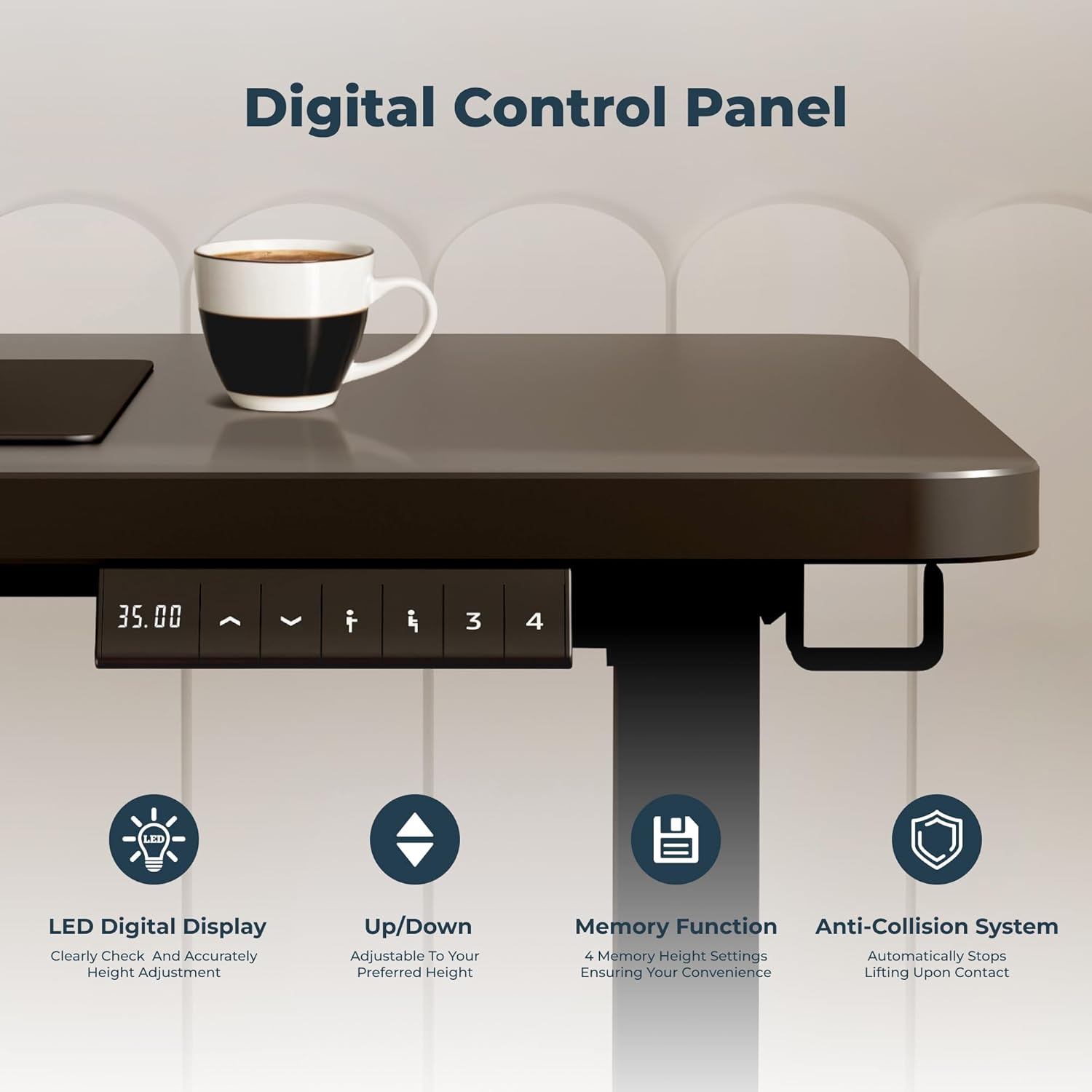
Image: A detailed view of the desk's digital control panel, featuring an LED display for precise height readings, buttons for height adjustment, and four memory preset buttons. This panel also indicates the presence of an anti-collision system for safety.
Anti-Collision System
For enhanced safety, the desk is equipped with an anti-collision system. If the desk encounters an obstacle during height adjustment, it will automatically stop and reverse slightly to prevent damage or injury. Ensure the area around the desk is clear before operating.
Quiet Operation
The desk's motor operates at a low noise level, typically less than 50 decibels, ensuring a quiet and undisturbed work environment during height adjustments.
Additional Features
- Headphone Hooks: The desk includes two hooks, one on each side, for convenient storage of headphones, bags, or other accessories.
- Cable Hole: A dedicated cable hole on the desktop helps manage and organize your power cords and cables, maintaining a tidy workspace.
- Curved Table Corners: The desk features friendly curved table corners, designed to provide a more welcoming and secure work environment by reducing sharp edges.

Image: A close-up view highlighting the desk's curved table corners and a headphone hook, demonstrating thoughtful design elements for user comfort and convenience.
Maintenance
Regular maintenance ensures the longevity and optimal performance of your FitStand Adjustable Electric Standing Desk. Follow these simple guidelines:
- Cleaning: Wipe the desktop and frame with a soft, damp cloth. Avoid abrasive cleaners or harsh chemicals that could damage the finish.
- Cable Management: Periodically check and organize cables to prevent tangling or interference with the desk's movement.
- Component Check: Ensure all screws and bolts remain tightened. If any loosen over time, gently re-tighten them.
- Weight Distribution: Distribute weight evenly across the desktop to prevent strain on the lifting mechanism.
Troubleshooting
If you encounter any issues with your FitStand Adjustable Electric Standing Desk, please refer to the following common troubleshooting steps:
- Desk Not Moving:
- Check if the power cord is securely plugged into both the desk and a working power outlet.
- Ensure there are no obstructions preventing the desk from moving.
- Try resetting the desk by unplugging it for 30 seconds and then plugging it back in.
- Uneven Movement:
- Verify that the desk is placed on a level surface.
- Ensure weight is evenly distributed on the desktop.
- Error Codes on Display:
- If an error code appears, consult the specific error code section in your detailed assembly guide or contact customer support for assistance.
- Noise During Operation:
- A slight hum is normal during adjustment. If the noise is excessive or unusual, check for loose components or contact support.
If these steps do not resolve the issue, please contact FitStand customer support for further assistance.
Product Specifications
Detailed specifications for the FitStand Adjustable Electric Standing Desk, model 5524:

Image: A diagram illustrating the key dimensions of the FitStand desk, including its 55.12-inch width, 23.62-inch depth, and the adjustable height range from 28.7 inches to 46.5 inches.
| Feature | Detail |
|---|---|
| Brand | FitStand |
| Model | 5524 |
| Product Dimensions (D x W x H) | 24"D x 55"W x 29"H (minimum height) |
| Adjustable Height Range | 28.7 inches to 46.5 inches |
| Color | Black |
| Style | Modern |
| Base Material | Metal (Alloy Steel) |
| Top Material Type | Engineered Wood |
| Finish Type | Lacquered |
| Special Feature | Bagged, Headphone Hook, Cable Hole, Curved Corners |
| Room Type | Classroom, Office, Study Room |
| Mounting Type | Tabletop |
| Required Assembly | Yes |
| Recommended People for Assembly | 2 |
| Includes All Assembly Tools | Yes |
| Tabletop Thickness | 1.13 Inches |
| Motor Noise Level | Less than 50 decibels |
| UPC | 810072847539 |
| Manufacturer | FLEXISPOT |
Warranty and Support
Warranty Information
The FitStand Adjustable Electric Standing Desk comes with a manufacturer's limited warranty. Please refer to the warranty card included in your product packaging for specific terms, conditions, and duration of coverage. This warranty typically covers defects in materials and workmanship under normal use.
Customer Support
For any questions, technical assistance, or warranty claims, please contact FitStand customer support. You can find contact information on the FitStand official website or through the retailer where you purchased the product. Please have your model number (5524) and purchase details ready when contacting support.
Online resources and FAQs may also be available on the FitStand website to assist with common inquiries.
Product Videos
No official product videos from the seller were found in the provided data for this model. Please check the product page on Amazon or the manufacturer's website for any available video demonstrations or guides.
Ask a question about this manual
Ask about setup, troubleshooting, compatibility, parts, safety, or missing instructions. Manuals+ will review the question and use this page’s manual context to help answer it.