
Joyroom JR-DB1
Joyroom Jdots Series JR-DB1 True Wireless Headphones User Manual
Model: JR-DB1
1. Introduction
This manual provides detailed instructions for the proper use and maintenance of your Joyroom Jdots Series JR-DB1 True Wireless Headphones. Please read this manual thoroughly before using the product to ensure optimal performance and longevity.
1.1 Product Overview
The Joyroom Jdots Series JR-DB1 True Wireless Headphones are designed to deliver high-quality audio with a comfortable and secure fit. Featuring advanced Bluetooth 5.3 technology, these earbuds offer stable connectivity, long battery life, and intuitive touch controls for a seamless audio experience.
1.2 Package Contents
Please verify that all items listed below are present in your product package:
- Joyroom Jdots Series JR-DB1 True Wireless Headphones (Left and Right Earbuds)
- Charging Case
- USB Charging Cable
- Multiple Sizes of Ear Tips
- User Manual

Figure 1.1: Contents of the Joyroom Jdots Series JR-DB1 package. This image displays the product box, the purple true wireless earbuds within their charging case, a separate purple charging case, a USB charging cable, various sizes of ear tips, and the user manual.
2. Safety Information
To ensure safe and proper operation, please adhere to the following safety guidelines:
- Do not expose the earbuds or charging case to extreme temperatures, direct sunlight, or high humidity.
- Avoid dropping, impacting, or disassembling the device. Unauthorized repairs can void the warranty and cause damage.
- Keep the device away from water and liquids. While rated IPX4 water-resistant, it is not waterproof and should not be submerged.
- Use only the provided charging cable or a certified equivalent.
- Do not use the earbuds at excessively high volumes for prolonged periods to prevent hearing damage.
- Keep out of reach of children and pets. Small parts may pose a choking hazard.
3. Setup
3.1 Initial Charging
Before first use, fully charge the earbuds and the charging case. Place the earbuds into the charging case. Connect the USB charging cable to the charging case and a power source (e.g., USB wall adapter, computer USB port). The indicator lights on the charging case will show the charging status. A full charge typically takes approximately 1.5 hours for the case and 1 hour for the earbuds.

Figure 3.1: Joyroom JR-DB1 earbuds placed inside the charging case. The image shows the earbuds nestled in their respective slots, with blue indicator lights on the front of the case, signifying charging status or battery level.
3.2 Bluetooth Pairing
- Power On: Open the charging case. The earbuds will automatically power on and enter pairing mode. The indicator light on one earbud will flash, indicating it's ready to pair.
- Activate Bluetooth: On your device (smartphone, tablet, computer), enable Bluetooth.
- Select Device: In your device's Bluetooth settings, search for "JR-DB1" or "Joyroom JR-DB1" in the list of available devices and select it to connect.
- Connection Confirmation: Once successfully paired, you will hear an audible confirmation from the earbuds, and the indicator lights will turn off or show a steady light.
Note: The earbuds support seamless switching between single and dual earbud modes. After initial pairing, they will automatically connect to the last paired device when removed from the charging case.

Figure 3.2: The Joyroom JR-DB1 earbuds shown alongside a smartphone screen. The phone's display indicates a successful Bluetooth connection to "JR-DB1", illustrating the pairing process and the "Free Switching" capability between single and dual earbud use.
4. Operating Instructions
The Joyroom JR-DB1 earbuds feature intuitive touch controls on each earbud. The touch sensor IC allows for easy management of your audio and calls.
| Action | Function |
|---|---|
| Double-click (either earbud) | Play/Pause music |
| Press & hold (either earbud) for 1s | Activate voice assistant |
| Triple-click (left earbud) | Previous Track |
| Triple-click (right earbud) | Next Track |
| Double-click (during incoming call) | Answer/End Call |
| Press & hold (during incoming call) for 1s | Reject Call |
| Five-click (either earbud) | Factory Reset |

Figure 4.1: Visual guide to the touch control functions of the Joyroom JR-DB1 earbud. This image highlights the touch-sensitive area and provides icons and descriptions for actions such as Play/Pause, Activate Voice Assistant, Previous/Next Track, Answer/End Call, Reject Call, and Factory Reset.
5. Maintenance
5.1 Cleaning
- Regularly clean the earbuds and charging case with a soft, dry, lint-free cloth.
- For stubborn dirt, lightly dampen the cloth with water or a mild, non-abrasive cleaner. Avoid getting moisture into openings.
- Clean the charging contacts on both the earbuds and the case periodically to ensure proper charging. Use a dry cotton swab or soft brush.
- Remove ear tips and clean them separately with water and mild soap if necessary. Ensure they are completely dry before reattaching.
5.2 Storage
- When not in use, store the earbuds in their charging case to protect them and keep them charged.
- Store the device in a cool, dry place, away from direct sunlight and extreme temperatures.
- If storing for an extended period, charge the earbuds and case at least once every three months to maintain battery health.
6. Troubleshooting
If you encounter issues with your Joyroom JR-DB1 headphones, please refer to the following common problems and solutions:
| Problem | Possible Cause / Solution |
|---|---|
| Earbuds not pairing with device |
|
| Only one earbud working |
|
| No sound or low volume |
|
| Charging case not charging |
|
| Earbuds not charging in case |
|
7. Specifications
Detailed technical specifications for the Joyroom Jdots Series JR-DB1 True Wireless Headphones:
- Model Name: Jdots Series JR-DB1
- Brand: Joyroom
- Connectivity Technology: Wireless (Bluetooth 5.3)
- Headphones Form Factor: In Ear
- Audio Decoding: AAC, SBC
- Speaker Size: 6mm bio-fiber diaphragm dynamic speaker
- Water Resistance: IPX4
- Earbud Music Playtime: Up to 8 hours (at 60% volume)
- Earbud Talk Time: Up to 6.5 hours
- Total Playtime with Charging Case: Up to 48 hours
- Charging Case Material: Plastic
- Color: Purple
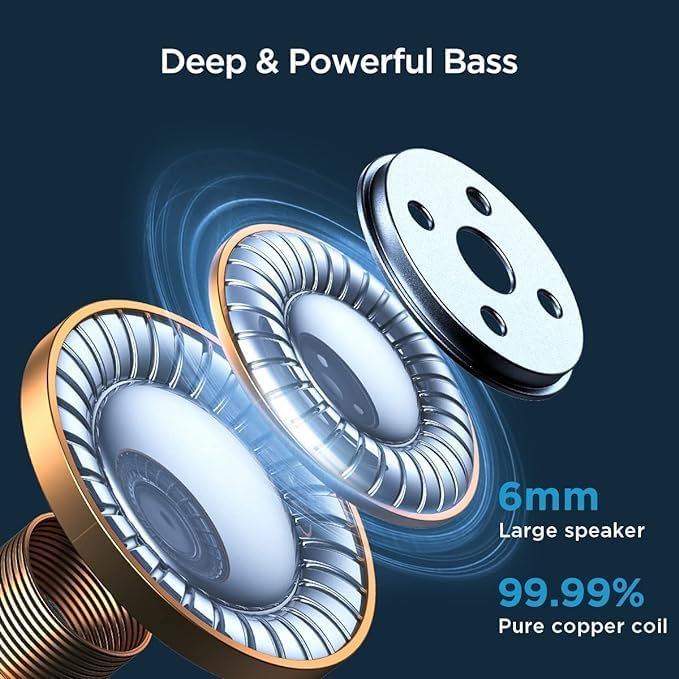
Figure 7.1: Illustration of the internal audio components of the Joyroom JR-DB1 earbud. This diagram emphasizes the "Deep & Powerful Bass" capability, showcasing a 6mm large speaker and a 99.99% pure copper coil, which contribute to high-fidelity sound.

Figure 7.2: The Joyroom JR-DB1 earbuds and their charging case, illustrating the impressive battery life. The image highlights "8h" for single earbud listening time, "28h" for simultaneous use with the case, and "48h" for alternative use with the case, emphasizing the "Small but Powerful" design.
8. Warranty and Support
Joyroom products are designed and manufactured to the highest quality standards. For warranty information, please refer to the warranty card included in your product packaging or visit the official Joyroom website. If you require further assistance or have questions not covered in this manual, please contact Joyroom customer support through their official channels.
For more information, visit the Joyroom Store on Amazon.
Related documentsJR-DB1

Ask a question about this manual
Ask about setup, troubleshooting, compatibility, parts, safety, or missing instructions. Manuals+ will review the question and use this page’s manual context to help answer it.