
Introduction
The KEFEYA 15.6" Triple Screen Laptop Monitor Extender is designed to significantly enhance your productivity by providing two additional 1080P FHD IPS portable displays for your laptop. This innovative device allows for a 300% improvement in work efficiency by expanding your workspace, making multitasking seamless and convenient.
Its versatile design supports various display modes including extend, mirror, landscape, and portrait, adapting to diverse work environments. With a durable metal frame and a lightweight, foldable structure, it's an ideal companion for travel, remote work, video conferencing, and creative tasks.
Experience crisp, vivid visuals with a 178° ultra-wide viewing angle, 300 nits of brightness, and 100% sRGB color gamut. The monitor also features a 90° adjustable kickstand and VESA mounting compatibility for optimal ergonomic comfort.
Package Contents
Upon opening your KEFEYA Triple Screen Laptop Monitor Extender package, you will find the following items:
- Folding Monitor Extender x 1
- USB-C to USB-C Cable x 2
- HDMI to Mini HDMI Cable x 1
- Power Adapter x 1
- HUB x 1 (for MacOS driver installation)
- User Manual x 1
- User Guide x 1

Image: KEFEYA Triple Screen Laptop Monitor Extender with labeled ports including Mini HDMI, Type-C, Power/Menu, and Shift Key.

Image: A visual representation of all components included in the KEFEYA M2 package, such as the monitor extender, USB-C cables, HDMI cable, power adapter, and user manuals.
Setup
The KEFEYA Triple Screen Monitor Extender is designed for easy setup, but specific steps vary depending on your operating system and laptop's port capabilities. Ensure your laptop has a Thunderbolt / full-featured USB-C port for optimal dual-screen functionality.
General Connection
For all connections, it is recommended to use the supplied power adapter to power the monitor, especially if your laptop's USB-C port does not provide sufficient power or full functionality.

Image: Diagram showing connection options: single USB-C for full functionality, or HDMI + USB-C for single screen if USB-C is not full-featured.
Windows Setup
For Windows laptops, the KEFEYA monitor extender is typically plug and play, requiring no additional driver installation. Simply connect the monitor using the appropriate USB-C cable.
MacOS Setup
For MacOS, a hub and driver installation are needed. After installing the driver, you will need to restart both your laptop and the monitor for the changes to take effect.
Driver Installation for MacOS
The necessary driver for MacOS is typically found on the included hub. Follow these steps to install:
- Connect the hub to your MacBook.
- Locate and run the driver installer from the hub (e.g., a .pkg file).
- Follow the on-screen prompts to complete the installation.
- After installation, restart your MacBook and the M2 Monitor Extender.
Video: This video demonstrates the step-by-step process of installing the necessary driver for MacOS to enable full functionality of the KEFEYA M2 Monitor Extender.
Video: A quick guide on how to easily set up the KEFEYA M2 Monitor Extender with a MacOS device, highlighting the simplicity of the connection process.
Operating Modes
The KEFEYA Triple Screen Monitor Extender offers multiple display modes to suit your workflow and sharing needs:
- Extended Mode: Expand your desktop across all three screens for maximum workspace.
- Duplicated Mode (Mirror Mode): Display the same content on all screens.
- Portrait Mode: Rotate the screens to a vertical orientation, ideal for reading documents or coding.
- 2-in-1 Screen Mode: Combine the two external screens into one large vertical display.
The upper screen can be rotated 360° and flipped 180° for face-to-face conversations or easy sharing with colleagues. Use the dedicated "Key" button on the monitor to switch between these display modes.

Image: Visual examples of the monitor's different display modes: Extended, Duplicated, Portrait, and a combined 2-in-1 Screen Mode.

Image: A user demonstrating the screen's ability to rotate 360° and flip 180° for easy data sharing in meetings.
Video: An overview of the KEFEYA 15.6 Inch FHD Full Metal Triple Screen Laptop Monitor, showcasing its design and multi-screen capabilities.
Display Quality
The KEFEYA Triple Screen Monitor Extender is equipped with two 15.6-inch IPS LCD panels, providing a high-quality visual experience:
- Resolution: 1920x1080P Full HD (FHD)
- Viewing Angle: 178° ultra-wide
- Brightness: 300 nits (280 Candela)
- Color Gamut: 100% sRGB
- Contrast Ratio: 1:1000
These specifications ensure accurate colors and crisp visuals, making it ideal for creative design, gaming, and efficient office work.

Image: A diagram detailing the display features such as 2x15.6 inch, 100% sRGB, 1080P FHD, Low Blue Light, and compatibility with Windows/MacOS.
Portability & Design
The KEFEYA Triple Screen Monitor Extender is built with portability and user-friendliness in mind:
- Dimensions: 8.69 x 14.17 x 0.82 inches
- Weight: Approximately 3.5 pounds
- Frame: 3.1-inch metal frame for durability and protection.
- Foldable Design: Folds up compactly, similar to a laptop, for easy transport.
- Kickstand: Integrated 90° adjustable kickstand for stable positioning.
- VESA Mount: Compatible with VESA mounts (50x50mm, 75x75mm, 100x100mm screw size M4x6mm) for improved space utilization on a desk or wall.

Image: The KEFEYA Portable Folding Monitor emphasizing its lightweight (3.57lb) and slim (0.82inch) design for on-the-go use.
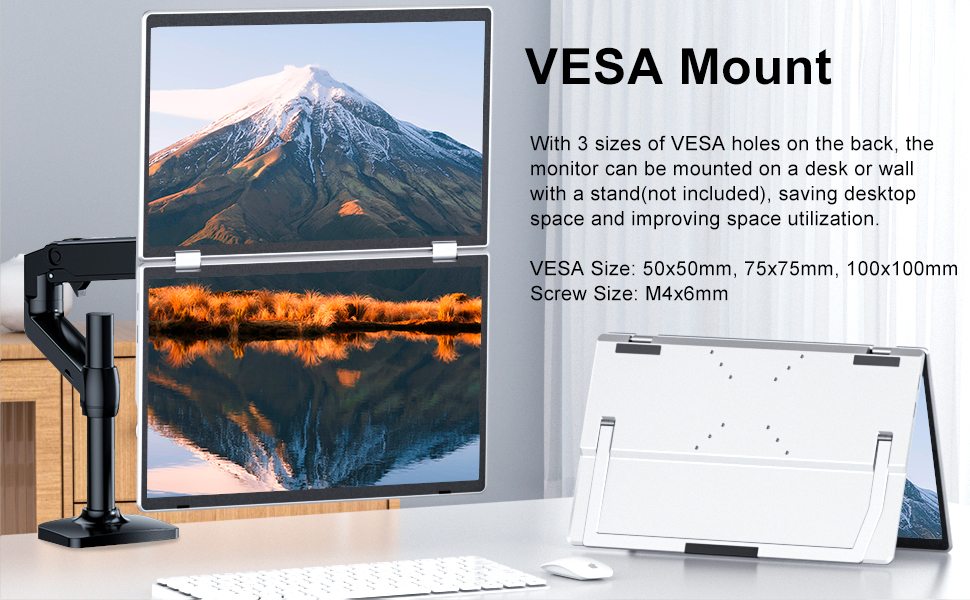
Image: A diagram showing the VESA mounting points on the back of the monitor, indicating compatibility with 50x50mm, 75x75mm, and 100x100mm VESA sizes.
Specifications
| Feature | Specification |
|---|---|
| Product Dimensions | 8.69 x 14.17 x 0.82 inches |
| Item Weight | 3.58 pounds |
| Item Model Number | KF-XZJ-M2 |
| Standing Screen Display Size | 15.6 Inches |
| Aspect Ratio | 16:9 |
| Resolution | 1920 x 1080 Pixels (FHD 1080p) |
| Image Brightness | 280 Candela |
| Total USB Ports | 2 |
| Screen Surface Description | Matte |
| Manufacturer | Shenzhen Baijiayoupu Technology Co., Ltd |
| Country of Origin | China |
Troubleshooting
If you encounter issues with your KEFEYA Triple Screen Monitor Extender, consider the following common troubleshooting steps:
- Screen Not Displaying All Pages (MacOS): Ensure you have installed the correct driver for MacOS using the included hub and restarted both your MacBook and the monitor extender. Without the driver, MacOS may only mirror or extend to one screen, not allowing for independent displays.
- Device Not Recognized: Double-check all cable connections. Ensure your laptop's USB-C port is full-featured (supports video signal and power). If issues persist, try reinstalling the drivers (for MacOS) or restarting your laptop and the monitor.
- Insufficient Power: If screens flicker or do not power on reliably, ensure you are using the supplied power adapter to provide adequate power to the monitor.
- Physical Damage: Handle the monitor gently. Avoid squeezing the screens or applying excessive force, as this can cause damage.
Warranty & Support
KEFEYA stands behind its products with a comprehensive warranty and dedicated customer support:
- Return Policy: 30-day return policy.
- Warranty: 12-month warranty from the date of purchase.
- Customer Service: Accessible customer service is available to assist with any inquiries or issues. Messages are typically replied to within 24 hours.
Please message KEFEYA directly if you need any help or have questions regarding your product.


