1. Introduction
This manual provides essential information for the safe and efficient operation, installation, and maintenance of your Bestway Flowclear Smart Touch 2,000 Gallons per Hour WiFi App Controlled Filter Pump System. Please read this manual thoroughly before installation and use, and retain it for future reference.
2. Safety Information
WARNING: Always disconnect the pump from the electrical supply before performing any maintenance or cleaning. This appliance is not intended for use by persons with reduced physical, sensory or mental capabilities, or lack of experience and knowledge, unless they have been given supervision or instruction concerning use of the appliance by a person responsible for their safety.
- Ensure the pump is placed on a solid, level surface.
- Do not operate the pump if the power cord or plug is damaged.
- Keep children away from the pump and pool area during operation.
- Do not bury the electrical cord. Locate the cord where it will not be damaged by lawnmowers, hedge trimmers, or other equipment.
- The pump must be supplied by a residual current device (RCD) having a rated residual operating current not exceeding 30 mA.
- For outdoor use, the pump must be connected to a grounded outlet.
3. Components and Overview
Familiarize yourself with the components included with your Flowclear Smart Touch Filter Pump System.

Figure 3.1: Bestway Flowclear Smart Touch Filter Pump System with various adapters and a Type IV-B filter cartridge.

Figure 3.2: Product dimensions (17 in. x 12 in. x 15 in.) and close-up of the digital control panel and app control features.
- Filter Pump Unit
- Filter Cartridge (Type IV-B)
- Hoses and Clamps
- Adapters for various pool connections
- Digital Control Panel with Wi-Fi indicator
4. Setup and Installation
Follow these steps to properly set up your filter pump system.
- Positioning the Pump: Place the pump on a stable, level surface at least 6.5 feet (2 meters) away from the pool edge. Ensure it is accessible for maintenance.
- Connecting Hoses:
- Connect one hose from the pool's outlet valve (water flowing out of the pool) to the pump's inlet port (marked "IN").
- Connect the second hose from the pump's outlet port (marked "OUT") to the pool's inlet valve (water flowing back into the pool).
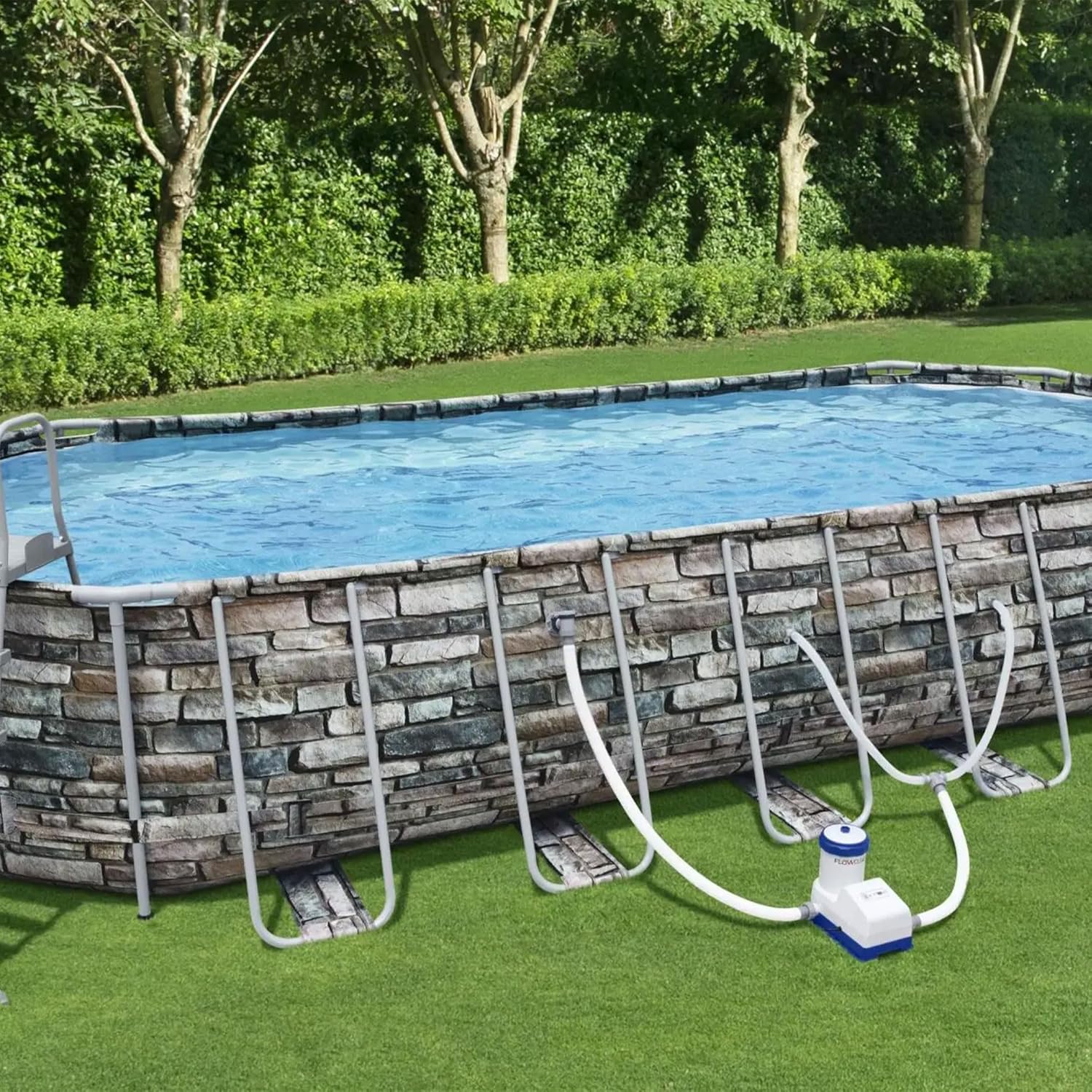
Figure 4.1: Proper connection of the filter pump to an above-ground pool.

Figure 4.2: Detail of hose connection to the pool valve.
- Installing Filter Cartridge: Open the filter housing cover, insert the Type IV-B filter cartridge, and secure the cover.
- Filling the Pump: Ensure the pool is filled with water and the pump's hoses are submerged to allow water to flow into the pump.
- Power Connection: Plug the pump into a grounded electrical outlet.
5. Operating Instructions
Your Flowclear Smart Touch pump can be operated via its digital control panel or through the Bestway Smart Hub app.
5.1 Digital Control Panel Operation
- Power Button: Press to turn the pump ON or OFF.
- Timer Button: Use to set the operating duration. Refer to the display for hours.
- Wi-Fi Indicator: Shows the status of the Wi-Fi connection.
- Filter Status Indicator: Alerts when the filter needs cleaning or replacement.

Figure 5.1: Digital control panel for manual operation and status monitoring.
5.2 Bestway Smart Hub App Control
For advanced control and scheduling, download the Bestway Smart Hub app.
- Download App: Scan the QR code on the pump's control panel or search for "Bestway Smart Hub" in your app store (Android / iOS).
- Pairing: Follow the in-app instructions to pair your pump with your Wi-Fi network.
- Remote Control: Once paired, you can turn the pump on/off, set schedules, and monitor its status from anywhere.
Video 5.1: Overview of the Bestway Flowclear Smart Touch 2000 GPH WiFi Controlled Pump features and app connectivity.
6. Maintenance
Regular maintenance ensures optimal performance and longevity of your filter pump.
- Filter Cartridge Cleaning/Replacement:
- Check the filter cartridge daily.
- Clean the cartridge by rinsing with a garden hose.
- Replace the filter cartridge every 2 weeks or sooner if heavily soiled.
- Pump Housing Cleaning: Wipe down the exterior of the pump with a damp cloth as needed.
- Winterization: Before winter, drain all water from the pump and hoses. Store the pump in a dry, frost-free location.
7. Troubleshooting
Refer to this section for common issues and their solutions.
| Problem | Possible Cause | Solution |
|---|---|---|
| Pump not turning on | No power; tripped RCD; damaged cord. | Check power connection; reset RCD; inspect cord for damage. |
| Low water flow | Clogged filter; air in system; kinked hose. | Clean/replace filter; bleed air from pump; straighten hoses. |
| Wi-Fi connection issues | Out of range; incorrect password; router issues. | Move pump closer to router; re-enter password; restart router. |
| Unusual noise from pump | Air in pump; debris in impeller. | Bleed air from pump; disconnect power and check impeller for obstructions. |
8. Specifications
| Feature | Detail |
|---|---|
| Brand | Bestway |
| Model Number | 821808586141 |
| Flow Rate | 2,000 Gallons per Hour (7,570 Liters per Hour) |
| Power Source | Corded Electric |
| Product Dimensions (L x W x H) | 14.7" x 11.8" x 17.1" (37.3 cm x 30 cm x 43.4 cm) |
| Material | Plastic |
| Compatibility | Above Ground Pools (300-12,000 Gallons) |
| Filter Type | Type IV-B Cartridge |
| Connectivity | Wi-Fi App Controlled |
9. Warranty and Support
For warranty information, technical support, or to purchase replacement parts, please visit the official Bestway website or contact Bestway customer service.
You can find more information and products from Bestway at their official store: Bestway Amazon Store.