Introduction
This manual provides detailed instructions for the safe installation, operation, and maintenance of your Commercial Electric 3-Light LED Puck Light Kit. Please read all instructions carefully before installation and retain this manual for future reference.
Safety Information
- Always disconnect power before installing, servicing, or cleaning this product.
- Do not install near heat sources or in damp locations. This product is for indoor use only.
- Ensure all connections are secure and correct to prevent electrical hazards.
- Do not attempt to modify or repair the unit. Refer servicing to qualified personnel.
Package Contents
Verify that all components listed below are included in your package. If any parts are missing or damaged, contact customer service before proceeding with installation.
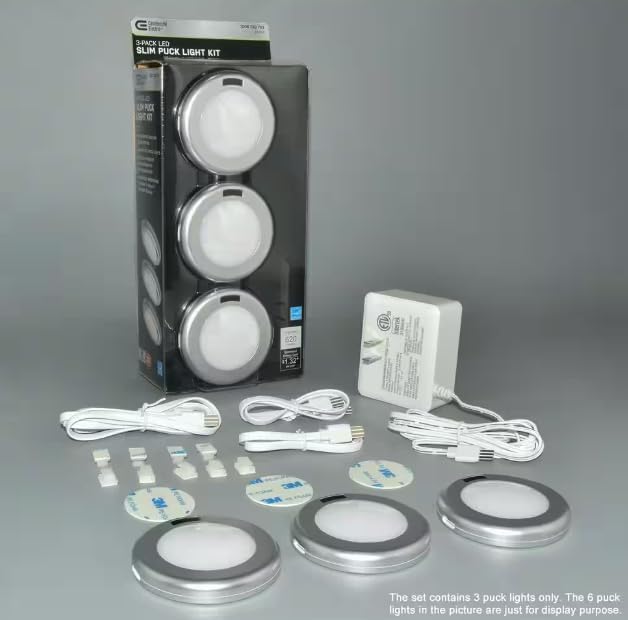
Image: All components of the 3-Light LED Puck Light Kit, including the three puck lights, power adapter, various connecting cables, and adhesive mounting pads, are displayed on a flat surface.
- 3 x LED Puck Lights
- 1 x Power Adapter
- Connecting Cables
- Adhesive Mounting Pads
- Remote Control (if included with your specific model)
Setup and Installation
Follow these steps for proper installation of your LED puck light kit. This kit is designed for easy installation under cabinets or shelves.
- Plan Placement: Determine the desired locations for each puck light. Ensure the power adapter can reach an outlet and the connecting cables can span between lights.
- Clean Surface: Clean the mounting surface thoroughly to ensure proper adhesion of the mounting pads.
- Mount Puck Lights: Peel the backing from the adhesive mounting pads and firmly press each puck light into its desired position. Hold for 30 seconds to ensure a strong bond.
- Connect Cables: Connect the puck lights to each other using the provided connecting cables. Ensure a secure connection at each light.
- Connect Power Adapter: Plug the main connecting cable into the power adapter, then plug the power adapter into a standard electrical outlet.

Image: Three LED puck lights are installed neatly under a wooden cabinet, with a hand reaching to interact with one of the lights, illustrating typical under-cabinet placement.
Operating Instructions
Your Commercial Electric LED Puck Light Kit offers multiple control options.
Touch Control
- To Turn On/Off: Gently touch the designated touch sensor area on any puck light.
- To Adjust Brightness: Hold your finger on the touch sensor to cycle through brightness levels. Release when the desired brightness is achieved.
Motion Sensor
The integrated motion sensor will automatically turn the lights on when motion is detected within its range and turn them off after a period of inactivity. Refer to the product packaging or specific model details for motion sensor range and duration.
Remote Control (if applicable)
If your kit includes a remote control, refer to its separate instructions for pairing and operation. Typically, the remote allows for power on/off, brightness adjustment, and potentially mode selection.
Maintenance
Proper maintenance ensures the longevity and optimal performance of your LED puck lights.
Cleaning
- Ensure the lights are off and unplugged before cleaning.
- Wipe the surfaces with a soft, dry, or slightly damp cloth.
- Do not use abrasive cleaners, solvents, or harsh chemicals, as these can damage the finish or electronic components.
LED Light Source
The LED light source in this product is designed for long-term use and is generally not user-replaceable. If the LEDs fail, the entire puck light unit may need replacement.
Troubleshooting
If you encounter issues with your LED puck light kit, consult the following table for common problems and solutions.
| Problem | Possible Cause | Solution |
|---|---|---|
| Lights do not turn on. | No power, loose connection, faulty outlet. | Check power adapter connection. Ensure outlet is functional. Verify all cables are securely connected. |
| Lights flicker or dim unexpectedly. | Loose connection, power fluctuation, faulty unit. | Check all cable connections. Try plugging into a different outlet. If problem persists, contact customer support. |
| Motion sensor not working. | Sensor obstructed, incorrect setting, insufficient motion. | Ensure sensor is clear of obstructions. Verify motion sensor mode is active (if selectable). Test with clear, deliberate motion. |
| Touch control unresponsive. | Dirty sensor, electrical interference. | Clean the touch sensor area. Ensure no other electrical devices are causing interference. |
Specifications
Key technical specifications for the Commercial Electric 3-Light LED Puck Light Kit.
| Feature | Specification |
|---|---|
| Brand | Commercial Electric |
| Model Number | 810029680073 |
| Light Source Type | LED |
| Number of Light Sources | 3 |
| Brightness | 1500 Lumens (Total) |
| Control Method | Touch, Motion Sensor, Remote Control |
| Indoor/Outdoor Usage | Indoor |
| Power Source | Corded Electric |
| Material | Acrylonitrile Butadiene Styrene, Crystal (Shade) |
| Color | Silver |
| Assembly Required | Yes |
| UPC | 810029680073 |
Warranty and Support
For warranty information or technical support, please refer to the documentation included with your product or contact Commercial Electric customer service directly. Keep your purchase receipt as proof of purchase.


