
RG51A(2)-E
Replacement Remote Control User Manual
Model: RG51A(2)-E, RG51A/E, RG51B(2)/E
Product Overview
This manual provides instructions for the use and care of your replacement remote control for Midea Air Conditioners. This remote is designed as a compatible replacement and may not offer all functions of your original remote.
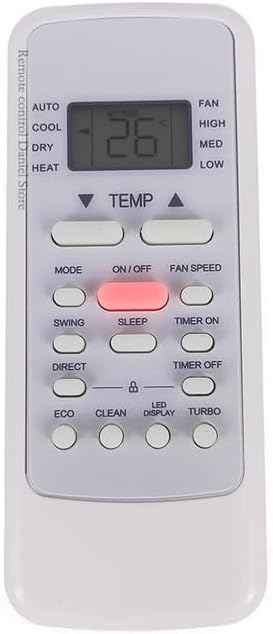
Figure 1: Front view of the replacement remote control, showing the display screen and various function buttons such as AUTO, COOL, DRY, HEAT, TEMP, MODE, ON/OFF, FAN SPEED, SWING, SLEEP, TIMER ON, DIRECT, TIMER OFF, ECO, CLEAN, LED DISPLAY, and TURBO.
The remote control is made of durable ABS plastic. Please note that the color of the remote (black or white) will be sent randomly.
Models Covered
This manual applies to the following replacement remote control models:
- RG51A(2)-E
- RG51A/E
- RG51B(2)-E
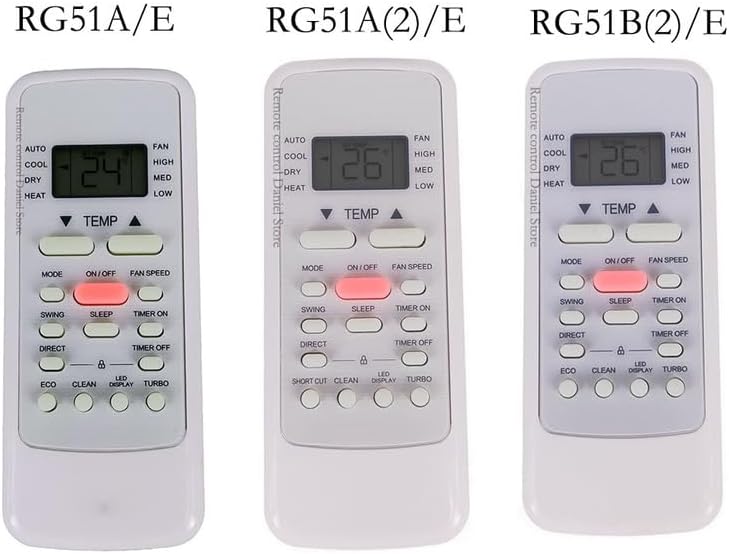
Figure 2: Comparison of three compatible remote control models: RG51A/E, RG51A(2)/E, and RG51B(2)/E, highlighting their similar layouts and functions.
Setup
Battery Installation
- Locate the battery compartment on the back of the remote control.
- Slide the battery cover downwards to open.
- Insert two AAA batteries (not included) according to the polarity indicators (+ and -) inside the compartment.
- Slide the battery cover back into place until it clicks securely.
Note: Ensure batteries are inserted correctly to prevent damage to the remote control.
Operating Instructions
This replacement remote control is pre-programmed and generally requires no setup for compatible Midea Air Conditioners. Simply point the remote at the air conditioner unit and press the desired function button.
Key Functions
| Button | Function |
|---|---|
| ON/OFF | Powers the air conditioner unit on or off. |
| MODE | Cycles through operating modes: Auto, Cool, Dry, Heat, Fan. |
| TEMP ▲/▼ | Adjusts the temperature setting. |
| FAN SPEED | Adjusts fan speed: Auto, Low, Med, High. |
| SWING | Controls the louver swing function. |
| SLEEP | Activates or deactivates sleep mode for quiet operation and energy saving. |
| TIMER ON/OFF | Sets the timer for the unit to turn on or off automatically. |
| ECO | Activates energy-saving mode. |
| TURBO | Activates rapid cooling or heating. |
Important: As this is a replacement remote, some advanced functions present on your original remote may not be supported or may operate differently. If you have your original remote's part number or your unit's model, providing this information can help ensure better compatibility.
Maintenance
Cleaning the Remote
- Wipe the remote control with a soft, dry cloth.
- Do not use liquid cleaners, sprays, or abrasive materials, as these can damage the remote's surface or internal components.
Battery Replacement
Replace batteries when the remote's range decreases or the air conditioner unit no longer responds consistently. Always replace both batteries at the same time with new ones of the same type.
Storage
If the remote control will not be used for an extended period, remove the batteries to prevent leakage and potential damage to the remote.
Troubleshooting
| Problem | Possible Cause / Solution |
|---|---|
| Remote not responding |
|
| Some functions not working |
|
| Display is dim or blank | Batteries are low. Replace with new batteries. |
Specifications
- Model Compatibility: RG51A(2)/E, RG51A/E, RG51B(2)/E (for Midea Air Conditioners)
- Material: ABS Plastic
- Power Source: 2 x AAA Batteries (not included)
- Color: Black or White (randomly sent)
- Special Feature: Ergonomic design
Note: Specifications are subject to change without notice.
Warranty and Support
Warranty Information
As a replacement product, specific warranty details may vary. Please refer to the seller's return policy or contact the seller directly for warranty information.
Customer Support
If you encounter any issues or have questions regarding the compatibility or operation of your replacement remote control, please contact the seller through the platform where you purchased the item. Providing your original remote's part number or your air conditioner unit's model number can assist in resolving compatibility inquiries.
Related Documents - RG51A(2)-E
 |
Toshiba R32 Multi-Type Air Conditioner Owner's Manual Comprehensive owner's manual for Toshiba R32 Multi-Type Air Conditioner units (MMY-SUG series). Covers installation, operation, maintenance, troubleshooting, specifications, and safety guidelines for commercial use. |
 |
Toshiba Split Type Air Conditioner Owner's Manual This owner's manual provides detailed instructions for operating and maintaining Toshiba split-type air conditioners, including safety precautions, feature explanations, troubleshooting, and maintenance procedures for models RAS-B05 to RAS-18J2KVG-E and RAS-05 to RAS-18J2AVG-E. |
 |
TOSHIBA e-STUDIO Printing Guide for Multifunctional Digital Systems This guide provides detailed instructions for printing with TOSHIBA e-STUDIO Multifunctional Digital Systems and Multifunctional Digital Color Systems, covering setup, driver configuration, and various printing options for Windows and Mac OS. |
 |
Mitsubishi Electric City Multi VRF Planungshandbuch KOMPAKT für 4-Wege-Deckenkassetten Umfassendes Planungshandbuch für Mitsubishi Electric City Multi VRF 4-Wege-Deckenkassetten (Modelle PLFY-P20VEM-E bis PLFY-P125VEM-E). Enthält technische Daten, Maße, Installationshinweise, Schalldaten und Zubehör für die Planung und Installation von VRF-Systemen. |
 |
TOSHIBA Multifunctional Digital Systems Scanning Guide Learn how to effectively use the scanning features of TOSHIBA Multifunctional Digital Systems and Color Systems with this comprehensive scanning guide. Covers basic operations, advanced settings, and utility tools for efficient document management. |
 |
Toshiba e-STUDIO Multifunctional Digital Color Systems Specifications This document provides detailed specifications for the Toshiba e-STUDIO series of multifunctional digital color systems, including paper handling, equipment features, and available options. It covers models such as e-STUDIO2020AC, e-STUDIO2520AC, e-STUDIO2525AC, e-STUDIO3025AC, e-STUDIO3525AC, e-STUDIO4525AC, e-STUDIO5525AC, e-STUDIO6525AC, e-STUDIO2528A, e-STUDIO3028A, e-STUDIO3528A, e-STUDIO4528A, e-STUDIO5528A, and e-STUDIO6528A. |