
1. Safety Information
Please read and understand all instructions before assembly and use. Keep this manual for future reference. Handle all components with care, especially the glass top, as it is fragile and heavy. Always ensure the desk is assembled on a soft, clean surface to prevent scratches. Two people are recommended for assembly to ensure safety and ease of handling.
Important: Do not overload drawers or the desktop. Distribute weight evenly. Regularly check all fasteners to ensure they remain tight. Do not stand or sit on the desk.
2. Product Overview
The Tribesigns Computer Desk (Model OFDESK0132) is a modern and versatile furniture piece designed for home office, living room, or bedroom use. It features a spacious clear glass top and four integrated storage drawers, providing ample workspace and organized storage. Constructed from high-quality MDF, tempered glass, and sturdy metal legs, this desk offers durability and stability.

Figure 2.1: Tribesigns Computer Desk with 4 Drawers, featuring a white and gold finish with a clear glass top.
3. Specifications
| Brand | Tribesigns |
| Model Number | OFDESK0132 |
| Product Dimensions | 19.69"D x 47.24"W x 29.92"H |
| Item Weight | 97 Pounds |
| Color | White and Gold |
| Style | Modern |
| Base Material | Metal |
| Top Material Type | Tempered Glass |
| Finish Type | Powder Coated |
| Special Feature | Scratch Resistant |
| Number of Drawers | 4 |
| Drawer Glide Mechanism | Ball Bearing or Roller |
| Required Assembly | Yes |
| Recommended People for Assembly | 2 |

Figure 3.1: Detailed dimensions of the Tribesigns Computer Desk.
4. Setup and Assembly
4.1 Before You Begin
- Ensure all parts and hardware are present by comparing with the included assembly guide. All necessary tools are included.
- Clear a spacious area for assembly, preferably on a soft, clean surface like a carpet, to prevent damage to the desk components.
- It is highly recommended that two people assemble this desk due to its size and weight, especially when handling the glass top and attaching larger sections.
4.2 Unpacking
- Carefully open the packaging and remove all components.
- Separate and identify all hardware and panels according to the assembly guide.
- Dispose of packaging materials responsibly.
4.3 Assembly Steps
- Assemble the Drawer Units: Follow the detailed diagrams in your assembly guide for constructing the drawer boxes. Pay close attention to the drawer glides; they often come as a single unit and must be separated into two parts (one for the drawer, one for the desk frame) before installation.
- Attach the Metal Legs: Securely fasten the gold-finished metal legs to the main desk frame using the provided hardware. Ensure all screws are tightened for stability.
- Install the Glass Top: Carefully place the tempered glass top onto the designated area of the desk frame. Ensure it is properly aligned and secured according to the instructions. The glass top is heavy and fragile; exercise extreme caution.
- Integrate Drawer Units: Slide the assembled drawers into their respective compartments. Ensure they glide smoothly. For the final piece, particularly the left side, extra hands may be beneficial to align multiple pins into the correct slots for screwing.
- Adjust Leveling Feet: The desk is equipped with adjustable foot pads on the metal frame. Adjust these pads as needed to ensure the desk is stable and level on uneven floors.
- Final Check: Once assembled, gently shake the desk to confirm stability. Tighten any loose connections.
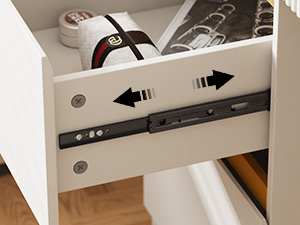
Figure 4.1: Close-up of the drawer glide mechanism, showing how it separates for installation.
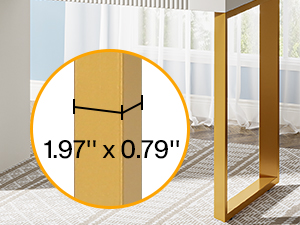
Figure 4.2: Detail of the sturdy metal leg construction.
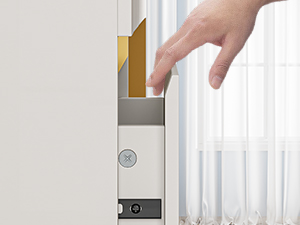
Figure 4.3: Illustration of the smooth drawer opening mechanism.
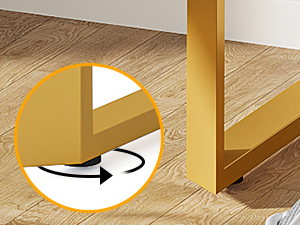
Figure 4.4: Adjustable foot pads for stability on uneven surfaces.
5. Operating Instructions
5.1 General Use
This desk is designed for various uses, including a computer workstation, writing desk, or makeup vanity. Its ample clear glass top provides sufficient space for monitors, laptops, books, and decorative items, while allowing visibility into the top drawer for quick access to stored items.

Figure 5.1: The desk configured for a home office setup.
5.2 Using the Drawers
The four storage drawers offer significant space for organizing documents, office supplies, makeup, or personal items. The smooth ball-bearing or roller glides ensure easy opening and closing. Avoid slamming drawers to maintain their longevity.

Figure 5.2: The desk with drawers open, showcasing storage capacity.
5.3 As a Makeup Vanity
The desk's design and ample surface make it suitable as a makeup vanity. The clear glass top can display frequently used items, while the drawers keep cosmetics and tools neatly stored.

Figure 5.3: The desk set up as a stylish makeup vanity.
6. Maintenance
- Cleaning: For the glass top, use a glass cleaner and a soft, lint-free cloth. For the MDF and metal surfaces, wipe with a damp cloth and mild detergent, then dry immediately. Avoid abrasive cleaners or harsh chemicals.
- Protection: Use coasters under drinks and placemats under hot items to protect the glass and desk surface.
- Regular Checks: Periodically inspect all screws and fasteners to ensure they are tight. Re-tighten if necessary to maintain stability.
- Avoid Direct Sunlight: Prolonged exposure to direct sunlight may affect the finish of the desk.
7. Troubleshooting
| Problem | Possible Cause / Solution |
|---|---|
| Desk is wobbly or uneven. | Check if all fasteners are securely tightened. Adjust the leveling foot pads at the bottom of the metal legs to compensate for uneven flooring. |
| Drawers do not slide smoothly. | Ensure drawer glides are correctly installed and aligned. Check for any obstructions in the tracks. Lightly lubricate glides if necessary (refer to assembly guide for specific type). Avoid overloading drawers. |
| Glass top appears scratched or damaged. | The tempered glass is scratch-resistant but not scratch-proof. Avoid dragging sharp or abrasive objects across the surface. For minor scratches, specialized glass repair kits may be used. For significant damage, contact customer service. |
| Missing parts or hardware. | Carefully re-check all packaging materials. If parts are still missing, contact Tribesigns customer service with your model number and a list of required parts. |
8. Warranty and Support
Tribesigns provides an 18-month limited warranty for this product, covering manufacturing defects. This warranty ensures that the product is free from defects in material and workmanship under normal use and service for the specified period.
For warranty claims, technical assistance, or any other inquiries, please contact Tribesigns customer service. Have your model number (OFDESK0132) and purchase information ready to expedite the process.
Customer Service: Please refer to the contact information provided with your purchase or visit the official Tribesigns website for support.


