
ClimaTek 103130-05
ClimaTek 103130-05 OEM Upgraded Furnace Control Board Instruction Manual
Model: 103130-05
1. Introduction
This manual provides essential instructions for the safe and efficient installation, operation, and maintenance of your ClimaTek 103130-05 OEM Upgraded Furnace Control Board. This control board is designed as a direct replacement for Lennox Part # 103130-05 and is compatible with various furnace systems.
Please read this manual thoroughly before attempting any installation or service. Retain this manual for future reference.
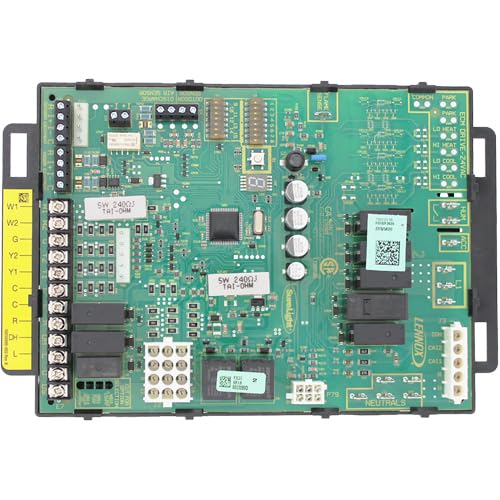
Figure 1: ClimaTek 103130-05 OEM Upgraded Furnace Control Board. This image displays the ClimaTek 103130-05 OEM Upgraded Furnace Control Board. The board is green with numerous integrated circuits, capacitors, resistors, and relays. On the left side, there are terminal blocks labeled W1, W2, G, Y2, Y1, C, C, R, and CH, indicating connections for thermostat wiring. Other labels visible include 'SW 2400J TAI-OHM', 'LD HEAT', 'LD COOL', 'LENNOX', and 'NEUTRALS', suggesting its function within a furnace system.
2. Safety Information
Improper installation, adjustment, alteration, service, or maintenance can cause property damage, injury, or death. Read all instructions thoroughly before proceeding. Only qualified service personnel should install or service this control board.
- Always disconnect power to the furnace before installing or servicing the control board.
- Wear appropriate personal protective equipment (PPE), such as safety glasses and gloves.
- Ensure all wiring connections are secure and conform to local and national electrical codes.
- Do not operate the furnace with damaged wiring or components.
- This control board contains sensitive electronic components. Handle with care to avoid electrostatic discharge (ESD) damage.
3. Setup and Installation
3.1 Pre-Installation Checklist
- Verify that the replacement board (ClimaTek 103130-05) matches the original board's specifications and part number (Lennox 103130-05).
- Ensure all necessary tools are available (e.g., screwdriver, wire strippers, multimeter).
- Confirm power to the furnace is disconnected at the main breaker.
3.2 Removal of Old Control Board
- Disconnect all electrical connections from the existing control board. Label each wire clearly to ensure correct re-connection.
- Carefully unmount the old control board from the furnace chassis. Note its orientation.
- Inspect the furnace wiring for any signs of damage or wear.
3.3 Installation of New Control Board
- Mount the new ClimaTek 103130-05 control board in the same location and orientation as the old board.
- Reconnect all labeled wires to their corresponding terminals on the new board. Refer to the wiring diagram provided with your furnace or the labels on the board itself (e.g., W1, W2, G, Y1, Y2, C, R, CH, NEUTRALS).
- Ensure all connections are tight and secure.
- Double-check all wiring against the furnace's wiring diagram.
4. Operating Instructions
After successful installation, follow these steps to initiate furnace operation:
- Restore power to the furnace at the main breaker.
- Set the thermostat to a desired temperature that is higher than the current room temperature to call for heat.
- Observe the furnace's operation. The control board will initiate the ignition sequence, fan operation, and other functions as required.
- Monitor for any error codes displayed on the control board (if applicable) or unusual sounds.
For specific operational modes (e.g., cooling, continuous fan), refer to your furnace's primary user manual and thermostat instructions.
5. Maintenance
The ClimaTek 103130-05 control board is designed for reliability and typically requires minimal maintenance. However, periodic inspection of the furnace system is recommended.
- Annual Inspection: Have a qualified HVAC technician inspect your furnace annually. This includes checking electrical connections, cleaning components, and verifying proper operation of the control board and other safety devices.
- Dust and Debris: Ensure the area around the control board and within the furnace is free from excessive dust and debris, which can impede airflow and component cooling.
- Wiring Integrity: Periodically check for any loose, frayed, or corroded wiring connections.
Always disconnect power before performing any maintenance or inspection.
6. Troubleshooting
This section provides general troubleshooting guidance. For complex issues, consult a qualified HVAC technician.
| Problem | Possible Cause | Solution |
|---|---|---|
| Furnace not starting | No power to furnace; thermostat setting too low; loose wiring connection; tripped breaker. | Check power supply and breaker; adjust thermostat; inspect wiring; reset breaker. |
| No heat output | Ignition failure; gas supply issue; faulty sensor. | Verify gas supply; check for error codes; consult technician. |
| Fan not operating | Faulty fan motor; control board issue; thermostat fan setting. | Check thermostat fan setting; inspect fan motor; consult technician. |
| Error code displayed | Specific system fault. | Refer to your furnace's specific error code chart for diagnosis. |
Note: Many modern control boards have diagnostic LED lights that flash specific patterns to indicate error codes. Consult your furnace's manual for the interpretation of these codes.
7. Specifications
| Feature | Detail |
|---|---|
| Model Number | 103130-05 |
| Brand | ClimaTek |
| Replaces Part Number | Lennox 103130-05 |
| Product Type | OEM Upgraded Furnace Control Board |
| Dimensions (L x W x H) | 12 x 9 x 5 inches |
| Weight | 1.5 Pounds |
| Compatibility | Lennox and other compatible furnace systems |
8. Warranty Information
ClimaTek products are manufactured to high-quality standards. For specific warranty terms and conditions, please refer to the warranty documentation included with your purchase or contact ClimaTek customer support. Typically, warranty coverage addresses defects in materials and workmanship under normal use and service.
Note: Improper installation or unauthorized modifications may void the product warranty.
9. Support and Contact
If you require technical assistance, have questions regarding installation, or need to report an issue, please contact your authorized ClimaTek dealer or customer support. When contacting support, please have your product model number (103130-05) and purchase information readily available.
For further information, you may visit the ClimaTek Store on Amazon.
Related documents103130-05


Ask a question about this manual
Ask about setup, troubleshooting, compatibility, parts, safety, or missing instructions. Manuals+ will review the question and use this page’s manual context to help answer it.