
1. Introduction
This manual provides comprehensive instructions for the use and maintenance of your Alltro Replacement Remote Control, model BN59-01303A. This remote is designed as a direct replacement for various Samsung TV models, offering full functionality without the need for complex programming.
Key features include:
- High-quality construction.
- No programming required – simply insert batteries and use.
- Full functionality, including channel adjustment, menu navigation, and smart TV features.
- Compatible with specified Samsung TV models.
2. Setup
2.1 Battery Installation
To begin using your remote control, you will need to install two AAA batteries (not included).
- Locate the battery compartment cover on the back of the remote control.
- Slide the cover downwards or press the latch to open it.
- Insert two AAA batteries, ensuring the positive (+) and negative (-) terminals align correctly with the markings inside the compartment.
- Replace the battery compartment cover by sliding it back into place until it clicks securely.
2.2 Initial Use
This replacement remote control does not require any programming. Once the batteries are correctly installed, it is ready for immediate use with compatible Samsung TV models.
3. Operating Instructions
Familiarize yourself with the buttons and their functions as described below. The layout of the remote control is designed for intuitive operation.
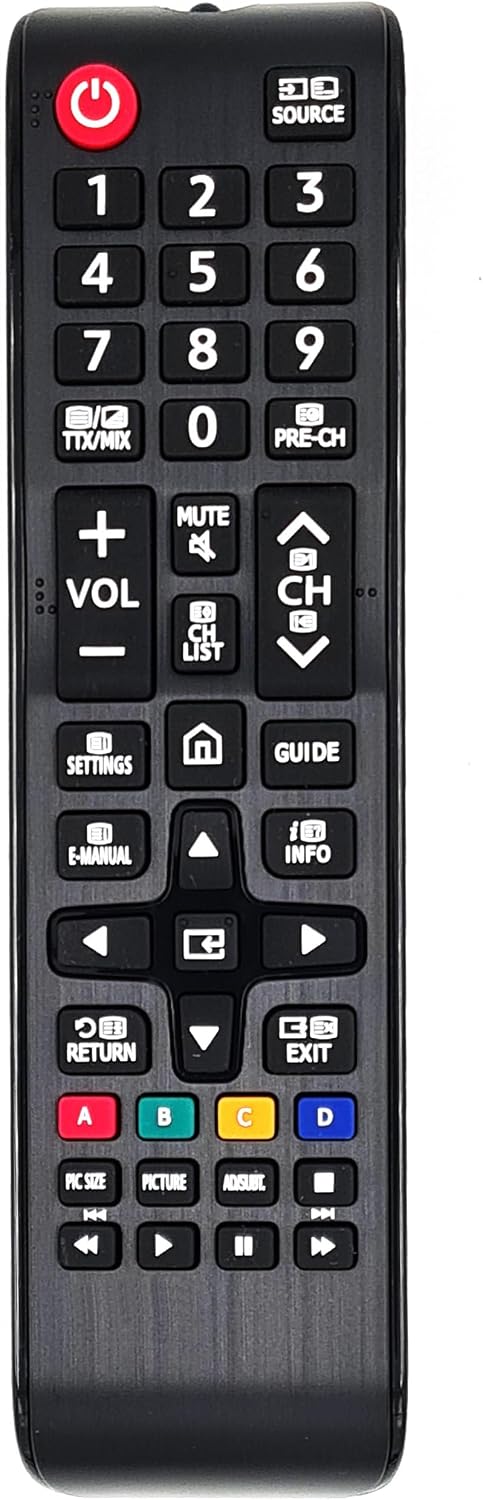
This image displays the full layout of the Alltro Replacement Remote Control, model BN59-01303A. It features a black body with clearly labeled buttons for power, numbers, volume, channel, navigation, and various smart TV functions.
3.1 Power and Source Control
- Power Button (⑂): Turns the TV on or off.
- SOURCE Button: Selects the input source (e.g., HDMI, AV, TV).
3.2 Number Pad and Channel Navigation
- Number Buttons (0-9): Directly enter channel numbers or numerical inputs.
- TTX/MIX Button: Toggles Teletext mode or mixes Teletext with TV picture.
- PRE-CH Button: Returns to the previously viewed channel.
- CH List Button: Displays the channel list.
- CH Up/Down Buttons (⌃ / ⌄): Changes the channel up or down.
3.3 Volume and Mute Control
- VOL +/- Buttons: Increases or decreases the volume level.
- MUTE Button: Mutes or unmutes the TV sound.
3.4 Navigation and Menu Buttons
- Directional Pad (Up, Down, Left, Right): Navigates through menus and options.
- Enter/OK Button (Center): Confirms a selection or enters a menu.
- SETTINGS Button: Accesses the TV's main settings menu.
- Home Button (⌂): Returns to the Smart Hub or Home screen.
- GUIDE Button: Displays the electronic program guide (EPG).
- E-MANUAL Button: Accesses the TV's electronic user manual.
- INFO Button: Displays information about the current program or input.
- RETURN Button: Returns to the previous screen or menu.
- EXIT Button: Exits the current menu or application.
3.5 Color Buttons and Media Playback
- Color Buttons (A, B, C, D): Perform specific functions depending on the current menu or application (e.g., red for recording, green for information).
- PIC SIZE Button: Adjusts the picture size/aspect ratio.
- PICTURE Button: Accesses picture mode settings.
- AD/SUBT Button: Toggles Audio Description or Subtitles.
- Media Playback Buttons (Rewind, Play, Pause, Stop, Fast Forward): Controls media playback functions.
4. Maintenance
4.1 Battery Replacement
When the remote control's range decreases or it becomes unresponsive, it is time to replace the batteries. Follow the battery installation steps in Section 2.1.
- Always replace both batteries at the same time.
- Do not mix old and new batteries, or different types of batteries.
- Remove batteries if the remote control will not be used for an extended period to prevent leakage.
- Dispose of used batteries responsibly according to local regulations.
4.2 Cleaning
To clean the remote control, use a soft, dry cloth. For stubborn dirt, slightly dampen the cloth with water or a mild, non-abrasive cleaner. Do not use harsh chemicals or immerse the remote control in water.
4.3 Storage
Store the remote control in a cool, dry place away from direct sunlight and extreme temperatures. Avoid dropping the remote control or exposing it to excessive force.
5. Troubleshooting
| Problem | Possible Cause | Solution |
|---|---|---|
| Remote control not working. | Dead or incorrectly installed batteries. | Replace batteries, ensuring correct polarity (+/-). |
| Remote control range is poor. | Low batteries; Obstruction between remote and TV; Infrared sensor on TV is blocked. | Replace batteries; Remove any objects blocking the line of sight; Ensure TV's IR sensor is clear. |
| Certain buttons do not respond. | Dirty contacts; Remote control malfunction. | Clean the remote control (see Section 4.2); If problem persists, consider replacement. |
| Remote control works intermittently. | Loose battery connection; Low battery power. | Ensure batteries are snug; Replace batteries. |
If you continue to experience issues after attempting these troubleshooting steps, please contact the seller or manufacturer for further assistance.
6. Specifications
| Brand | Alltro |
| Model Number | BN59-01303A |
| Connectivity Technology | Infrared |
| Compatible Devices | Samsung Televisions (UE40K5502AK, UE40K5510, UE40K5512, UE40K5572, UE40K5582, UE40K5600, UE40K5602, UE40K5672, UE40KU6000, UE40KU6020, UE40KU6070, UE40KU6072, etc.) |
| Maximum Range | 10 Meters |
| Special Feature | No programming required |
| Item Weight | 68 Grams |
| UPC | 735654563761 |
7. Warranty and Support
Information regarding specific warranty terms for this product is not explicitly provided. For details on warranty coverage, returns, or technical support, please refer to the purchase documentation or contact the seller directly.
Seller Contact: Alltro GmbH (via Amazon.fr)
For general inquiries or assistance, please visit the Alltro GmbH seller page on Amazon.