
Monster XKT01
MONSTER Airmars XKT01 True Wireless Earphones User Manual
Model: XKT01 | Brand: Monster
1. Introduction
Thank you for choosing the MONSTER Airmars XKT01 True Wireless Earphones. These earphones are designed to provide a high-quality audio experience with the convenience of true wireless technology. This manual will guide you through the setup, operation, and maintenance of your new earphones.

Image: MONSTER Airmars XKT01 True Wireless Earphones in their charging case.
2. Product Overview and Features
The MONSTER Airmars XKT01 earphones offer a range of features for an enhanced listening experience:
- True Wireless Stereo: Enjoy rich, delicate, high, middle, and low frequency balanced sound.
- Bluetooth 5.2: Provides a stable and continuous connection for audio and calls.
- Music/Game Mode: Switch between optimized sound effects for music listening or gaming.
- High Capacity Battery: Extended playtime with the included charging case.
- Compact Design: Semi-in-ear form factor for comfortable wear.
- Type-C Charging: Modern and convenient charging interface.

Image: Visual representation of key features including game mode, surround sound, and long endurance.
3. Setup and First Use
3.1 Charging the Earphones and Case
Before first use, ensure both the earphones and the charging case are fully charged.
- Place the earphones into the charging case, ensuring they are correctly seated.
- Connect the Type-C charging cable to the charging port on the case and the other end to a USB power source (e.g., wall adapter, computer USB port).
- The indicator lights on the case will show the charging status. Once fully charged, the lights will indicate completion or turn off.
Note: The charging case has a battery capacity of 300 mAh, and each earbud has 30 mAh.

Image: Earphones and charging case, highlighting battery life.
3.2 Pairing with Your Device
The earphones will automatically enter pairing mode when taken out of the charging case.
- Open the charging case and remove both earphones. They will automatically power on and attempt to pair with each other.
- On your device (smartphone, tablet, computer), go to the Bluetooth settings.
- Search for available devices and select "MONSTER XKT01" from the list.
- Once connected, you will hear a confirmation tone, and the earphones will be ready for use.
Note: After the initial pairing, the earphones will automatically connect to the last paired device when removed from the case, provided Bluetooth is enabled on the device.

Image: Earphones demonstrating Bluetooth 5.2 connectivity with a smartphone.
4. Operating Instructions
4.1 Basic Controls (Touch Functions)
The earphones feature touch-sensitive controls for various functions. (Specific touch gestures are not provided in product data, general functions are listed below.)
- Play/Pause: Tap once on either earbud.
- Next Track: Double-tap the right earbud.
- Previous Track: Double-tap the left earbud.
- Answer/End Call: Tap once on either earbud during an incoming call.
- Reject Call: Press and hold either earbud for 2 seconds during an incoming call.
- Activate Voice Assistant: Triple-tap either earbud.
4.2 Switching Between Music Mode and Game Mode
The XKT01 earphones allow you to switch between optimized sound profiles for music and gaming.
- To switch modes, press and hold the touch area on the right earbud for approximately 2 seconds until you hear a mode change prompt.
- Game mode provides lower latency for a more synchronized audio-visual experience during gaming.

Image: Earphones illustrating the Music/Game Mode feature.
5. Maintenance and Care
Proper maintenance ensures the longevity and optimal performance of your earphones.
- Cleaning: Use a soft, dry, lint-free cloth to clean the earphones and charging case. Do not use harsh chemicals or abrasive materials.
- Storage: When not in use, store the earphones in their charging case to protect them and keep them charged.
- Avoid Water: While the product may have some water resistance (indicated as 'Living waterproof' in features), avoid submerging the earphones or exposing them to excessive moisture.
- Temperature: Do not expose the earphones to extreme temperatures (hot or cold) or direct sunlight for extended periods.
6. Troubleshooting
If you encounter issues with your MONSTER Airmars XKT01 earphones, try the following solutions:
| Problem | Possible Solution |
|---|---|
| Earphones not pairing with device |
|
| Only one earbud working |
|
| Low volume or poor sound quality |
|
| Charging issues |
|
7. Specifications
Detailed technical specifications for the MONSTER Airmars XKT01 True Wireless Earphones:
| Feature | Detail |
|---|---|
| Brand | Monster |
| Model | XKT01 |
| Bluetooth Version | V5.2 |
| Bluetooth Transmission Range | About 10m (barrier-free) |
| Speaker Size | 13mm |
| Charging Interface | Type C |
| Charging Case Battery Capacity | 300 mAh |
| Earbud Battery Capacity | 30 mAh * 2 |
| Rated Input | 5V 35 mA |
| Ear Placement | In Ear |
| Form Factor | In Ear |
| Impedance | 32 Ohm |
| Color | White (as per product details, though image shows options) |
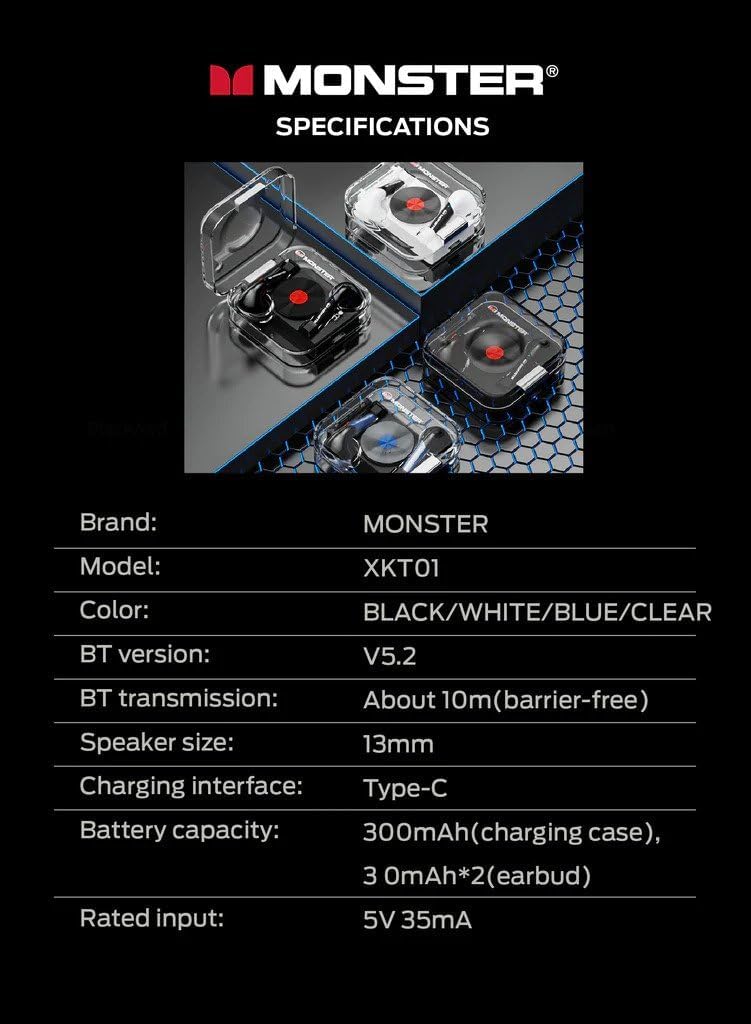
Image: Official specifications table for the MONSTER Airmars XKT01.
8. Warranty and Support
For warranty information and technical support, please refer to the official Monster product website or contact your retailer. Keep your proof of purchase for warranty claims.
Manufacturer: Monster
Item Model Number: XKT01
ASIN: B0CM6M3SK6
Related documentsXKT01


Ask a question about this manual
Ask about setup, troubleshooting, compatibility, parts, safety, or missing instructions. Manuals+ will review the question and use this page’s manual context to help answer it.