1. Introduction
The AUTOUTLET OBD2 Diagnostic Scan Tool (Model EFU094) is designed to assist in diagnosing vehicle issues by reading and clearing Diagnostic Trouble Codes (DTCs). This device provides access to real-time data, freeze frame information, I/M readiness status, and performs battery tests, helping users understand and address potential problems with their vehicle's engine system. It supports all OBDII protocols and is compatible with most vehicles manufactured after 1996 (U.S.), 2006 (EU), and 2009 (Asia).
2. Package Contents
Verify that all items are present in the package:
- AUTOUTLET OBD2 Diagnostic Scan Tool (EFU094)
- User Manual

Image: The AUTOUTLET OBD2 Diagnostic Scan Tool shown alongside its included user manual.
3. Safety Information
Please read and understand all safety instructions before using this device. Failure to follow these instructions may result in electric shock, fire, or serious injury.
- Always operate the vehicle in a well-ventilated area.
- Do not wear loose clothing or jewelry when working on a vehicle.
- Keep a fire extinguisher suitable for gasoline/electrical fires nearby.
- Do not connect or disconnect the device while the ignition is on or the engine is running.
- Avoid contact with hot engine parts or moving components.
- This device is for diagnostic purposes only and should not be used to replace professional automotive repair.
4. Product Overview
4.1 Device Components

Image: The AUTOUTLET OBD2 Diagnostic Scan Tool, showing its display screen, navigation buttons (OK, EXIT, Up, Down), and the attached OBDII connector cable.
The AUTOUTLET OBD2 Diagnostic Scan Tool features a clear display screen, intuitive navigation buttons, and a robust OBDII connector cable for reliable connection to your vehicle.
4.2 Key Features
- Reads and clears Diagnostic Trouble Codes (DTCs).
- Displays Live Data streams (up to 88 types).
- Views Freeze Frame data.
- Checks I/M Readiness status.
- Performs Battery Test (voltage and life).
- Retrieves Vehicle Information (VIN, CIN, CVN).
- Supports all OBDII protocols (KWP2000, J1850 VPW, ISO9141, J1850 PWM, CAN).
- Multi-language support (10 languages).

Image: A visual representation of the scan tool's multifunctional capabilities, including reading codes, deleting codes, viewing freeze frames, I/M readiness, showing vehicle information, live PCM data, and battery test.
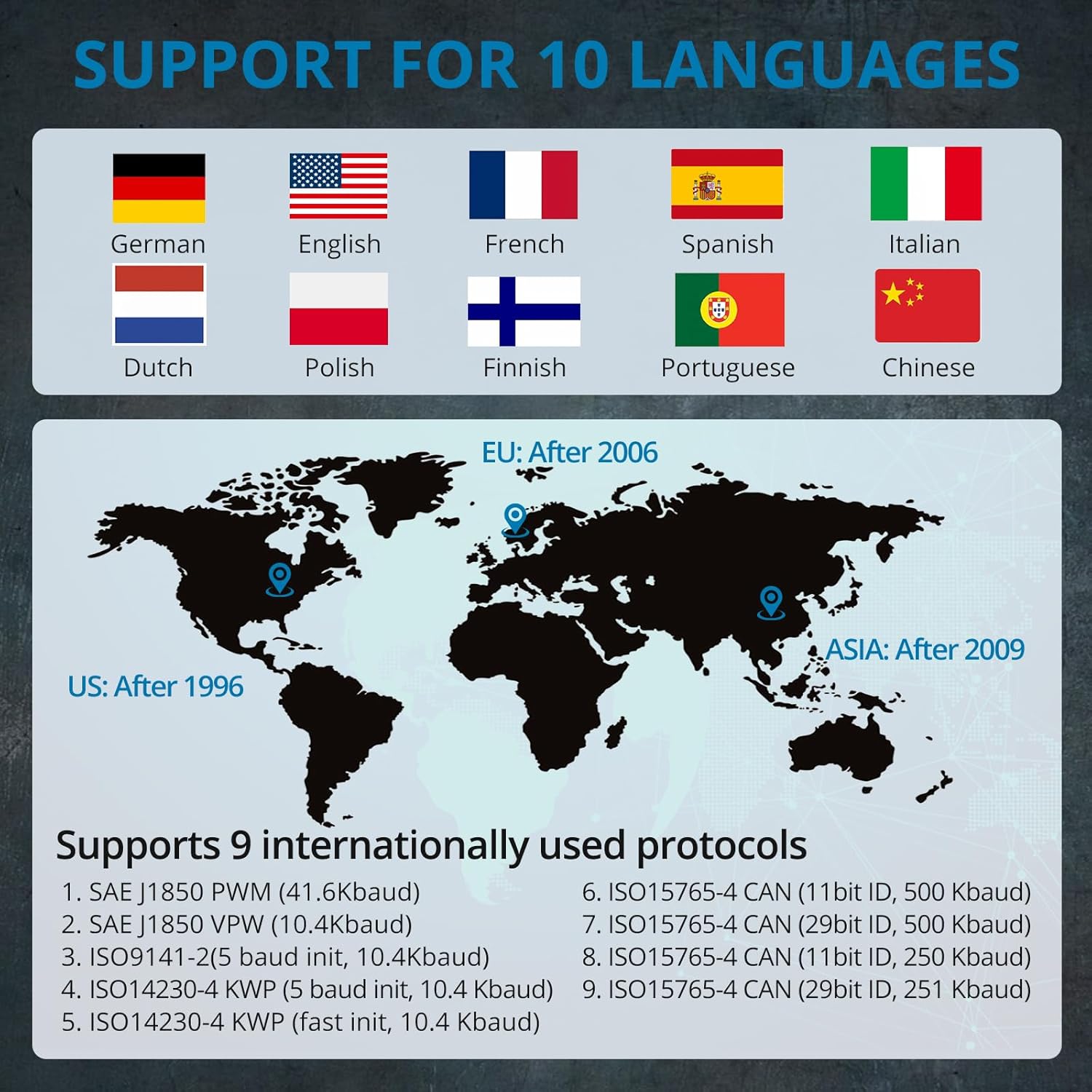
Image: A world map indicating vehicle compatibility by region (US after 1996, EU after 2006, Asia after 2009), flags representing 10 supported languages, and a list of 9 internationally used OBDII protocols.
5. Setup
5.1 Locating the OBDII Port
The OBDII (On-Board Diagnostics II) port, also known as the DLC (Diagnostic Link Connector), is typically located within 12 inches of the steering wheel, often under the dashboard on the driver's side. Refer to your vehicle's service manual if you cannot locate it. Some vehicles may have a plastic cover over the DLC that needs to be removed before connecting the scanner.

Image: An illustrative diagram highlighting common locations (A, B, C, D, E, F) for the OBDII port within a vehicle's interior.
5.2 Connecting the Device
- Ensure the vehicle's ignition is OFF.
- Locate the 16-pin OBDII DLC on your vehicle.
- Firmly plug the OBDII connector of the scan tool into the vehicle's DLC. The device will power on automatically.
- Turn the vehicle's ignition to the ON position (engine can be off or running, depending on the diagnostic task).
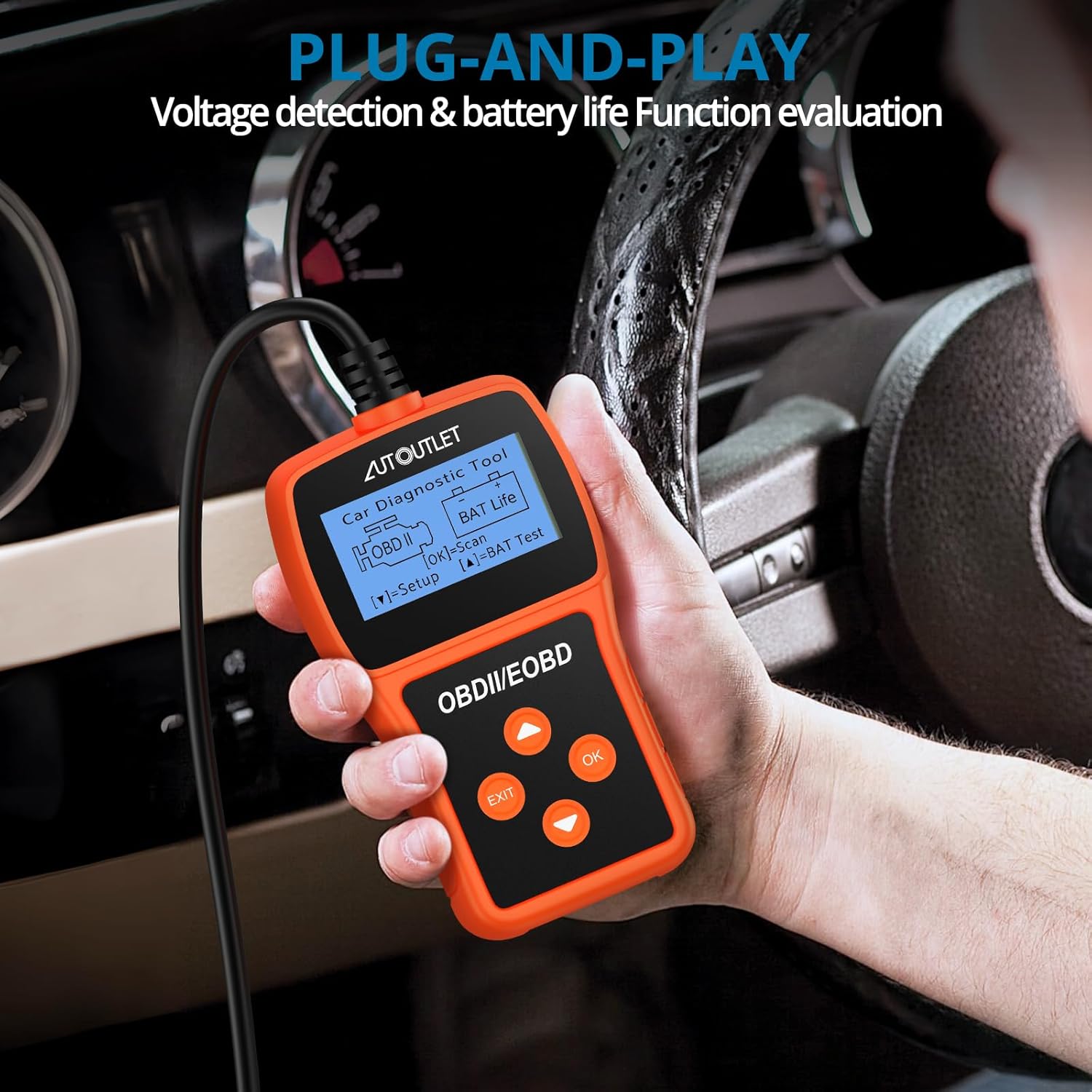
Image: A hand holding the AUTOUTLET OBD2 scan tool, which is connected to a vehicle's OBDII port, demonstrating its plug-and-play functionality.
5.3 Language Selection
Upon initial power-up or through the System Setup menu, you can select your preferred language from the 10 available options (English, Spanish, French, German, Dutch, Chinese, Italian, Polish, Finnish, Portuguese).
6. Operating Instructions
Use the UP and DOWN buttons to navigate through menus, OK to confirm selections, and EXIT to return to the previous screen.
6.1 Reading Diagnostic Trouble Codes (DTCs)
- From the main menu, select "Read Codes".
- The scanner will display any stored DTCs along with their definitions.
6.2 Clearing Diagnostic Trouble Codes (DTCs)
Warning: Clearing DTCs will erase all diagnostic data from the vehicle's computer. Ensure you have recorded any necessary information before proceeding.
- From the main menu, select "Erase Codes".
- Confirm your selection when prompted.
- The Check Engine Light (MIL) should turn off after successful clearing.

Image: A visual comparison of a car's dashboard, showing the Check Engine Light illuminated before clearing codes and extinguished after successful code deletion.
6.3 Viewing Live Data
This function allows you to view real-time operational parameters of the vehicle's engine. The AUTOUTLET scanner can display up to 88 real-time data streams.
- From the main menu, select "Live Data" or "Data Stream".
- Select the specific parameters you wish to monitor.
- The data will be displayed numerically.
6.4 I/M Readiness Monitor
The I/M Readiness Monitor function checks if the various emissions-related systems on the vehicle are operating correctly and are ready for inspection and maintenance testing.
- From the main menu, select "I/M Readiness".
- The screen will display the status of various monitors (e.g., O2 Sensor, Catalyst, EVAP System).
6.5 Viewing Freeze Frame Data
Freeze Frame Data records a snapshot of the vehicle's operating conditions at the moment an emission-related fault occurred. This can help in diagnosing intermittent problems.
- From the main menu, select "View Freeze Frame".
- The scanner will display the recorded parameters.
6.6 Vehicle Information
This function retrieves the Vehicle Identification Number (VIN), Calibration ID (CIN), and Calibration Verification Number (CVN) of the vehicle.
- From the main menu, select "Vehicle Info".
- The requested information will be displayed.
6.7 Battery Test Function
The device can check and monitor the vehicle's battery voltage and evaluate its service life.
- From the main menu, select "BAT Test" or "Battery Test".
- Follow the on-screen prompts to perform the battery measurement and monitoring.

Image: The AUTOUTLET scan tool's screen showing the battery test menu, with options for battery measurement, monitoring, and life assessment.
7. Maintenance
- Cleaning: Use a soft, damp cloth to clean the device. Do not use abrasive cleaners or solvents.
- Storage: Store the device in a dry, cool place, away from direct sunlight and extreme temperatures.
- Cable Care: Avoid bending or twisting the OBDII cable excessively to prevent damage.
8. Troubleshooting
| Problem | Possible Cause | Solution |
|---|---|---|
| Device does not power on. | Loose connection to OBDII port; Vehicle ignition off; Blown fuse in vehicle's OBDII circuit. | Ensure the OBDII connector is firmly seated. Turn vehicle ignition to ON. Check vehicle's fuse box for a blown fuse related to the OBDII port. |
| Link error / Cannot communicate with vehicle. | Incorrect protocol; Faulty connection; Vehicle not OBDII compliant. | Verify vehicle is OBDII compliant (most US vehicles 1996+, EU 2006+, Asia 2009+). Check connection. Try on another OBDII compliant vehicle if possible. |
| Codes cannot be cleared. | Ignition not ON; Fault still present; Multiple ECUs. | Ensure ignition is ON (engine off). Address the underlying fault first. Some vehicles may require specific procedures or have multiple ECUs. |
| Screen is blank or frozen. | Software glitch; Power interruption. | Disconnect and reconnect the device. If problem persists, contact customer support. |
Note: This product cannot measure data that can only be measured by automobile manufacturers when specific vehicle protocols are required (e.g., ABS, SAS, ESP, EPS, TPMS, Transmission and other subsystems, DPF, Battery Reset, Oil Service Reset, EPB Brake Pad Replacement, and Throttle Position Adjustment).
9. Specifications
| Feature | Detail |
|---|---|
| Model | EFU094 |
| Brand | AUTOUTLET |
| Operating System | Linux |
| Product Dimensions | 5.12 x 2.83 x 0.98 inches (13 x 7.2 x 2.5 cm) |
| Item Weight | 8.8 ounces (249 grams) |
| Display | 2.4 inch (monochrome LCD) |
| Supported Protocols | KWP2000, J1850 VPW, ISO9141, J1850 PWM, CAN (9 international protocols) |
| Vehicle Compatibility | Post-1996 U.S., Post-2006 EU, Post-2009 Asian vehicles |
| Languages Supported | English, Spanish, French, German, Dutch, Chinese, Italian, Polish, Finnish, Portuguese |
| Data Streams | Up to 88 real-time data streams |
| Cable Length | 24.4 inches (approx. 62 cm) |