
Introduction
This manual provides essential information for the safe and efficient operation of your SYLVOX Deck Pro QLED 2.0 43-inch Outdoor Smart TV. Please read all instructions carefully before installation and use. This television is designed for outdoor use, featuring robust weather protection and smart functionalities.
What's in the Box
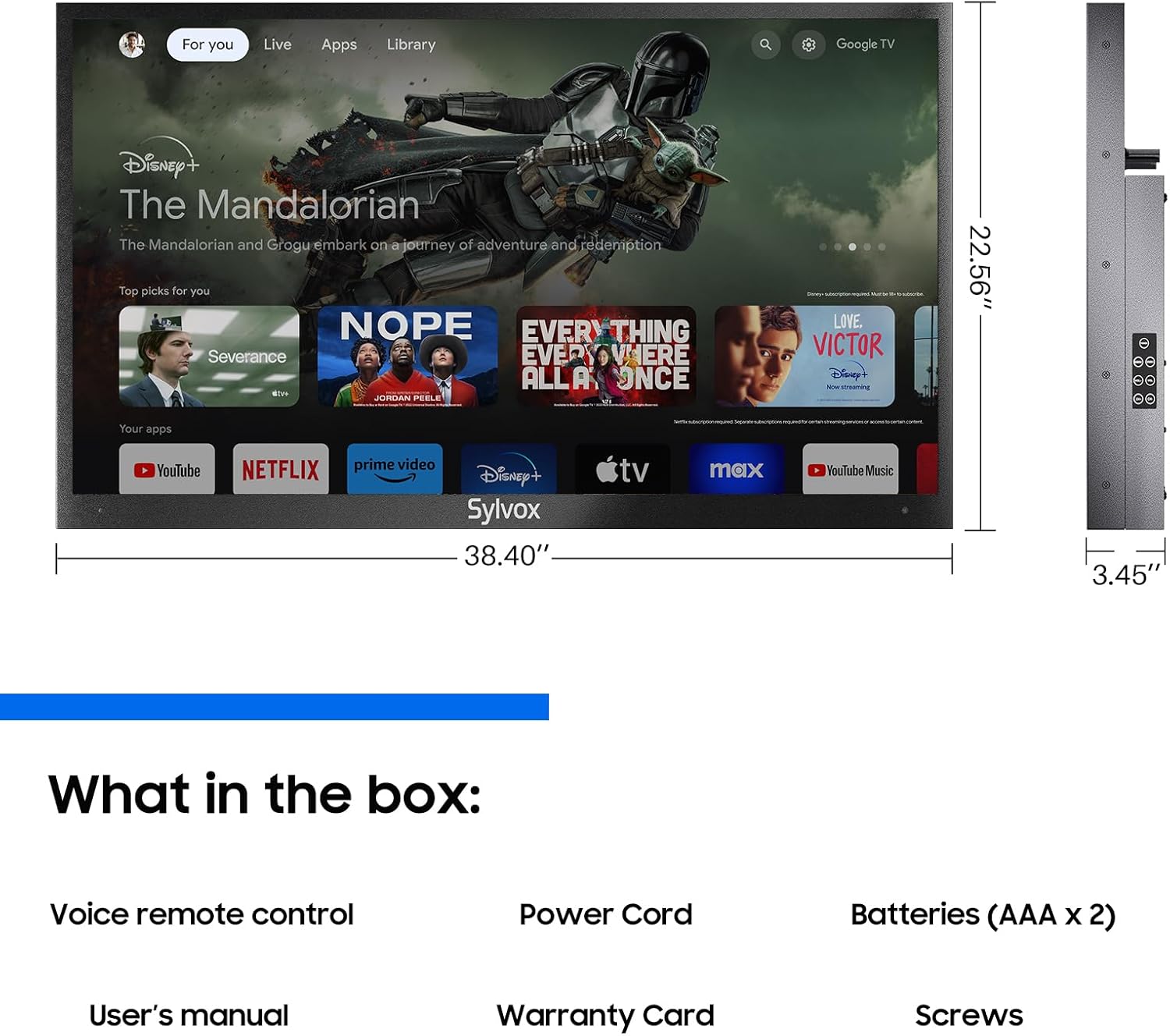
Verify that all components are present in the packaging:
- SYLVOX Deck Pro QLED 2.0 43-Inch Outdoor Smart TV
- Voice Remote Control (Bluetooth)
- Power Cord
- AAA Batteries (x2)
- User's Manual
- Warranty Card
- Mounting Screws

Setup
Mounting the TV
The SYLVOX Deck Pro QLED 2.0 43-inch TV is designed for wall mounting. It is compatible with VESA 400 x 200 mm mounting standards. Ensure you use a sturdy wall mount capable of supporting the television's weight and dimensions. The mount is sold separately.

Connecting Peripherals
To access the input ports (3 HDMI, 2 USB 2.0, RJ45, Optical Out, TV Coaxial), you must remove the sealed back panel by unscrewing the retaining screws. After connecting your devices, ensure the panel is securely reattached to maintain the IP55 waterproof rating.
Operating Instructions
Google TV Interface
Your SYLVOX Outdoor Smart TV runs on Google TV, providing a user-friendly interface for accessing streaming services, live TV, and various applications. Navigate using the directional buttons on your remote control.

Voice Control
The included Bluetooth remote features a dedicated Voice Assistant button. Press this button and speak your commands to search for content, navigate menus, adjust volume, or control other smart home devices.

Chromecast Built-in
Utilize the built-in Chromecast feature to wirelessly cast content (movies, shows, apps, games) from your compatible smartphone, tablet, or laptop directly to the TV screen.
Features
IP55 Waterproof and Weatherproof Design
The SYLVOX Deck Pro QLED 2.0 TV boasts an IP55 rating, ensuring it is protected against dust ingress and low-pressure water jets from any direction. This robust construction allows for year-round outdoor entertainment, capable of withstanding various weather conditions.
1000 Nits High Brightness
Experience clear and vibrant visuals even in partial sunlight with the TV's 1000 nits peak brightness. This high luminosity ensures excellent picture quality for outdoor viewing during the day or night.

QLED Display with Dolby Atmos
The QLED display technology delivers purer, richer, and more brilliant colors compared to standard LED TVs. Coupled with Dolby Atmos audio, the television provides an immersive visual and auditory experience.

Maintenance
To ensure the longevity and optimal performance of your outdoor TV, regularly clean the screen with a soft, damp cloth. Avoid harsh chemicals. Ensure the back panel covering the ports is always securely fastened to maintain its waterproof integrity. During extreme weather conditions (e.g., severe storms, prolonged freezing temperatures), consider additional protective measures or temporary storage indoors if feasible, although the TV is designed to withstand temperatures from -22°F to 122°F.
Troubleshooting
- No Power: Ensure the power cord is securely connected to both the TV and a working power outlet. Check the power source.
- No Signal: Verify that the correct input source is selected. Check all cable connections (HDMI, coaxial) and ensure external devices are powered on.
- Remote Not Responding: Replace the AAA batteries in the remote. Ensure there are no obstructions between the remote and the TV. If using Bluetooth, ensure the remote is paired correctly.
- Picture Quality Issues: Adjust picture settings (brightness, contrast, picture mode) via the Google TV menu. Ensure the content source is high-resolution (e.g., 4K for optimal display).
- Sound Issues: Check volume levels on both the TV and any connected audio devices. Verify Dolby Atmos settings in the sound menu.
Specifications
| Screen Size | 43 Inches |
| Display Technology | QLED |
| Resolution | 4K (3840 x 2160) |
| Refresh Rate | 60 Hz |
| Brightness | 1000 Nit (Peak) |
| Water Resistance | IP55 Waterproof |
| Audio Output Mode | Dolby Atmos (5.1.2 Channels) |
| Operating System | Google TV (Android) |
| Connectivity | Wi-Fi, Bluetooth, Chromecast Built-in |
| HDMI Ports | 3 |
| USB 2.0 Ports | 2 |
| VESA Mount Standard | 400 x 200 mm |
| Product Dimensions (DxWxH) | 3.45"D x 38.4"W x 22.56"H |
| Model Number | OQ43A2KHGD-S-I |
Warranty and Support
Your SYLVOX Deck Pro QLED 2.0 TV comes with a limited warranty, including 12-month free defect protection and 30-day hassle-free returns for quality issues. Original packaging is required for returns. For technical assistance or warranty claims, please refer to the contact information provided in your warranty card or visit the official SYLVOX support channels.