
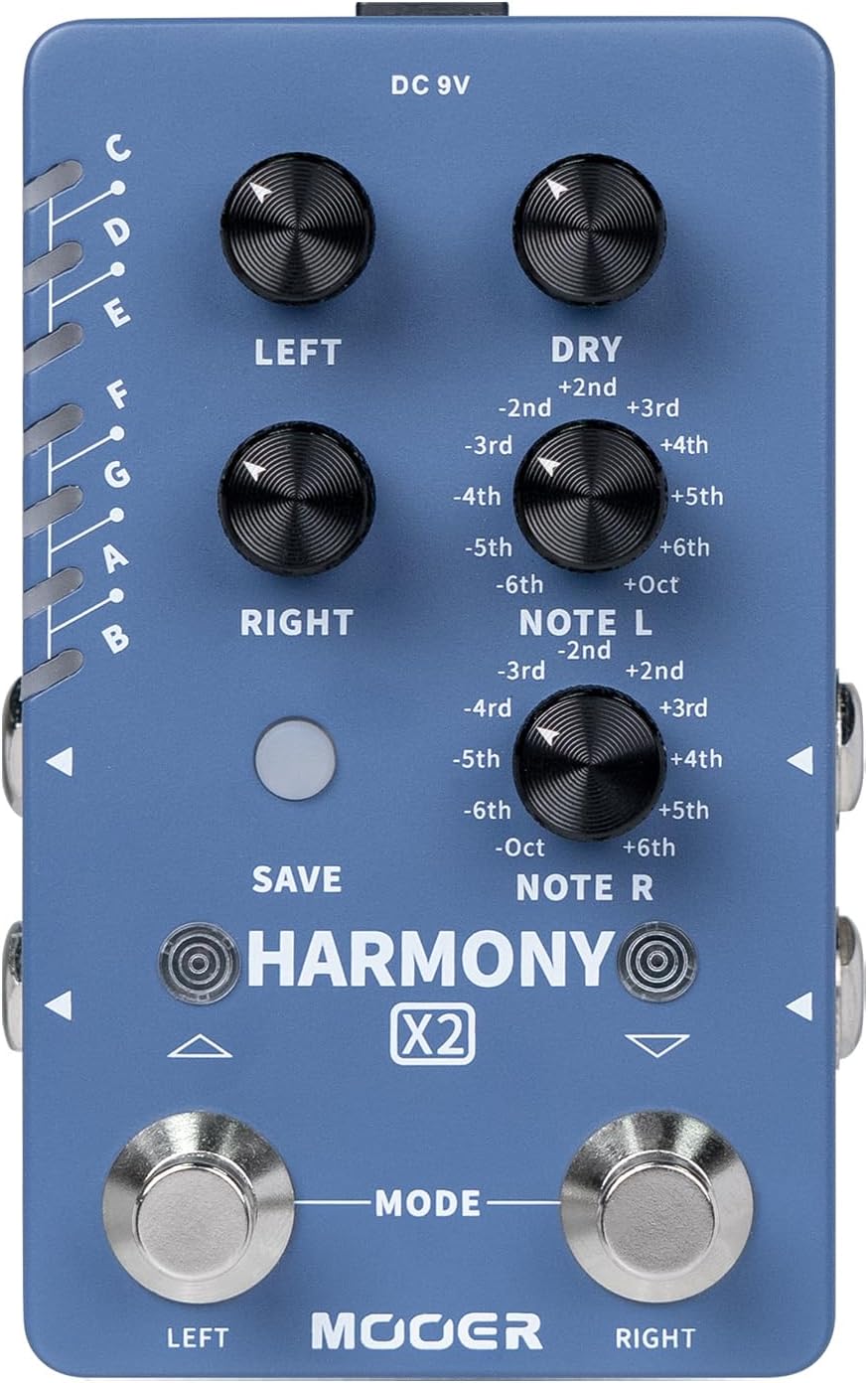
1. Product Overview
The MOOER Harmonizer X2 is a professional stereo harmony effects pedal designed for electric guitar and bass. It offers a wide range of harmony options and intuitive controls for precise sound shaping.
Key Features
- High-quality stereo harmony effect.
- Up to 12 pitches available, switchable between major and minor modes.
- Each pitch offers 11 different harmony modes.
- Individual dry/wet signal adjustment for precise mixing.
- Mixed and individual output modes for various setups.
- Dual-footswitch control for each harmony effect channel.

Image: The Harmonizer X2 pedal with a visual representation of its high-quality stereo harmony effect capability.
2. Setup
Follow these steps to set up your MOOER Harmonizer X2 pedal:
- Power Connection: Connect a standard 9V DC power adapter (center negative, 300mA minimum) to the DC 9V input jack on the top of the pedal.
- Input Connection: Connect your guitar or bass to the LEFT (mono) input jack using a standard 1/4-inch instrument cable. For stereo input, connect a second cable to the RIGHT input jack.
- Output Connection: Connect the LEFT (mono) output jack to your amplifier or audio interface. For stereo output, connect a second cable from the RIGHT output jack to a second amplifier or stereo input on your interface.

Image: The Harmonizer X2 pedal connected with input and output cables, demonstrating typical setup.
3. Operation
Controls and Functions
The Harmonizer X2 features several knobs and footswitches for comprehensive control over your harmony effects:
- LEFT Knob: Adjusts the volume level of the left channel of the harmony effect.
- RIGHT Knob: Adjusts the volume level of the right channel of the harmony effect.
- DRY Knob: Adjusts the volume level of the dry (unaffected) signal.
- NOTE L Knob: Rotates to adjust the harmony type for the left output.
- NOTE R Knob: Rotates to adjust the harmony type for the right output.
- SAVE Button: Press to switch between scales. Press and hold to save the current changes.

Image: Close-up view of the Harmonizer X2 pedal, highlighting the individual control knobs and their functions.
Footswitch Control
- LEFT Footswitch: Press to turn On/Off the left harmony effect output.
- RIGHT Footswitch: Press to turn On/Off the right harmony effect output.
- MODE (Dual Footswitch): Press LEFT + RIGHT footswitches simultaneously to enter the scales/tonality select mode.

Image: The Harmonizer X2 pedal showing the left and right footswitches and their respective functions.
Harmony Modes and Scale Selection
The pedal supports up to 12 pitches and allows switching between major and minor modes. The LED indicator on the left side of the pedal shows the currently selected scale (C, D, E, F, G, A, B, C#/Db, D#/Eb, F#/Gb, G#/Ab, A#/Bb).

Image: The Harmonizer X2 pedal displaying the LED indicator for scale selection and the SAVE button.
Output Mode Setting
The Harmonizer X2 offers two output modes: Mixed Mode and Individual Mode. This allows for flexible integration into various audio setups.
- Mixed Mode (SAVE Red): Both left and right harmony effects are combined and output through both L(MONO) and R output jacks.
- Individual Mode (SAVE Blue): The left harmony effect is output through the L(MONO) jack, and the right harmony effect is output through the R jack, allowing for separate processing.
To switch between output modes, press and hold the SAVE button and the RIGHT footswitch simultaneously.

Image: Diagram illustrating the Mixed Mode and Individual Mode output settings on the Harmonizer X2 pedal.
Harmony Effect List
The following table details the harmony effects available for each scale in both Major (Red) and Minor (Blue) modes:
| Scale (Major) | Color | Harmony Effect | Scale (Major) | Color | Harmony Effect |
|---|---|---|---|---|---|
| C | RED | L: +3rd R: -4th | C | BLUE | L: +3rd R: -3rd |
| D | RED | L: +3rd R: -4th | D | BLUE | L: +3rd R: -3rd |
| E | RED | L: +3rd R: -4th | E | BLUE | L: +3rd R: -3rd |
| F | RED | L: +3rd R: -4th | F | BLUE | L: +3rd R: -3rd |
| G | RED | L: +3rd R: -4th | G | BLUE | L: +3rd R: -3rd |
| A | RED | L: +3rd R: -4th | A | BLUE | L: +3rd R: -3rd |
| B | RED | L: +3rd R: -4th | B | BLUE | L: +3rd R: -3rd |
| C#/Db | RED | L: +3rd R: -4th | C#/Db | BLUE | L: +3rd R: -3rd |
| D#/Eb | RED | L: +3rd R: -4th | D#/Eb | BLUE | L: +3rd R: -3rd |
| F#/Gb | RED | L: +3rd R: -4th | F#/Gb | BLUE | L: +3rd R: -3rd |
| G#/Ab | RED | L: +3rd R: -4th | G#/Ab | BLUE | L: +3rd R: -3rd |
| A#/Bb | RED | L: +3rd R: -4th | A#/Bb | BLUE | L: +3rd R: -3rd |
Table: Detailed list of harmony effects for each scale in both Major (RED) and Minor (BLUE) modes.
4. Maintenance
To ensure the longevity and optimal performance of your Harmonizer X2 pedal, follow these maintenance guidelines:
- Cleaning: Use a soft, dry cloth to clean the pedal's surface. Avoid abrasive cleaners or solvents that could damage the finish or internal components.
- Storage: Store the pedal in a cool, dry place away from direct sunlight, extreme temperatures, and high humidity.
- Handling: Handle the pedal with care. Avoid dropping it or subjecting it to strong impacts, which can damage the circuitry or housing.
- Power Supply: Always use a compatible 9V DC (center negative) power supply to prevent damage. Disconnect power when not in use for extended periods.
5. Troubleshooting
If you encounter issues with your Harmonizer X2 pedal, refer to the following common problems and solutions:
- No Sound:
- Ensure the power supply is correctly connected and functioning.
- Check all instrument cables for proper connection and integrity.
- Verify that the DRY, LEFT, and RIGHT knobs are not set to minimum volume.
- Confirm that the footswitches are engaged (LEDs lit for active harmony).
- Unexpected Harmony or Pitch Issues:
- Check the selected scale using the SAVE button and LED indicator.
- Adjust the NOTE L and NOTE R knobs to select the desired harmony type.
- Ensure the pedal is in the correct output mode (Mixed or Individual) for your setup.
- Noise or Hum:
- Use a high-quality, isolated power supply.
- Check for faulty cables or interference from other electronic devices.
If the problem persists, please contact MOOER customer support for further assistance.
6. Specifications
Detailed specifications for the MOOER Harmonizer X2 pedal:
- Item Weight: 15.5 ounces
- Product Dimensions: 5.43 x 4.8 x 2.95 inches (138mm x 122mm x 75mm)
- Compact Dimensions: 75mm (D) x 115mm (W) x 33mm (H) - Note: This refers to the main body excluding knobs/jacks.
- Model Number: MOOER (Harmonizer X2)
- Hardware Interface: HP-HSC
- Signal Format: Analog
- Power Source: Corded Electric
- Voltage: 9 Volts DC
- Amperage: 300 Milliamps
- Color Name: Harmonizer X2
- Style: Compact

Image: The Harmonizer X2 pedal with its compact dimensions (75mm D x 115mm W x 33mm H) clearly indicated.
7. Warranty Information
For detailed warranty information regarding your MOOER Harmonizer X2 pedal, please refer to the warranty card included with your product or visit the official MOOER website. Warranty terms and conditions may vary by region and retailer.
8. Customer Support
If you require further assistance, technical support, or have questions not covered in this manual, please contact MOOER customer support through their official website or the retailer from whom you purchased the product. Provide your product model (Harmonizer X2) and any relevant purchase details when seeking support.