1. Product Overview
The SERVOMASTER SD1000 is a portable power station designed to provide reliable power for various applications, including outdoor activities, emergency backup, and off-grid living. It features a 1008Wh LiFePO4 battery, 800W AC output (2000W surge), and multiple output ports for diverse device compatibility. The unit also supports fast AC charging, solar charging, and smart app control.

Figure 1: Front view of the SERVOMASTER SD1000 Portable Power Station, showcasing its display and various output ports.
Key Features:
- 1008Wh LiFePO4 Battery: Provides long-lasting and safe power with over 2000 charge cycles.
- 800W AC Output (2000W Surge): Capable of powering a wide range of appliances.
- Fast AC Charging: Recharges from 0% to 100% in approximately 1.5 hours.
- Solar Charging Capability: Built-in 99% efficiency MPPT controller supports up to 200W solar input.
- Uninterruptible Power Supply (UPS) Function: Seamlessly switches to battery power in 10ms during grid failure.
- Multiple Output Ports: Includes 2x Type-C (100W), 1x USB-A (12W), 2x USB-A (18W Fast Charge), 2x DC, 1x Car outlet, 2x AC outlets, and 1x Wireless charger.
- Smart App Control: Monitor and control the power station via a dedicated mobile application.
- Integrated Lighting: Features a reading lamp, atmosphere lamp, and SOS signal flash.
2. What's in the Box
Upon unboxing your SERVOMASTER SD1000, please verify that all components are present:
- SERVOMASTER SD1000 Portable Power Station x1
- AC Charging Cable x1
- Solar Charging Cable x1
- User Manual x1
3. Setup and Initial Charging
3.1 Initial Charging
Before first use, it is recommended to fully charge the SERVOMASTER SD1000. The unit supports fast AC charging.
- Locate the AC charging port on the side of the power station. This port is typically covered by a protective flap.
- Open the protective flap.
- Connect the provided AC charging cable to the "Maxi Charge" port on the power station.
- Plug the other end of the AC charging cable into a standard wall outlet.
- The LCD screen will indicate the charging status. The unit can reach 100% charge in approximately 1.5 hours.
Video 1: This video demonstrates the physical features of the SERVOMASTER SD1000, including its various ports and controls. It also shows the process of connecting the AC charging cable to the "Maxi Charge" port for initial charging (starting at 01:27 in the video).
3.2 Solar Charging
The SD1000 can be charged using compatible solar panels (sold separately). It features a built-in MPPT controller for efficient solar energy conversion.
- Connect the solar charging cable (included) to your solar panels.
- Connect the other end of the solar charging cable to the "Solar/Car Input" port on the power station.
- Position the solar panels in direct sunlight for optimal charging. The LCD screen will display the solar input wattage.

Figure 2: The SERVOMASTER SD1000 connected to solar panels in an outdoor setting, illustrating its eco-friendly recharge capability.
4. Operating Instructions
4.1 Powering On/Off
To power on the SERVOMASTER SD1000, long press the main power switch located on the front panel. The LCD screen will illuminate, indicating the unit is active. To power off, long press the main power switch again.
4.2 Using Output Ports
The SD1000 offers a variety of output ports to power different devices:
- DC Output: Short press the DC output key to activate the 12V DC ports.
- USB-A & Type-C Output: These ports are typically active when the unit is powered on.
- AC Output: Short press the AC ON/OFF button located on the side of the unit to activate the AC outlets. A red indicator light will illuminate when AC output is active.
- Wireless Charging: Short press the wireless charging button on the front panel to enable wireless charging. Place your compatible device on the designated wireless charging pad.
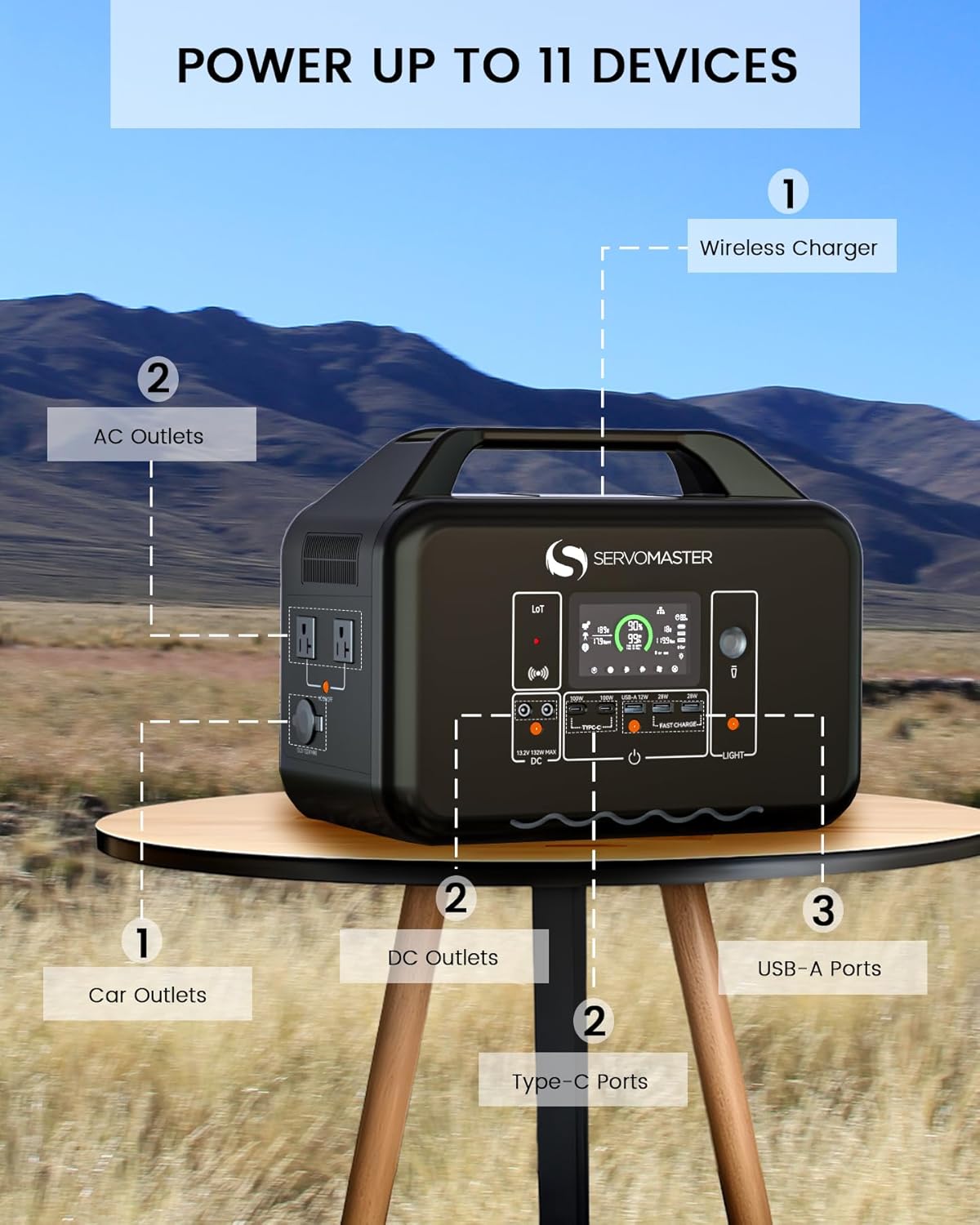
Figure 3: An illustration of the SERVOMASTER SD1000 highlighting and labeling its 11 output ports, including wireless charger, AC outlets, car outlet, DC outlets, USB-A, and Type-C ports.
4.3 SmartDrive Mode (Max 2000W Output)
For high-power appliances, the SD1000 features a SmartDrive mode that allows for a maximum output of 2000W.
- Ensure the power station is on.
- Short press the AC ON/OFF button two times consecutively.
- The unit will enter SmartDrive mode, indicated by a specific icon on the LCD, allowing it to power devices up to 2000W.
Video 2: This video demonstrates the activation of the SmartDrive mode (starting at 01:50 in the video), enabling the power station to deliver up to 2000W for high-power appliances like a car refrigerator.
4.4 Silent Charging Mode
To reduce fan noise during AC charging, activate Silent Charging mode.
- While the unit is AC charging, long press the AC ON/OFF button.
- An icon indicating silent charging will appear on the LCD screen. In this mode, charging speed may be reduced to maintain noise levels below 30dB.
Video 3: This video illustrates how to activate the Silent Charging mode (starting at 02:02 in the video) by long-pressing the AC ON/OFF button, which reduces operational noise during charging.
4.5 Integrated Lighting
The SD1000 includes various lighting functions:
- Atmosphere Lamp: Short press the light switch to activate the atmosphere lamp.
- Reading Lamp: Short press the light switch again to switch to the strong reading light. Press again for a dim reading light.
- SOS Signal: Press the light switch a third time to activate the SOS rescue signal flash.
Video 4: This video demonstrates the various lighting modes of the power station (starting at 01:35 in the video), including the atmosphere lamp, reading lamp (strong and dim), and the SOS signal flash.
4.6 Smart App Control
The SERVOMASTER SD1000 can be monitored and controlled via a smartphone application.
- Download the Landbook APP from your device's app store (App Store for iOS, Google Play for Android).
- Ensure your phone is connected to a Wi-Fi network for the initial setup.
- Open the app and follow the instructions to detect nearby devices. Select your SD1000 from the list.
- Once connected, you can monitor battery status, input/output power, and control various functions like the LED lights remotely.
- If connection issues occur, long press the IoT button for 3 seconds to reset the Wi-Fi settings.

Figure 4: A smartphone displaying the Landbook app interface, demonstrating remote monitoring and control capabilities for the SERVOMASTER SD1000.
Video 5: This video guides users through the Smart App Control feature (starting at 02:08 in the video), showing how to download the app, connect to the power station, and control its functions remotely.
5. Maintenance
Proper maintenance ensures the longevity and optimal performance of your SERVOMASTER SD1000.
- Cleaning: Use a dry, soft cloth to clean the exterior of the power station. Avoid using abrasive cleaners or solvents.
- Storage: Store the unit in a cool, dry place away from direct sunlight and extreme temperatures. For long-term storage, it is recommended to discharge the battery to about 50% and recharge it every 3-6 months.
- Battery Care: The LiFePO4 battery is designed for durability. Avoid fully discharging the battery frequently to prolong its lifespan.
- Ventilation: Ensure the cooling fan vents are clear of obstructions during operation to prevent overheating.
6. Troubleshooting
If you encounter issues with your SERVOMASTER SD1000, refer to the following common troubleshooting steps:
- Unit Not Turning On: Ensure the battery is charged. If the battery is completely depleted, connect it to an AC power source for a few minutes before attempting to power on.
- No Output from Ports: Verify that the specific output function (DC, AC, Wireless) is activated via its respective button. Check the LCD screen for any error indicators.
- Overload Protection: If an appliance draws too much power, the unit's overload protection may activate, shutting down the output. Disconnect the high-power appliance, press the "Overload Protection" reset button (if available, typically near the AC input), and restart the output function.
- App Connection Issues: For initial app connection, ensure your phone is on a Wi-Fi network. If issues persist, long press the IoT reset button on the power station for 3 seconds to reset its Wi-Fi settings.
- Reduced Charging Speed: In Silent Charging mode, the charging speed is intentionally reduced. If not in Silent Charging mode, ensure the charging cable is securely connected and the power source is adequate.
7. Specifications
| Specification | Value |
|---|---|
| Brand | SERVOMASTER |
| Model Number | SD1000 |
| Battery Type | LiFePO4 (Lithium-Phosphate) |
| Battery Capacity | 1008Wh (45 Amp Hours) |
| AC Output Power | 800W (2000W Surge) |
| Voltage | 120 Volts |
| AC Fast Input | Max 800W (0-100% in 1.5 hours) |
| Solar Input | Max 200W (MPPT) |
| Output Ports | 2x Type-C (100W), 1x USB-A (12W), 2x USB-A (18W Fast Charge), 2x DC, 1x Car outlet, 2x AC outlets, 1x Wireless charger |
| Item Weight | 24.4 pounds |
| Dimensions (Approx.) | 13.3" x 7.5" x 10.3" (based on image) |
| Special Features | Electric, Portable, Wireless Charging, APP Control, UPS Function |
| Manufacturer | Zhuhai Initial Entropy Energy Co., Ltd. |
| Date First Available | October 30, 2023 |

Figure 5: Dimensions of the SERVOMASTER SD1000 Portable Power Station, showing its compact and portable design.
8. Warranty and Support
The SERVOMASTER SD1000 comes with exclusive customer service. For warranty claims, technical support, or any inquiries, please contact SERVOMASTER customer support through the retailer where the product was purchased or refer to the contact information provided in the product packaging.