
1. Introduction
This manual provides essential instructions for the safe installation, operation, and maintenance of your GIDERWEL ZigBee Smart Recessed LED Downlight. This product is designed to provide versatile lighting with adjustable white and color ambiance, controllable via smart applications and voice commands. Please read this manual thoroughly before installation and use, and retain it for future reference.

Image: GIDERWEL ZigBee Smart Recessed LED Downlight, showing its sleek, round design.
2. Safety Information
- Electrical Safety: Installation should be performed by a qualified electrician or in accordance with local electrical codes. Ensure power is turned off at the circuit breaker before installation, maintenance, or removal.
- Indoor Use Only: This product is designed for indoor use in dry locations. Do not expose to water or moisture.
- Voltage: Operate only within the specified voltage range of 100-240 Volts, 50-60 Hertz.
- Heat Dissipation: Ensure adequate ventilation around the fixture. Do not cover the downlight with insulating material unless specifically rated for IC (Insulated Ceiling) contact.
- Damage: Do not use if the product or its components appear damaged. Contact customer support for assistance.
3. Package Contents
The GIDERWEL ZigBee Smart Recessed LED Downlight package includes the following items:
- 4 x GIDERWEL ZigBee Smart Recessed LED Downlights
- 4 x E26 Base Connectors
- 4 x Quick Connectors (Junction Box)
- User Manual (this document)

Image: Illustration of the GIDERWEL ZigBee Smart Recessed LED Downlight package contents, including the downlights and connectors.
4. Specifications
| Feature | Specification |
|---|---|
| Brand | GIDERWEL |
| Model Name | LM070 |
| Light Type | LED (RGBWW) |
| Wattage | 7 Watts |
| Brightness | 590 Lumens |
| Color Temperature | 3000K (Warm White) to 6000K (Cool White) + RGB |
| Voltage | 100-240V AC, 50/60Hz |
| Control Method | App, Voice (ZigBee 3.0) |
| Product Dimensions | 4.72 x 3.93 x 1.96 inches |
| Hole Size (Ideal) | 95mm-100mm (approx. 4 inches) |
| Material | Aluminum |
| Indoor/Outdoor Usage | Indoor |
5. Setup
5.1 ZigBee Hub Requirement
A ZigBee hub is required for smart control functionalities (APP and voice control). Compatible hubs include:
- Philips Hue Bridge
- SmartThings Hub
- Tuya Smart Hub
- Amazon Echo Plus, Echo Studio, Echo Show (2nd Gen) (built-in ZigBee 3.0 controller, no separate hub needed for these specific Echo devices)
Note: This product will not work with Amazon Echo Dot without a compatible ZigBee hub.
5.2 Initial Pairing Process
After physical installation, follow these general steps to pair your downlight with your ZigBee hub:
- Ensure your ZigBee hub is powered on and connected to your network.
- Open the corresponding smart home application (e.g., Philips Hue app, SmartThings app, Tuya Smart app).
- Initiate the device search or pairing mode within the app.
- Power on the GIDERWEL downlight. The light may flash or change color to indicate pairing mode.
- Once detected, follow the in-app instructions to complete the pairing and assign the light to a room or group.
Video: Demonstrates the pairing process of the GIDERWEL ZigBee Smart Recessed LED Downlight with a Philips Hue Bridge and app, including color and brightness adjustments.
6. Installation
The GIDERWEL ZigBee Smart Recessed LED Downlight is designed for easy installation in standard 4-inch recessed housing cans. Ensure power is off before beginning installation.
6.1 Product Dimensions and Hole Size

Image: Diagram showing the dimensions of the recessed downlight (120mm/4.72in diameter, 50mm/1.96in height) and the ideal hole size (100mm/3.93in). Key components like metal spring clips, E26 base connectors, and quick connectors are also highlighted.
6.2 Step-by-Step Installation
- Drill the Ceiling Hole: If installing in a new location, drill a hole in the ceiling with an ideal diameter of 95mm-100mm (approximately 4 inches).
- Screw in E26 Base: Screw the E26 base connector into the existing E26 socket in your recessed housing.
- Connect Wires: Connect the quick connector from the downlight to the quick connector from the E26 base. Ensure a secure connection.
- Position Spring Clips: Push the metal spring clips on the sides of the downlight upwards, reversing them into the ceiling hole.
- Secure Downlight: Gently push the downlight into the ceiling hole until it sits flush with the ceiling. The spring clips will hold it in place.
- Power On and Control: Restore power to the circuit. The downlight is now ready for pairing and control via your smart home app.
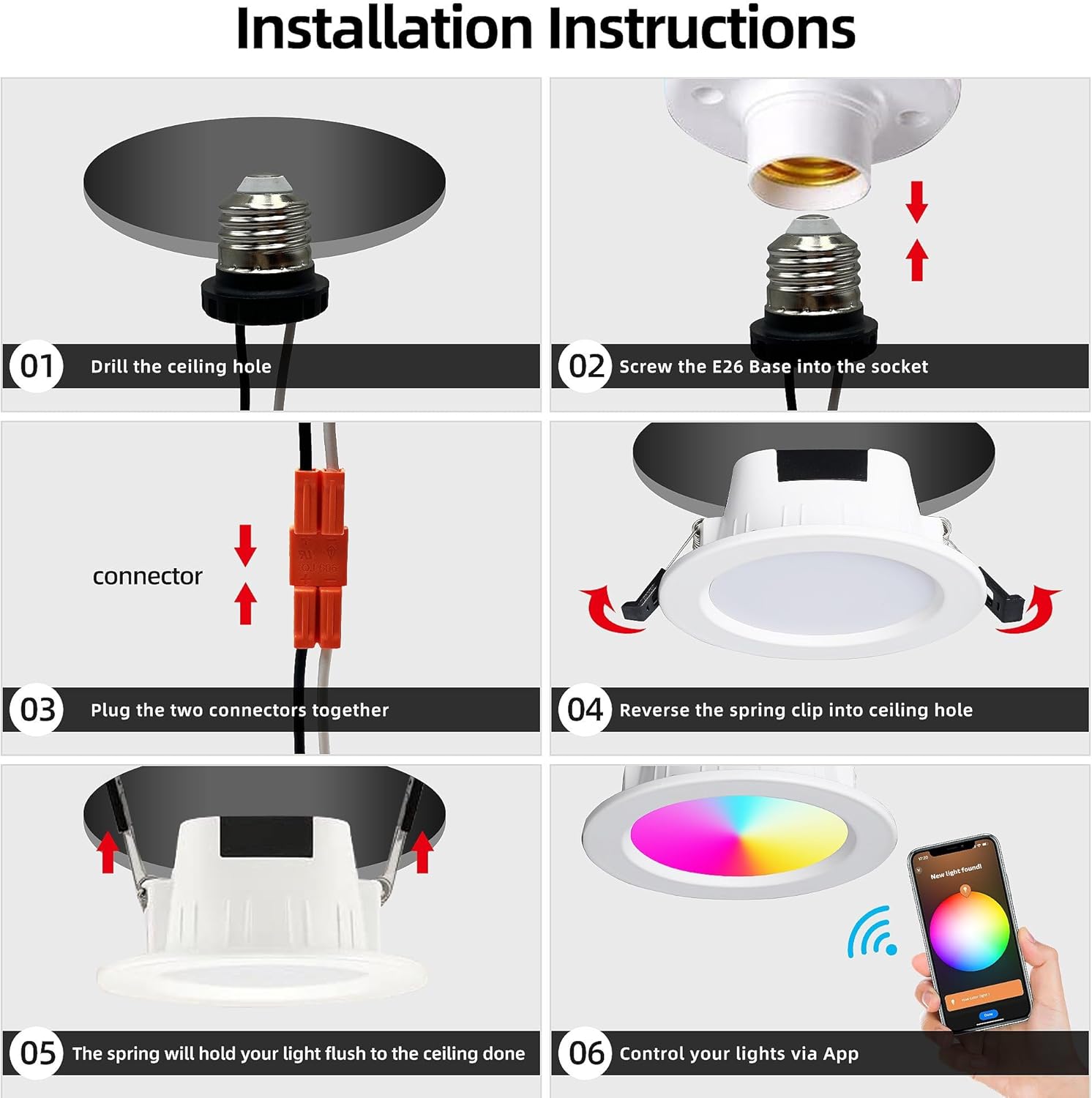
Image: Visual step-by-step guide illustrating the installation process, from drilling the hole to connecting wires and securing the downlight in the ceiling.
7. Operating Instructions
7.1 Smart APP Control
Once paired with your ZigBee hub, you can control your GIDERWEL downlights using the compatible smart home application (e.g., Philips Hue, SmartThings, Tuya Smart).
- On/Off: Toggle the light on or off directly from the app.
- Brightness Adjustment: Adjust the brightness from 1% to 100%.
- Color Temperature (CCT) Control: Select pure white light from warm white (3000K) to cool white (6000K).
- RGB Color Selection: Choose from 16 million colors to create various ambiances.
- Scene Modes: Create and activate personalized scene modes for different activities or moods.
- Group Control: Control multiple downlights simultaneously by grouping them in the app.

Image: Screenshot of a smartphone app interface demonstrating smart control, including color selection and compatibility with Amazon Alexa, iOS, Android, and Tuya Smart Hub.

Image: Visual representation of the downlight's ability to produce dimmable RGB, cool white, and warm white light, with a color temperature slider from 3000K to 6000K and brightness adjustment.
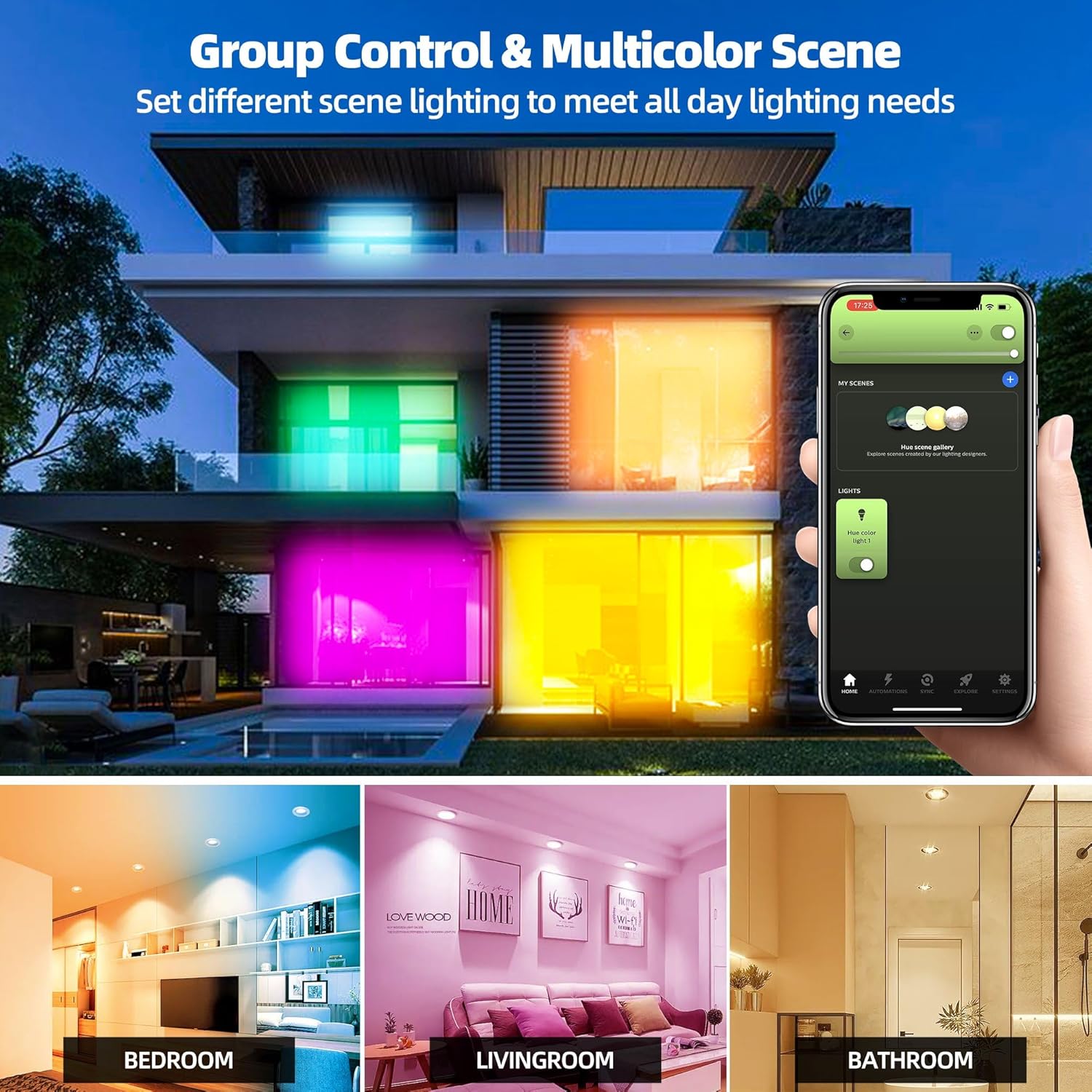
Image: Example of group control and multicolor scene settings in a smart home environment, showing different rooms illuminated with various colors.
7.2 Alexa Voice Control
If you have a compatible Amazon Echo device (Echo Plus, Echo Studio, Echo Show 2nd Gen), you can control your downlights using voice commands. Ensure your downlights are paired with your Echo device.
- Turn On/Off: "Alexa, turn on [light name]." / "Alexa, turn off [light name]."
- Adjust Brightness: "Alexa, dim [light name] to 50%." / "Alexa, brighten [light name]."
- Change Color: "Alexa, set [light name] to red." / "Alexa, change [light name] to warm white."

Image: A family interacting with an Amazon Echo device to control the lighting, demonstrating voice commands like "Alexa, set the light to warm white."
8. Maintenance
- Cleaning: Ensure the power is off before cleaning. Wipe the downlight with a soft, dry cloth. Do not use abrasive cleaners or solvents.
- No User-Serviceable Parts: The GIDERWEL ZigBee Smart Recessed LED Downlight contains no user-serviceable parts. Do not attempt to disassemble or repair the unit. This will void the warranty.
- Regular Checks: Periodically check for any loose connections or signs of damage. If any issues are observed, discontinue use and contact customer support.
9. Troubleshooting
| Problem | Possible Cause | Solution |
|---|---|---|
| Light does not turn on. | No power; loose connection; faulty unit. | Check circuit breaker. Ensure all connections are secure. Test with another working light if possible. |
| Cannot pair with ZigBee hub. | Hub not in pairing mode; light too far from hub; incompatible hub. | Ensure hub is in pairing mode. Move light closer to the hub. Verify hub compatibility (e.g., not Echo Dot). |
| Light flickers or buzzes. | Incompatible dimmer switch; electrical interference; faulty unit. | This product is dimmable via smart control, not necessarily traditional dimmer switches. Ensure no external dimmer is used. Check electrical wiring. If problem persists, contact support. |
| Light turns on automatically after power outage. | Default startup behavior. | Some smart home systems or apps may offer settings to adjust the startup behavior (e.g., turn off, last state). Check your specific app's settings. |
| Colors are not accurate or limited. | App settings; calibration issue. | Ensure the app is updated. Try recalibrating the light within the app if an option is available. |
10. Warranty and Support
GIDERWEL products are manufactured to high quality standards. For specific warranty details, please refer to the warranty card included with your purchase or visit the official GIDERWEL website.
If you encounter any issues or have questions regarding your GIDERWEL ZigBee Smart Recessed LED Downlight, please contact GIDERWEL customer support through the retailer where you purchased the product or via the contact information provided on the official GIDERWEL website.
Please have your model number (LM070) and purchase date available when contacting support.
