
BOSEAN T-Z01-pro
BOSEAN T-Z01-pro 8-in-1 Indoor Air Quality Monitor User Manual
Model: T-Z01-pro | Brand: BOSEAN
Introduction
This manual provides detailed instructions for the proper use and maintenance of your BOSEAN T-Z01-pro 8-in-1 Indoor Air Quality Monitor. This device is designed to detect various air quality parameters including Formaldehyde (HCHO), Volatile Organic Compounds (TVOC), Particulate Matter (PM2.5), Temperature, Humidity, Carbon Monoxide (CO), Carbon Dioxide (CO2), and overall Air Quality Index (AQI).
Please read this manual thoroughly before operating the device to ensure accurate readings and safe usage.

Image: BOSEAN T-Z01-pro Air Quality Monitor, front view with display showing various readings.
Package Contents
Upon opening the package, verify that all items are present:
- BOSEAN T-Z01-pro Air Quality Monitor
- Type-C Charging Cable
- User Manual (this document)
- Storage Box
- Warranty Card
- Certificate of Conformity

Image: Contents of the BOSEAN T-Z01-pro package, including the monitor, charging cable, and documentation.
Setup and First Use
- Initial Charging: Before first use, fully charge the device using the provided Type-C cable. Connect the cable to the device's Type-C interface and a compatible USB power source (e.g., computer USB port). A full charge typically takes 4-6 hours. The device has a 1500mAh rechargeable lithium battery, providing 6-8 hours of service time.
- Preheating: For optimal accuracy, allow the new device to charge and preheat for 24-48 hours before initial use.
- Ventilation for Accuracy: Before the first use or after long-term storage, place the monitor in a well-ventilated indoor environment for at least 1 hour to ensure data accuracy.
- Placement: Ensure the device is placed upright. The air circulation relies on the air inlet and outlet on the back. Do not obstruct the back of the machine or the air inlet. Avoid placing it in direct strong convective airflow.

Image: The BOSEAN T-Z01-pro Air Quality Monitor connected to a Type-C charging cable, illustrating the charging process.

Image: An overview of the BOSEAN T-Z01-pro Air Quality Monitor, labeling the power switch, Type-C interface, mute ON/OFF, support frame, vent, display screen, setting/select/confirm buttons, and return key.
Operating Instructions
Power On/Off
Press the power on/off button located on the side of the device to turn it on or off. A single button controls all basic operations.
Understanding the Display
The device features an LCD Digital Color Screen that displays real-time readings for various air quality parameters. The screen provides a clear overview of the environment quality and tracks individual gas mean values.

Image: A detailed breakdown of the BOSEAN T-Z01-pro display, showing indicators for speech state, battery capacity, temperature, humidity, HCHO concentration, PM2.5 concentration, TVOC concentration, CO concentration, CO2 concentration, and AQI level.
The Air Quality Index (AQI) is indicated by a color-coded system:
- Good (Green)
- Slight Pollution (Yellow)
- Moderately Pollution (Red)
- Severe Pollution (Purple)
Alarm Function
The monitor includes a color and sound alarm system. When pollutant levels exceed normal thresholds, the detector will sound an alarm, and the interface color will change to indicate the risk level.
Sensor Correction (Calibration)
The device supports sensor correction for certain parameters. To perform a correction:
- Select "Sensor Correction" from the settings menu.
- Press the "SET" button to enter the sensor correction interface. A prompt will appear.
- Follow the on-screen prompts, which typically instruct you to place the machine in clear air and wait for a specified period (e.g., 15 minutes). Ensure the air vent is not blocked.
- Press "SET" to start calibration.
- Once "CorrectionComplete" is displayed, the process is finished. Press the "Return" key to exit.

Image: Screenshot of the BOSEAN T-Z01-pro's sensor correction interface, showing instructions to place the device in clear air and initiate calibration.
Maintenance and Important Notes
- Sensor Sensitivity: The sensors within the device are highly sensitive to environmental factors. To prevent damage and ensure accurate readings, avoid using the device in environments with volatile substances such as perfume, alcohol, air fresheners, or other pungent odors. These substances can affect or damage the sensors.
- Indoor Use: When using the monitor indoors, it is recommended to close doors and windows to get a more accurate reading of the enclosed space.
- Charging Temperature: During charging, the device generates heat, which may cause temporary differences in temperature and humidity readings compared to the actual ambient conditions.
- Cleaning: Use a soft, dry cloth to clean the device. Do not use liquid cleaners or abrasive materials.

Image: The BOSEAN T-Z01-pro Air Quality Monitor displayed next to a glass of wine and an air freshener, with a red 'X' indicating that such items should be avoided near the sensor due to their volatile compounds.
Troubleshooting
| Problem | Possible Cause | Solution |
|---|---|---|
| Inaccurate readings (e.g., high TVOC/HCHO) | Presence of volatile chemicals (perfumes, cleaners, alcohol, air fresheners) or recent painting/new furniture. | Move the device to a well-ventilated area free from strong odors. Perform sensor correction if available for the specific parameter. Allow the device to stabilize for several hours. |
| Device not turning on or low battery life | Battery is depleted or charging issue. | Ensure the device is fully charged using the provided Type-C cable. Verify the charging cable and adapter are functional. Try charging from a different USB power source (e.g., a computer USB port). |
| Display is blank or frozen | Software glitch or low battery. | Attempt a hard reset by holding the power button for 10-15 seconds. If unresponsive, charge the device for several hours and try again. |
| Alarm sounds frequently without apparent reason | High pollutant levels, or sensor malfunction. | Ventilate the area. Check for sources of pollution. If the issue persists in a known clean environment, contact customer support. |
Specifications
| Parameter | Value |
|---|---|
| Model Number | T-Z01-pro |
| Detected Substances | HCHO, TVOC, PM2.5, Temperature, Humidity, CO, CO2, AQI |
| HCHO Measuring Range | 0-999 mg/m³ |
| TVOC Measuring Range | 0-9.999 mg/m³ |
| PM2.5 Measuring Range | 0-999 µg/m³ |
| Screen | 3.2 inch color LCD DISPLAY, 320*240 resolution |
| Working Temperature | 0-50°C |
| Working Humidity | ≤90% RH |
| Power Supply | 1500mAh Lithium Battery |
| Charging Interface | Type-C |
| Item Weight | Approximately 240g |
| Product Dimensions | 172 x 82 x 31 mm (7 x 4 x 17 cm) |
| Error Range (Formaldehyde) | ±10% |
| Error Range (TVOC) | ±10% |
| Error Range (Humidity) | ±10% RH |
| Error Range (Temperature) | ±2°C |
| Error Range (CO/CO2) | ±15% (Calculated values based on TVOC sensor) |
| Sensors Used | Semiconductor, Electrochemical, Temperature & Humidity, NDIR (for CO2 calculation) |

Image: A table detailing the technical specifications of the BOSEAN T-Z01-pro, including measuring ranges, screen type, power supply, and error ranges.
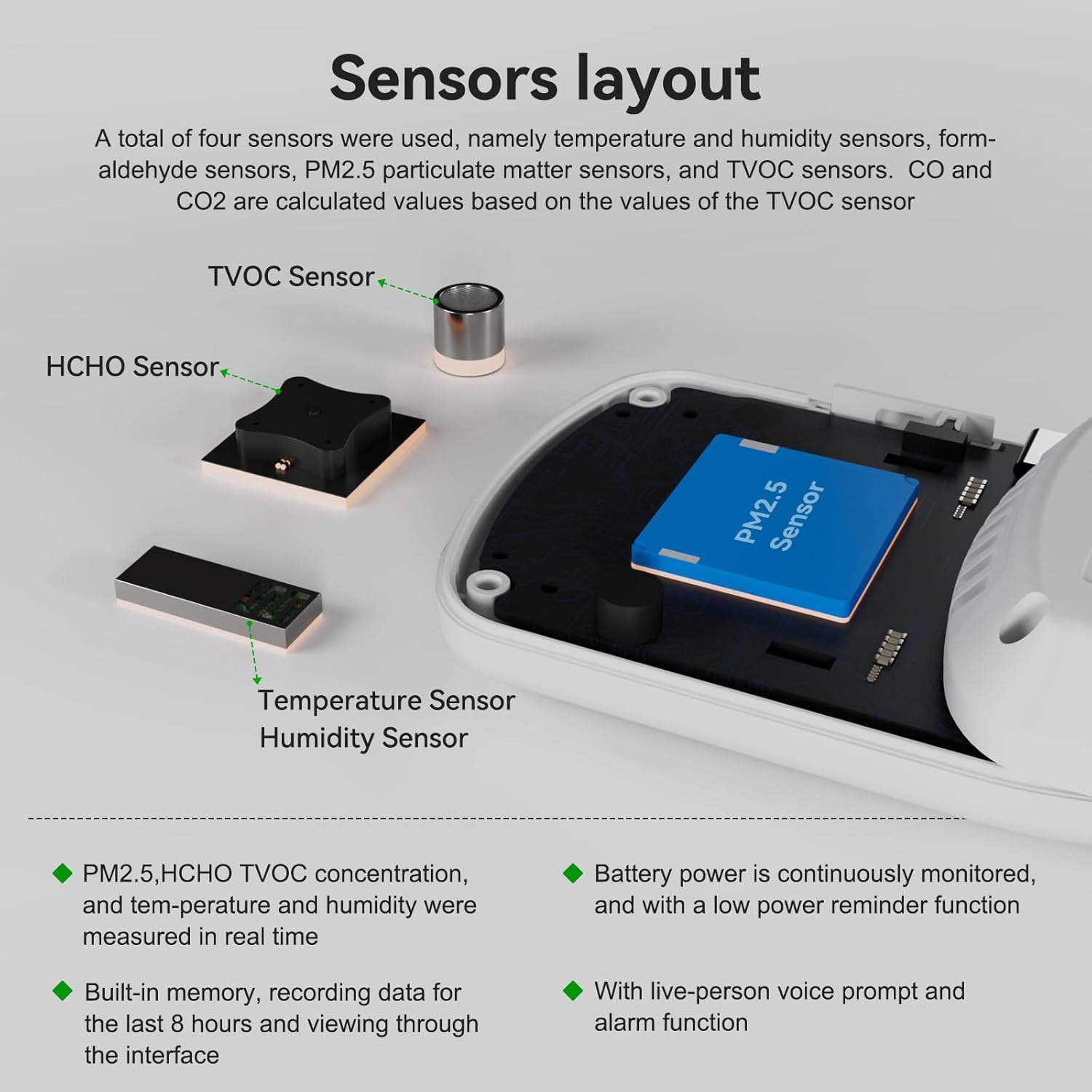
Image: An exploded view illustrating the internal layout of the BOSEAN T-Z01-pro sensors, including TVOC, HCHO, PM2.5, and Temperature/Humidity sensors.
Warranty and Support
The BOSEAN T-Z01-pro Air Quality Monitor comes with a warranty as specified by the manufacturer. Please refer to the included Warranty Card for specific terms and conditions.
For any quality problems, technical assistance, or support inquiries, please contact BOSEAN customer service. Contact information can typically be found on the product packaging, warranty card, or the official BOSEAN website.
Ask a question about this manual
Ask about setup, troubleshooting, compatibility, parts, safety, or missing instructions. Manuals+ will review the question and use this page’s manual context to help answer it.