
1. Introduction
Thank you for choosing the Lenovo Thinkplus LP3 Pro Wireless Bluetooth Earbuds. This manual provides essential information for setting up, operating, and maintaining your earbuds. Please read this guide carefully before use to ensure optimal performance and longevity of your device.
2. Product Overview
The Lenovo Thinkplus LP3 Pro earbuds are designed for high-quality audio and convenient wireless communication. They feature Bluetooth 5.2 for stable connectivity and low latency, making them suitable for both music and calls.
Key Features:
- Bluetooth 5.2: Ensures strong signal connection stability and low latency, compatible with both Apple and Android devices.
- High-Fidelity Audio: Equipped with a dual-vibration diaphragm and a large 10mm moving coil speaker for clear, deep triple bass sound.
- Noise Reduction: In-ear design provides an effective noise reduction effect.
- Clear Calls: Supports high-definition voice calls with both earbuds, featuring environmental noise reduction for clear communication.
- Touch Control: Intuitive touch controls allow you to manage music playback (previous/next track), adjust volume, answer calls, and activate your voice assistant.
Components:
- Left Earbud
- Right Earbud
- Charging Case
- USB Charging Cable (not explicitly listed but standard)
- User Manual (this document)

Figure 2.1: Lenovo Thinkplus LP3 Pro black earbuds in their charging case, highlighting the dual host feature for stable connection.

Figure 2.2: Lenovo Thinkplus LP3 Pro white earbuds in their charging case, showcasing the HiFi sound quality capabilities.
3. Setup
3.1 Charging the Earbuds and Case
Before first use, fully charge the earbuds and the charging case. The charging case has a battery capacity of 250mAh, and each earbud has a 35mAh battery. Earbuds typically charge in about 1 hour.
- Place the earbuds into the charging case. Ensure they are correctly seated to make contact with the charging pins.
- Connect the charging case to a power source using a compatible USB cable.
- The indicator lights on the charging case will show the charging status. Refer to the case for specific light patterns.
- Once fully charged, disconnect the charging cable.
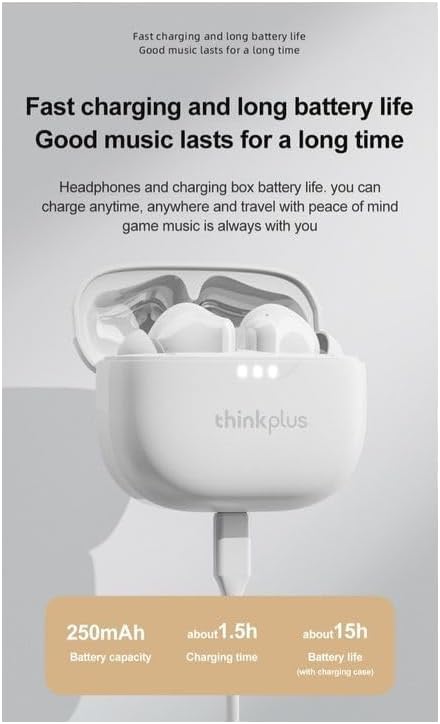
Figure 3.1: Lenovo Thinkplus LP3 Pro white earbuds in their charging case, illustrating the charging process and battery information.
3.2 Bluetooth Pairing
To connect your earbuds to a device:
- Ensure the earbuds are charged and placed in the charging case.
- Open the charging case. The earbuds will automatically enter pairing mode.
- On your device (smartphone, tablet, etc.), go to Bluetooth settings and turn Bluetooth on.
- Search for available devices. You should see "Lenovo LP3 Pro" or a similar name appear in the list.
- Select "Lenovo LP3 Pro" to connect. Once connected, you will hear a confirmation tone, and the earbuds will be ready for use.
- The earbuds have a transmission distance of up to 10 meters.
4. Operating Instructions
4.1 Basic Touch Controls
The Lenovo Thinkplus LP3 Pro earbuds feature touch-sensitive controls on each earbud. The specific functions may vary slightly depending on your device and application.
| Action | Function |
|---|---|
| Single Tap (Left/Right) | Play/Pause Music, Answer/End Call |
| Double Tap (Left) | Previous Track |
| Double Tap (Right) | Next Track |
| Long Press (Left) | Volume Down |
| Long Press (Right) | Volume Up |
| Triple Tap (Left/Right) | Activate Voice Assistant |
| Long Press (Incoming Call) | Reject Call |
4.2 Making and Receiving Calls
The earbuds support high-definition voice calls with environmental noise reduction.
- Answering a Call: Single tap either earbud.
- Ending a Call: Single tap either earbud during a call.
- Rejecting a Call: Long press either earbud when a call comes in.

Figure 4.1: Lenovo Thinkplus LP3 Pro white earbuds demonstrating enhanced call quality through AAC audio decoding and anti-interference technology.
4.3 Gaming Mode (Low Latency)
The LP3 Pro earbuds offer a low-latency mode, ideal for gaming, to ensure audio and video synchronization.
- Activating Gaming Mode: Refer to your device's settings or the earbud's specific touch control sequence (if available, not explicitly detailed in product description).
- This mode minimizes audio delay, providing a more immersive gaming experience.
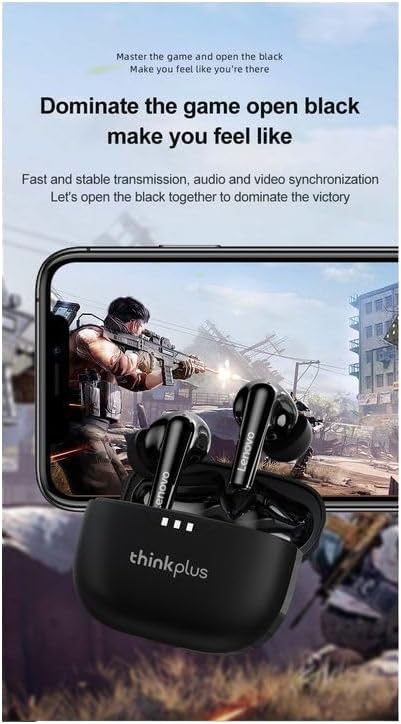
Figure 4.2: Lenovo Thinkplus LP3 Pro black earbuds shown with a gaming phone, emphasizing their low-latency performance for an immersive gaming experience.
5. Maintenance
Proper maintenance ensures the longevity and performance of your earbuds.
- Cleaning: Regularly clean the earbuds and charging case with a soft, dry, lint-free cloth. Do not use abrasive cleaners or solvents.
- Ear Tips: If removable, clean the ear tips with a damp cloth and mild soap, then dry thoroughly before reattaching.
- Charging Contacts: Ensure the charging contacts on both the earbuds and the case are clean and free of debris to maintain proper charging.
- Storage: Store the earbuds in their charging case when not in use to protect them from dust and damage.
- Avoid Water: The earbuds are not waterproof. Avoid exposure to water, moisture, or extreme temperatures.
6. Troubleshooting
If you encounter issues with your Lenovo Thinkplus LP3 Pro earbuds, try the following troubleshooting steps:
6.1 Pairing Issues
- Earbuds not pairing with device:
- Ensure both earbuds are charged.
- Turn off Bluetooth on your device and turn it back on.
- Forget/delete "Lenovo LP3 Pro" from your device's Bluetooth list and try pairing again.
- Place earbuds back in the case, close the lid, wait a few seconds, then open to re-enter pairing mode.
- Only one earbud working:
- Ensure both earbuds are charged.
- Place both earbuds back into the charging case, close the lid, and then open it again. This often re-syncs them.
- Try resetting the earbuds (refer to manufacturer's website for specific reset instructions if needed).
6.2 Sound Issues
- No sound or low volume:
- Check the volume level on both your device and the earbuds.
- Ensure the earbuds are properly seated in your ears.
- Clean any debris from the earbud speakers.
- Reconnect the earbuds to your device.
- Sound cutting in and out:
- Ensure you are within the 10-meter Bluetooth range of your device.
- Avoid obstacles between your device and earbuds that might interfere with the signal.
- Minimize interference from other wireless devices.
6.3 Charging Issues
- Earbuds/case not charging:
- Ensure the charging cable is securely connected to both the case and the power source.
- Try a different USB cable and power adapter.
- Clean the charging contacts on the earbuds and inside the case.
7. Specifications
| Feature | Specification |
|---|---|
| Model Name | Thinkplus LP3 Pro |
| Model Number | LPP3 |
| Brand | Lenovo |
| Connectivity Technology | Wireless (Bluetooth) |
| Bluetooth Version | V5.2 |
| Speaker Unit Size | 10mm |
| Earbud Battery Capacity | 35mAh (each) |
| Charging Case Battery Capacity | 250mAh |
| Earbud Usage Time | Approx. 4-5 hours |
| Earbud Charging Time | Approx. 1 hour |
| Transmission Distance | Up to 10 meters |
| Control Method | Touch, Voice |
| Form Factor | In-Ear |
| Color | White |
| Material | Plastic |
| Shipping Dimensions | 10.4 x 10 x 3.4 cm |
| Weight | 70 grams |
8. Safety Information
Please observe the following safety guidelines:
- Do not disassemble or modify the earbuds or charging case.
- Keep the device away from extreme temperatures, direct sunlight, and moisture.
- Avoid dropping or subjecting the device to strong impacts.
- Do not use the earbuds at high volume for extended periods to prevent hearing damage.
- Keep out of reach of children and pets.
- Dispose of the device responsibly according to local regulations.
9. Warranty and Support
For warranty information and technical support, please refer to the official Lenovo website or contact your local retailer. Keep your proof of purchase for any warranty claims.