Introduction
The Dexin KK-837B is a versatile 12-digit electronic calculator designed for a wide range of users, including students, office professionals, and home users. Its compact size and durable construction make it suitable for daily calculations. This manual provides detailed instructions on setting up, operating, maintaining, and troubleshooting your calculator to ensure optimal performance.
Product Overview
The Dexin KK-837B features a clear LCD display and a user-friendly keypad layout. Below are images illustrating the calculator's design and key components.

This image displays the primary view of the Dexin KK-837B electronic calculator. It highlights the large LCD screen at the top and the well-arranged 12-digit keypad below, including numerical keys, function keys, and memory keys. The "AUTO POWER OFF" indicator is visible on the left side of the display area.
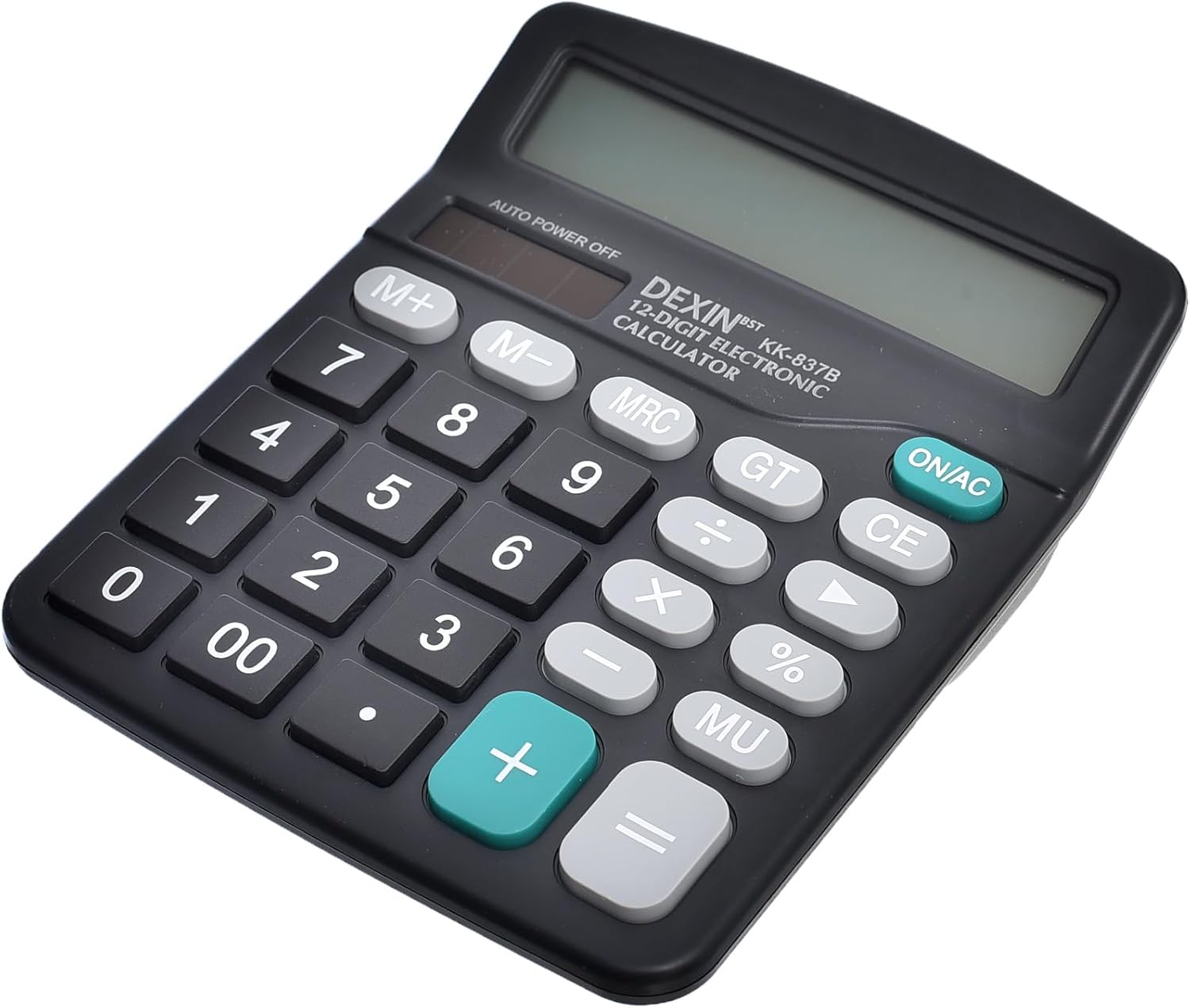
This image provides an angled perspective of the Dexin KK-837B calculator, emphasizing its sleek, compact design and slightly curved edges. This view helps illustrate the calculator's portability and comfortable grip, making it easy to handle for extended periods.

A detailed close-up shot of the Dexin KK-837B's LCD display and the upper section of its keypad. This view clearly shows the "DEXIN KK-837B 12-DIGIT ELECTRONIC CALCULATOR" branding, the "AUTO POWER OFF" label, and the distinct ON/AC, CE, GT, MRC, M+, and M- buttons, highlighting the clarity of the display and the tactile nature of the keys.
Setup
Power Source
The Dexin KK-837B calculator is battery-powered, ensuring portability and convenience. It also features a solar panel for extended battery life in well-lit environments.
Turning On/Off
- To turn on the calculator, press the ON/AC button. This button also clears all entries and resets the calculator to its initial state.
- The calculator features an Auto Power Off function to conserve battery life. It will automatically turn off after a period of inactivity.
Operating Instructions
Basic Arithmetic Operations
Perform standard calculations using the numerical keys and operation buttons:
- Addition (+): Enter the first number, press +, enter the second number, then press =.
- Subtraction (-): Enter the first number, press -, enter the second number, then press =.
- Multiplication (×): Enter the first number, press ×, enter the second number, then press =.
- Division (÷): Enter the first number, press ÷, enter the second number, then press =.
Memory Functions
- M+ (Memory Plus): Adds the displayed value to the memory.
- M- (Memory Minus): Subtracts the displayed value from the memory.
- MRC (Memory Recall/Clear):
- Press once to recall the value stored in memory.
- Press twice to clear the memory.
Other Functions
- CE (Clear Entry): Clears the last entered number or operation without affecting previous calculations or memory.
- GT (Grand Total): Displays the grand total of all calculations performed since the last ON/AC press.
- % (Percentage): Used for percentage calculations. For example, to calculate 10% of 200, enter 200 × 10 %, which will display 20.
- MU (Mark Up): Used for mark-up calculations.
Maintenance
- Cleaning: Use a soft, dry cloth to clean the calculator's surface. For stubborn dirt, slightly dampen the cloth with water. Avoid using harsh chemicals or abrasive cleaners.
- Storage: Store the calculator in a cool, dry place away from direct sunlight and extreme temperatures.
- Battery Replacement: While the calculator is solar-powered, it also uses a backup battery. If the display becomes dim or unresponsive in sufficient light, the battery may need replacement. Refer to the battery compartment on the back of the unit for specific battery type and replacement instructions (typically a button cell battery).
Troubleshooting
| Problem | Possible Cause | Solution |
|---|---|---|
| Display is blank or dim. | Insufficient light for solar panel, or low battery. | Move to a well-lit area. If problem persists, replace the battery. |
| Calculator does not respond to key presses. | Calculator is frozen or battery is completely drained. | Press ON/AC to reset. If still unresponsive, replace the battery. |
| Incorrect calculation results. | Incorrect input or previous calculation not cleared. | Press CE to clear the last entry or ON/AC to clear all and restart. Double-check your input. |
Specifications
| Feature | Detail |
|---|---|
| Brand | Dexin |
| Model Name | KK-837B |
| Model Number (Manufacturer Part Number) | 6221237572984 |
| ASIN | B0CM1NHDNQ |
| Calculator Type | Standard Function |
| Display Type | LCD |
| Number of Digits | 12 |
| Power Source | Battery Powered (with Solar Assist) |
| Color | Black |
| Item Weight | 150 grams |
| Package Dimensions | 20 x 10 x 5 cm |
| First Available Date | October 28, 2023 |
Warranty and Support
Specific warranty information for the Dexin KK-837B calculator is not provided in the product details. For any support inquiries, warranty claims, or technical assistance, please contact the retailer or the manufacturer directly. Keep your purchase receipt as proof of purchase.


