Introduction
This manual provides comprehensive instructions for the GENGQIANSI Replacement Remote Control, designed for use with various Pioneer Micro CD Receiver Systems. Please read this manual carefully before using the remote control to ensure proper operation and to maximize its functionality.
This remote control is a direct replacement and requires no programming. Simply insert batteries and it is ready for use with compatible Pioneer models including AXD7727, AXD7728, X-SMC00, X-SMC00-W, X-SMC00DAB, X-SMC00DAB-W, X-CM32BT-W, X-CM32BT-K, and X-CM32BT-R.

Image: The GENGQIANSI Replacement Remote Control shown alongside a Pioneer Micro CD Receiver System setup, with a family enjoying entertainment. A detailed view of the remote's buttons is also visible.
Setup
1. Battery Installation
- Locate the battery compartment on the back of the remote control.
- Slide the battery compartment cover downwards to open it.
- Insert two (2) AAA 1.5V batteries, ensuring the positive (+) and negative (-) terminals align correctly with the markings inside the compartment.
- Slide the battery compartment cover back into place until it clicks securely.

Image: Rear view of the remote control, highlighting the battery compartment for AAA batteries.
2. Initial Use
This replacement remote control is pre-programmed and does not require any setup or pairing with your Pioneer Micro CD Receiver System. Once batteries are installed, it is ready for immediate use.
3. Wall Mounting Bracket (Optional)
The remote control may include a wall mounting bracket for convenient storage. To use, attach the bracket to a desired surface using appropriate fasteners (not included). The remote can then be placed into the bracket when not in use.
Operating Instructions
Familiarize yourself with the buttons and their functions as described below. Point the remote control directly at the infrared sensor on your Pioneer Micro CD Receiver System for optimal performance.
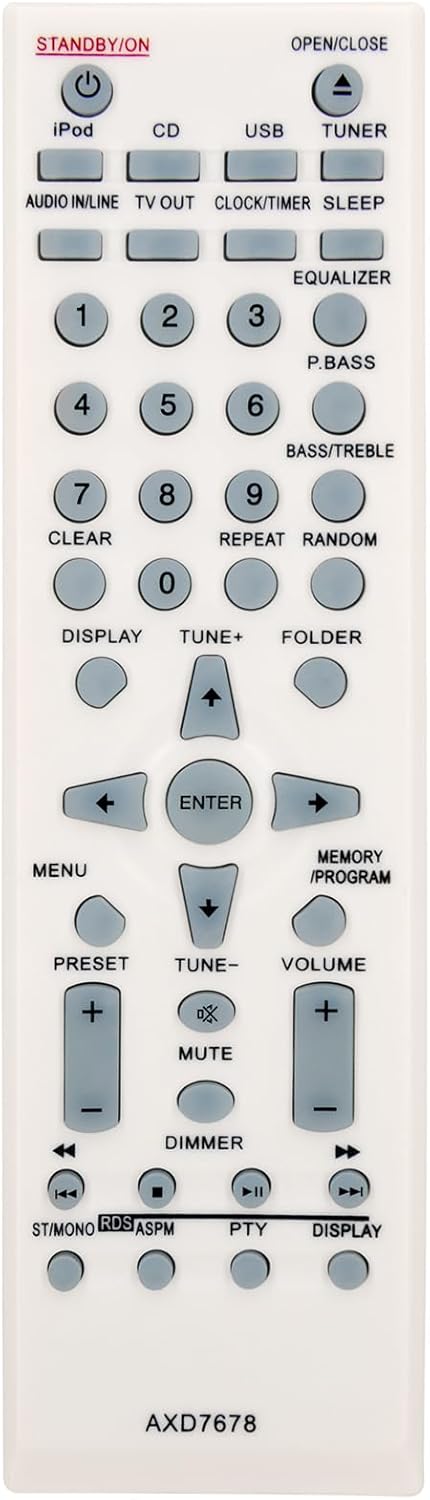
Image: Detailed front view of the remote control, displaying all buttons and their respective labels for easy identification.
Button Functions
| Button | Function |
|---|---|
| STANDBY/ON | Powers the system on or off (standby mode). |
| iPod | Selects the iPod input source. |
| CD | Selects the CD input source. |
| USB | Selects the USB input source. |
| TUNER | Selects the Tuner (radio) input source. |
| OPEN/CLOSE | Opens or closes the CD tray. |
| AUDIO IN/LINE | Selects the Audio In/Line input source. |
| TV OUT | Controls TV output functions (if applicable to your system). |
| CLOCK/TIMER | Accesses clock and timer settings. |
| SLEEP | Sets the sleep timer. |
| EQUALIZER | Adjusts equalizer settings. |
| P.BASS | Activates or deactivates P.BASS (Powerful Bass) function. |
| 1-9, 0 | Numeric keypad for direct track selection, radio station input, etc. |
| BASS/TREBLE | Adjusts bass and treble levels. |
| CLEAR | Clears current input or selection. |
| REPEAT | Repeats playback (e.g., single track, all tracks). |
| RANDOM | Enables random playback (shuffle). |
| DISPLAY | Changes display information on the system. |
| TUNE+ / TUNE- | Tunes radio frequencies up or down. |
| FOLDER | Navigates through folders on USB or other media. |
| MENU | Accesses the system's main menu. |
| Navigation Arrows (Up, Down, Left, Right) | Navigates through menus and selections. |
| ENTER | Confirms a selection or enters a menu item. |
| PRESET + / - | Selects preset radio stations. |
| MEMORY / PROGRAM | Stores radio station presets or programs CD playback order. |
| VOLUME + / - | Increases or decreases the system volume. |
| MUTE | Mutes or unmutes the audio output. |
| DIMMER | Adjusts the brightness of the system's display. |
| Playback Controls (Rewind, Play/Pause, Fast Forward, Stop, Skip Back, Skip Forward) | Controls media playback (e.g., CD, USB, iPod). |
| ST/MONO | Switches between stereo and mono reception for radio. |
| RDS/ASPM | Activates RDS (Radio Data System) or ASPM (Automatic Station Preset Memory) functions. |
| PTY | Selects program type for RDS radio. |
| DISPLAY (bottom) | Additional display function, potentially cycling through different information modes. |
Maintenance
Battery Replacement
Replace batteries when the remote control's range decreases or if it becomes unresponsive. Always replace both batteries simultaneously with new AAA 1.5V batteries. Do not mix old and new batteries, or different types of batteries.
Cleaning
Wipe the remote control with a soft, dry cloth. Do not use abrasive cleaners, solvents, or chemical sprays, as these can damage the surface or internal components.
Storage
If the remote control will not be used for an extended period, remove the batteries to prevent leakage and potential damage.
Troubleshooting
| Problem | Possible Cause | Solution |
|---|---|---|
| Remote not responding. | Dead or incorrectly inserted batteries. Obstruction between remote and system. Remote out of range. | Replace batteries, ensuring correct polarity. Remove any obstructions. Move closer to the system. |
| Short operating range. | Weak batteries. | Replace batteries with new ones. |
| Intermittent operation. | Loose battery connection. Interference. | Check battery compartment for secure fit. Ensure no strong light sources (e.g., direct sunlight, fluorescent lights) are interfering with the IR signal. |
| Specific button not working. | Button malfunction or system incompatibility for that specific function. | Ensure the function is supported by your Pioneer system. If other buttons work, the specific button might be faulty. |
Specifications
- Model: AXD7678
- Brand: GENGQIANSI
- Compatible Systems: Pioneer AXD7727, AXD7728, X-SMC00, X-SMC00-W, X-SMC00DAB, X-SMC00DAB-W, X-CM32BT-W, X-CM32BT-K, X-CM32BT-R Micro CD Receiver Systems
- Power Source: 2 x AAA 1.5V Batteries (not included)
- Dimensions: Approximately 5 x 2 x 1 inches (12.7 x 5.08 x 2.54 cm)
- Weight: Approximately 1.06 ounces (30 grams) (without batteries)
- Material: ABS Plastic
Warranty and Support
This product comes with a standard manufacturer's warranty. For specific warranty details, please refer to the product packaging or contact your retailer. For technical support or inquiries, please contact GENGQIANSI customer service through your purchase platform.