
1. Introduction
This manual provides detailed instructions for the safe and correct installation and operation of your GRIFEMA GB1007-6 TV Wall Bracket. Please read this manual thoroughly before installation and retain it for future reference. This bracket is designed to securely mount flat and curved screen televisions ranging from 37 to 82 inches, with a maximum weight capacity of 60 kg (132 lbs) and VESA compatibility from 100x100mm to 600x400mm.

Figure 1: The GRIFEMA GB1007-6 TV Wall Bracket, designed for secure mounting of televisions.
2. Safety Information
WARNING: Failure to read and follow these instructions may result in personal injury, property damage, or voiding of your warranty.
- Ensure the mounting surface can safely support the combined weight of the bracket and the television.
- Do not mount this product on plaster wall, cavity wall, or soft wall surfaces. Only install on solid concrete, concrete block, or brick walls.
- Always use appropriate safety equipment, such as safety glasses, during installation.
- If you are unsure about any part of the installation process, consult a qualified professional.
- Do not exceed the maximum weight capacity of 60 kg (132 lbs).
- Ensure all screws are securely tightened before releasing the TV.
3. Package Contents
Verify that all components are present and undamaged before beginning installation. If any parts are missing or damaged, contact GRIFEMA customer support.

Figure 2: An overview of all components included in the package, such as the wall plate, TV brackets, various screws, anchors, washers, and a spirit level for installation.
- Wall Plate (x1)
- TV Brackets (x2)
- Mounting Hardware Kit (screws, anchors, washers, spacers)
- Spirit Level (x1)
- Hex Key (x1)
- Instruction Manual (this document)
4. Specifications
| Feature | Specification |
|---|---|
| Model Number | GB1007-6 |
| Screen Size Compatibility | 37 - 82 inches |
| Maximum Weight Capacity | 60 kg (132 lbs) |
| VESA Compatibility (Min-Max) | 100x100mm - 600x400mm |
| Tilt Angle | +2° to -12° |
| Distance from Wall | 3.5 cm (1.38 inches) |
| Material | High Quality Alloy Steel |
| Product Dimensions | 25.31 x 16.46 x 1.38 inches |
| Item Weight | 4.27 pounds |

Figure 3: Visual representation of the bracket's compatibility with 37-82 inch screens, its 60kg (132 lbs) capacity, and VESA range from 100x100mm to 600x400mm.
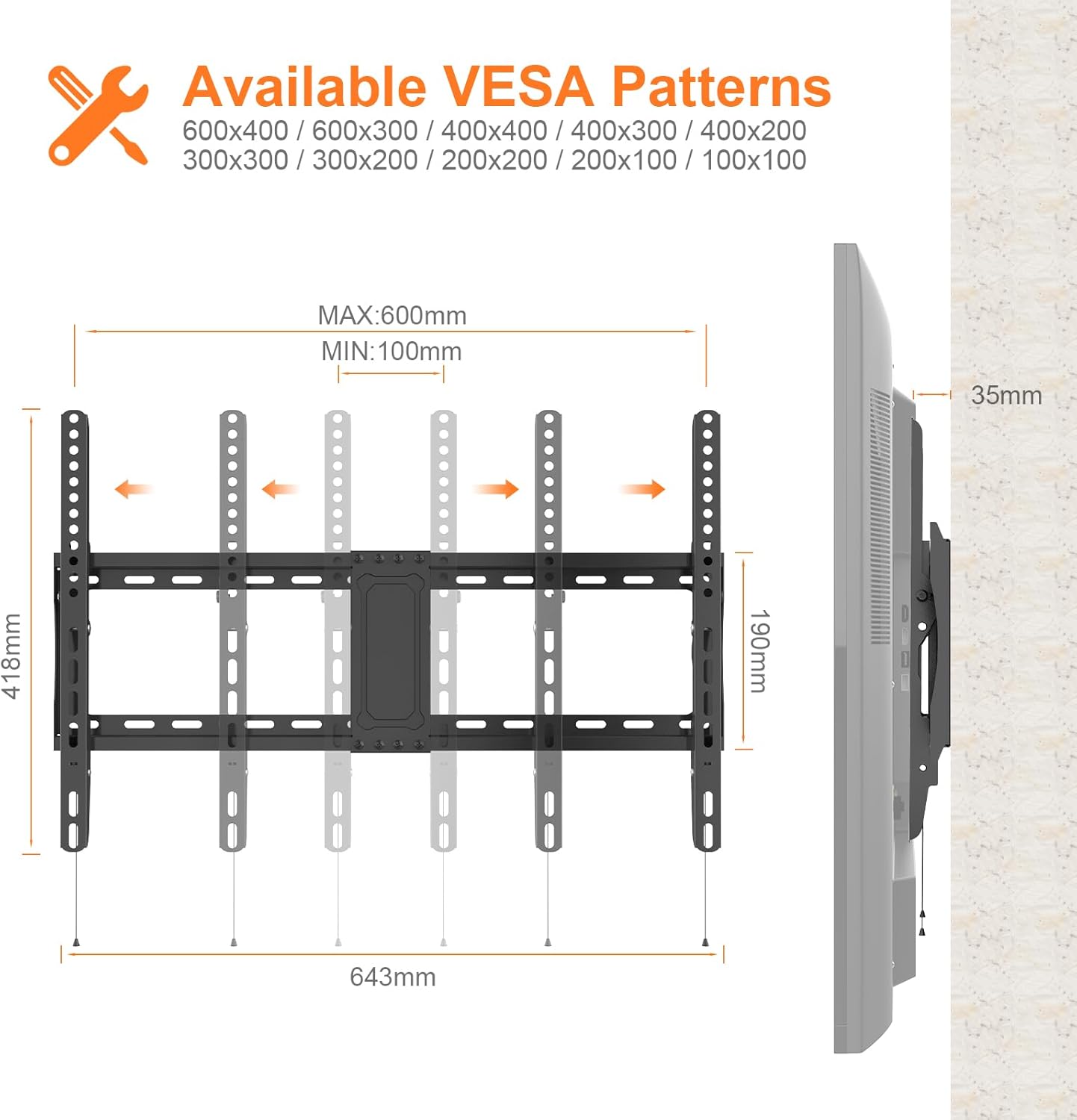
Figure 4: Diagram illustrating available VESA patterns (100x100mm to 600x400mm) and the bracket's overall dimensions, including its 35mm slim profile from the wall.
5. Setup (Installation)
5.1 Pre-Installation Checklist
- Wall Type: Ensure your wall is solid concrete, concrete block, or brick. DO NOT install on plaster, cavity, or soft walls.
- TV Weight: Confirm your TV's weight does not exceed 60 kg (132 lbs).
- VESA Pattern: Check your TV's VESA mounting pattern (distance between mounting holes on the back of the TV) is between 100x100mm and 600x400mm.
- Tools Required (not included): Drill, stud finder (if applicable), pencil, measuring tape, screwdriver.
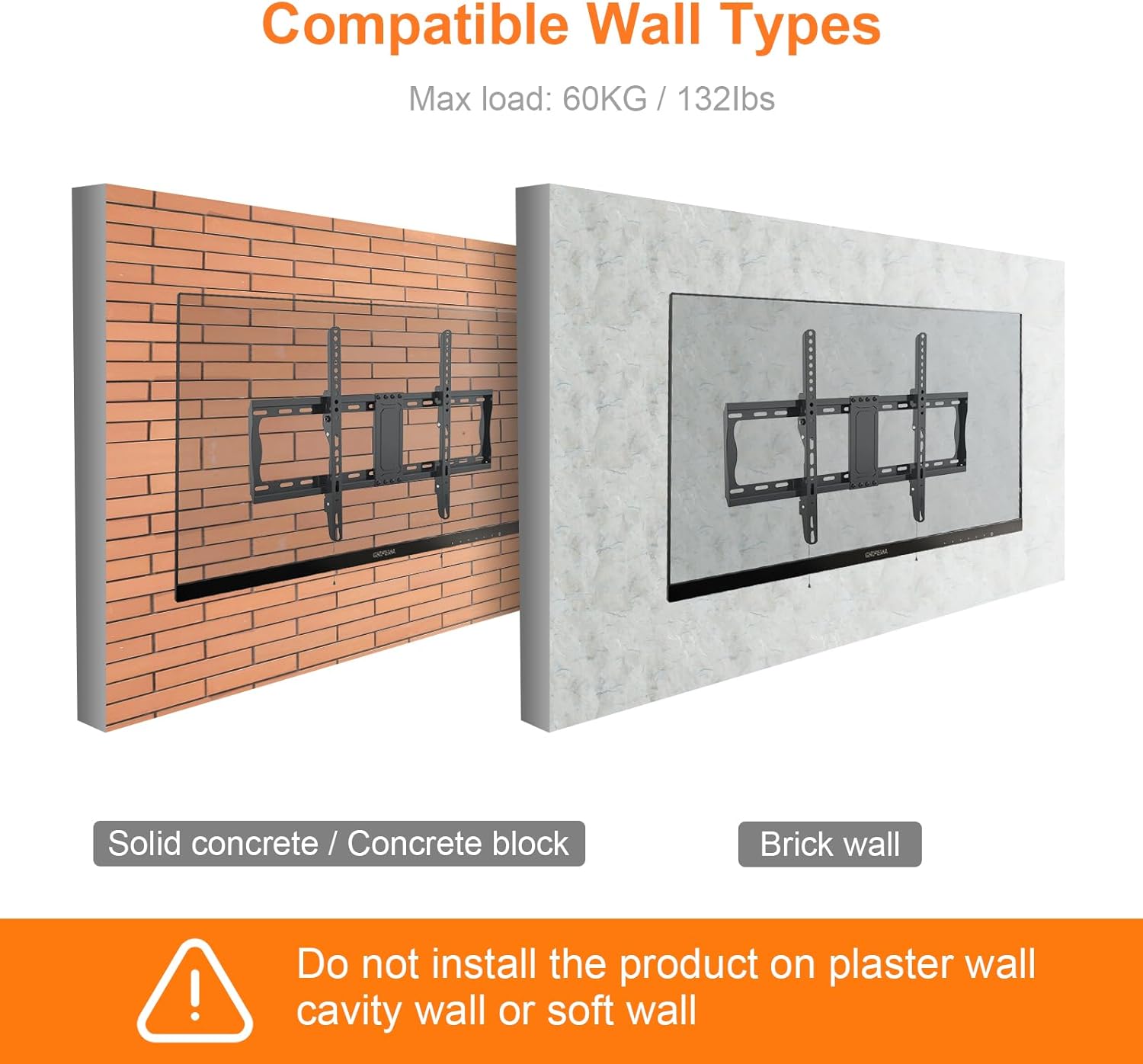
Figure 5: Illustrates suitable wall types for installation: solid concrete, concrete block, and brick wall. Includes a warning against plaster, cavity, or soft walls.
5.2 Step-by-Step Installation
- Attach TV Brackets to TV: Secure the two TV brackets to the back of your television using the appropriate screws, washers, and spacers from the hardware kit. Ensure the brackets are centered and level.
- Mark Wall Drilling Points: Hold the wall plate against the wall at your desired TV height and position. Use the included spirit level to ensure it is perfectly horizontal. Mark the drilling points through the holes on the wall plate with a pencil.
- Drill Holes: Drill pilot holes at the marked locations. The drill bit size will depend on your wall type and the anchors provided. Insert the wall anchors into the drilled holes.
- Mount Wall Plate: Align the wall plate with the drilled holes and secure it to the wall using the provided screws. Tighten all screws firmly.
- Hang TV: Carefully lift the television (with the TV brackets attached) and hook the TV brackets onto the wall plate. Ensure the TV is securely seated on the wall plate.
- Secure TV: The bracket features a locking mechanism. Pull the release cords downwards to unlock, then push the TV against the wall plate to engage the lock. Release the cords to secure the TV in place. This mechanism prevents accidental dislodging.
6. Operating
6.1 Adjusting Tilt Angle
The GRIFEMA GB1007-6 bracket allows for vertical tilt adjustment to optimize your viewing experience and reduce glare. The tilt range is +2° upwards to -12° downwards.
- To adjust the tilt, gently push or pull the bottom of the television to achieve the desired angle.
- The bracket is designed to hold the tilt position once set.
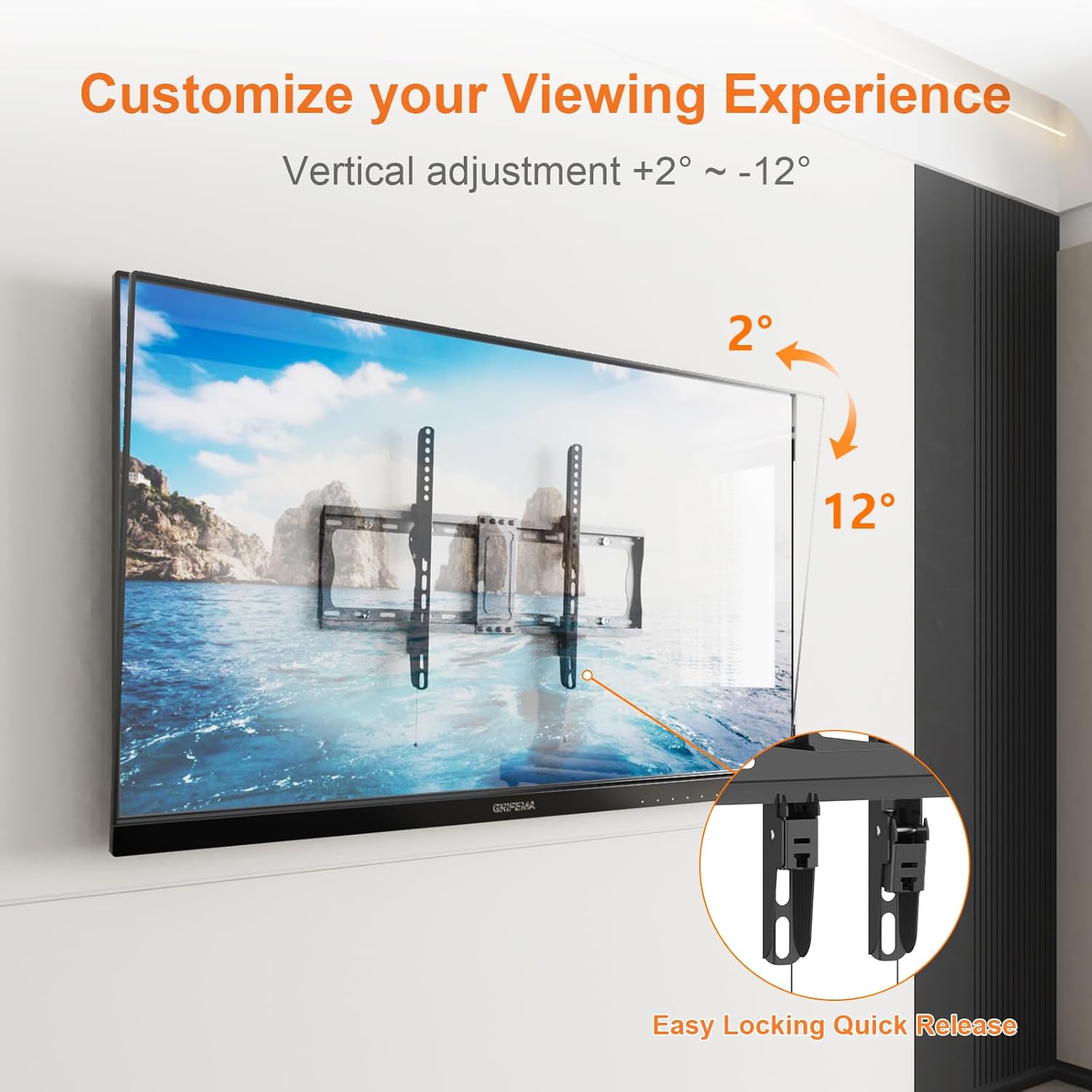
Figure 6: Image demonstrating the vertical tilt adjustment range of +2° to -12° and the easy locking quick release mechanism for the TV.
6.2 Removing the TV from the Wall
To remove the TV from the wall bracket:
- Locate the two pull cords hanging from the bottom of the TV brackets.
- Pull both cords downwards simultaneously to disengage the locking mechanism.
- Carefully lift the TV off the wall plate. It is recommended to have assistance when removing the TV.
7. Maintenance
- Periodically check all screws and connections to ensure they remain tight and secure.
- Clean the bracket with a soft, dry cloth. Avoid using abrasive cleaners or solvents.
- Do not hang additional items on the TV or the bracket.
8. Troubleshooting
8.1 TV is not level after installation.
- Ensure the wall plate was installed perfectly level using a spirit level. If not, minor adjustments may be possible by slightly loosening and re-tightening the TV bracket screws on the TV, or by re-leveling the wall plate.
8.2 TV feels unstable on the wall.
- Verify that all wall plate screws are securely fastened into the wall anchors.
- Confirm that the TV brackets are fully engaged with the wall plate's locking mechanism. The pull cords should be retracted.
- Recheck that your wall type is suitable for installation (solid concrete, concrete block, or brick).
8.3 Cannot adjust the tilt.
- Ensure no cables are obstructing the movement of the TV.
- Apply gentle, even pressure to the top or bottom of the TV to initiate the tilt.
9. Warranty and Support
For warranty information and customer support, please refer to the documentation provided at the point of purchase or contact GRIFEMA directly through their official website or customer service channels. Please have your model number (GB1007-6) and purchase details ready when contacting support.