
1. Product Overview
The Allesin Motorized Roller Blinds offer a smart and convenient solution for window coverings. Featuring a 100% blackout, triple-layer fabric, these blinds provide UV protection, thermal insulation, and enhanced privacy. The battery-powered motor ensures quiet operation and long-lasting performance.

Image 1.1: Allesin Motorized Roller Blind (Smoky Gray).

Image 1.2: Fabric composition and blackout capabilities.
2. Safety Information
This product is designed with safety in mind. The cord-free design eliminates strangulation risks, making it suitable for environments with children and pets.
- Ensure all mounting hardware is securely fastened to prevent the blinds from falling.
- Keep the remote control out of reach of small children to prevent unintended operation.
- Do not attempt to disassemble or repair the motor system yourself. Contact support if issues arise.

Image 2.1: Cord-free design for child and pet safety.
3. Setup and Installation
3.1 Measuring for the Perfect Fit
Accurate measurements are crucial for proper installation and function. Consider whether you will use an inside mount or an outside mount.
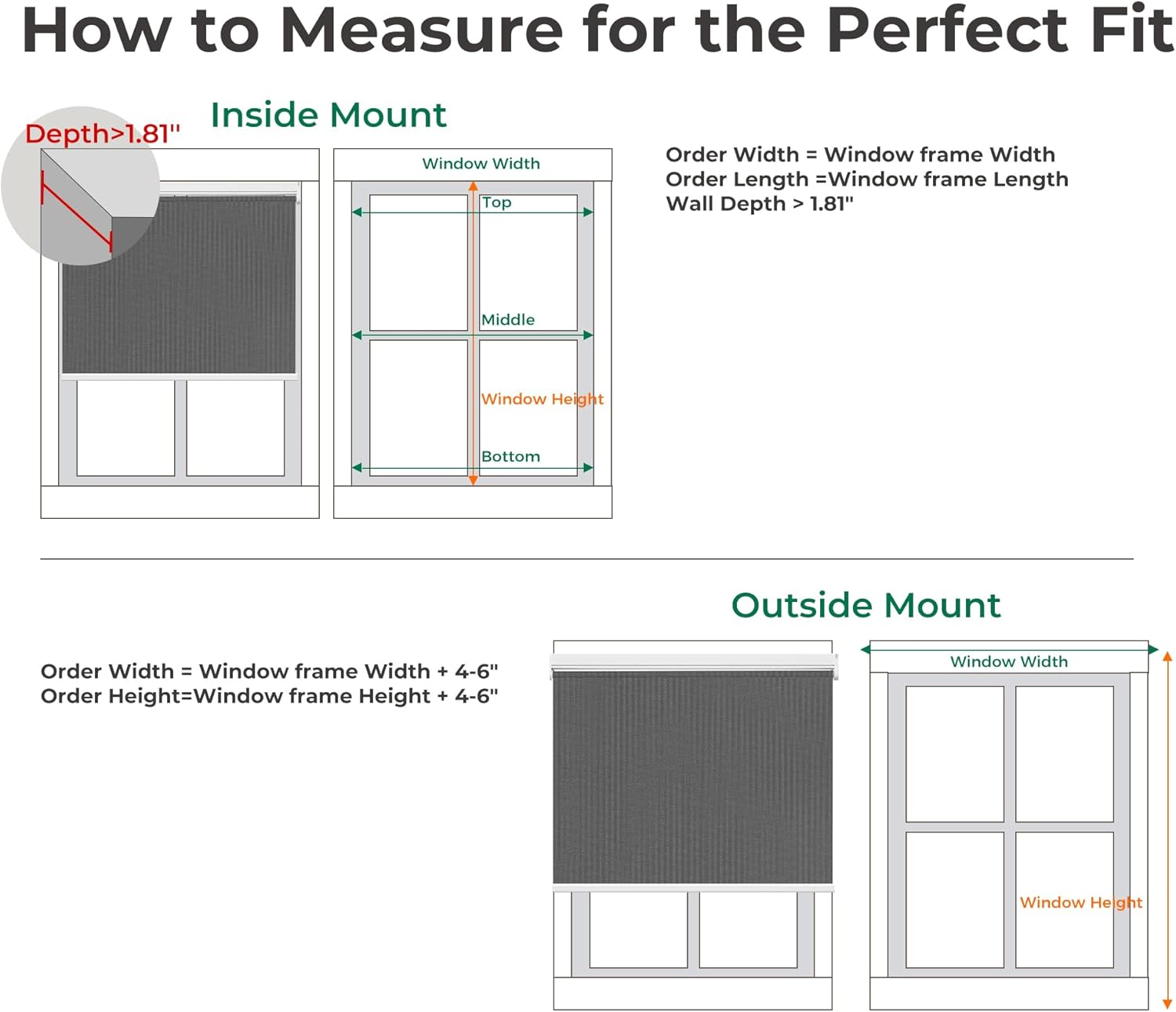
Image 3.1: Measurement guide for inside and outside mounts.
Inside Mount:
- Window frames require a minimum depth of 2 inches.
- Blind width should be 0 to 0.2 inches less than the window width.
- For 100% blackout, an outside mount is recommended to minimize light gaps.
Outside Mount:
- Shades should extend 4 to 6 inches wider than the window frame for optimal coverage.
- Shades should extend 4 to 6 inches taller than the window frame for optimal coverage.
3.2 Secure Installation Steps
Follow these steps for a secure installation of your roller blinds.

Image 3.2: 3-Step Secure Installation.
- Step 1: Secure the mounting brackets with screws into the window frame or wall.
- Step 2: Align the roller blind with the secured brackets and snap it firmly into place.
- Step 3: Gently pull down the shade to ensure it is properly seated and operates smoothly.
3.3 Battery Installation and Replacement
The blinds are powered by 6 AA dry batteries (included), offering 3-6 months of use. The M100 motor system is designed for easy battery replacement.

Image 3.3: Easy Battery Replacement Guide.
- Roll up the blinds completely and lay them flat on a stable surface.
- Unscrew the screw on the left side of the motor with a screwdriver. Be careful not to pull hard to prevent the power cord connector from loosening.
- According to the battery box tips, correctly install 6 AA dry batteries.
- Install the battery box back into the beam, tighten the screws, and re-install the blinds.
4. Operating Instructions
Your Allesin Motorized Roller Blinds can be controlled via remote, app, or voice commands.
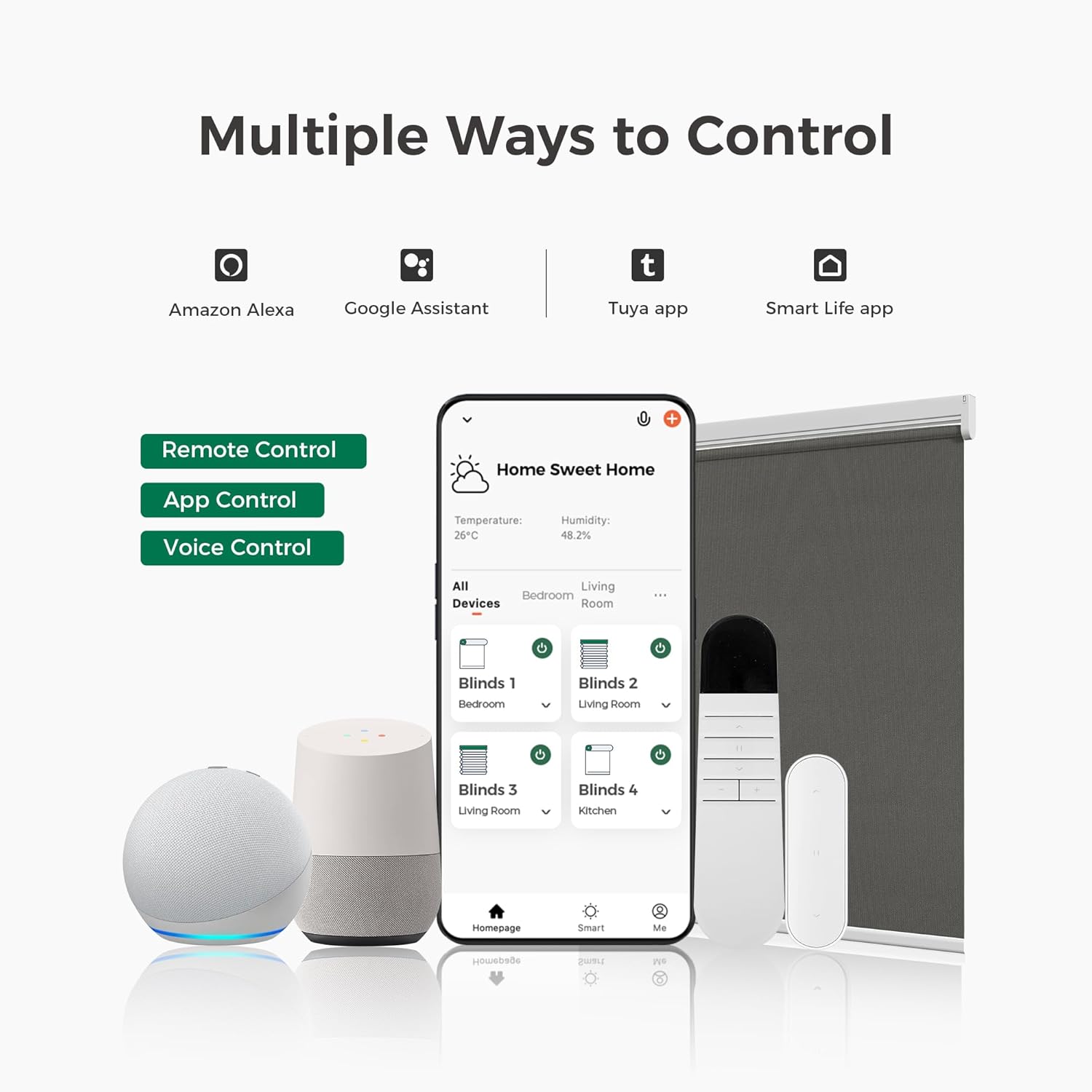
Image 4.1: Multiple control options for the blinds.
4.1 Remote Control
The included single-channel remote allows for easy adjustment of your blinds.
- Use the up arrow button to raise the blind.
- Use the down arrow button to lower the blind.
- The stop button will halt the blind at its current position.
An optional 15-channel remote (B0BVD2GRPD) is available for managing multiple blinds simultaneously.

Image 4.2: Remote control options.
4.2 App & Voice Control (Optional Accessories)
For smart functionality, HUB accessories are required.
- USB Converter (B0BVDSX6B3): Provides basic connectivity for single-device control via mobile app or Alexa.
- Smart Bridge (B0CC22FQX6): Supports seamless control of up to 30 window coverings simultaneously through the app, Alexa, or Google Assistant for whole-home automation.

Image 4.3: App and Voice Control functionality.
5. Maintenance
Proper maintenance ensures the longevity and optimal performance of your Allesin Motorized Roller Blinds.
5.1 Cleaning
- Spot Clean Only: Use a soft, damp cloth with mild soap to gently clean any soiled areas on the fabric. Do not machine wash or submerge the blinds in water.
- Avoid harsh chemicals or abrasive cleaners, as these can damage the fabric and motor components.
5.2 Battery Care
- The motor is designed for energy efficiency, providing approximately 3-6 months of use on 6 AA dry batteries.
- Replace all batteries simultaneously when they run low to ensure consistent power. Refer to Section 3.3 for battery replacement instructions.
- If the blinds will not be used for an extended period, it is recommended to remove the batteries to prevent leakage.
6. Troubleshooting
If you encounter issues with your Allesin Motorized Roller Blinds, please refer to the following common troubleshooting tips:
- Blinds not responding to remote: Check if the remote control batteries are depleted. Ensure the remote is within range and pointed towards the blinds.
- Blinds not moving: Verify that the main batteries in the blind's motor are correctly installed and not depleted. Replace if necessary.
- Uneven movement: Ensure the blinds are installed level. If the issue persists, contact customer support.
- App/Voice control issues: Confirm that your optional HUB accessories (USB Converter or Smart Bridge) are properly connected and configured. Check your Wi-Fi connection and app settings.
For further assistance, please contact Allesin customer support.
7. Specifications
| Feature | Detail |
|---|---|
| Brand | Allesin |
| Model Number | 43c32614-a1ca-4b98-bec0-729430da95fb |
| Color | Smoky Gray |
| Size | 27"W x 72"H |
| Material | Polyester |
| Opacity | 100% Blackout |
| Operation Mode | Automatic (Motorized) |
| Control Type | Motorized (Remote, App, Voice with accessories) |
| Power Source | 6 AA Dry Batteries (included) |
| Special Feature | Fade Resistant, Energy-Saving & Quiet Motor |
| Product Care | Spot Clean Only |
| Item Weight | 3.43 pounds |
| Mounting Type | Inside Mount (recommended) |
8. Warranty and Support
For any product inquiries, technical support, or warranty claims, please contact the Allesin US Store directly through your purchase platform or visit the official Allesin website for contact information.
Please retain your proof of purchase for warranty purposes.


