
1. Introduction
The QFX VP-110 is a versatile digital multimedia player designed for home entertainment. It supports DVD and CD playback, features an HDMI output for high-definition video, and includes functionalities such as CD ripping to USB and an integrated FM radio tuner. This manual provides essential information for setting up, operating, and maintaining your device.
2. Package Contents
Please check the package for the following items:
- QFX VP-110 DVD/CD Player
- Remote Control (requires 2x AAA batteries, not included)
- Power Cable
- User Manual
3. Product Overview
Familiarize yourself with the main components of your QFX VP-110 player.
3.1 Front Panel and Remote Control
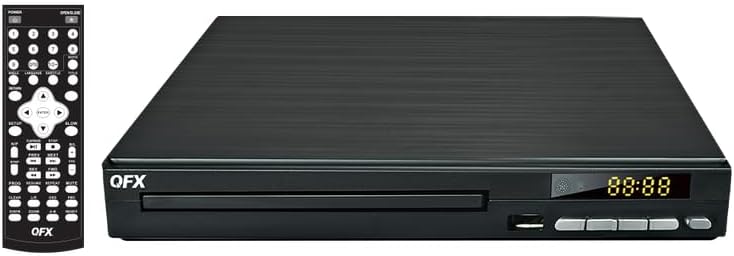
Image 1: Front view of the QFX VP-110 DVD/CD Player alongside its remote control. The player features a disc tray, display, and control buttons. The remote control provides comprehensive functions for playback, menu navigation, and settings.

Image 2: An angled perspective of the QFX VP-110 DVD/CD Player, highlighting its compact design and front panel layout including the disc tray and display.
3.2 Rear Panel Connections

Image 3: The rear panel of the QFX VP-110 DVD/CD Player, displaying the HDMI output, composite video output, stereo audio outputs (RCA), and the AC power input. These ports are used for connecting the player to a television or audio system.
4. Setup
Follow these steps to connect your DVD/CD player to your television and power source.
4.1 Connecting to a Television
- HDMI Connection (Recommended): Connect one end of an HDMI cable (not included) to the HD OUT port on the rear of the player and the other end to an HDMI input on your television. Select the corresponding HDMI input on your TV.
- Composite Video Connection: If your TV does not have an HDMI input, connect a composite video cable (yellow RCA) to the VIDEO output on the player and the corresponding video input on your TV. Connect the red and white RCA audio cables to the R (right) and L (left) audio outputs on the player and the corresponding audio inputs on your TV.
4.2 Power Connection
- Plug the power cable into the AC IN port on the rear of the player.
- Plug the other end of the power cable into a standard electrical outlet.
4.3 Remote Control Battery Installation
Open the battery compartment on the back of the remote control and insert two AAA batteries, ensuring correct polarity (+/-). Close the compartment securely.
5. Operating Instructions
5.1 Disc Playback (DVD/CD)
- Turn on your television and the QFX VP-110 player. Select the correct input source on your TV.
- Press the OPEN/CLOSE button on the player or remote control to open the disc tray.
- Place a DVD or CD disc gently onto the disc tray with the label side facing up.
- Press the OPEN/CLOSE button again to close the disc tray. The player will automatically begin playback or display a disc menu.
- Use the remote control's navigation buttons (Up, Down, Left, Right) and ENTER button to navigate menus. Use PLAY/PAUSE, STOP, FF (Fast Forward), and REW (Rewind) for playback control.
5.2 CD Ripping to USB
The player allows you to convert audio tracks from a CD into MP3 files and save them to a USB drive.
- Insert an audio CD into the disc tray.
- Insert a USB flash drive into the USB port on the front of the player.
- During CD playback, press the RIP button on the remote control (if available) or navigate through the on-screen menu to find the ripping function.
- Follow the on-screen prompts to select tracks and start the ripping process.
5.3 FM Radio Operation
- Press the MODE or FUNCTION button on the remote control to switch to FM radio mode.
- Use the TUNE+ and TUNE- buttons to manually tune to a station, or press SCAN to automatically search and save available stations.
- Adjust the volume using the VOL+ and VOL- buttons.
6. Maintenance
Proper care ensures the longevity and optimal performance of your player.
- Cleaning the Unit: Wipe the exterior of the player with a soft, dry cloth. Do not use liquid cleaners or abrasive materials.
- Cleaning Discs: Use a soft, lint-free cloth to wipe discs from the center outwards. Avoid touching the playback surface.
- Ventilation: Ensure the player has adequate ventilation. Do not block ventilation openings.
- Storage: Store the player in a cool, dry place away from direct sunlight and extreme temperatures.
7. Troubleshooting
If you encounter issues, refer to the following common problems and solutions.
| Problem | Possible Cause | Solution |
|---|---|---|
| No power | Power cable not connected; Power outlet faulty | Ensure power cable is securely connected. Try a different outlet. |
| No picture on TV | Incorrect TV input selected; Loose HDMI/AV cable | Select the correct HDMI or AV input on your TV. Check cable connections. |
| No sound | TV/player volume too low; Audio cables loose | Increase volume on TV and player. Check audio cable connections. |
| Disc not playing | Disc is dirty, scratched, or incompatible format | Clean the disc. Try a different disc. Ensure disc format is supported (DVD+/-R, DVD+/-RW, CD, CD-R, CD-RW). |
| Remote control not working | Batteries depleted or incorrectly inserted; Obstruction between remote and player | Replace batteries. Ensure correct polarity. Remove any obstructions. |
8. Specifications
- Model: VP-110
- Media Type Support: DVD+/-R, DVD+/-RW, CD, CD-R, CD-RW
- Connectivity: HDMI, Composite Video (RCA), Stereo Audio (RCA), USB
- Video Output: Progressive Scan, Full HD 1080p (via HDMI)
- Additional Features: CD Ripping to USB, FM Radio
- Power Supply: AC 110V-240V~ 50/60Hz
- Item Weight: Approximately 1.94 pounds (0.88 kg)
- Dimensions (approx.): 9.96 x 9.8 x 2.87 inches (25.3 x 24.9 x 7.3 cm)
9. Warranty and Support
For warranty information and technical support, please refer to the warranty card included with your product or visit the official QFX website. Keep your purchase receipt as proof of purchase for any warranty claims.
10. Product in Use
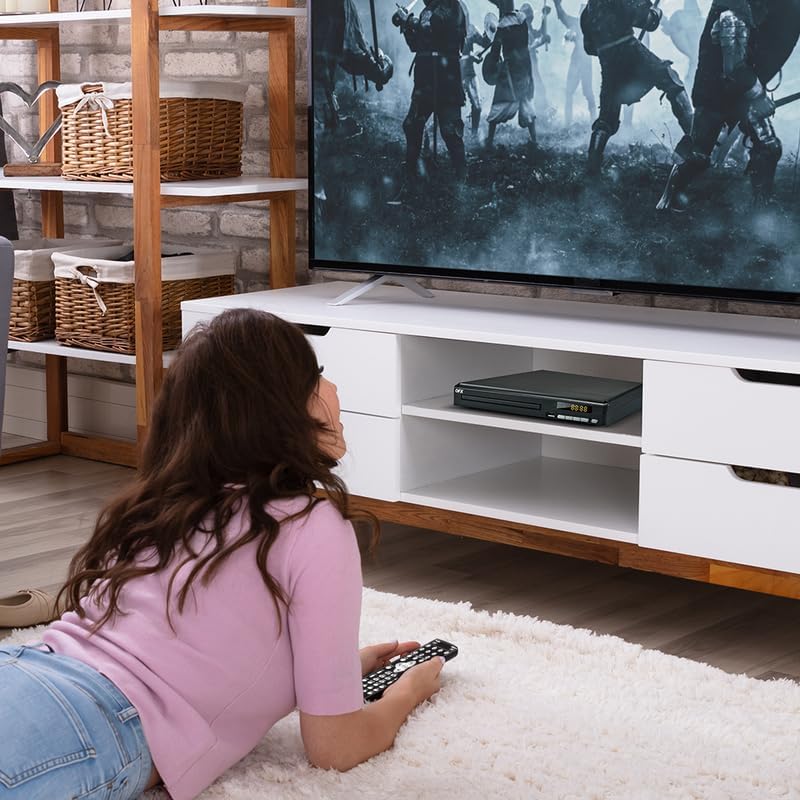
Image 4: The QFX VP-110 DVD/CD Player integrated into a home entertainment setup, positioned on a TV stand beneath a television. This illustrates a typical placement for the device in a living room environment.


