
KleenZi ANS-8050

KleenZi Spin Scrubber Electric 8-in-1 Cleaning Brush
User Manual
Introduction
Thank you for choosing the KleenZi Spin Scrubber Electric 8-in-1 Cleaning Brush. This versatile and powerful cordless cleaning tool is designed to simplify your cleaning tasks across various surfaces in your home and car. With its adjustable handle, dual-speed settings, and eight interchangeable brush heads, it provides an efficient and effortless cleaning experience. Please read this manual thoroughly before first use to ensure safe and optimal operation of your new spin scrubber.
Safety Information
To prevent injury or damage, always observe the following safety precautions:
- Read all instructions before using the appliance.
- Keep the appliance out of reach of children and pets.
- Do not immerse the entire handle, which houses the motor, in water. The brush head is IPX7 waterproof, but the main unit should not be fully submerged.
- Use only the provided charging cable.
- Do not operate the scrubber if it is damaged or malfunctioning.
- Avoid applying excessive pressure, as this may cause the motor to stop or reduce its lifespan.
- Ensure the brush head is securely attached before operation.
- Do not use on delicate surfaces that may be scratched by abrasive brush heads. Test on an inconspicuous area first.
Package Contents
Verify that all items are present in your package:
- 1 x Electric Spin Scrubber (Main Handle)
- 1 x Extension Handle
- 8 x Replaceable Brush Heads
- 1 x Charging Line (Type-C)
- 2 x Product Manuals (including this one)
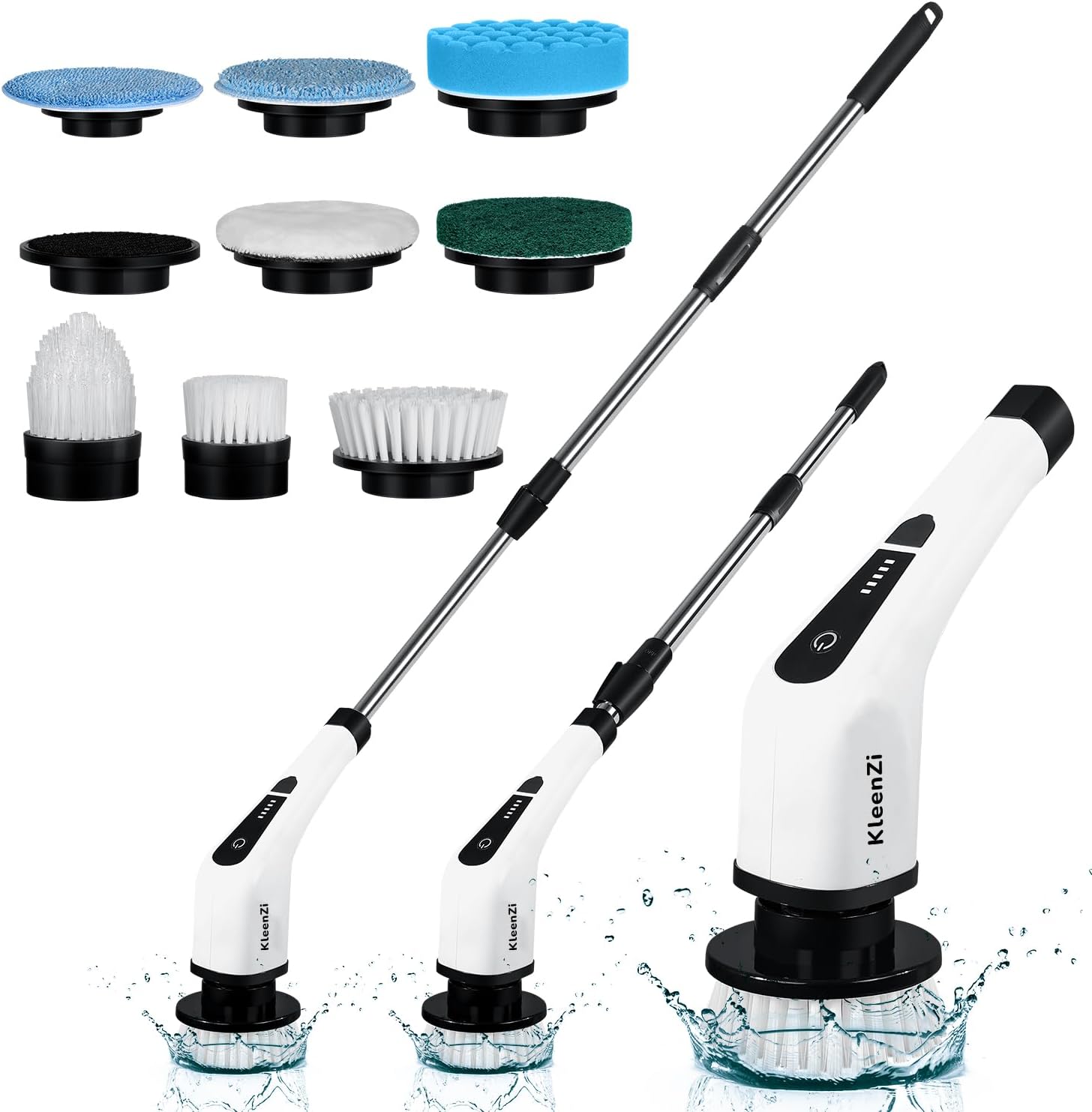
Image: The KleenZi Spin Scrubber with its main handle, extension handle, and all eight interchangeable brush heads.
Product Overview
The KleenZi Spin Scrubber is designed for maximum cleaning efficiency and user comfort. Key features include:
- 8-in-1 Interchangeable Brush Heads: A variety of brushes for different cleaning needs, from large flat surfaces to tight corners.
- Cordless Design: Freedom of movement without being tethered to an outlet.
- Adjustable Extension Handle: Extends from 12 inches to 54 inches for reaching high or low areas without bending or straining.
- Dual Speed Levels: Choose between 250 RPM (low speed) for delicate surfaces and 350 RPM (high speed) for tougher stains.
- IPX7 Waterproof Protection: The brush head is designed to withstand immersion in water, making it safe for wet cleaning environments.
- Powerful Battery: 5000mAh capacity providing up to 90 minutes of working time on a single charge.
- Battery Level Display: Real-time power monitoring for convenient use.

Image: Illustration showing the KleenZi Spin Scrubber in its cordless 12-inch configuration, and with the extendable handle at 43.3 inches and 54 inches, highlighting its versatility.

Image: A visual guide to the eight interchangeable brush heads, including large flat brush, small flat brush, corner brush, wool cloth, polishing cloth, rough cloth, scouring brush, and sponge brush, each suited for different cleaning tasks.
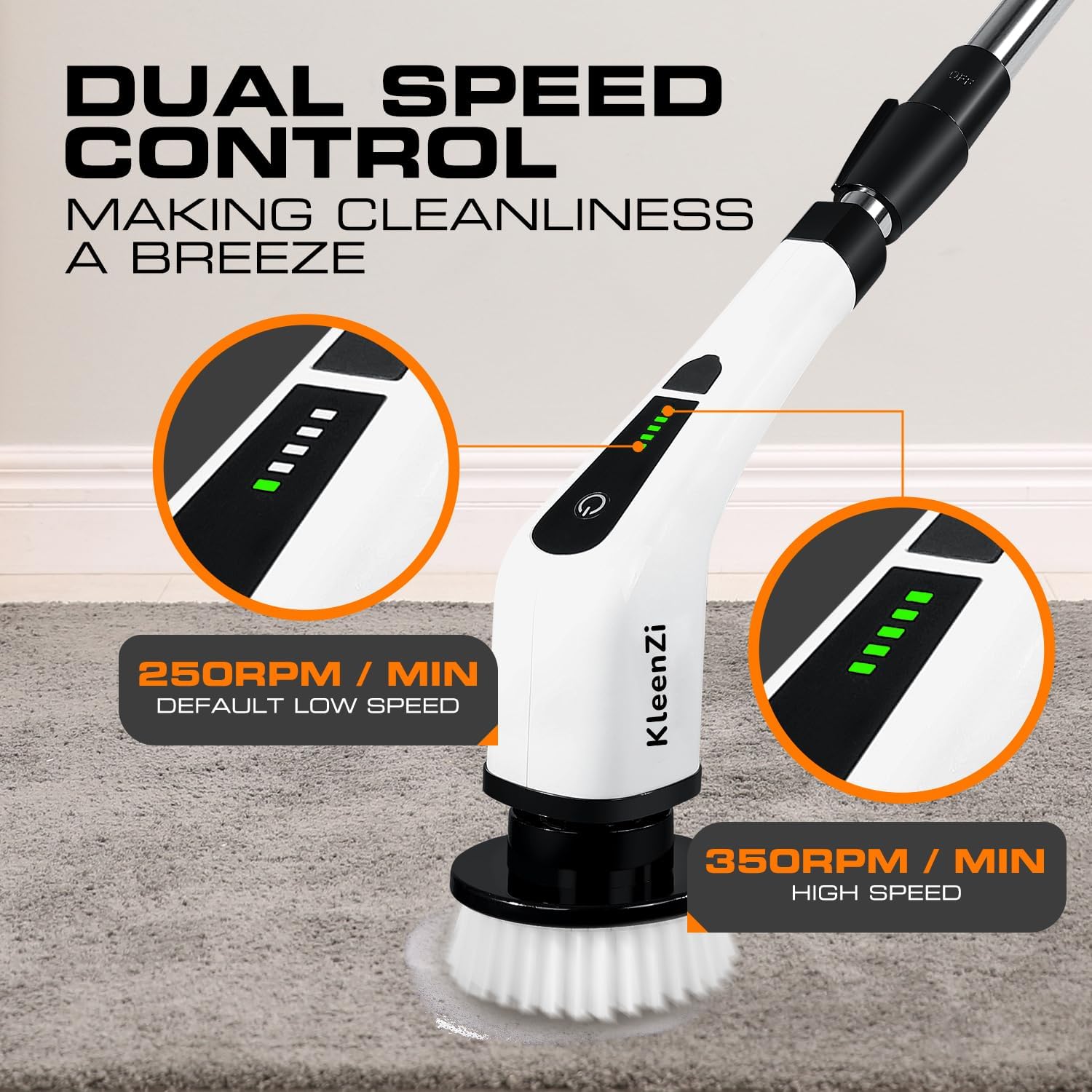
Image: Diagram illustrating the dual speed control feature, showing the default low speed of 250 RPM and the high speed of 350 RPM, with corresponding battery indicator lights.
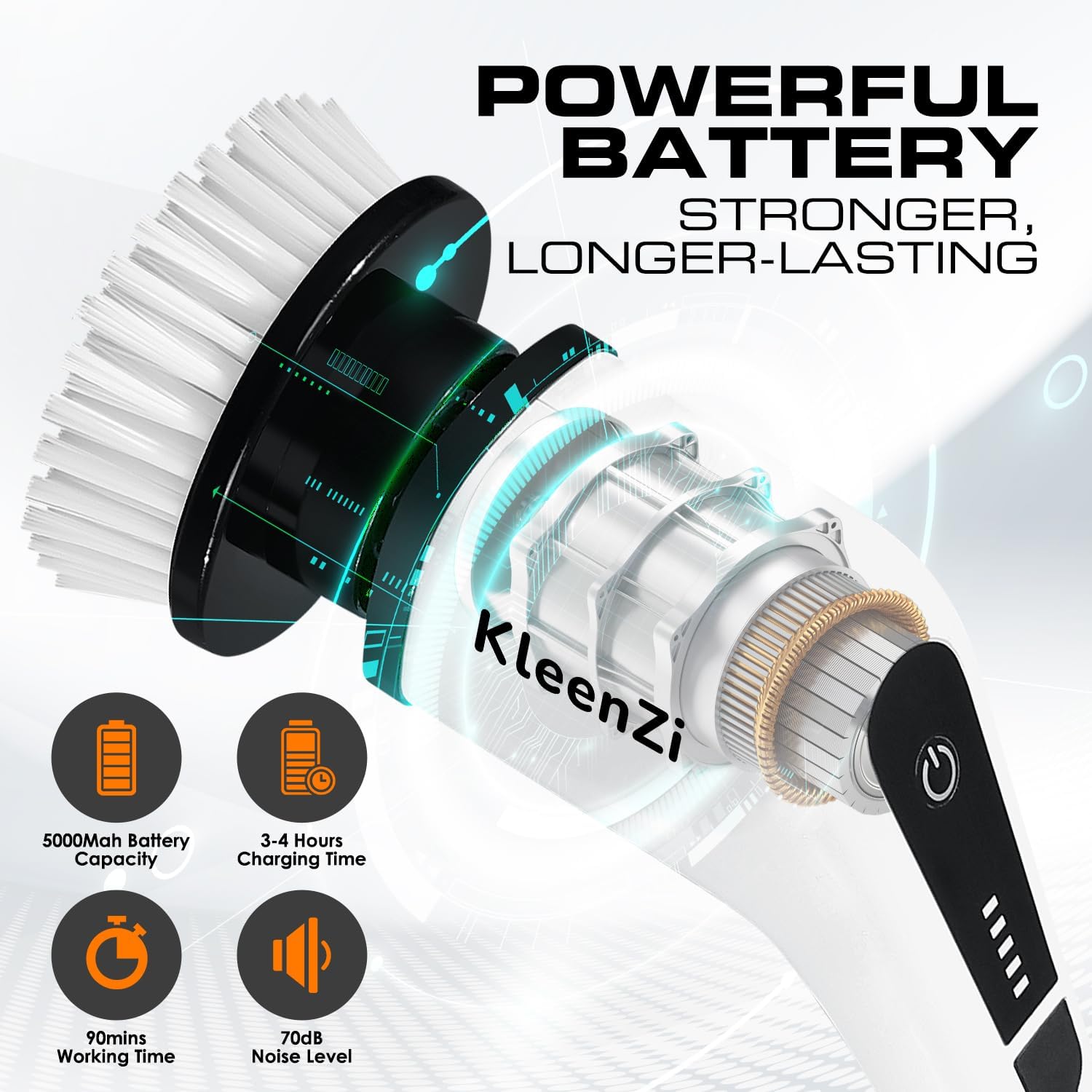
Image: Infographic detailing the powerful battery, showing 5000mAh capacity, 3-4 hours charging time, 90 minutes working time, and 70dB noise level.

Image: A close-up of the KleenZi Spin Scrubber's brush head submerged in water, demonstrating its IPX7 waterproof protection and ease of operation.
Setup
- Assembly:
- For handheld use, simply use the main handle.
- For extended reach, connect the extension handle to the main handle. Ensure it clicks securely into place. The handle can be adjusted from 12 inches (cordless) to 54 inches (fully extended).
- Attaching Brush Heads:
- Align the desired brush head with the rotating shaft on the scrubber.
- Push firmly until it clicks into place.
- To remove, pull the brush head off the shaft. Some brush heads may require a firm pull.
- Initial Charging:
- Before first use, fully charge the scrubber for 3-4 hours.
- Connect the Type-C charging cable to the charging port on the handle and plug the other end into a suitable USB power adapter (not included).
- The battery indicator lights will show charging progress. All lights will be solid when fully charged.
Operating Instructions
- Power On/Off: Press the power button on the handle to turn the scrubber on. Press again to turn it off.
- Changing Speeds: The scrubber has two speed modes. The default is low speed (250 RPM). Press the power button once to switch to high speed (350 RPM). Press again to cycle back to low speed.
- Selecting the Right Brush Head: Choose the appropriate brush head for the surface and type of cleaning required:
- Large Flat Brush: Ideal for floors, pools, carpets, and large tile areas.
- Small Flat Brush: Suitable for stoves, sinks, and smaller flat surfaces.
- Corner Brush: Designed for counters, corners, and wheel hubs.
- Wool Cloth: Gentle cleaning for furniture, car seats, and leather.
- Polishing Cloth: For polishing cars, kitchen ventilators, and gas cookers.
- Rough Cloth: Effective for windows and wood floors.
- Scouring Brush: For sinks, car surfaces, and kitchenware.
- Sponge Brush: Good for stoves, car surfaces, and general kitchenware cleaning.
- Cleaning Process:
- Apply appropriate cleaning solution to the surface or directly to the brush head.
- Turn on the scrubber and select the desired speed.
- Gently guide the rotating brush over the surface to be cleaned. Avoid pressing down too hard, as this can slow down the motor.
- For hard-to-reach areas, utilize the adjustable extension handle.


Image: The KleenZi Spin Scrubber being used to clean a sink and a car wheel, demonstrating its versatility for various surfaces.
Maintenance and Care
- Cleaning the Brush Heads: After each use, remove the brush head and rinse it thoroughly under running water. For stubborn residue, use a mild soap. Allow to air dry completely before storing.
- Cleaning the Main Unit: Wipe the main handle and extension handle with a damp cloth. Do not use abrasive cleaners or immerse the main unit in water.
- Battery Care: To prolong battery life, avoid fully discharging the battery frequently. Recharge the unit when the battery indicator shows low power. If storing for a long period, charge the battery every 3 months.
- Storage: Store the scrubber and its accessories in a cool, dry place away from direct sunlight and extreme temperatures.
Troubleshooting
| Problem | Possible Cause | Solution |
|---|---|---|
| Scrubber does not turn on. | Battery is depleted. | Charge the scrubber fully (3-4 hours). |
| Brush head stops spinning or spins weakly. | Low battery; Excessive pressure applied; Brush head obstructed. | Recharge the battery; Reduce pressure during cleaning; Check for and remove any obstructions around the brush head. |
| Unit not charging. | Charging cable or adapter faulty; Loose connection. | Ensure the charging cable is securely connected to both the scrubber and the power adapter. Try a different USB power adapter or cable if available. |
| Brush heads are difficult to remove. | Tight fit for secure attachment. | Apply firm, steady pressure when pulling off the brush head. Wiggling slightly may help. |
Specifications
| Feature | Detail |
|---|---|
| Brand | KleenZi |
| Model Number | ANS - 8050 |
| Color | Black-white |
| Material | Plastic, Stainless Steel |
| Product Dimensions | 54"L x 4"W x 4"H (fully extended) |
| Item Weight | 1.5 Pounds |
| Battery Type | Lithium Ion (included) |
| Battery Capacity | 5000mAh |
| Charging Time | 3-4 Hours |
| Working Time | Up to 90 minutes |
| Speed Levels | 2 (250 RPM / 350 RPM) |
| Waterproof Rating | IPX7 (brush head) |
| Special Features | Extendable Handle, Grip Handle, Lightweight, Portable, Replaceable Head |
| Surface Recommendation | Furniture, Wall, Window, Bathtub, Floor, Tile, Marble, Grout, Sink, Wheel, Cooktop, Ceiling, Glass, Toilet |
Warranty and Support
The KleenZi Spin Scrubber Electric 8-in-1 Cleaning Brush comes with a one-year limited warranty from the date of purchase. This warranty covers manufacturing defects and issues arising from normal use.
If you encounter any questions, issues, or require support with your product, please do not hesitate to contact KleenZi customer service. Our team is dedicated to assisting you and ensuring your satisfaction.
For customer support, please refer to the contact information provided on the product packaging or the official KleenZi website.
Related Documents - ANS-8050
 |
Rafada ANS-8050 Hand-held Electric Spin Scrubber User Manual Comprehensive user manual for the Rafada ANS-8050 Hand-held Electric Spin Scrubber, detailing safety measures, product parameters, usage instructions, accessories, and troubleshooting. |
 |
Common Questions and Answers for Bomves Electric Spin Scrubber Find answers to common questions about the Bomves Electric Spin Scrubber, including battery charging issues, performance, brush control, and telescopic rod installation. |
 |
Electric Cleaning Brush ANS-8051A User Instructions Comprehensive instructions for the Electric Cleaning Brush Model ANS-8051A, covering product features, operation, charging, cleaning, maintenance, and accessory usage. |
 |
Product Instructions: Electric Cleaning Brush ANS-8051A Detailed instructions and guide for the ANS-8051A Electric Cleaning Brush, covering features, usage, charging, maintenance, and safety warnings. |
 |
ANS-8051A Electric Cleaning Brush: User Manual and Product Information Comprehensive guide for the ANS-8051A electric cleaning brush, covering features, operation, charging, brush head usage, maintenance, and safety instructions. |
 |
AudioSources Automotive Multimedia System User Manual Comprehensive user manual for the AudioSources Android-based automotive multimedia system, covering setup, features, settings, and troubleshooting for models ANS-810A, ANS-610A, ANS-840A, and ANS-940A. |
Ask a question about this manual
Ask about setup, troubleshooting, compatibility, parts, safety, or missing instructions. Manuals+ will review the question and use this page’s manual context to help answer it.