
1. Introduction and Overview
The Vekesen D02 TikTok Scrolling Ring is a versatile Bluetooth remote control designed to enhance your digital media experience. It allows for hands-free control of various applications on your smartphone, including TikTok, Ebook readers, camera functions, and music playback. This manual provides detailed instructions for setup, operation, and maintenance of your device.
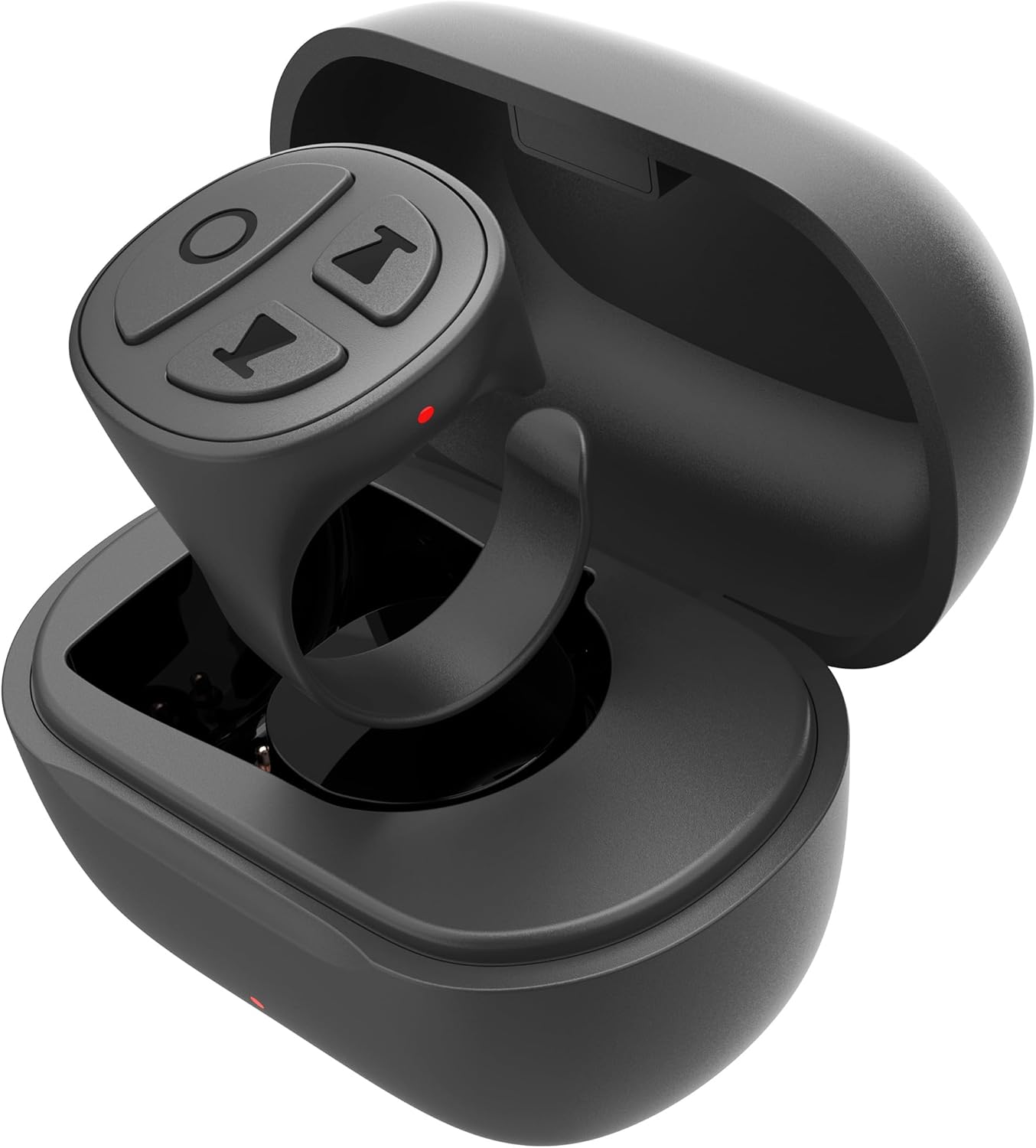
Image: The Vekesen D02 TikTok Scrolling Ring, a compact black device with four control buttons, rests within its matching charging case.
2. Product Features
- TikTok Scrolling: Effortlessly scroll up/down, left/right, pause/play videos, adjust volume, and send likes.
- Ebook Page Turner: Remotely control page turning in compatible E-book applications (e.g., Kindle App).
- Bluetooth Camera Shutter: Capture photos and record videos from a distance of up to 33 feet.
- Music Remote: Control music playback, including play/pause, skip tracks, and volume adjustment.
- Compatibility: Works with both iOS and Android devices.
3. Setup Guide
3.1 Bluetooth Pairing
- Ensure the scrolling ring is charged.
- Press and hold the power button on the ring for 3 seconds until the red and blue indicator lights flash alternately. This indicates the device is in pairing mode.
- On your smartphone, navigate to Settings > Bluetooth.
- Turn on Bluetooth.
- Locate "D02" in the list of available devices and tap to connect. Once connected, the indicator lights on the ring will stop flashing.
3.2 iOS Specific Settings (AssistiveTouch)
For iPhone and iPad users, enabling AssistiveTouch is required for full functionality. Android devices do not require this step.
- Open the Settings app on your iOS device.
- Tap Accessibility.
- Tap Touch.
- Tap AssistiveTouch.
- Toggle the AssistiveTouch switch to the 'On' position. A small gray dot will appear on your screen.
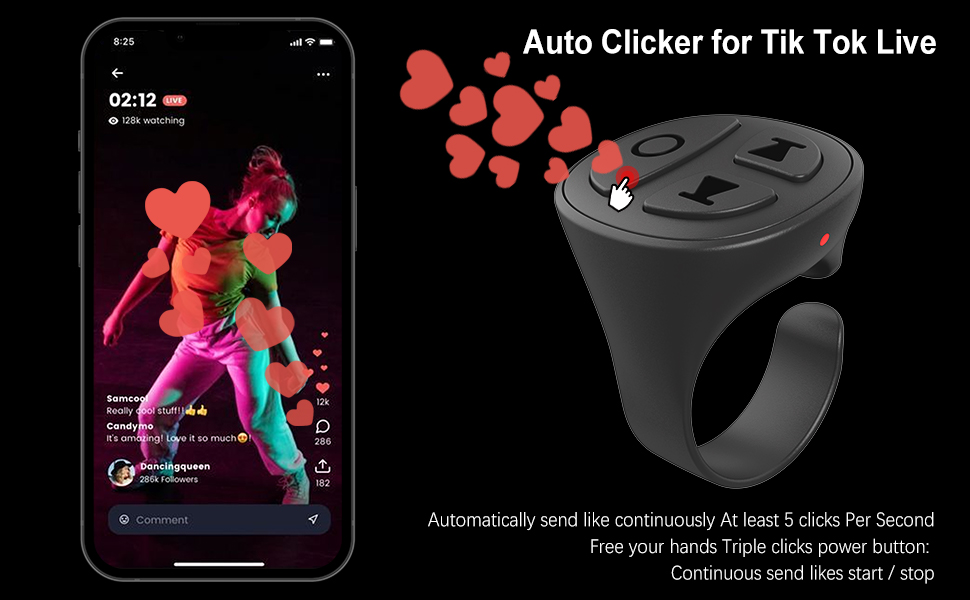
Image: A visual guide demonstrating the steps to enable AssistiveTouch on an iPhone, showing the sequence from Settings to Accessibility, Touch, and finally activating AssistiveTouch.
Video: A demonstration of connecting the Vekesen D02 TikTok Scrolling Ring to an iPhone via Bluetooth and enabling the necessary AssistiveTouch setting for proper functionality.
4. Operating Instructions
4.1 Switching Modes (TikTok Video / Music)
The Vekesen D02 has two primary modes: TikTok Video Mode and Music Mode. To switch between modes, press and hold the up and down buttons simultaneously for 2 seconds. The indicator lights will flash to confirm the mode change.
- TikTok Video Mode: Used for TikTok, short video apps, reading apps, and camera apps.
- Music Mode: Used for music apps and phone call apps.

Image: A diagram showing the Vekesen D02 TikTok Scrolling Ring and instructions on how to switch between TikTok Video Mode and Music Mode by pressing the up and down buttons.
4.2 TikTok Video Control
Ensure the ring is in TikTok Video Mode.
- Single click (Power button): Pause/Play video.
- Double click (Power button): Send a like.
- Triple click (Power button): Continuous send likes (start/stop).
- Single click (Up button): Previous video.
- Double click (Up button): Swipe left.
- Press and hold (Up button): Volume down.
- Single click (Down button): Next video.
- Double click (Down button): Swipe right.
- Press and hold (Down button): Volume up.
- Press and hold (Left button for 1 second): Lock/Open screen.

Image: A smartphone displaying a TikTok video, with the Vekesen D02 TikTok Scrolling Ring shown next to it, highlighting its various control functions for video navigation and interaction.
Video: A demonstration of the auto-clicker feature for sending continuous likes during a TikTok Live session using the Vekesen D02 TikTok Scrolling Ring.
4.3 Ebook Page Turning (Kindle App)
The D02 ring supports page turning in the Kindle App. It is important to note that this functionality is for the Kindle App on smartphones/tablets, not for dedicated Kindle e-reader devices.
- Open the Kindle App and select a book.
- Tap the middle of the screen to bring up the menu.
- Tap the 'Aa' icon (Font & Layout settings).
- Go to the 'Layout' tab.
- Turn off the "Continuous Scrolling" option.
- Exit the settings.
- Now, double-click the Up button to turn the page backward, and double-click the Down button to turn the page forward.

Image: A visual comparison showing that the Vekesen D02 TikTok Scrolling Ring works with the Kindle App on a smartphone (indicated by 'YES') but not with a physical Kindle device (indicated by 'NO').
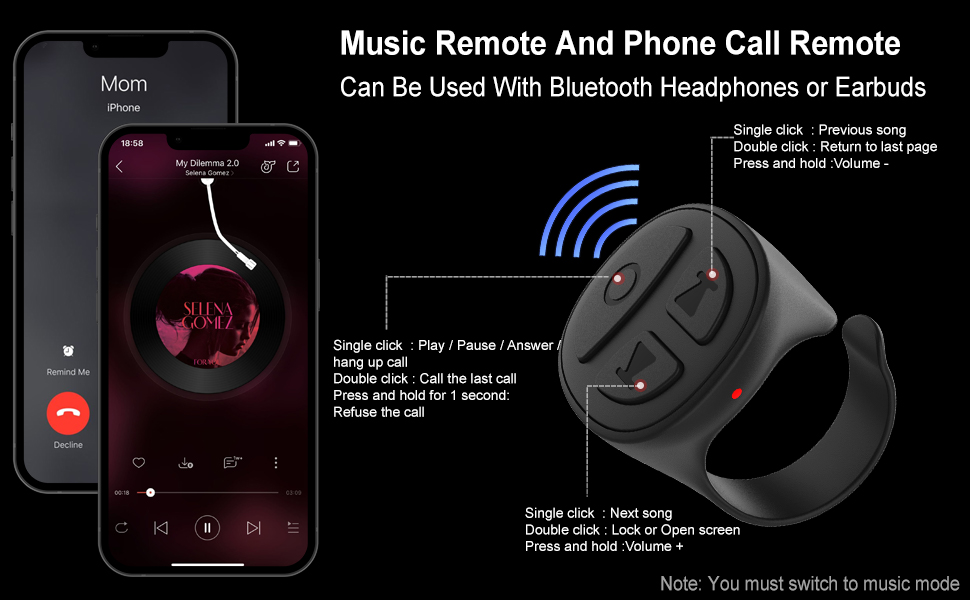
Image: A detailed screenshot guide on how to configure the Kindle App settings, specifically turning off 'Continuous Scrolling', to enable page turning with the Vekesen D02 TikTok Scrolling Ring.
4.4 Camera Shutter Remote
In TikTok Video Mode, you can use the ring as a remote camera shutter.
- Open your phone's camera app.
- Long press either the Up or Down button on the ring to take a picture or start/stop video recording.
4.5 Music and Phone Call Control
Ensure the ring is in Music Mode.
- Single click (Power button): Play/Pause music; Answer/Hang up call.
- Double click (Power button): Call the last contact.
- Press and hold (Power button for 1 second): Refuse an incoming call.
- Single click (Up button): Previous song.
- Double click (Up button): Return to last page.
- Press and hold (Up button): Volume down.
- Single click (Down button): Next song.
- Double click (Down button): Lock/Open screen.
- Press and hold (Down button): Volume up.

Image: A visual representation of the Vekesen D02 TikTok Scrolling Ring's controls for managing music playback and handling phone calls, indicating which buttons perform specific actions in Music Mode.
5. Charging and Battery Life
The Vekesen D02 Scrolling Ring comes with a portable charging case.
- Charging Time: Approximately 1 hour for a full charge.
- Single Use Battery Life: Up to 40 hours (based on 2 hours of daily use, providing approximately three weeks of use).
- Battery Life with Charging Case: Up to 280 hours.

Image: An infographic illustrating the charging time and extended battery life provided by the Vekesen D02 TikTok Scrolling Ring's charging case.
6. Troubleshooting
6.1 Device Not Pairing
- Ensure the ring is charged and in pairing mode (red and blue lights flashing alternately).
- Verify Bluetooth is enabled on your smartphone.
- Try restarting both the ring and your smartphone.
- If previously paired, try forgetting the device in your phone's Bluetooth settings and re-pairing.
6.2 Functions Not Working on iOS
- Confirm that AssistiveTouch is enabled in your iOS Accessibility settings (refer to Section 3.2).
- Ensure your iOS version is compatible (iOS 14.8 or higher is generally recommended for optimal performance).
6.3 Ebook Page Turning Issues
- Verify you are using a compatible E-book app (e.g., Kindle App), not a dedicated E-reader device.
- Check that "Continuous Scrolling" is disabled within the E-book app's layout settings (refer to Section 4.3).
7. Specifications
| Feature | Specification |
|---|---|
| Model Number | D02 |
| Product Dimensions | 1 x 0.86 x 1.2 inches |
| Item Weight | 0.16 ounces |
| Connectivity | Bluetooth |
| Compatible Devices | Android devices, iOS devices |
| Max Supported Devices | 1 |
8. Warranty and Support
Vekesen provides a One Year Manufacturer Warranty for this product. If you encounter any issues or have questions regarding your Vekesen D02 TikTok Scrolling Ring, please contact Vekesen customer support for assistance. Your satisfaction is important to us.