
4DRC 4DRC V33
4DRC V33 Drone User Manual
Model: 4DRC V33
Brand: 4DRC
1. Introduction
This manual provides essential information for the safe operation and maintenance of your 4DRC V33 Drone. Please read it thoroughly before first use and retain it for future reference. The 4DRC V33 is a remote-controlled quadcopter designed for recreational use, featuring LED lights, altitude hold, and headless mode, making it suitable for beginners and children.
2. Package Contents
Verify that all items listed below are present in your package:
- 4DRC V33 Drone
- Remote Controller
- 2 x Lithium Ion Batteries
- USB Charging Cable
- Spare Propellers (4 pieces)
- Propeller Guards (pre-installed)
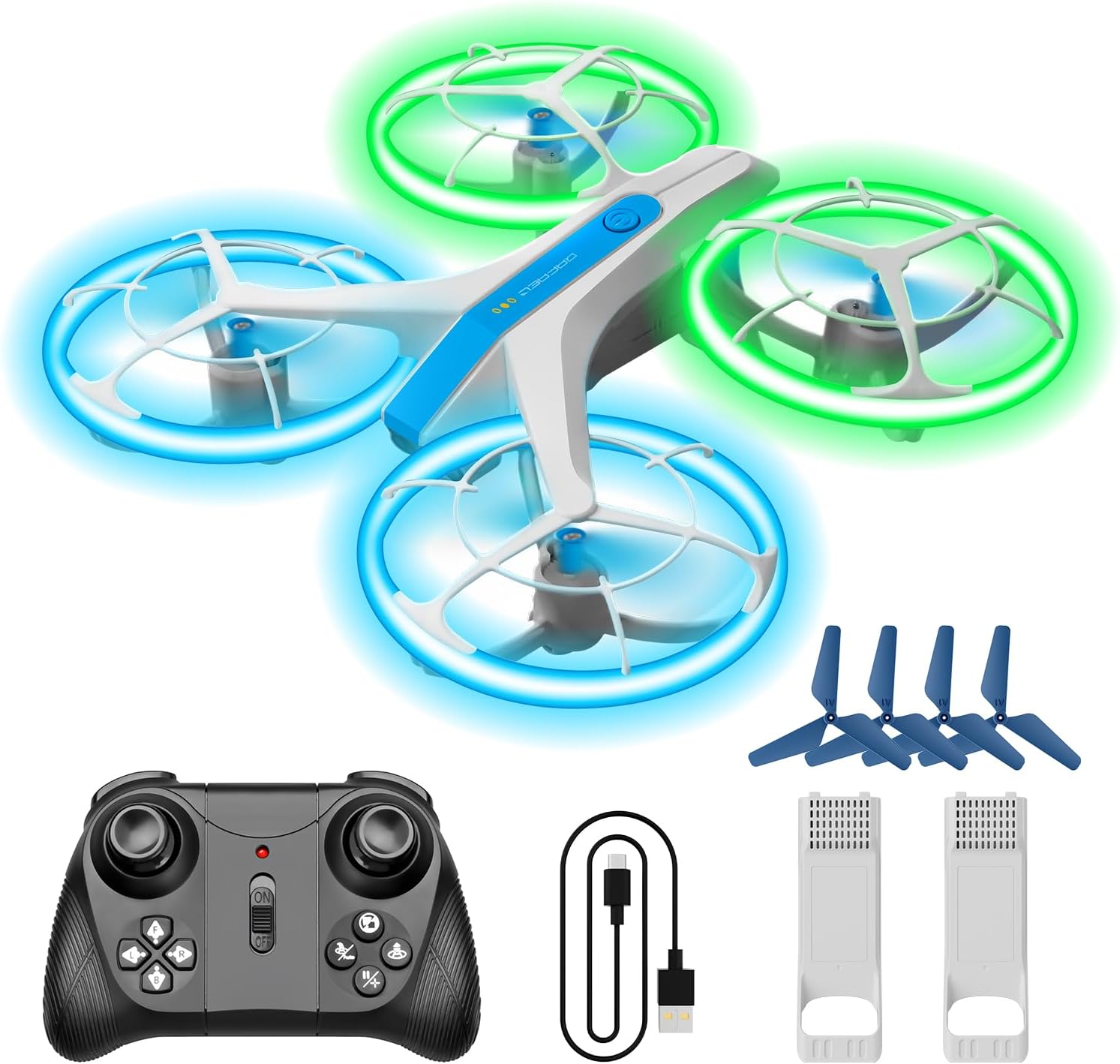
3. Setup
3.1. Charging the Drone Battery
- Connect the drone battery to the USB charging cable.
- Plug the USB cable into a 5V/1A USB power adapter (not included) or a computer USB port.
- The charging indicator light on the cable will illuminate during charging and turn off when fully charged.
- Charging typically takes approximately 60-90 minutes.
3.2. Installing Drone Battery
- Ensure the drone is powered off.
- Carefully insert a fully charged battery into the battery compartment on the drone.
- Ensure the battery is securely latched in place.
3.3. Installing Remote Controller Batteries
- Open the battery cover on the back of the remote controller.
- Insert 3 x AAA batteries (not included) according to the polarity markings.
- Close the battery cover securely.
3.4. Propeller Guards
The 4DRC V33 drone comes with pre-installed propeller guards for enhanced safety and durability, especially for new users. These guards protect the propellers from impacts and reduce the risk of injury.

4. Operating Instructions
4.1. Pairing the Drone and Controller
- Place the drone on a flat, level surface.
- Power on the drone. The LED lights will flash.
- Power on the remote controller.
- Push the left joystick (throttle) all the way up, then all the way down. The drone's LED lights will stop flashing and remain solid, indicating successful pairing.
4.2. Basic Flight Controls
- One-Key Take Off/Landing: Press the dedicated button on the controller to automatically take off or land the drone.
- Altitude Hold: The drone maintains its current altitude automatically, allowing for stable hovering.
- Headless Mode: In this mode, the drone's orientation is relative to the pilot, eliminating the need to adjust its position before flight.

4.3. Advanced Features
- LED Lights: The drone features bright blue and green LED lights on its protective frames, offering a vivid flight experience. Three different display modes are available.
- 3 Speed Modes: Adjust the drone's speed to match your skill level, from beginner to advanced.
- 3D Flips: Perform acrobatic flips with a press of a button.
- Circle Flight: The drone can perform a circular flight path around a central point.
- Rotate To Fly Back: A specific function allowing the drone to rotate and return towards the pilot.


5. Maintenance
5.1. Cleaning
Use a soft, dry cloth to clean the drone and controller. Avoid using water or chemical cleaners, as they may damage electronic components.
5.2. Propeller Replacement
If a propeller is damaged, carefully remove it and replace it with a new one from the spare parts kit. Ensure the correct propeller (A or B) is installed on the corresponding motor arm.
5.3. Battery Care
- Always use the provided USB charging cable.
- Do not overcharge or over-discharge the batteries.
- Store batteries in a cool, dry place away from direct sunlight and extreme temperatures.
- Remove batteries from the drone and controller when not in use for extended periods.
6. Troubleshooting
| Problem | Possible Cause | Solution |
|---|---|---|
| Drone does not respond to controller. | Not paired; low battery in drone or controller. | Re-pair the drone and controller; charge drone battery; replace controller batteries. |
| Drone flies erratically or drifts. | Not calibrated; damaged propeller; strong wind. | Calibrate the drone on a flat surface; replace damaged propellers; fly in calm conditions. |
| LED lights not working. | Low drone battery; light mode not activated. | Charge drone battery; check controller for light mode activation button. |
| Short flight time. | Battery not fully charged; old battery. | Ensure battery is fully charged; consider replacing old batteries. |
7. Specifications
- Model: 4DRC V33
- Brand: 4DRC
- Product Dimensions: 15 x 12 x 5 cm
- Item Weight: 200 g
- Batteries: 2 Lithium Ion batteries (included)
- Connectivity Technology: USB (for charging)
- Special Features: Lightweight, LED Lights, Altitude Hold, Headless Mode, Propeller Guards
- Skill Level: All (Beginner-friendly)
- Age Range: Kid
- Color: White
8. Warranty and Support
For warranty information and customer support, please refer to the contact details provided with your purchase or visit the official 4DRC website. Keep your proof of purchase for any warranty claims.
Related documents4DRC V33


Ask a question about this manual
Ask about setup, troubleshooting, compatibility, parts, safety, or missing instructions. Manuals+ will review the question and use this page’s manual context to help answer it.