
1. Introduction
Thank you for purchasing the TEMPWARE Portable Electric Fireplace Heater and 7500W Garage Heater. This manual provides essential information for the safe operation, installation, and maintenance of your new heating appliances. Please read all instructions carefully before use and retain this manual for future reference.

Image 1.1: The TEMPWARE Portable Electric Fireplace Heater (right) and the 7500W Garage Heater (left) with its remote control.
2. Important Safety Instructions
Always follow basic safety precautions when using electrical appliances to reduce the risk of fire, electric shock, and injury to persons.
- Read all instructions before using this heater.
- Do not use this heater outdoors.
- This heater is hot when in use. To avoid burns, do not let bare skin touch hot surfaces.
- Keep combustible materials, such as furniture, pillows, bedding, papers, clothes, and curtains at least 3 feet (0.9 m) from the front of the heater and keep them away from the sides and rear.
- Extreme caution is necessary when any heater is used by or near children or invalids and whenever the heater is left operating unattended.
- Always unplug the heater when not in use.
- Do not operate any heater with a damaged cord or plug or after the heater malfunctions, has been dropped, or damaged in any manner.
- Do not run cord under carpeting. Do not cover cord with throw rugs, runners, or similar coverings. Arrange cord away from traffic area and where it will not be tripped over.
- To disconnect heater, turn controls to off, then remove plug from outlet.
- Do not insert or allow foreign objects to enter any ventilation or exhaust opening as this may cause an electric shock or fire, or damage the heater.
- To prevent a possible fire, do not block air intakes or exhaust in any manner. Do not use on soft surfaces, like a bed, where openings may become blocked.
- All electrical connections must be in accordance with local and National Electrical Code (NEC) standards.
Product-Specific Safety Features:
- Tip-over Protection: The fireplace heater is equipped with a safety switch that automatically shuts off the unit if it is accidentally tipped over.
- Overheat Protection: Both heaters feature an overheat protection sensor that automatically turns off the device if it reaches an unsafe temperature. If this occurs, unplug the power cord, wait 3-5 minutes for the unit to cool, and then plug it back in.

Image 2.1: Illustration of the fireplace heater's tip-over protection feature, demonstrating automatic power-off when tilted.
3. Product Components and Features
3.1 Portable Electric Fireplace Heater

Image 3.1: Detailed view of the Portable Electric Fireplace Heater, highlighting its flame display and control knobs.
- 4 Heating Modes: High (1500 watts), Low (1000 watts), 3D flame only, and Flameless Mode.
- Realistic 3D Flame Effect: Provides visual ambiance.
- Compact and Portable Design: Easy to move between rooms.
- Safety Features: Includes tip-over and overheat protection.
3.2 7500W Garage Heater

Image 3.2: The 7500W Garage Heater, featuring its robust design and accompanying remote control.
- High Heat Output: Up to 7500 watts (25,590 BTUs) for heating large areas up to 1,250 square feet.
- Adjustable Louvers: Directs air output for optimal heat distribution.
- Variable Mounting Angle: Allows for flexible installation and heat direction.
- ECO Mode: Automatically adjusts heating based on ambient temperature to save energy.
- Timer Function: Programmable auto-off timer (1-12 hours).
- Safety Features: Includes overheat protection and a 90-second countdown delay protection.
4. Installation
4.1 Portable Electric Fireplace Heater Placement
- Place the fireplace heater on a firm, level surface.
- Ensure adequate clearance from walls, furniture, and other combustible materials (minimum 3 feet).
- Plug the heater directly into a 120V AC, 15-amp (or higher) grounded outlet. Do not use extension cords or power strips.

Image 4.1: Examples of suitable placement for the fireplace heater in different indoor environments.
4.2 7500W Garage Heater Hardwired Installation
The 7500W Garage Heater requires hardwired installation. This procedure must be performed by a qualified electrician in accordance with the (US) National Electric Code and local codes.
- Ensure the heater is grounded.
- Connect the heater to a properly sized current protection circuit breaker.
- Mount the heater securely using the provided bracket, considering the variable mounting angles for optimal heat direction.

Image 4.2: The garage heater's adjustable louvers and mounting bracket, allowing for precise heat direction.
5. Operating Instructions
5.1 Portable Electric Fireplace Heater Operation
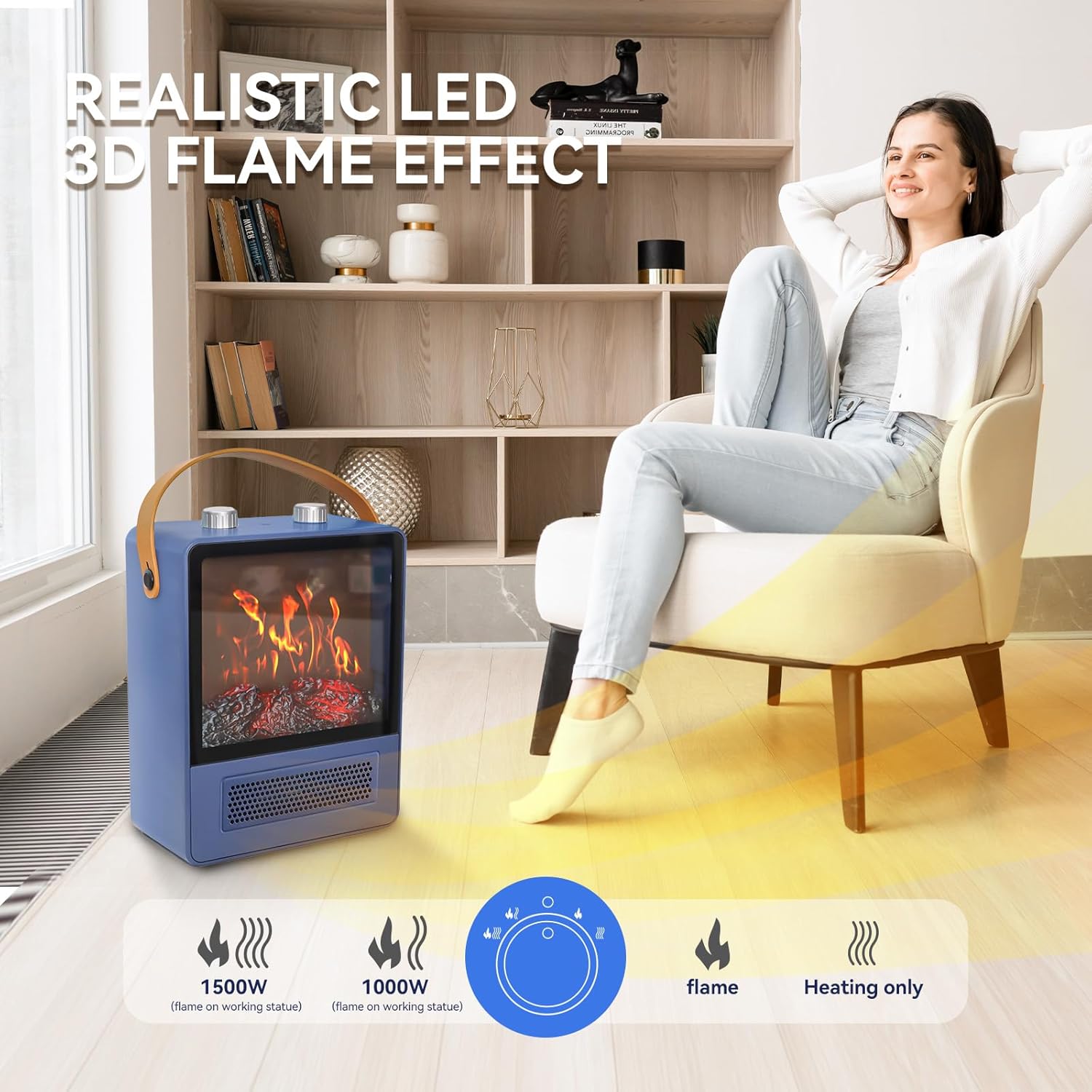
Image 5.1: Control panel and heating modes of the Portable Electric Fireplace Heater.
- Power On/Off: Use the main power switch or remote control to turn the unit on or off.
- Heating Modes: Select from four modes:
- High Heat (1500W): Provides maximum warmth.
- Low Heat (1000W): For moderate heating.
- 3D Flame Only: Activates the flame effect without heat.
- Flameless Mode: Provides heat without the flame effect.
- Temperature Control: Adjust the desired temperature using the thermostat controls.
5.2 7500W Garage Heater Operation

Image 5.2: Control functions of the 7500W Garage Heater.
- Power On/Off: Use the ON/OFF button on the control panel or remote.
- Heat Settings: Select between 6,250 watts (low) and 7,500 watts (high) to suit your heating needs.
- ECO Mode: Activate ECO mode for automatic temperature regulation. The built-in sensor will adjust the working mode or turn off the heater based on the ambient temperature to optimize energy consumption.
- Timer Function: Set an auto-off timer for 1-12 hours to automatically shut off the heater after a specified period.
- Temperature Adjustment: Use the Temperature + and Temperature - buttons to set your desired room temperature.
- °F/°C Conversion: Switch between Fahrenheit and Celsius display.
- Adjustable Louvers: Manually adjust the louvers on the front of the heater to direct the airflow and heat to specific areas.

Image 5.3: Key operational features of the garage heater in a practical setting.
6. Maintenance
Regular maintenance ensures optimal performance and longevity of your heaters.
- Cleaning: Always unplug the heater before cleaning. Use a soft, damp cloth to wipe the exterior surfaces. Do not use abrasive cleaners or solvents.
- Dust Removal: Periodically vacuum the air intake and exhaust vents to prevent dust buildup, which can impede airflow and reduce efficiency.
- Storage: When not in use, store the heater in a cool, dry place, preferably in its original packaging, to protect it from dust and damage.
7. Troubleshooting
If your heater is not operating correctly, refer to the following common issues and solutions:
- Heater does not turn on:
- Ensure the power cord is securely plugged into a functional electrical outlet.
- Check if the circuit breaker has tripped.
- Verify that the main power switch on the unit is in the 'ON' position.
- Heater turns off unexpectedly (Overheat/Tip-over Protection):
- If the unit has overheated or tipped over, it will automatically shut off as a safety measure.
- Unplug the power cord from the outlet.
- Wait 3-5 minutes for the unit to cool down.
- Ensure the unit is on a stable, level surface and that air vents are not blocked.
- Plug the power cord back into the outlet and restart the heater.
- No heat output, but fan/flame is working:
- For the fireplace heater, ensure it is not in '3D Flame Only' mode. Select a heating mode (1000W or 1500W).
- Check the thermostat setting; it might be set lower than the ambient room temperature.
- Remote control not working:
- Check and replace the batteries in the remote control.
- Ensure there are no obstructions between the remote and the heater's receiver.
8. Specifications
| Feature | Specification |
|---|---|
| Brand | TEMPWARE |
| Model | B0CLXXD7V3 |
| Power Source | Corded Electric |
| Installation Type | Freestanding (Fireplace Heater), Hardwired (Garage Heater) |
| Heat Output (Fireplace Heater) | 1500 Watts (High), 1000 Watts (Low) |
| Heat Output (Garage Heater) | 7500 Watts (High), 6250 Watts (Low) |
| Heating Coverage (Garage Heater) | Up to 1250 square feet |
| Special Features | Overheat Protection, Tip-over Protection, ECO Mode, Timer Function, Adjustable Louvers |
| Room Type | Bedroom, Living Room (Fireplace Heater), Garage, Workshop (Garage Heater) |
| Specific Uses For Product | Indoor |
| Manufacturer | TEMPWARE |
| Date First Available | October 30, 2023 |
9. Warranty and Customer Support
For warranty information and customer support, please refer to the documentation included with your purchase or visit the official TEMPWARE website. You may also contact TEMPWARE customer service directly for assistance with product inquiries, troubleshooting, or parts replacement.