1. Introduction
The CAPTOK 1500W Pure Sine Wave Inverter converts 12V DC battery power to 120V AC household power, providing a clean and stable energy source for various applications. This manual provides essential information for safe and efficient operation, setup, and maintenance of your inverter.
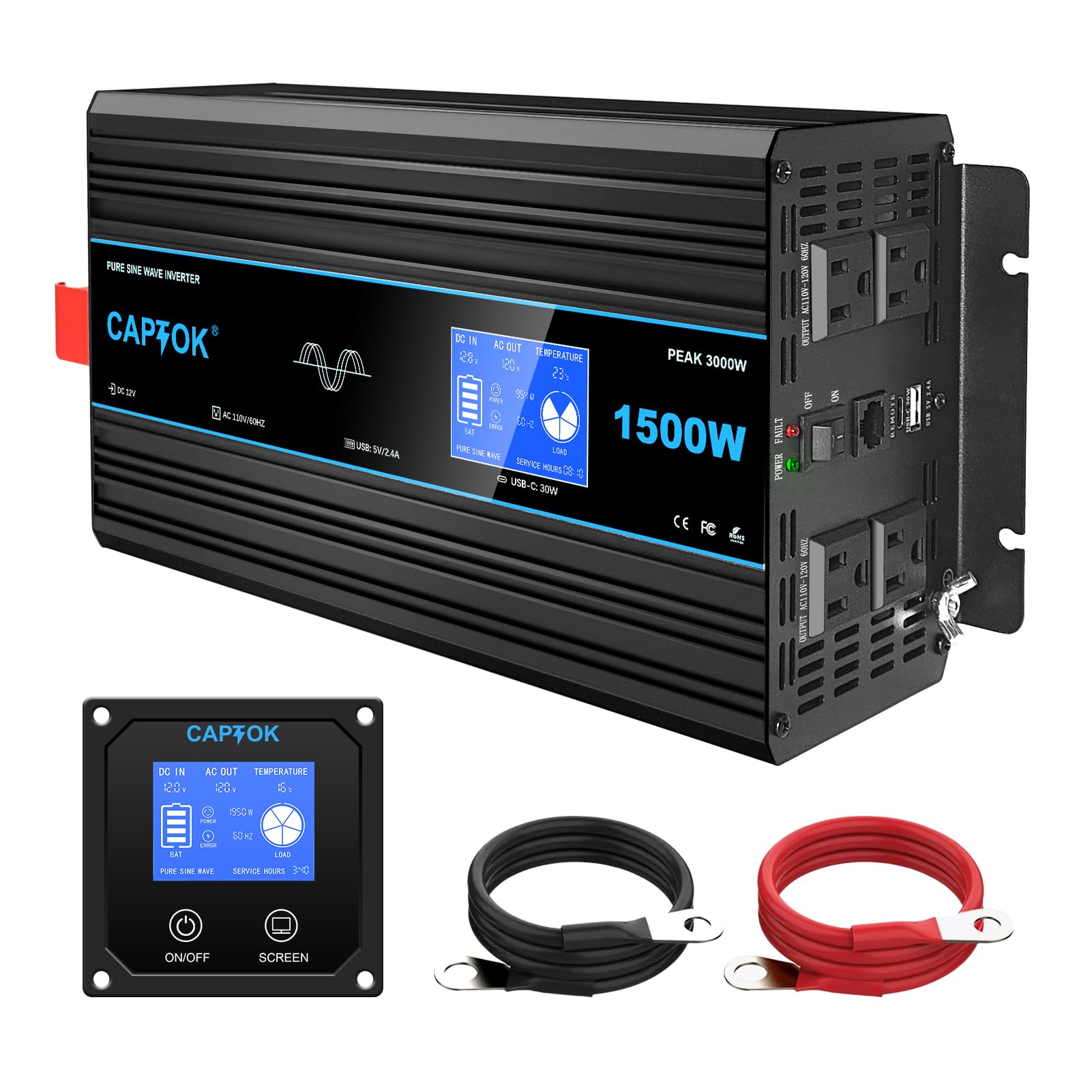
Image: The CAPTOK 1500W Pure Sine Wave Inverter, a compact black unit with orange accents, featuring an integrated LCD display and multiple output ports.
2. Product Features
- Advanced LCD Monitor: A large built-in LCD display allows for clear viewing and monitoring of the inverter's operating information, including input voltage, output voltage, and load power. The remote control display is synchronized in real-time for convenient monitoring.
- Multiple Output Ports: Equipped with 4 AC outlets, 1 USB 5V 2.4A port, and 1 Type-C 30W port, ensuring fast power supply for multiple devices simultaneously.
- Comprehensive Safety Protections: Features isolated input/output design and provides under-voltage protection, over-voltage protection, overload protection, over-heat protection, and short-circuit protection to ensure safe operation.
- Temperature Controlled Silent Fan: The built-in powerful cooling fan activates when the temperature reaches 45°C (113°F), ensuring stable and quiet operation.
- Pure Sine Wave Output: Ensures clean power and low interference, suitable for sensitive electronics.

Image: Close-up of the CAPTOK inverter's advanced LCD display, showing real-time data such as DC input voltage, AC output voltage, temperature, power, frequency, and load.

Image: The CAPTOK inverter connected to a power strip, illustrating its multiple AC outlets, USB, and Type-C ports for various devices.

Image: Diagram highlighting the CAPTOK inverter's safety protections, including low/over voltage, overheating, overload, short circuit, reverse connection, isolated input/output, and real-time monitoring.

Image: The CAPTOK inverter with an illustration of its silent, temperature-controlled cooling fan, designed for fast heat dissipation under high loads.
Image: The CAPTOK inverter connected to a kettle and a coffee maker, demonstrating its pure sine wave output for household appliances.
3. Package Contents
- CAPTOK 1500W Pure Sine Wave Inverter
- LCD Display (integrated)
- Remote Control
- Battery Connection Cables (red and black)
- User Manual
4. Safety Information
IMPORTANT SAFETY WARNINGS:
- Always use the battery connection cables provided in the package to ensure proper and safe operation.
- A minimum battery capacity of 12V 200AH is recommended. Using a battery with insufficient capacity may result in inadequate output voltage or damage to the inverter/battery.
- Ensure proper ventilation around the inverter to prevent overheating.
- Do not expose the inverter to water, rain, or excessive moisture.
- Avoid operating the inverter in direct sunlight or near heat sources.
- Always connect the inverter to a battery before connecting any AC loads.
- Disconnect the inverter from the battery when not in use or before performing any maintenance.
- Ensure the inverter is properly grounded. A grounding screw is provided for this purpose.

Image: Close-up of the grounding screw on the side of the CAPTOK inverter, indicating the connection point for a ground wire.
5. Setup & Installation
- Prepare the Battery: Ensure your 12V battery (minimum 200AH recommended) is fully charged and in good condition.
- Connect Battery Cables:
- Connect the red (positive) battery cable to the positive (+) terminal of the inverter.
- Connect the black (negative) battery cable to the negative (-) terminal of the inverter.
- Connect the other end of the red cable to the positive (+) terminal of your battery.
- Connect the other end of the black cable to the negative (-) terminal of your battery.
- Ensure all connections are tight and secure to prevent arcing or overheating.
- Grounding: Connect a ground wire (not included, but recommended for safety) from the grounding screw on the inverter to a proper earth ground.
- Remote Control Connection: If using the remote control, plug its cable into the designated "REMOTE" port on the inverter.
- Placement: Place the inverter in a dry, well-ventilated area, away from flammable materials and direct sunlight.

Image: The CAPTOK inverter connected to a battery, with its remote control mounted on a wall, showing the cable connection between them.
For a visual guide on how the inverter works with a solar system or directly with a battery, refer to the diagram below:

Image: A diagram illustrating two connection methods for the CAPTOK inverter: one with solar panels, a charge controller, and a battery, and another directly with a battery.
6. Operating Instructions
- Power On: Flip the ON/OFF switch on the inverter to the "ON" position, or use the ON button on the remote control. The LCD display will illuminate, showing current operating parameters.
- Connect Devices: Plug your AC devices into the 120V AC outlets, or your USB/Type-C devices into the respective ports. Ensure the total wattage of your devices does not exceed the inverter's continuous power rating (1500W).
- Monitor Performance: Regularly check the LCD display for input voltage, output voltage, and load power to ensure optimal operation and prevent overloading.
- Power Off: When finished, disconnect all devices, then flip the ON/OFF switch on the inverter to the "OFF" position, or use the OFF button on the remote control.
Understanding the LCD Display
The integrated LCD display provides real-time feedback on the inverter's status:
- DC IN: Displays the input voltage from your 12V battery.
- AC OUT: Shows the output AC voltage (120V).
- TEMPERATURE: Indicates the internal temperature of the inverter.
- POWER: Displays the current power draw in watts.
- BAT: Shows the battery charge level.
- ERROR: Illuminates if an error condition is detected.
- LOAD: Visual representation of the current load on the inverter.

Image: A detailed graphic of the CAPTOK inverter's digital LCD display, showing various parameters like input voltage, output voltage, temperature, battery level, load power, and error indicators.
7. Maintenance
- Keep the inverter clean and free from dust and debris.
- Ensure the cooling fan vents are unobstructed for proper airflow.
- Periodically check battery connections for tightness and corrosion.
- Store the inverter in a cool, dry place when not in use.
8. Troubleshooting
| Problem | Possible Cause | Solution |
|---|---|---|
| Inverter does not turn on. | Loose battery connections, low battery voltage, faulty switch. | Check battery cable connections. Recharge or replace battery. Ensure switch is fully "ON". |
| No AC output. | Overload, low battery, inverter fault. | Reduce connected load. Check battery voltage. Power cycle the inverter. |
| Inverter beeps or shows error. | Overload, over-temperature, low/over voltage, short circuit. | Refer to LCD display for specific error code. Address the cause (e.g., reduce load, allow cooling, check battery). |
| Fan runs constantly or loudly. | High internal temperature, obstructed vents. | Ensure proper ventilation. Reduce load if operating in high temperatures. |
9. Specifications
| Feature | Detail |
|---|---|
| Model Number | CAPTOK 1500W |
| Wattage (Continuous) | 1500W |
| Input DC Voltage | 12V |
| Output AC Voltage | 120V |
| Output Waveform | Pure Sine Wave |
| AC Outlets | 4 |
| USB Port | 1 (5V 2.4A) |
| Type-C Port | 1 (30W) |
| Recommended Min. Battery Capacity | 12V 200AH |
| Product Dimensions | 5.28 x 2.56 x 1.54 inches |
| Item Weight | 8.14 pounds |
10. Warranty & Support
The CAPTOK 1500W Pure Sine Wave Inverter comes with a 24-month worry-free warranty. For technical support, troubleshooting assistance, or warranty claims, please contact CAPTOK customer service through your retailer or the official CAPTOK website.
We are committed to providing high-quality, user-friendly products and continuously improving the user experience.

Image: A customer service representative wearing a headset, symbolizing support for CAPTOK products.
11. Official Product Video
Watch this official product video for a quick overview of the CAPTOK 1500W Pure Sine Wave Inverter:
Video Description: A short video showcasing the CAPTOK 1500W Pure Sine Wave Power Inverter, highlighting its features and applications.


