
1. Introduction
This manual provides detailed instructions for the proper use and maintenance of your CATIGA CD-2786 Desktop Calculator. Designed for efficiency and ease of use, this calculator is suitable for various environments including office, home, and school. Please read this manual thoroughly to ensure optimal performance and longevity of your device.
2. Product Overview
The CATIGA CD-2786 is a 12-digit desktop calculator featuring a large LCD display, sensitive buttons, and dual power capabilities (solar and battery). Its ergonomic design and robust construction make it a reliable tool for daily calculations.
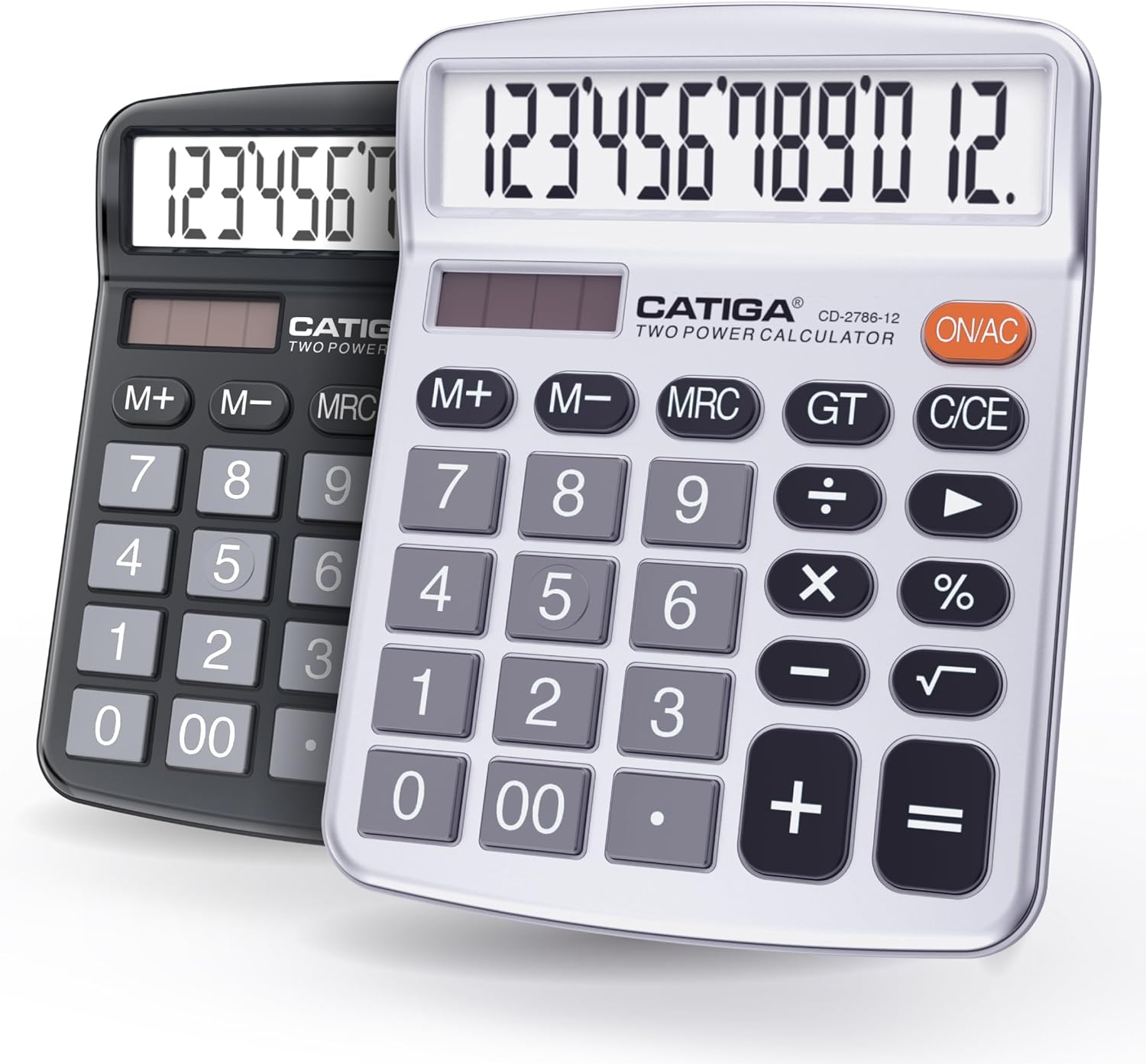
Figure 2.1: CATIGA CD-2786 Desktop Calculators (Black and Silver)
Key Features:
- Large LCD Display: Clearly displays up to 12 digits for easy readability.
- Sensitive and Large Buttons: Ensures fast and smooth calculation processes, reducing input errors.
- Dual Power Design: Operates on both solar power (in lit environments) and battery power (1 LR44 battery included).
- Versatile Functionalities: Includes standard arithmetic operations (add, subtract, multiply, divide), backspace, grand total (GT), clear entry (CE), percentage (%), memory functions (M+/M-/MRC), and On/AC.
- Auto Power-Off: The calculator automatically turns off after approximately 6 minutes of inactivity to conserve power.
- User-Friendly Design: Features 4x anti-slip rubber pads for stability and an ergonomic angle for comfortable viewing.

Figure 2.2: Large LCD Display and Ergonomic Design

Figure 2.3: Dual Power Sources (Solar and Battery)
3. Setup
3.1. Power Source
The CATIGA CD-2786 calculator operates using a dual power system: solar and battery. A 1 LR44 battery is included and pre-installed.
- Solar Power: For optimal performance, use the calculator in a well-lit environment. The solar panel, located above the display, will power the device.
- Battery Power: In low-light conditions, the calculator automatically switches to battery power. The included LR44 battery ensures continuous operation.
3.2. Initial Use
The calculator is ready for use upon unboxing. Simply press the ON/AC button to turn it on. If the display is dim or blank, ensure it is exposed to sufficient light or check the battery.
4. Operating Instructions
4.1. Basic Operations
- ON/AC: Turns the calculator on or clears all entries and memory.
- C/CE: Clears the last entry. Pressing it once clears the current number; pressing it twice clears the entire calculation (similar to AC if no calculation is active).
- +: Addition
- -: Subtraction
- x: Multiplication
- ÷: Division
- =: Displays the result of the calculation.
4.2. Advanced Functions
- %: Percentage function. For example, to calculate 10% of 200, enter 200 x 10 %. The result will be 20.
- M+: Adds the displayed number to the memory.
- M-: Subtracts the displayed number from the memory.
- MRC: Recalls the memory content. Pressing it twice clears the memory.
- GT (Grand Total): Sums the results of all previous calculations.
- Backspace (►): Deletes the last digit entered.
4.3. Auto Power-Off
To conserve battery life, the calculator will automatically power off after approximately 6 minutes of inactivity. Press the ON/AC button to turn it back on.
5. Maintenance
5.1. Cleaning
To clean the calculator, use a soft, dry cloth. Do not use liquid cleaners, abrasive materials, or solvents, as these may damage the display or casing.
5.2. Battery Replacement
If the display becomes consistently dim even in bright light, the LR44 battery may need replacement. To replace the battery:
- Turn the calculator over.
- Locate the battery compartment cover.
- Carefully open the cover (a small screwdriver may be required).
- Remove the old LR44 battery and insert a new one, ensuring correct polarity (+/-).
- Close the battery compartment cover securely.
Dispose of old batteries according to local regulations.
5.3. Storage
Store the calculator in a cool, dry place away from direct sunlight and extreme temperatures. Avoid placing heavy objects on top of the calculator to prevent damage to the display or buttons.
6. Troubleshooting
- Display is blank or dim:
Ensure the calculator is in a well-lit area for solar power. If the issue persists, the LR44 battery may need replacement. - Buttons are unresponsive:
Press the ON/AC button to reset the calculator. Ensure no debris is lodged under the buttons. - Incorrect calculation results:
Double-check your input. Press ON/AC to clear all previous entries and memory before starting a new calculation. - Calculator turns off unexpectedly:
The calculator has an auto power-off feature after 6 minutes of inactivity. If it turns off during active use, ensure sufficient light for solar power or consider replacing the battery.
7. Specifications
| Feature | Specification |
|---|---|
| Product Dimensions | 4.8 x 6 x 0.1 inches |
| Item Weight | 12 ounces |
| Model Number | CD-2786-12 |
| Batteries Required | 1 LR44 (included) |
| Brand | CATIGA |
| Calculator Type | Standard Function |
| Power Source | Dual Power (Solar and Battery) |
| Screen Size | 4.5 Inches |
| Display Digits | 12 Digits |
8. Warranty and Support
For warranty information or technical support, please refer to the product packaging or contact CATIGA customer service through their official website or the retailer where the product was purchased. Keep your purchase receipt as proof of purchase.
