
1. Introduction
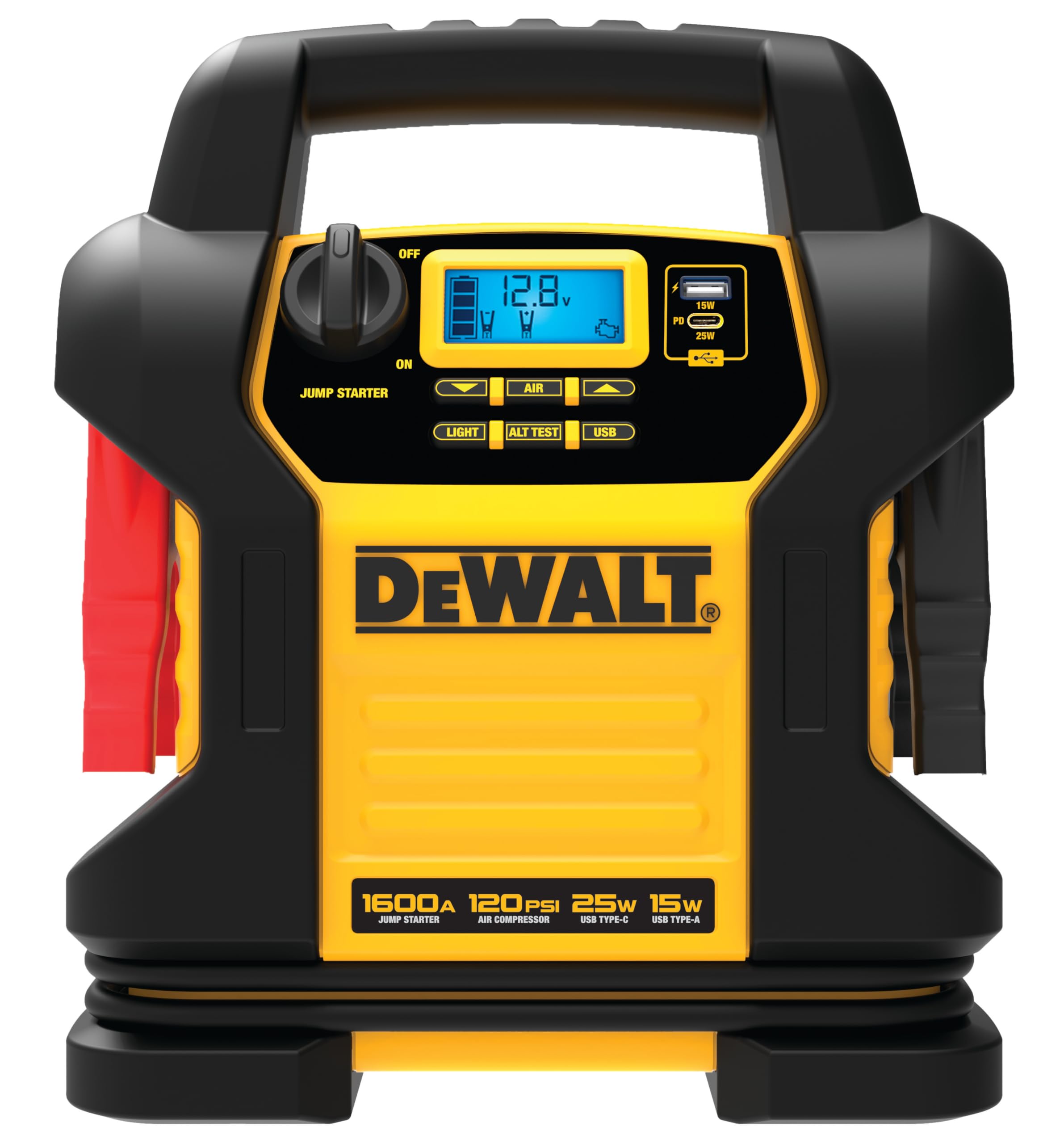
The DEWALT DXAEJ14-Type2 is a versatile digital portable power station designed for automotive and personal electronic needs. It combines a powerful 1600 Peak Amp jump starter, a 120 PSI digital air compressor, and multiple USB charging ports (15W USB-A and 25W USB-C). This manual provides essential information for the safe and effective operation, maintenance, and troubleshooting of your device.
2. Safety Information
WARNING: Read and understand all safety information and instructions before operating this product. Failure to follow these instructions may result in electric shock, fire, and/or serious injury.
- Always wear eye protection and protective clothing when working with batteries.
- Ensure adequate ventilation when charging or operating the unit.
- Keep the unit away from children and unauthorized personnel.
- Do not expose the unit to rain or wet conditions.
- Avoid touching battery clamps together or allowing them to contact the same metal object.
- The unit features reverse polarity protection; however, always connect the red clamp to the positive (+) terminal and the black clamp to the negative (-) terminal of the battery.
- Do not attempt to jump start a frozen battery.
- Do not use the unit if cables or clamps are damaged.
3. Product Features
The DEWALT DXAEJ14-Type2 offers a range of functionalities to assist with vehicle emergencies and portable power needs:
- 1600 Peak Amp Jump Starter: Capable of jump-starting 12-Volt AGM, GEL, or WET batteries, including those in V8 engines.
- 120 PSI Digital Air Compressor: Features AUTOSTOP and a Sure Fit nozzle for inflating tires, sports equipment, and more.
- USB Power Bank: Includes 15W USB-A and 25W USB-C ports for charging electronic devices.
- Built-in AC Charging Cube: Allows convenient recharging of the unit using a standard extension cord (not included).
- Reverse Polarity Protection: Provides an audible alarm to prevent incorrect clamp connections.
- High-Powered LED Light: Illuminates work areas in low-light conditions.
- LCD Screen: Displays real-time information, including battery voltage and charge status.
- Alternator Test Function: Helps determine if your vehicle's alternator is functioning correctly.
4. Setup and Initial Charging
Before first use, and for optimal performance, fully charge the unit. The unit should be charged immediately overnight after each use and every 30 days when not in use.
- Locate the built-in AC charging cube on the unit.
- Plug a standard extension cord (not included) into the AC charging cube.
- Plug the other end of the extension cord into a standard 120V AC wall outlet.
- Allow the unit to charge until the LCD screen indicates a full charge.
- Disconnect the extension cord from the wall outlet and then from the unit.
5. Operating Instructions
5.1. Jump Starting a Vehicle
- Ensure the vehicle's ignition is off and all accessories are unplugged.
- Connect the red positive (+) clamp to the positive (+) terminal of the vehicle's battery.
- Connect the black negative (-) clamp to a non-moving metal part of the vehicle's chassis, away from the battery and fuel lines. Do not connect to the negative battery terminal directly unless specified by the vehicle manufacturer.
- Turn the JUMP STARTER switch on the unit to the 'ON' position. If an improper connection is detected, the reverse polarity alarm will sound. Correct the connection before proceeding.
- Attempt to start the vehicle. If it does not start within 5-6 seconds, wait at least 3 minutes before trying again.
- Once the vehicle starts, turn the JUMP STARTER switch to 'OFF'.
- Disconnect the black negative (-) clamp first, then the red positive (+) clamp.
- Recharge the unit immediately after use.
5.2. Using the Air Compressor
- Ensure the unit is adequately charged.
- Attach the Sure Fit nozzle to the tire valve stem or sports equipment.
- Press the 'AIR' button to activate the compressor. The LCD screen will display the current pressure.
- Use the up/down arrows to set the desired pressure. The AUTOSTOP feature will automatically shut off the compressor once the set pressure is reached.
- Monitor the pressure on the digital display.
- Once inflation is complete, detach the nozzle and turn off the compressor if it hasn't automatically stopped.
5.3. Charging Electronic Devices
The unit provides 15W USB-A and 25W USB-C power outputs for charging smartphones, tablets, and other compatible electronic devices.
- Connect your device's charging cable to the appropriate USB-A or USB-C port on the unit.
- The unit will begin charging your device.
- Disconnect your device once charging is complete.
5.4. Using the LED Light
Press the 'LIGHT' button to turn the integrated LED light on or off, providing illumination for nighttime operations or dark environments.
5.5. Alternator Test
The unit can perform a basic test of your vehicle's alternator to help diagnose charging system issues.
- Connect the jump starter clamps to the vehicle battery as described in the jump-starting section (red to positive, black to chassis ground).
- Start the vehicle's engine.
- Press the 'ALT TEST' button on the unit.
- The LCD screen will display the alternator's voltage output, indicating its operational status. Refer to your vehicle's manual for expected voltage ranges.
6. Maintenance
Proper maintenance ensures the longevity and reliability of your DEWALT DXAEJ14-Type2 unit.
- Recharging: Recharge the unit immediately after each use. If not in use, recharge every 30 days to maintain battery health.
- Cleaning: Clean the exterior of the unit with a soft, dry cloth. Do not use harsh chemicals or abrasive cleaners.
- Storage: Store the unit in a cool, dry place, away from direct sunlight and extreme temperatures. Ensure clamps are properly stored in their designated holders to prevent accidental contact.
- Cable Inspection: Regularly inspect the jump starter cables and clamps for any signs of damage, fraying, or corrosion. Replace if necessary.
7. Troubleshooting
If you encounter issues with your DEWALT DXAEJ14-Type2, refer to the following common troubleshooting steps:
- Unit Not Charging: Ensure the extension cord is securely plugged into both the unit's AC charging cube and a live wall outlet. Check the wall outlet with another device.
- Vehicle Not Starting: Verify that the jump starter clamps are connected correctly (red to positive, black to chassis ground). Ensure the unit is fully charged. Allow the unit to cool down for a few minutes between jump-start attempts.
- Reverse Polarity Alarm Sounds: This indicates incorrect clamp connection. Immediately disconnect the clamps and re-connect them correctly (red to positive, black to chassis ground).
- Air Compressor Not Working: Check that the unit is sufficiently charged. Ensure the nozzle is securely attached to the item being inflated. Verify the desired pressure is set.
- USB Ports Not Charging Devices: Ensure the unit has sufficient charge. Try a different USB cable or device to rule out cable/device issues.
If problems persist after attempting these steps, contact DEWALT customer support for further assistance.
8. Specifications
| Feature | Specification |
|---|---|
| Brand | DEWALT |
| Model Number | DXAEJ14-Type2 |
| Product Dimensions | 10.8"D x 5.6"W x 14.2"H |
| Item Weight | 19.27 pounds |
| Peak Output Current | 1600 Amps |
| Air Compressor Pressure | 120 PSI |
| USB-A Output | 15W |
| USB-C Output | 25W |
| UPC | 814632015260 |
| Manufacturer | Baccus Global LLC |
9. Warranty and Support
The DEWALT DXAEJ14-Type2 Digital Portable Power Station Jump Starter includes a limited 1-year manufacturer warranty. For warranty claims, technical support, or further assistance, please refer to the contact information provided with your product packaging or visit the official DEWALT website.
Note: No official product videos were provided in the product data for embedding in this manual.


