1. Introduction
Congratulations on your purchase of the Milex Wonder MWC005 Chef 18in1 Multi-Cooker Master. This versatile appliance is designed to simplify your cooking experience, offering a wide range of functions including steaming, sautéing, slow cooking, and more. Please read this manual thoroughly before first use to ensure safe and optimal operation of your new multi-cooker.

Figure 1: Front view of the Milex Wonder MWC005 Chef 18in1 Multi-Cooker Master. The image shows the sleek black exterior with green accents, the control panel with two rotary dials, and the transparent lid.
2. Important Safety Instructions
WARNING: To reduce the risk of fire, electric shock, or injury, always follow these basic safety precautions.
- Read all instructions before using the appliance.
- Do not touch hot surfaces. Use handles or knobs.
- To protect against electrical shock, do not immerse cord, plugs, or the main unit in water or other liquid.
- Close supervision is necessary when any appliance is used by or near children.
- Unplug from outlet when not in use and before cleaning. Allow to cool before putting on or taking off parts.
- Do not operate any appliance with a damaged cord or plug, or after the appliance malfunctions or has been damaged in any manner.
- The use of accessory attachments not recommended by the appliance manufacturer may cause injuries.
- Do not use outdoors.
- Do not let cord hang over edge of table or counter, or touch hot surfaces.
- Do not place on or near a hot gas or electric burner, or in a heated oven.
- Extreme caution must be used when moving an appliance containing hot oil or other hot liquids.
- Always attach plug to appliance first, then plug cord into the wall outlet. To disconnect, turn any control to "off", then remove plug from wall outlet.
- Do not use appliance for other than intended use.
- This appliance cooks under pressure. Improper use may result in scalding injury. Ensure unit is properly closed before operating.
- Ensure the drain and steam outlet is clear and unobstructed during operation.
3. Product Overview
3.1 Components
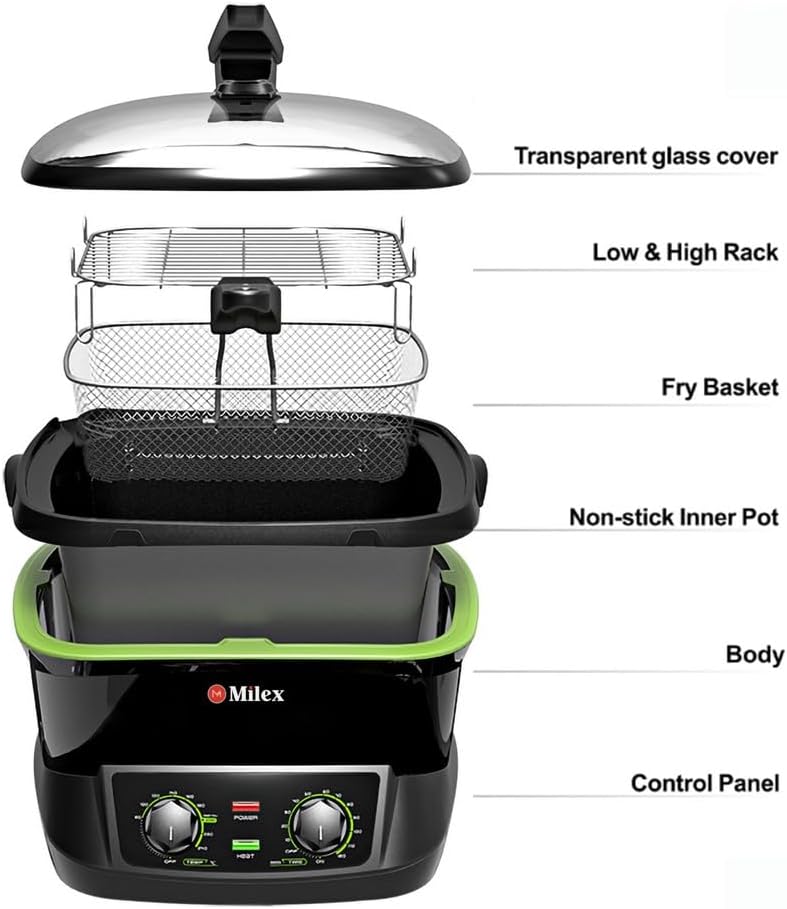
Figure 2: Exploded view of the Milex Wonder MWC005 Multi-Cooker showing its main components. From top to bottom: Transparent glass cover, Low & High Rack, Fry Basket, Non-stick Inner Pot, Body, and Control Panel.
- Transparent Glass Cover: Allows you to monitor cooking progress without lifting the lid.
- Low & High Rack: Used for steaming or elevating food within the pot.
- Fry Basket: Designed for deep frying or blanching.
- Non-stick Inner Pot: The main cooking vessel with an 8L capacity and ceramic non-stick coating.
- Body: The main housing of the multi-cooker, containing heating elements and electronics.
- Control Panel: Located on the front, featuring two rotary dials for temperature/function and timer settings, along with indicator lights.
3.2 Control Panel
The control panel features two main rotary dials and indicator lights:
- Left Dial (Temperature/Function): Used to select desired cooking temperature or function (e.g., OFF, WARM, TEMP °C).
- Right Dial (Timer): Used to set the cooking time (e.g., OFF, MINS, HRS).
- POWER Indicator Light: Illuminates when the unit is powered on.
- HEAT Indicator Light: Illuminates when the heating element is active.
4. Setup
- Unpacking: Carefully remove all packaging materials and accessories from the box. Retain packaging for future storage or transport.
- Initial Cleaning: Before first use, wash the inner pot, glass cover, racks, and fry basket with warm, soapy water. Rinse thoroughly and dry completely. Wipe the exterior of the main body with a damp cloth. Do not immerse the main body in water.
- Placement: Place the multi-cooker on a stable, flat, heat-resistant surface, away from walls or cabinets to allow for proper ventilation. Ensure there is sufficient space around the unit.
- Power Connection: Ensure the voltage of your power outlet matches the specifications of the appliance (220-240V, 50Hz). Plug the independent power cord into the multi-cooker's power inlet, then into a grounded wall outlet.
- Assembly: Place the non-stick inner pot securely into the main body. Ensure it sits flat and is properly seated.
5. Operating Instructions
The Milex Wonder MWC005 offers various cooking functions. Always ensure the inner pot is correctly placed before adding ingredients or turning on the appliance.
5.1 General Operation
- Plug in the multi-cooker. The POWER indicator light will illuminate.
- Turn the left dial to select your desired temperature or function.
- Turn the right dial to set the cooking time.
- The HEAT indicator light will turn on when the heating element is active and cycle on/off to maintain the set temperature.
- Once cooking is complete, turn both dials to "OFF" and unplug the appliance.
5.2 Specific Cooking Functions
5.2.1 Sauté/Sear
This function is ideal for browning meats or sautéing vegetables before other cooking methods.
- Add a small amount of cooking oil or fat to the inner pot.
- Turn the left dial to a desired temperature for sautéing (e.g., 180°C - 200°C).
- Allow the pot to preheat for a few minutes.
- Add ingredients and cook, stirring as needed.
- When finished, turn dials to "OFF".
5.2.2 Steam
Perfect for vegetables, fish, or dumplings. Utilize the Low & High Rack for steaming.
- Add the appropriate amount of water to the inner pot (ensure water level is below the rack).
- Place the Low & High Rack into the inner pot.
- Arrange food on the rack.
- Cover with the glass lid.
- Turn the left dial to a suitable steaming temperature (e.g., 100°C).
- Set the desired steaming time using the right dial.
- Ensure the drain and steam outlet is clear.
5.2.3 Slow Cook
Ideal for tenderizing meats and developing rich flavors over extended periods.
- Add ingredients to the inner pot.
- Cover with the glass lid.
- Turn the left dial to a low temperature setting (e.g., 80°C - 90°C).
- Set the desired slow cooking time using the right dial (e.g., several hours).
- Monitor liquid levels for longer cooking times.
5.2.4 Other Functions (e.g., Yogurt, Deep Fry)
The 18-in-1 functionality allows for various cooking methods. For specific recipes and detailed instructions on functions like yogurt making or deep frying (using the fry basket), refer to dedicated recipe books or online resources for multi-cookers. Adjust temperature and time dials according to recipe requirements.
The multi-cooker supports three-layer cooking, allowing you to cook different components of a meal simultaneously. This typically involves placing ingredients directly in the inner pot, and then using the racks to steam or cook items above the main dish.
6. Cleaning and Maintenance
Regular cleaning ensures the longevity and optimal performance of your multi-cooker.
- Always unplug the appliance from the power outlet and allow it to cool completely before cleaning.
- Inner Pot, Glass Cover, Racks, and Fry Basket: These parts are dishwasher safe. Alternatively, wash them with warm, soapy water and a non-abrasive sponge. Rinse thoroughly and dry completely before storing. Do not use harsh chemicals or abrasive cleaning pads, as this may damage the non-stick coating.
- Main Body: Wipe the exterior of the multi-cooker body with a soft, damp cloth. Do not immerse the main body in water or any other liquid. Ensure no water enters the control panel area.
- Drain and Steam Outlet: Periodically check and clean the drain and steam outlet to ensure it is free from food debris or blockages.
- Storage: Store the multi-cooker in a dry place, away from direct sunlight and out of reach of children.
7. Troubleshooting
If you encounter issues with your Milex Wonder MWC005, please refer to the following common problems and solutions:
| Problem | Possible Cause | Solution |
|---|---|---|
| Appliance does not turn on. | Not plugged in; power outlet malfunction; power cord damaged. | Ensure power cord is securely plugged into both the appliance and a working wall outlet. Check circuit breaker. Inspect power cord for damage. |
| Food not cooking properly. | Incorrect temperature/time setting; insufficient liquid; lid not properly sealed. | Verify temperature and time settings. Add more liquid if necessary for steaming/slow cooking. Ensure lid is seated correctly. |
| Steam escaping excessively. | Lid not properly sealed; drain/steam outlet blocked. | Ensure lid is securely placed. Check and clear any blockages in the drain and steam outlet. |
| Food sticking to inner pot. | Insufficient oil/liquid; cooking at too high a temperature; damaged non-stick coating. | Use adequate oil/liquid. Adjust temperature. Avoid using metal utensils that can scratch the coating. |
If the problem persists after trying these solutions, please contact customer support.
8. Specifications
| Model: | MWC005 |
| Brand: | Milex |
| Power: | 1800W |
| Voltage: | 220-240V, 50Hz |
| Capacity: | 8 Liters |
| Material: | Stainless Steel, Non-stick (Ceramic) Inner Pot |
| Dimensions (Product): | Approx. 35.5 cm (D) x 38.3 cm (W) x 31.3 cm (H) |
| Item Weight: | 3 kg |
| Features: | 18-in-1 functions, Drain and steam outlet, Three layer cooking, Dishwasher safe inner pot/accessories |
9. Warranty and Support
For warranty information and details regarding your Milex Wonder MWC005 Chef 18in1 Multi-Cooker Master, please refer to the warranty card included with your purchase or visit the official Milex website. Keep your proof of purchase for warranty claims.
If you require technical assistance or have questions not covered in this manual, please contact Milex customer support. Contact details can typically be found on the manufacturer's website or on the product packaging.
This manual is subject to change without prior notice. The latest version can be found on the manufacturer's official website.